

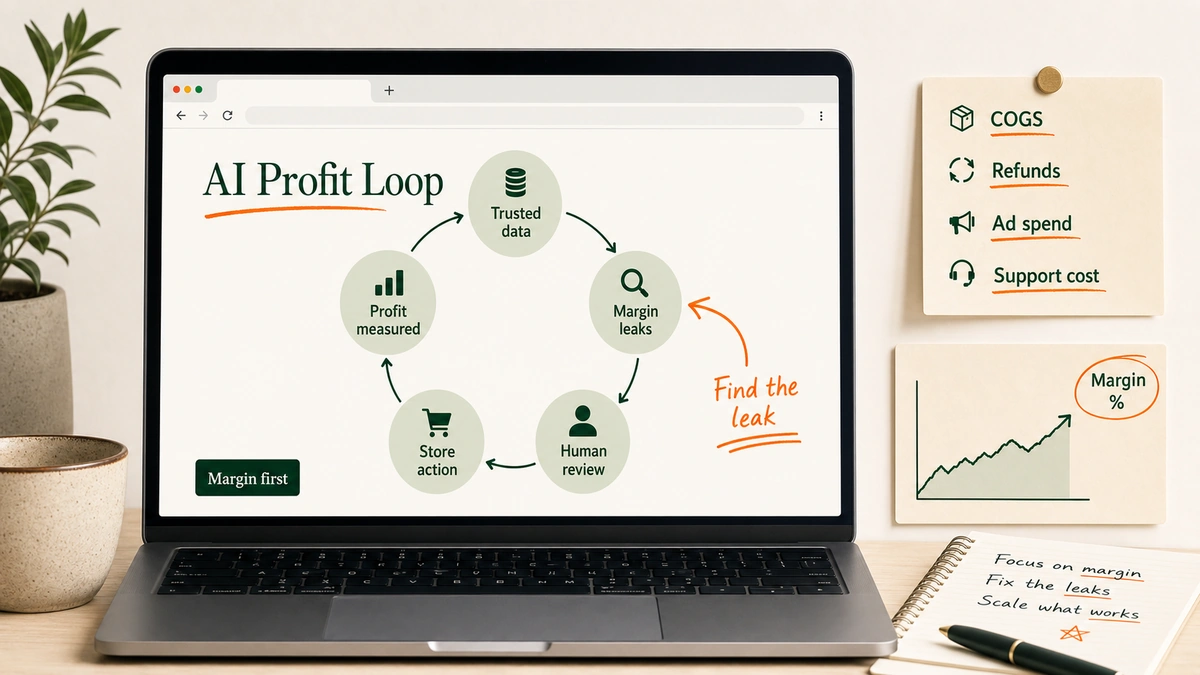
Most Shopify AI advice starts in the wrong place.
“Use AI for product descriptions.”
“Use AI for chat.”
“Use AI for ads.”
Cool. Whatever.
The better question is: where is profit leaking?
For a lean DTC team, AI is useful when it helps the store make better margin decisions faster. Not when it creates more dashboards, more copy, and more things for someone to check at 11 p.m.
This guide gives you five practical loops. Each one includes the setup, the AI job, the human review gate, and a real ecommerce example with reported results.
Key Takeaways
- AI improves Shopify profitability when it is tied to contribution margin, not vague automation.
- The useful loop is trusted data, narrow question, ranked recommendation, human approval, and measured action.
- The safest first build is one profit leak: reporting, bundles, support, creative, or retention.
Table of Contents
- How Shopify stores use AI to improve profitability: the profit loop
- Step 1: Build the profit truth layer before you automate
- Step 2: Ask AI to find margin leaks, not “insights”
- Step 3: Use AI to raise profitable AOV, not just revenue
- Step 4: Cut support cost without removing judgment
- Step 5: Speed up creative and retention testing
- Common mistakes when Shopify owners use AI for profit
- Start with one leak
- Sources
How Shopify stores use AI to improve profitability: the profit loop
A profitable AI workflow has five parts:
- Trusted data.
- A narrow question.
- Ranked recommendations.
- Human approval for risky moves.
- Measurement after the action ships.
That is the loop.
Not “AI writes 100 emails.” Not “AI summarizes the dashboard.” A loop. Inputs, decision, action, feedback.
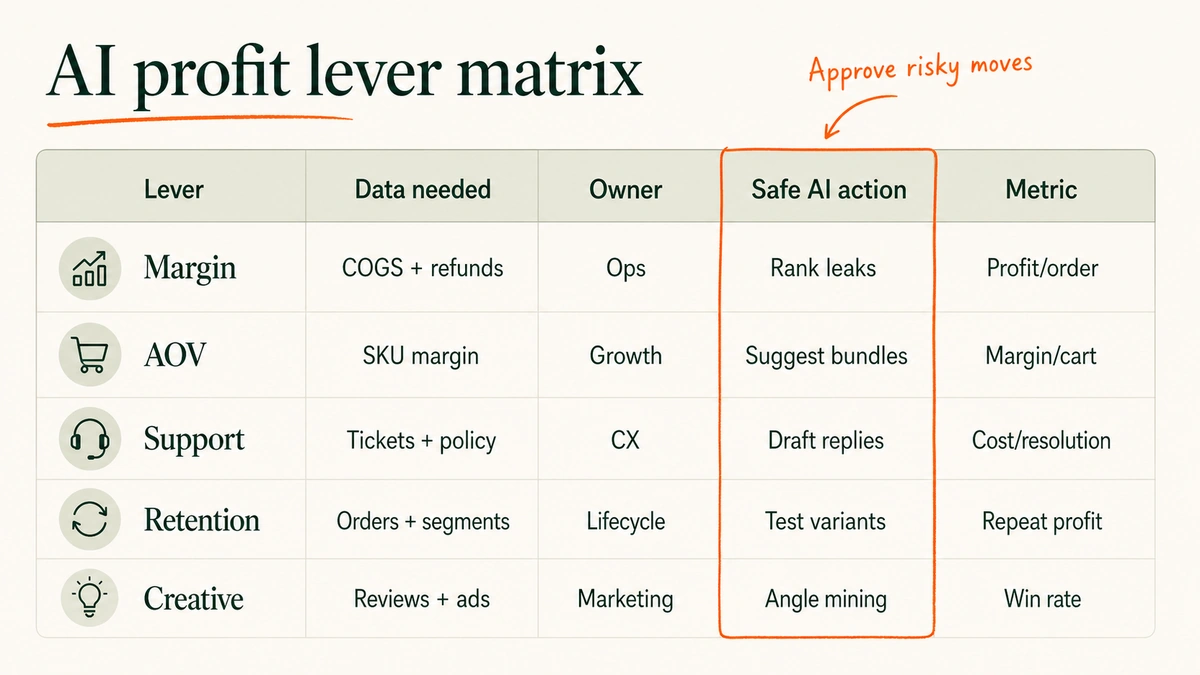
| Profit lever | AI should do | Human should approve | Main metric |
|---|---|---|---|
| Margin truth | Reconcile product, order, refund, ad, and shipping data | Cost rules and exclusions | Contribution margin |
| Margin leaks | Rank weak SKUs, campaigns, bundles, and discounts | Budget changes and pricing moves | Profit per order |
| AOV | Recommend bundles and add-ons | Product exclusions and offer logic | Gross margin per cart |
| Support | Draft or resolve repetitive requests | Refunds, angry customers, VIPs | Cost per resolution |
| Creative and retention | Generate test variants and summarize objections | Brand claims and offer promises | Repeat purchase profit |
Important note: AI cannot fix bad cost data. It will only make wrong decisions faster.
Shopify’s own help docs are blunt here: profit reports only work for products and variants that had cost recorded when they were sold, and discounts or refunds affect margin reporting. Cc: Shopify profit reports.
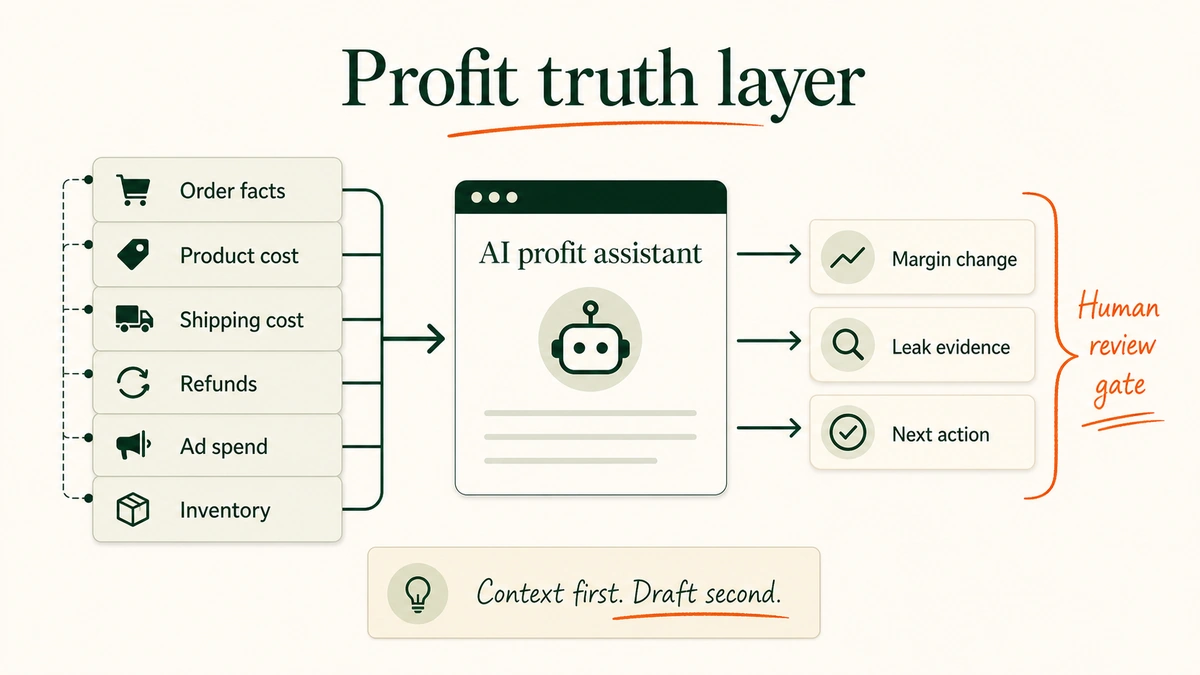
Step 1: Build the profit truth layer before you automate
Start here. Boring place. Correct place.
AI needs a clean profit layer before it can make useful recommendations. For a Shopify store, that means the model can see the difference between revenue, gross margin, and actual contribution margin.
Your minimum dataset:
- Product cost by SKU and variant.
- Shipping cost by order or shipping profile.
- Payment and transaction fees.
- Discounts, refunds, returns, and replacements.
- Ad spend by channel, campaign, and date.
- Email/SMS revenue where attribution is reliable.
- Inventory status and stockout risk.
Then define the metric AI is allowed to optimize.
Not revenue. Not ROAS alone. Contribution margin after variable costs.
In our work, this is where most AI profit projects either start clean or start crooked. If the SKU cost is wrong, the recommendation is theater.
Practical guide: Build a weekly “profit truth” view before plugging in AI recommendations. Pull Shopify orders, product costs, refunds, discounts, shipping labels, payment fees, ad spend, and email/SMS performance into one place. Then ask AI to explain movement in contribution margin, not just top-line revenue.
The prompt should be narrow:
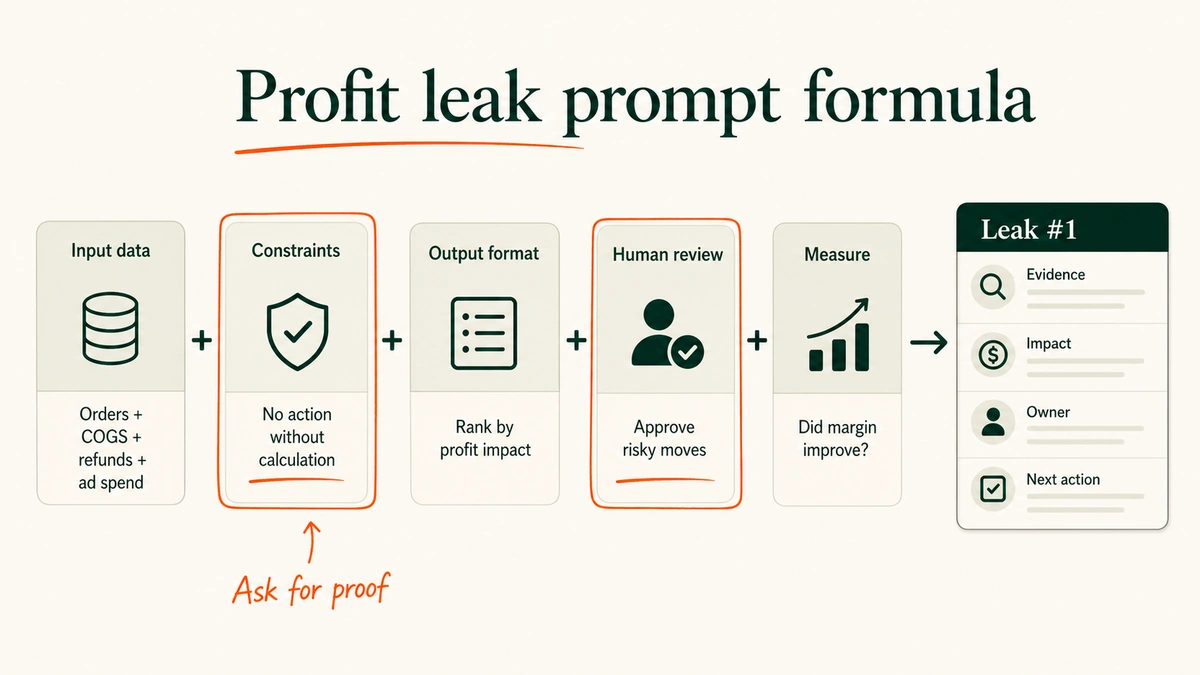
Review last week's Shopify performance by SKU, channel, and order.

Rank the top 10 profit changes by estimated contribution margin impact.

For each item, include:
- what changed
- evidence from the data
- estimated profit impact
- confidence level
- recommended owner
- next action

Do not recommend price, discount, or budget changes without showing the calculation.
Example: SFERRA Fine Linens used Triple Whale as a shared source of truth across channels and agencies. In Triple Whale’s 2026 case study, SFERRA reported 5+ hours saved per week on reporting with Moby AI, 3x ROAS growth in six months, and $300K+ lifetime incremental flow revenue from Sonar Send. Source: Triple Whale SFERRA case study.
“Everyone’s looking at the same numbers, so we get straight to decisions.”
— Stacy Feldman, Vice President of Ecommerce, SFERRA and Pratesi. Source: Triple Whale.
That is the real point. The AI was useful because the team had one version of the numbers.
For a 5-50 person brand, this is usually the highest-ROI first move. One source of truth. Fewer arguments. Faster decisions.
Step 2: Ask AI to find margin leaks, not “insights”
“Give me insights” is a bad AI prompt.
It invites vague dashboard poetry. Up. Down. Interesting. Significant.
Ask for leaks instead.
Margin leaks are places where the store is working hard but keeping too little. A SKU with heavy returns. A campaign that looks good on ROAS but sells the wrong products. A bundle that raises AOV and quietly murders margin. A discount code that trains repeat buyers to wait.
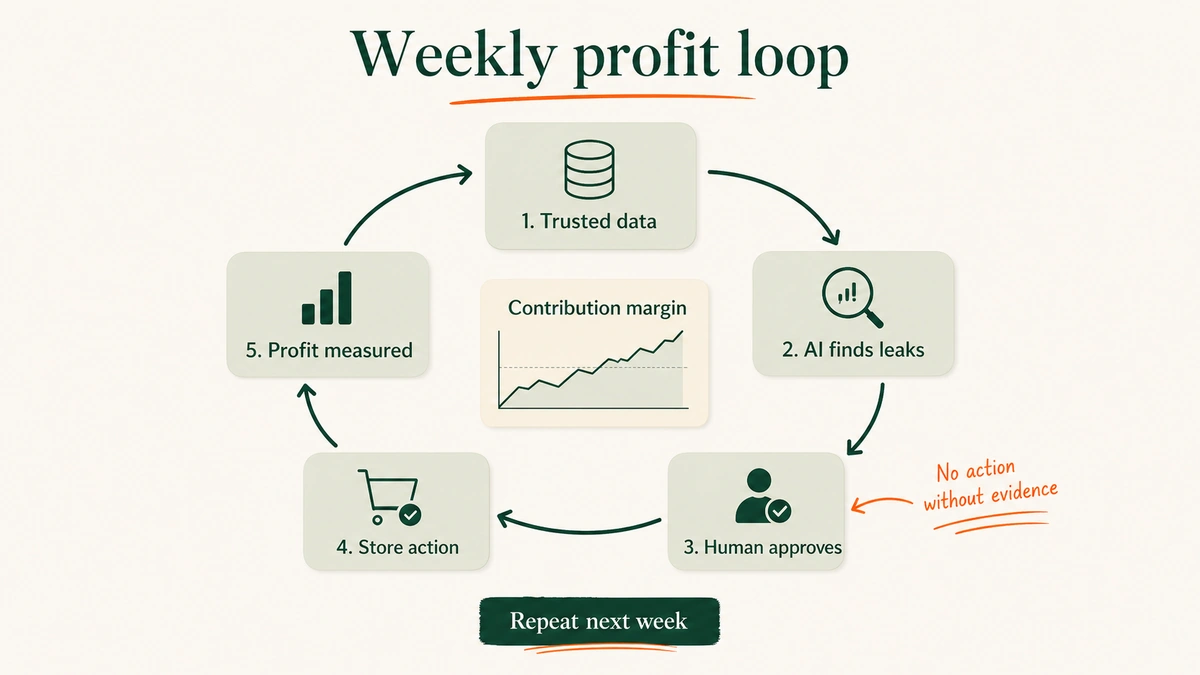
Practical guide: Give AI a weekly profit file and ask it to rank leaks by dollars, confidence, and reversibility. Reversibility matters. Pausing one ad set for 48 hours is safer than changing pricing across the store.
We tested this framing because it forces the model to show its work. No evidence. No action.
Use this structure:
- Show the current margin baseline.
- Identify the leak.
- Estimate the dollar impact.
- Show the evidence.
- Recommend the lowest-risk test.
- Assign an owner.
Example: Bones Coffee Company worked with ATTN Agency and Triple Whale to scale YouTube campaigns using clearer attribution and performance data. In the case study, ATTN reported that Bones Coffee’s YouTube daily ad spend scaled +960% within 45 days, with +701% YoY net profit growth, +592% YoY Shopify sales growth, and +627% YoY ROAS growth. Source: Triple Whale and ATTN Bones Coffee case study PDF.
I would not treat those numbers as a universal benchmark. It is a vendor case study. It is also still useful.
The lesson is not “buy YouTube ads.” The lesson is: when the data layer gets trusted, the team can place bigger bets on the campaigns that are actually profitable.
Pro tip: Ask AI to include “why this might be wrong” in every leak recommendation. That one line catches more sloppy analysis than another chart.
Step 3: Use AI to raise profitable AOV, not just revenue
AOV is seductive.
Add bundles. Add upsells. Add a free shipping bar. Watch the cart size rise.
Then the month closes and margin looks worse.
The problem is that many AOV plays are revenue plays pretending to be profit plays. AI can help, but only when it knows the margin rules.
Practical guide: Build an offer rule sheet before turning on AI recommendations. Tag products by margin, return risk, replenishment behavior, stock level, and shipping weight. Then let AI recommend:
- High-margin accessories.
- Replenishment products.
- Bundles that fit the buying moment.
- Size, shade, or variant helpers.
- Add-ons that do not create shipping pain.
Also give it exclusions:
- Low-margin SKUs.
- High-return products.
- Products below inventory threshold.
- Items with fragile shipping economics.
- Anything compliance-sensitive.
Example: The Vitamin Shoppe used Bloomreach Loomi AI to personalize search and category-page discovery. Bloomreach’s 2026 case study reports a 6.51% lift in search average order value, 5.69% lift in search revenue per visitor, and 7.73% lift in search add-to-cart rate, measured across two-week periods before and after launch. Source: Bloomreach Vitamin Shoppe case study.
“The implementation gave us results even better than I anticipated.”
— Tamara Pircz, Vice President, Digital Commerce, The Vitamin Shoppe. Source: Bloomreach.
The detail to steal: recommendations were not random “you may also like” blocks. They helped shoppers find the right product faster.
For a smaller Shopify brand, you can start with one use case:
“For each PDP, recommend one high-margin add-on that fits the product, inventory status, and customer intent.”
Simple. Measurable. Not glamorous.
Step 4: Cut support cost without removing judgment
Customer support is a profit lever because tickets have a cost.
Every “where is my order?” email. Every subscription pause. Every refund request. Every duplicate message after a slow reply.
But the fix is not to let AI handle everything. That is how brands create screenshots customers share for the wrong reason.
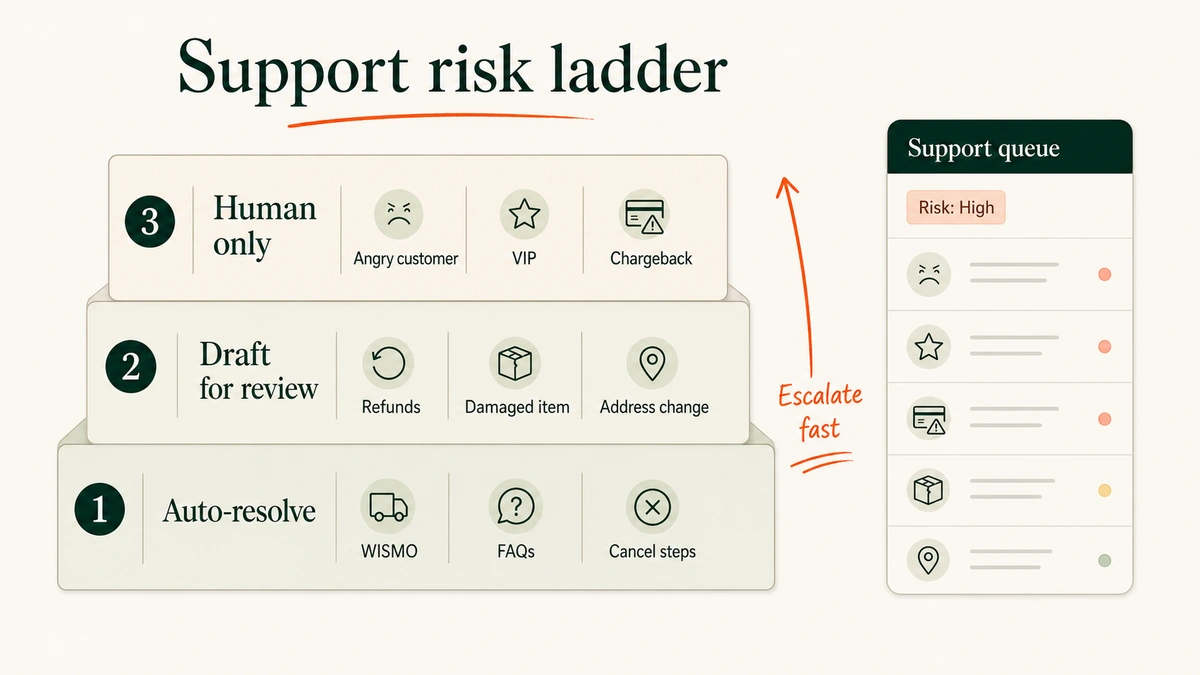
The fix is a support ladder.
Practical guide: Split tickets into three lanes:
- Auto-resolve: WISMO, subscription edits, cancellation instructions, delivery FAQs, simple product questions.
- Draft for review: refunds, damaged items, address changes, return exceptions, unclear policy cases.
- Human only: angry customers, VIP customers, legal threats, chargebacks, medical or safety claims.
If you want the deeper support setup, these two EfficiaLabs guides are relevant: using ChatGPT for Shopify customer support and using Claude for nuanced Shopify support tickets.
Example: eJam partnered with SigmaMind AI to automate support workflows across multiple ecommerce brands, Shopify stores, subscription tools, email, live chat, Facebook, and Instagram. SigmaMind’s 2026 case study reports 80% email automation by day 60, 71% lower first response time, 30% lower resolution time, 50% lower support cost, and 95% CSAT. Source: SigmaMind eJam case study.
This is the right kind of support example for a custom AI build. The hard work was not “install chatbot.” It was intent detection, sentiment handling, subscription actions, social comments, store routing, and escalation rules.
We built support ladders this way because one bad refund answer can wipe out the time saved by 100 clean WISMO replies.
Optional comparison: The Edit LDN used Kortical/K-Chat for a Shopify support chatbot. Kortical’s case study reports 80% of queries answered by AI, 88% support-cost reduction, and 13x message-handling capacity. Source: Kortical The Edit LDN case study.
The agency-built lesson: support AI needs permissions, not just prompts.
Read order status. Change subscriptions only when rules are clear. Draft refunds before sending. Escalate when the customer sounds angry.
Good support automation feels boring. That is the point.
Step 5: Speed up creative and retention testing
Profit improves when the team learns faster.
Which offer brings a second purchase? Which subject line gets opened by new customers but ignored by VIPs? Which product objection appears in reviews, tickets, and abandoned checkout replies?
AI is useful here because it compresses grunt work:
- Summarize customer objections from tickets, reviews, post-purchase surveys, and ad comments.
- Turn objections into email, SMS, PDP, and ad-test angles.
- Create variants by segment.
- Compare winners by gross margin and repeat purchase behavior.
- Feed the winners back into the next test.
Practical guide: Build a weekly retention testing loop. Every Monday, ask AI to summarize the top objections and buying triggers from the previous week. Every Tuesday, ship two email/SMS variants. Every Friday, compare conversion, AOV, gross margin, unsubscribe rate, and repeat purchase movement.
Do not let AI choose the final claim. Let it produce options. A human checks offer truth, brand voice, compliance, and margin.
Example: Half Magic consolidated email, SMS, Customer Hub, and analytics in Klaviyo. Klaviyo’s 2026 case study reports 5x YoY growth in repeat purchasers in the last 12 months, 110% YoY growth in revenue from Klaviyo automations, and 2x higher AOV from orders attributed to Customer Hub in 90 days. Source: Klaviyo Half Magic case study.
The practical takeaway is not “use Klaviyo.” The takeaway is that creative, retention, self-service, and customer data should feed one another.
Tickets tell you objections. Reviews tell you desired outcomes. Repeat purchase data tells you what actually stuck.
AI makes that loop faster.
Common mistakes when Shopify owners use AI for profit
The mistakes are predictable.
Mistake 1: Optimizing revenue instead of margin.
Revenue is easier to see. Profit is easier to lose. Give AI contribution margin, not just sales.
Mistake 2: Feeding AI channel-reported truth only.
Ad platforms grade their own homework. Use Shopify orders, cost data, refunds, and a consistent attribution view before asking for budget recommendations.
Mistake 3: Automating support before writing escalation rules.
AI should not improvise on refunds, angry customers, damaged products, safety issues, or VIP accounts.
Mistake 4: Letting AI recommend bundles without cost rules.
A bundle can lift AOV and lower profit at the same time. Add margin and inventory exclusions.
Mistake 5: Measuring speed but not business impact.
Saving five hours is good. Saving five hours while margin improves is better.
Mistake 6: Asking for one-off outputs.
The money is in loops. Weekly data in. AI recommendation. Human approval. Shopify action. Profit review.
Start with one leak
Do not rebuild the whole store around AI.
Pick one leak.
Margin reporting. Bad bundles. Support tickets. Creative testing. Repeat purchase.
Then build the loop around it. Clean input. Narrow question. Human gate. Measured output.
That is how Shopify store owners use AI to improve profitability without turning the business into an automation science project.
We have seen the quiet version win more often: one workflow, one owner, one number that improves.
See you in the next one – Vai

No comment yet, add your voice below!