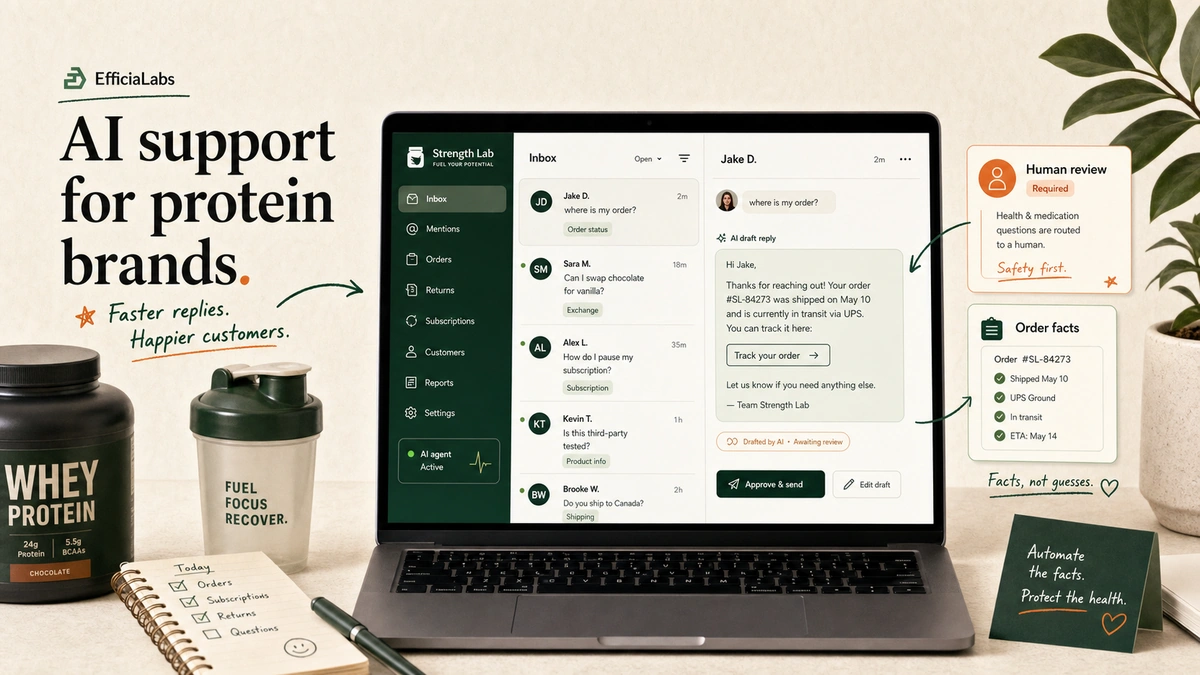
In this article, I’ll show you how not to lose your $25,000/year client.
Unless your client is growing at 2× every quarter, it is very unlikely that they will fire you for suboptimal performance. However, they may fire you when they see no “visible” work from you.
Here for the skill? Take it now, read the rest after.
It’s work that shows them you hear them, listen to them, and do what they say.
And getting a MoM, task assignment list, and a meeting summary is considered “visible” work by them.
This is how you can draft it every time after a meeting with minimal clicks and keystrokes.
How do most agencies do this today?
I have seen it firsthand in meetings with my B2B clients. Most B2B agency owners take notes on a notepad.
Some are creating a single Google Doc per client, adding headings with today’s date and a table. They put notes on the left, and action items are on the right. They fill details in the call, then spend 20 minutes after it turning “send draft” into tasks with owners.
It works. But it’s time-consuming and fully manual.
Why doesn’t an AI notetaker alone fix it?
Now, some tech‑advanced B2B agency owners are now using AI meeting transcription that transcribes the meeting as soon as it ends.
But the main issue is that a summary remains in a folder or chat.
There is no reliable way to convert a transcript into MoM action items and an email draft that you can send to your client.
Someone said, “we’ll get that over to you.” Your notetaker turns that into a task, with an owner, and a date.
That’s wrong!
What should really be done?
You need to have a workflow that uses your existing AI, that is, Claude or ChatGPT, to take some meeting transcriptions and convert each meeting transcription into three parts:
MoM
Task assignment list
Client update email.
Doing it manually will take at least 15 minutes per meeting, but an AI workflow can do this in 30 seconds or less.
Build this in 4 steps
1: Use an AI meeting transcriber
Use Fireflies, Granola, Fathom, or Otter. Choose any.
Don’t use Gemini’s and Zoom’s native transcription. They don’t work if someone else hosts the meeting. You need one that works every time.
2: Connect Claude to it
Browse Claude Connectors and connect your meeting tool, then connect the other tools you use, such as Gmail, Drive, Asana, and Notion.
3: Write rules
Most people generally skip this step, but the writing rules ensure the output is safe to send to a client.
Follow these Follow these four rules:
An owner is a name someone said out loud. Nobody named? The row says OWNER NOT STATED. Never guess from who talked most.
A due date is a date someone spoke. “Soon” and “before the launch” are quotes, not dates.
Keep “agreed” separate from “nobody objected.” They look identical in a transcript.
Flag what’s missing. Half your action items can’t be started from the transcript alone, because the context lives in someone’s head or in last month’s call. Make it say so. “Needs the approved budget figure” is one question you can ask in thirty seconds. A vague task just sits there for a week.
4: Review, then send
Just draft the email. Don’t automatically send it.
Every missing part is flagged in a single shortlist at the end. You need to fix those rows and then send.
What you automatically should get after every call
MoM, with decisions kept separate from open questions
Task assignment list, with an owner, a date and an agreement status on every row
Client update email, where only genuinely agreed items show up as decisions
The action item template
Every row on this table earns its place. Steal it whether or not you automate anything.
Task
Owner
Due
Said
Agreement
Needs
Send the July report
OWNER NOT STATED
NO DATE STATED
“we’ll get that over to you”
AGREED
Who owns this
Push variant B live
Neil
Fri 22 Aug
“Friday the 22nd”
NOT OBJECTED
Explicit client yes
Fold Dan’s copy into B
OWNER NOT STATED
NO DATE STATED
“someone should probably”
DISCUSSED ONLY
Whether this is happening
Said is the column that no one builds, but everyone needs.
Download the skill
I have exported the Claude skill, which is similar to the one I use internally. You can upload it once and run it for every client call after that.
Where should I send it?
Enter your email and the download starts straight away. I’ll send you the link as well, so you still have it tomorrow.
Done. Check your inbox.
If the download did not start, grab it here.
You do not need to set up anything beyond connecting your meeting tools and other tools you use.
And if you’re stuck wondering where else you can use AI to do tasks with fewer clicks, that’s what we build: AI task agents for B2B agencies, so the boring admin work stops eating your day.
My 15+ clients’ SEO expert friend uses this way to automate their biweekly keyword audits (and it saves him 675 clicks and 150 minutes of screen work every two weeks)
It is from a client (now a very good friend) who runs an SEO agency. I don’t provide SEO services. I suggested it to him this way, and I’m sharing it with his permission.
How to automate keyword search with Claude?
Connect Semrush or Ahrefs MCP to Claude/ChatGPT and ask:
Find every organic keyword my [domain] ranks for in [country/state/city]. Include the keyword, position, KD, monthly volume and ranking page. Group them by positions 2–15, 16–50 and 51–100. Sort each group by volume.
Now prioritize them
Positions 2 to 15 are the low-hanging opportunities. These pages already rank well, so just improve content, title, internal links, and backlinks to push them higher.
Positions 16 to 50 are second priority. These keywords need a little more work, but what he has observed is that if the keywords from positions 2 to 15 are optimized, then these keywords also become optimized. More like a domino effect (because these are more or less related to the keywords shown in positions 2 to 15).
Positions 51 to 100: These are potential opportunities. Your clients may rank for some of these accidentally by writing these keywords somewhere in the post or page. Better manually review each of them and work on only relevant keywords. For local businesses, ask Claude to filter for keywords containing the city, neighborhood, or service area.
Finally, manually check the intent of each keyword. For example:
How does a dry freezer work? It’s an informational keyword.
Buy a dry freezer in NYC. It’s a transactional keyword.
Once you have built a workflow, create a recurring CoWork task to run it every 14 days.
Calculations:
675 clicks: He roughly makes 45 clicks per client to manually do this.
150 mins: He roughly spends 10 mins per client to manually pull this data.
How to do it Fully Automated with AI?
The issue is that you must first automate for a specific number of days, such as 14 days, but what happens if we want 7 days, 30 days, 45 days, or, let’s say, 90 days? You again have to use the MCP to pull this data.
Rather, you can have something called AI task agents that live inside your plot or ChatGPT, and you can use them to complete this very specific task with just a single prompt. No need to write every single word every time.
Sample prompt: /keyword-audit-task-agent Pull the data for Acme Corp for the last 30 days.
We can build task agents like this for you around your workflow. Each task agent is custom-built for a very specific task. If you are not sure which AI task agents you can use, you can schedule a 45-minute meeting with me, during which you explain your most painful or boring workflow. I will then suggest how you can use existing AI solutions (Claude project, artifacts, Claude code, etc.) to address it, or we will send you a quotation for a custom build.
I’m writing this post because it aligns with my mission. My mission is to free people from the boring parts of their work, so they can do more of what they enjoy.
One prompt · start to finish
ClaudeAcme Corp workspace
Agents
keyword-audit-task-agent
rank-tracker
brief-writer
report-builder
/keyword-audit-task-agent Pull the data for Acme Corp for the last 30 days.
Save as an agentAdjustYou still review the 51–100 group by hand
✓ Approved. Task agent saved.
Keyword audit — Acme CorpRe-run with one line whenever you need it — it always waits for your approval.Run on demand
~150 minof manual pulling saved per run · 10 min × 15 clients
~675 clicksyou no longer make by hand · 45 clicks × 15 clients
This is one agent. We build them around your workflow.Custom task agents for agencies — you keep the judgment, it does the mechanical parts.Apply for the $300 audit
/keyword-audit-task-agent Pull the data for Acme Corp for the last 30 days.Reply to keyword-audit-task-agent…↑
You ask once. It works across your tools. You approve. It repeats.
Illustrative example. Figures are the manual effort this replaces, not a guarantee. Product names are trademarks of their owners.
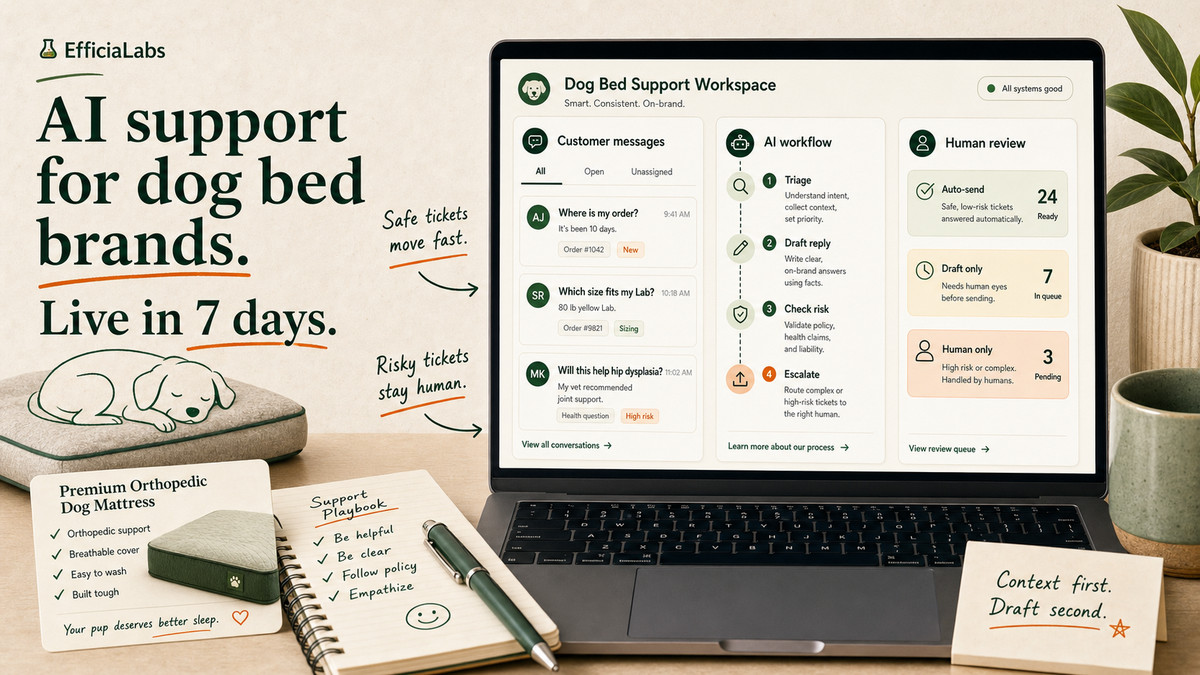
It’s a Monday in June. One customer wants to know if your orthopedic foam will fix her senior Lab’s hip dysplasia. Another wants to return a bed her dog already slept on for three weeks. A third just needs to know what size fits a Great Dane.
Three very different tickets. One inbox. One small team.
Here’s the short version.
AI customer service for dog mattress brands means putting an AI layer on your support inbox. It drafts replies for repeat questions, looks up real order data, and routes anything risky to a human. Set up right, it answers the boring 60% in seconds and leaves the 40% that needs a person to your team.
We build these for DTC brands every week. The setup below is the one we’d run for a dog bed brand, start to finish, in seven days.
The hard part isn’t the AI. It’s knowing which questions to never let it answer. So let’s go ticket by ticket.
What AI customer service for dog mattress brands actually means
It is not a chatbot bolted to your homepage that says “I’m sorry, I didn’t understand that.”
It’s a system that sits inside the helpdesk you already use, whether that’s Gorgias, Zendesk, Freshdesk, or plain Gmail. Every time a ticket lands, it does three jobs:
Reads the ticket and pulls the customer’s real order from Shopify.
Drafts a reply in your brand voice for a human to approve or send.
Routes anything risky, like an orthopedic-relief or chew-safety question, to a person.
Over weeks, the safe stuff goes out faster and the team stops re-typing the same six answers.
It matters this much for a dog bed brand because of three things. Volume, repetition, and a customer who treats the product as family.
“Where is my order” tickets alone run between 30% and 50% of support volume for most DTC stores in 2025 (Shopify). Add a category where every buyer wants to know about sizing, washing, and whether the foam is safe, and you get a flood of near-identical questions.
The market is big and the buyer is invested. The US pet industry hit $158 billion in 2025 (APPA), and people research a dog bed like they research their own mattress.
The demand for speed is real too. 67% of consumers expect more personalized service now that AI can read their history, per the Zendesk CX Trends Report (2025), and the same report found nearly 90% of CX leaders expect AI to resolve most customer issues within a few years (Zendesk). For more numbers on where DTC teams actually spend, we keep a running list of AI in DTC statistics.
Near-identical questions are exactly what AI is good at. In our work with pet brands, the trick is always drawing the line between those and the questions where a wrong answer costs you money or a regulator’s attention.
Which dog mattress support tickets should you automate first?
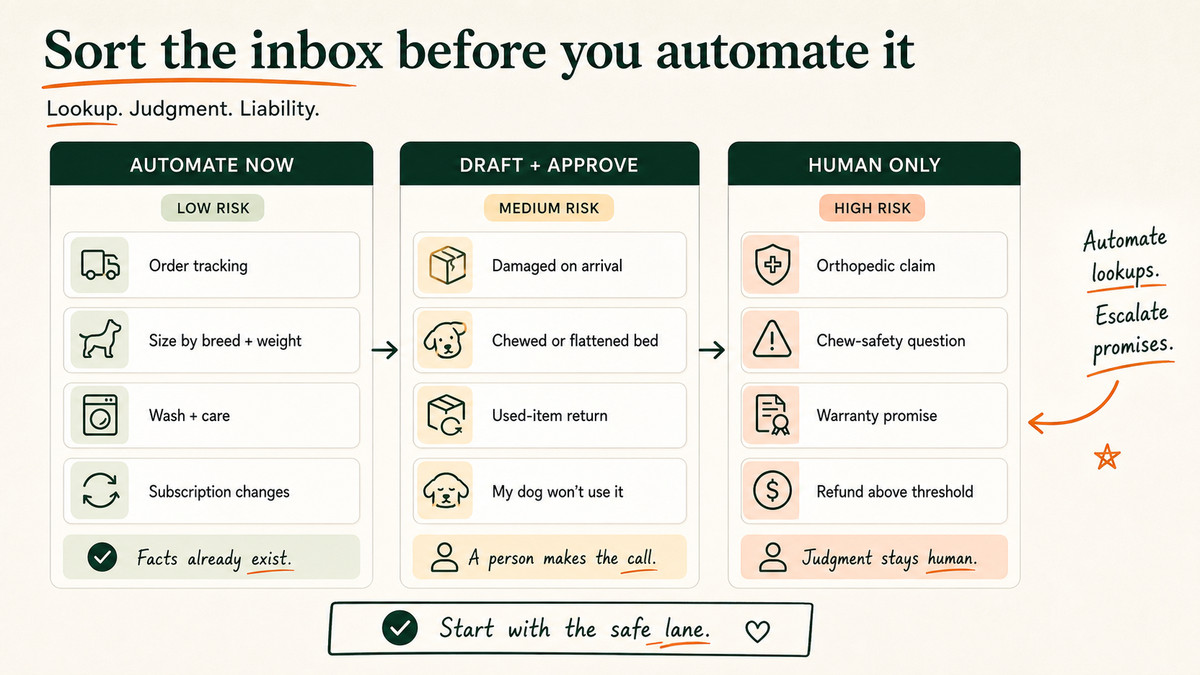
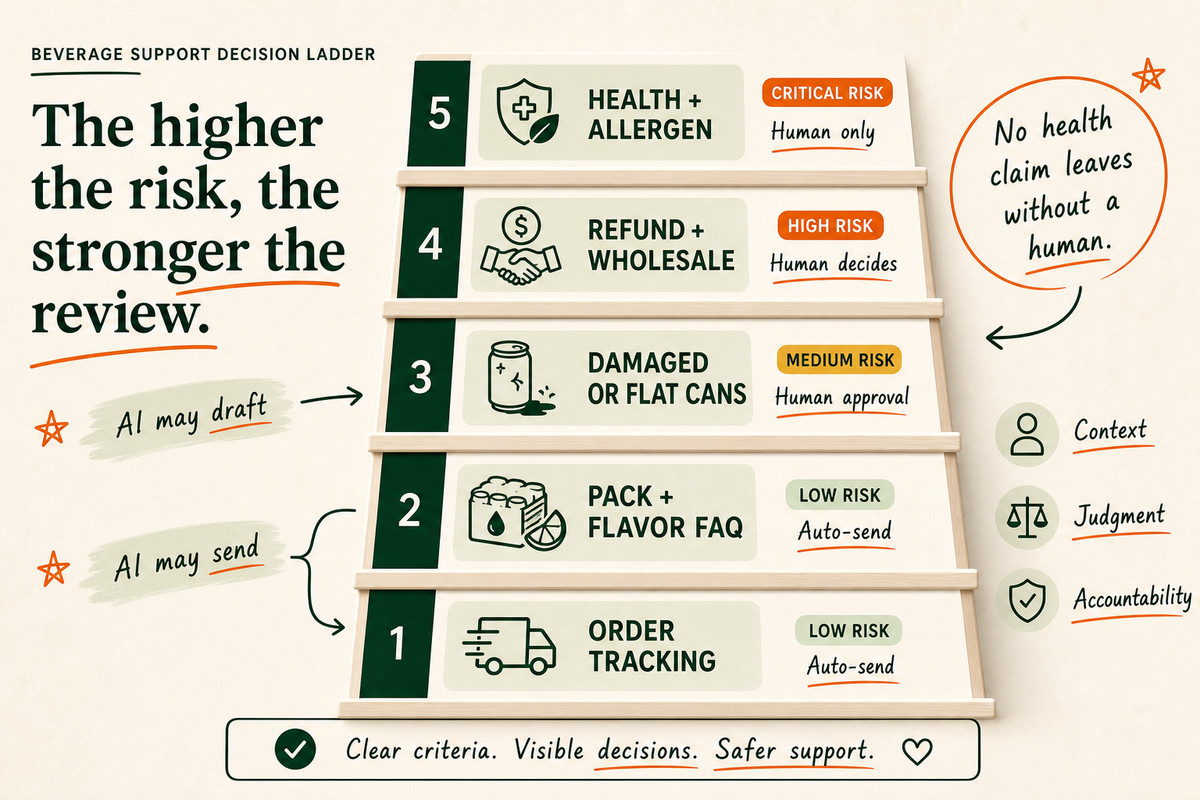
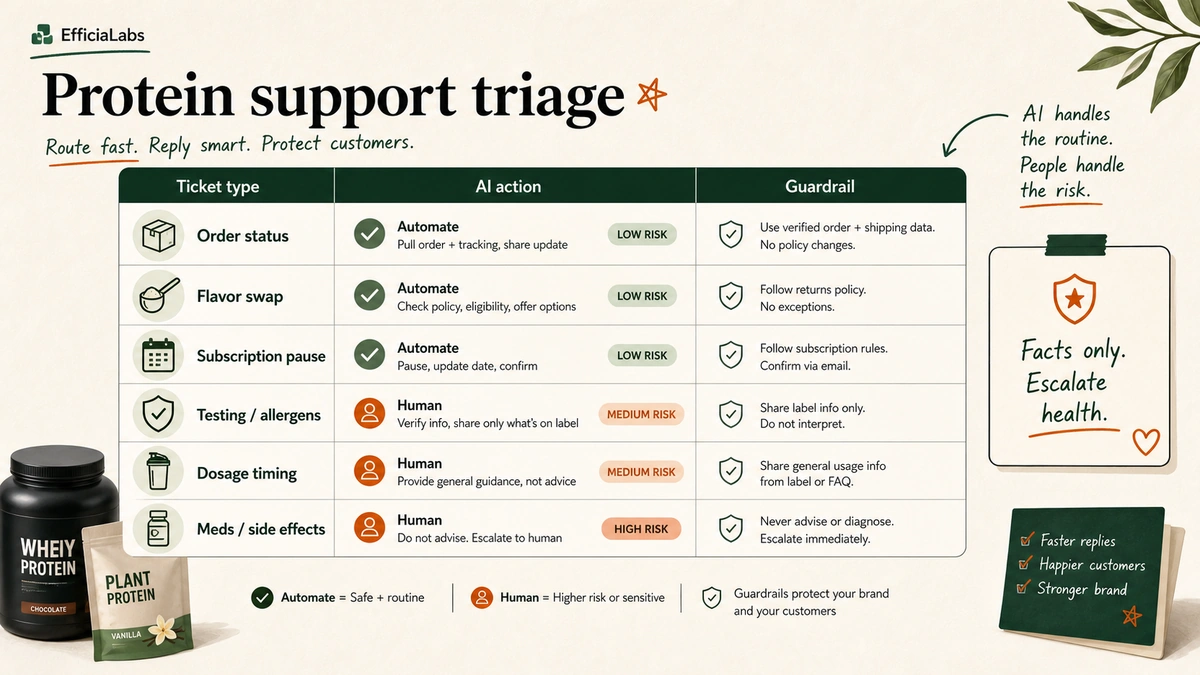
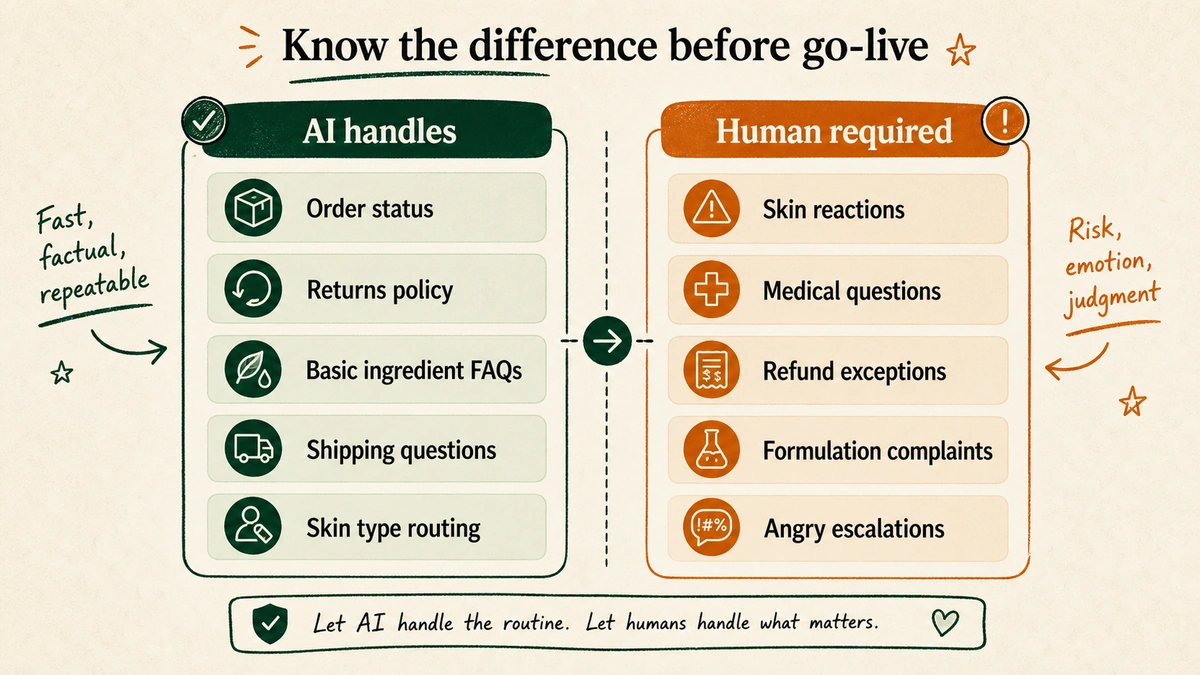
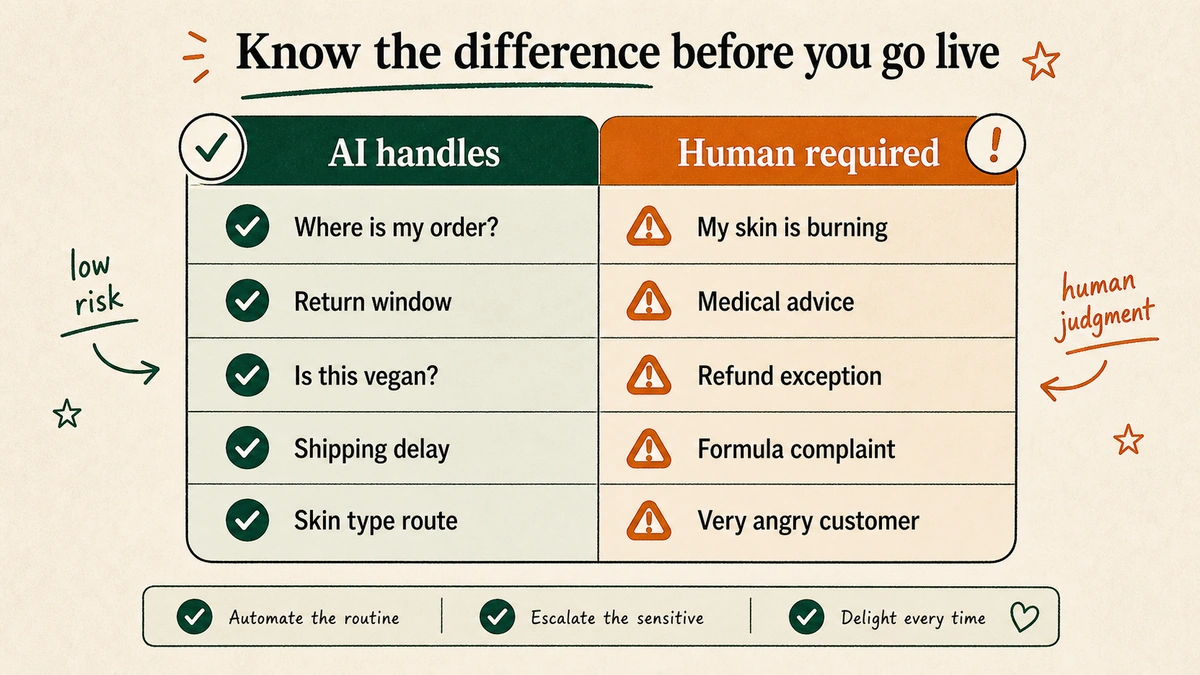
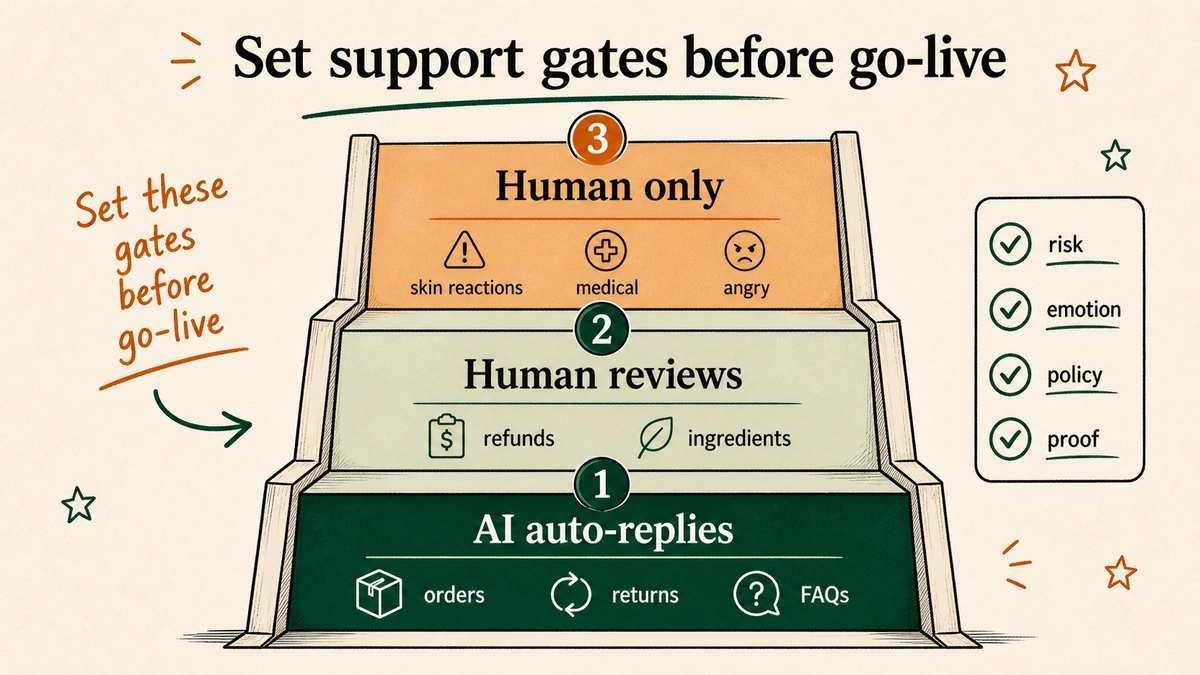
Start with the tickets that are high-volume, low-risk, and answerable from data you already have. Leave anything involving health, money over a threshold, or a warranty promise to a person.
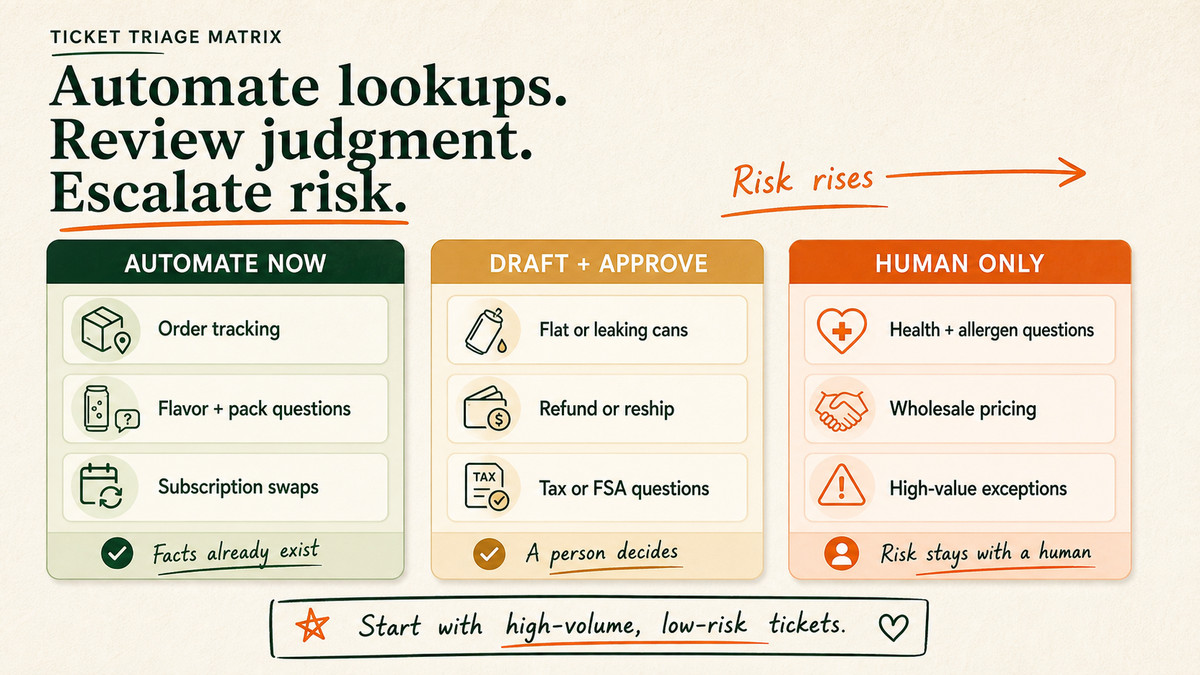
Here’s how we sort a typical dog bed inbox on day one.
Ticket type
Automate now
Keep human-in-loop
Why
Where is my order / tracking
Yes
No
Pulls straight from Shopify and the carrier. The 30 to 50% chunk.
Sizing by breed and weight
Yes
No
Answerable from your size chart. “What fits an 80-lb Lab.”
Wash and care instructions
Yes
No
Cover removal, machine-wash rules, foam care. Pure lookup.
Autoship or replacement-cover orders
Yes
No
Recharge or Shopify subscriptions does the action; AI explains it.
Chewed, flat, or damaged on arrival
Draft only
Approve before send
Needs a refund or reship decision and a photo check.
Bulky or used-item returns
Draft only
Approve before send
Hygiene rules and freight cost. A judgment call.
Orthopedic, joint, or health claims
No
Human writes it
Regulated speech. More on this next.
Chew-proof or warranty guarantees
No
Route to a person
A promise you have to stand behind. Not a support task.
The pattern: anything that is a lookup, automate. Anything that is a judgment call, draft and review. Anything that is a legal or revenue promise, hand to a human.
We walk through the same sort for ingestible products in our protein supplements support guide, and the shipping-and-returns logic is nearly identical to what we set up for brewery stores.
Pro tip: Pull your last 500 tickets and tag them by these buckets before you automate a single thing. You’ll usually find five ticket types cover 80% of the inbox. Build for those five and ignore the long tail until week two.
The guardrails that matter for dog beds
This is the section the generic guides skip, and it’s the one that can actually hurt you.
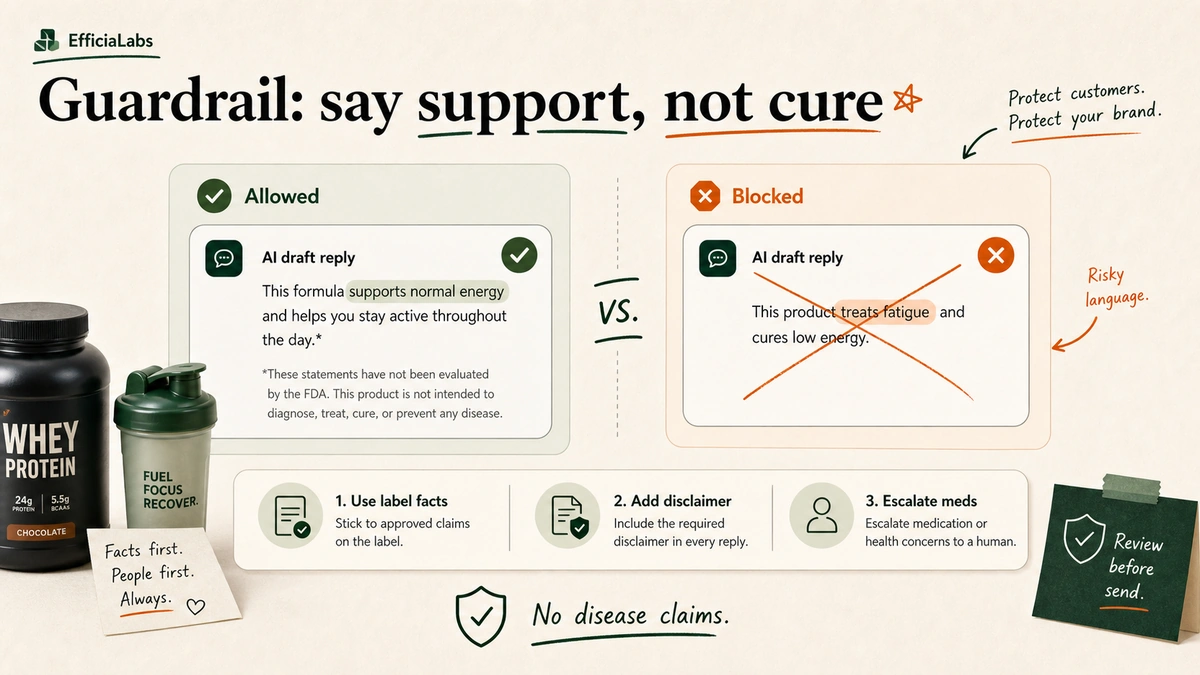
A dog bed sold as “orthopedic,” “joint support,” “for arthritis,” or “vet recommended” is making a health claim. Any claim about what your product does to a body, even a dog’s body, has to be truthful and backed by evidence. The bar, straight from the FTC’s Health Products Compliance Guidance (December 2022), is “competent and reliable scientific evidence.”
Boring, yes. Also the part that keeps you out of trouble.
An AI that freelances a sentence like “yes, this bed will cure your dog’s hip dysplasia” is a liability. So we hard-wire the model to never make a health, medical, or treatment claim.
If a ticket asks whether the bed will fix arthritis, relieve a specific condition, or replace a vet’s advice, it doesn’t get an AI answer. It gets escalated to a named human, every time.
Chew-safety is the second hard line. “Is the foam toxic if he chews it?” is a safety question, not a product-spec question. The AI can state what the materials are, say a foam is CertiPUR-US certified if that’s a fact you’ve documented, and then escalate anything that sounds like a dog actually ate the bed. It should never improvise “totally safe.”
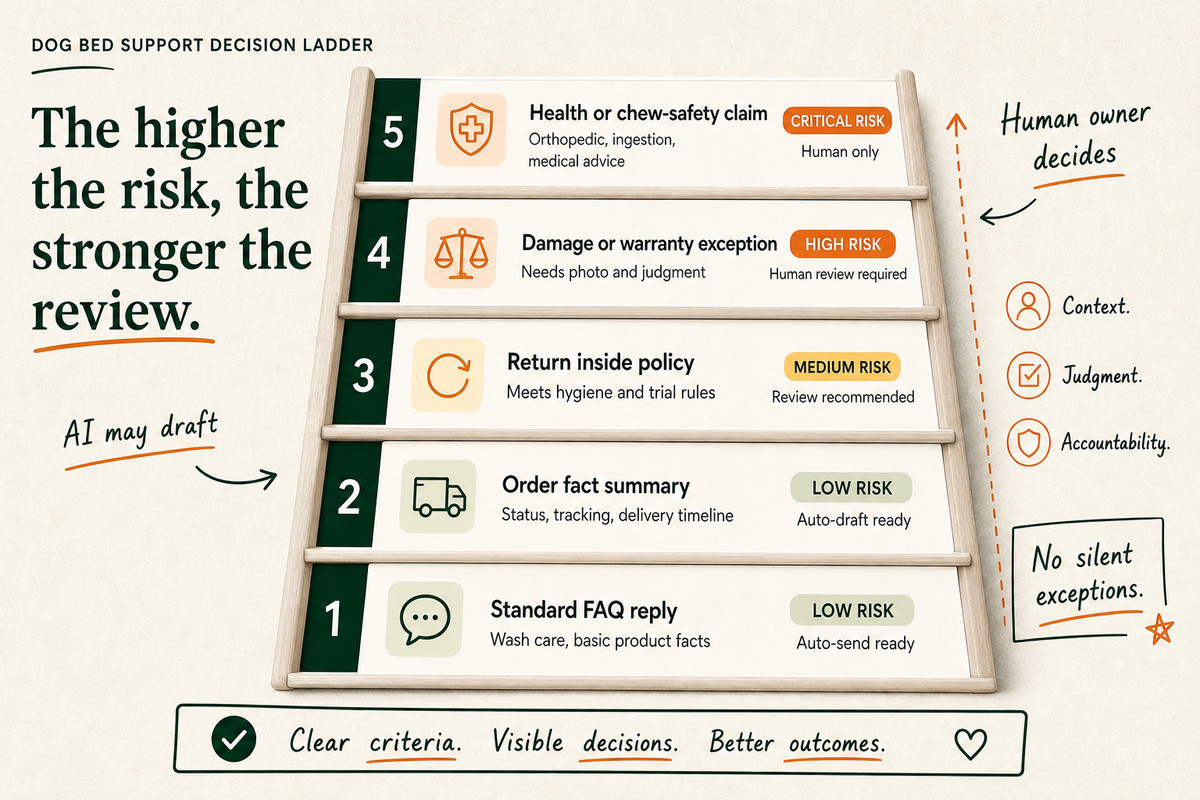
The rest of the risk ladder is about money and trust. Used-item and bulky returns are a judgment call: a dog bed that’s been slept on has hair and odor, and the freight to send it back can cost more than the bed. The AI drafts the reply against your hygiene policy, and a human approves the refund or reship. The same high-stakes logic we use for premium watch stores applies here, just with chew damage instead of carat weight.
Here is the guardrail logic we drop into every dog bed build:
Never do this:
- Make any health, medical, treatment, or "will it fix/relieve X" claim
- Say a material is "safe to chew" or "non-toxic" without a documented fact
- Promise a chew-proof or lifetime warranty outcome
- Approve a refund or reship above $[your threshold]
- Promise a delivery date the carrier hasn't confirmed

Always do this:
- For orthopedic/health/chew-safety questions, escalate to a human
- For damaged or chewed beds, ask for a photo, then draft for approval
- For used or bulky returns, draft against the hygiene policy, then approve
- For anything you're unsure about, say a teammate will follow up
- Match the brand voice rules below
One more worth hard-coding: the “my dog won’t use it” ticket. That’s a satisfaction issue, not a defect. The AI should treat it as a draft-and-approve reply that offers your trial or return terms, not an automatic refund.
How do you make AI match your dog brand’s voice?
You write the voice down. Then you make the AI obey it.
Pet is one of the most emotional categories in DTC. The buyer isn’t shopping for furniture. They’re buying comfort for a family member, and a reply that reads like a bank email breaks the trust your marketing worked to build.
The fix is a short, specific voice spec. Not “be friendly.” Real rules with real examples.
Words we use: “your pup,” “good news,” “on it,” the customer’s first name.
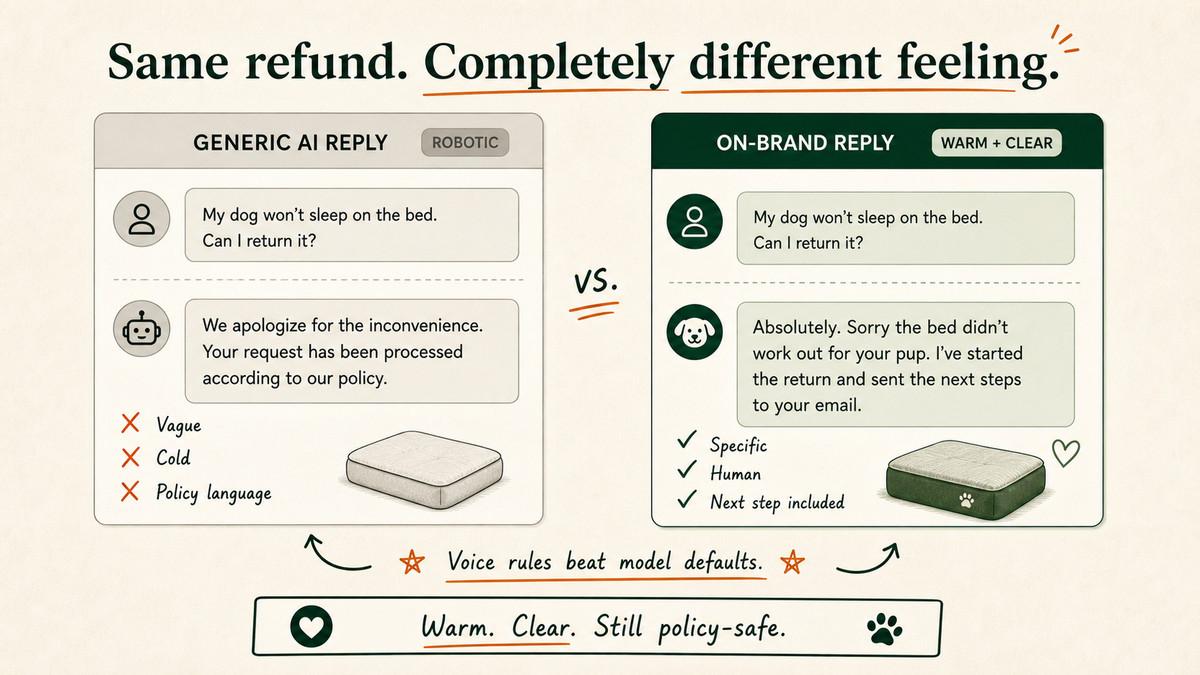
Words we never use: “kindly,” “we apologize for the inconvenience,” “per our policy.”
Emoji: one, max, and only the paw or the wave.
One real before-and-after: a flat “Your refund has been processed” becomes “Done, refund’s on its way back to you. Sorry the bed didn’t work out for your pup.”
We built and tested this across enough inboxes to know the brand-voice rules matter more than the model you pick. A cheap model with a tight voice spec beats an expensive one running on defaults. The full method, including the weekly QA loop we use to keep it on-brand, is in our guide on matching AI to your brand voice.
“If the replies sound like AI, you don’t pay. That’s the whole bar,” says Vaibhav Sharan, founder of EfficiaLabs.
What does AI customer service for a dog mattress brand actually cost?
Less than you think, and the pricing model is the part nobody explains.
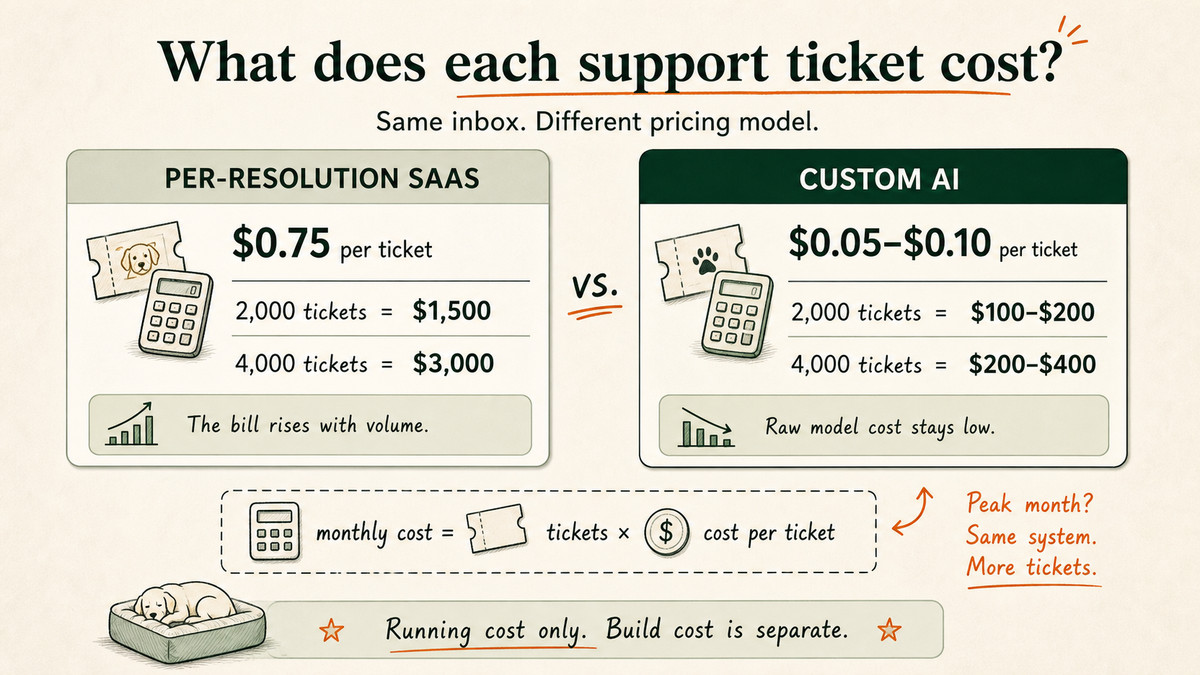
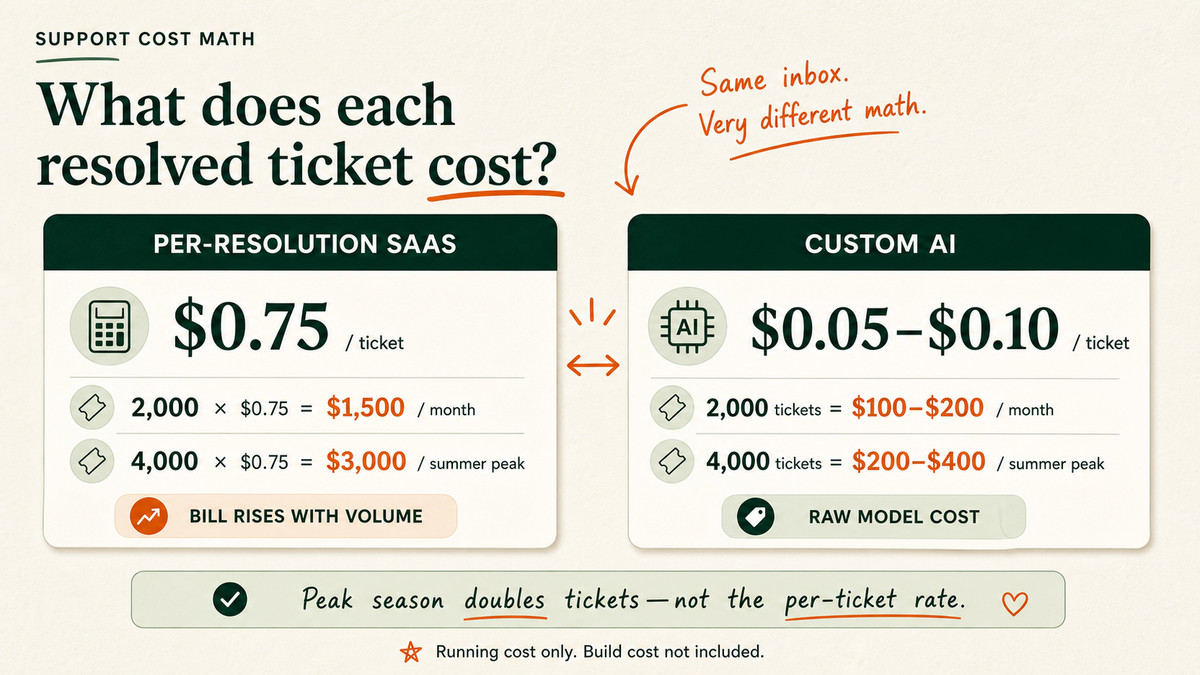
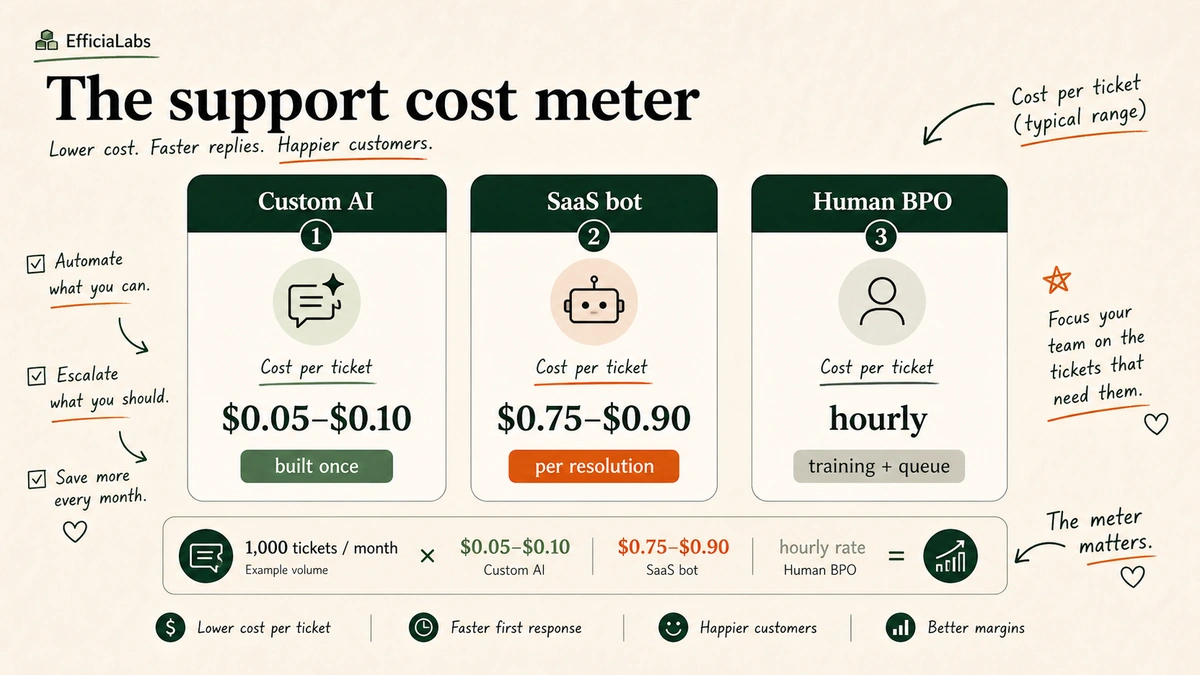
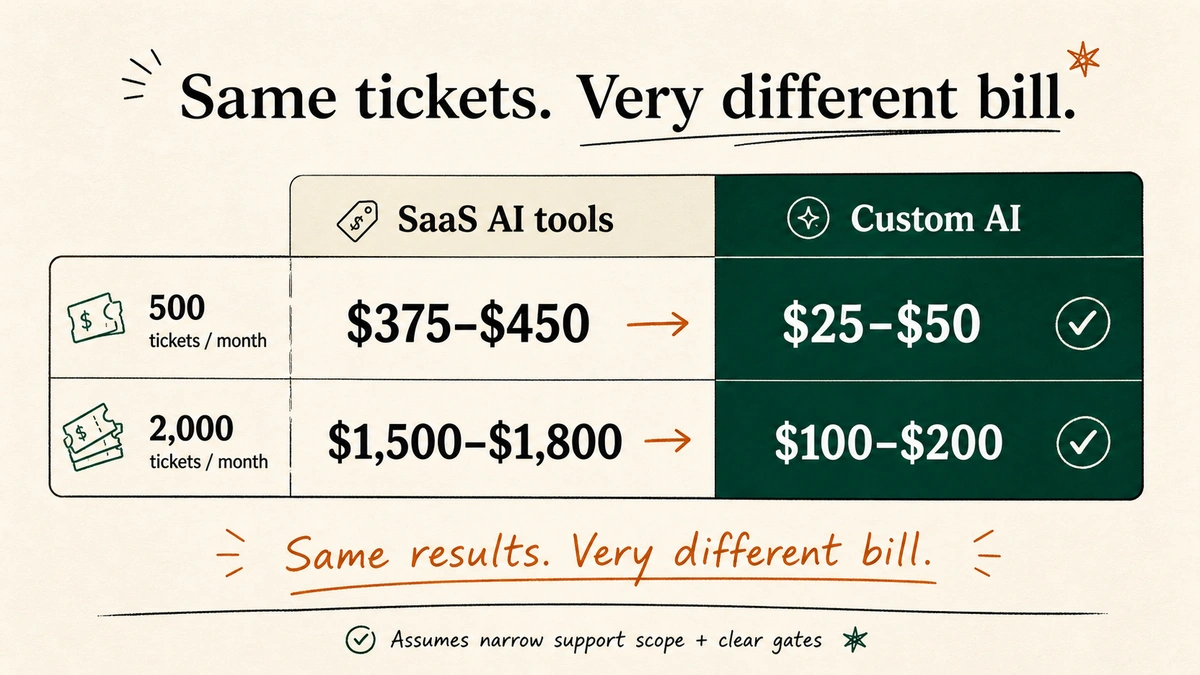
Most support SaaS charges per seat or per resolution. A per-resolution tool at $0.75 to $0.90 a conversation looks fine until a post-holiday return wave hits and the bill scales with every ticket.
A custom build runs on raw model cost. We measured this across client inboxes, and we typically land between $0.05 and $0.10 per ticket. Here’s the math on a brand doing 2,000 support tickets a month.
Approach
Per-ticket cost
2,000 tickets / month
At peak (4,000)
Per-resolution SaaS
$0.75
$1,500
$3,000
Custom AI (EfficiaLabs)
$0.05 to $0.10
$100 to $200
$200 to $400
That gap is the difference between support being a line item you watch and one you forget about. And the custom build doesn’t charge you more in January just because more people are returning the bed grandma bought the dog.
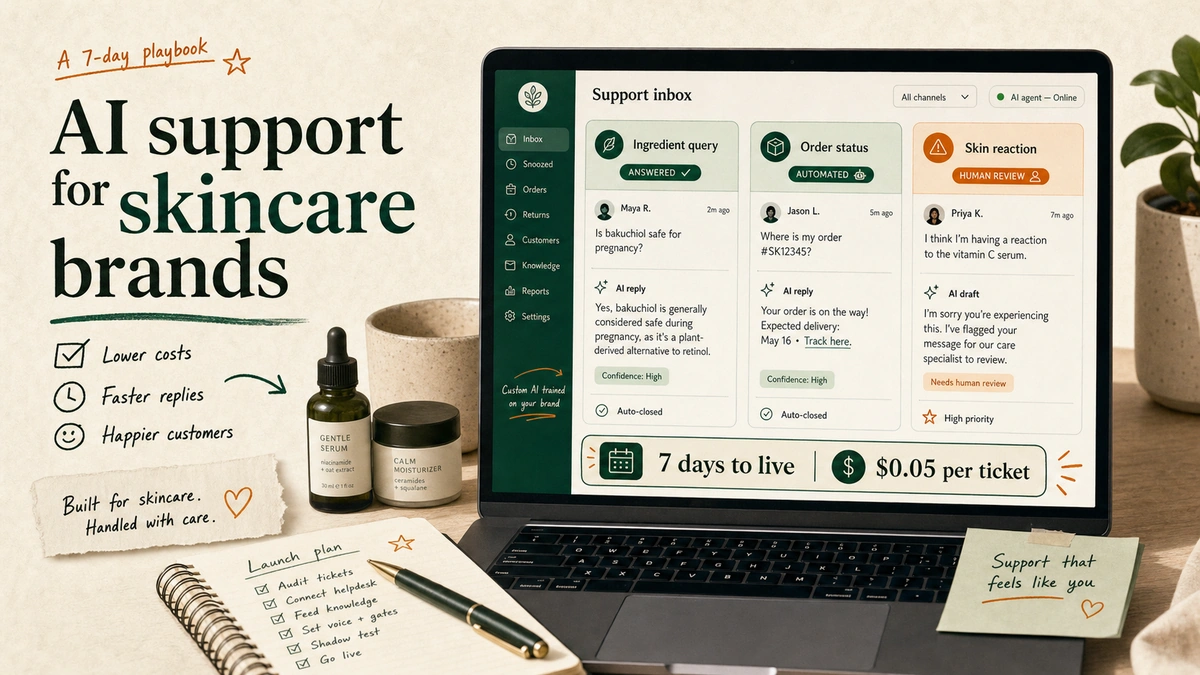
We did the same cost breakdown for skincare brands in our 7-day skincare support guide, and the per-ticket numbers hold across categories.
Note: the per-ticket figure is the running cost, not the build. We handle the build, deploy, and upkeep, so the only thing your team spends is the hour it takes to grant portal access.
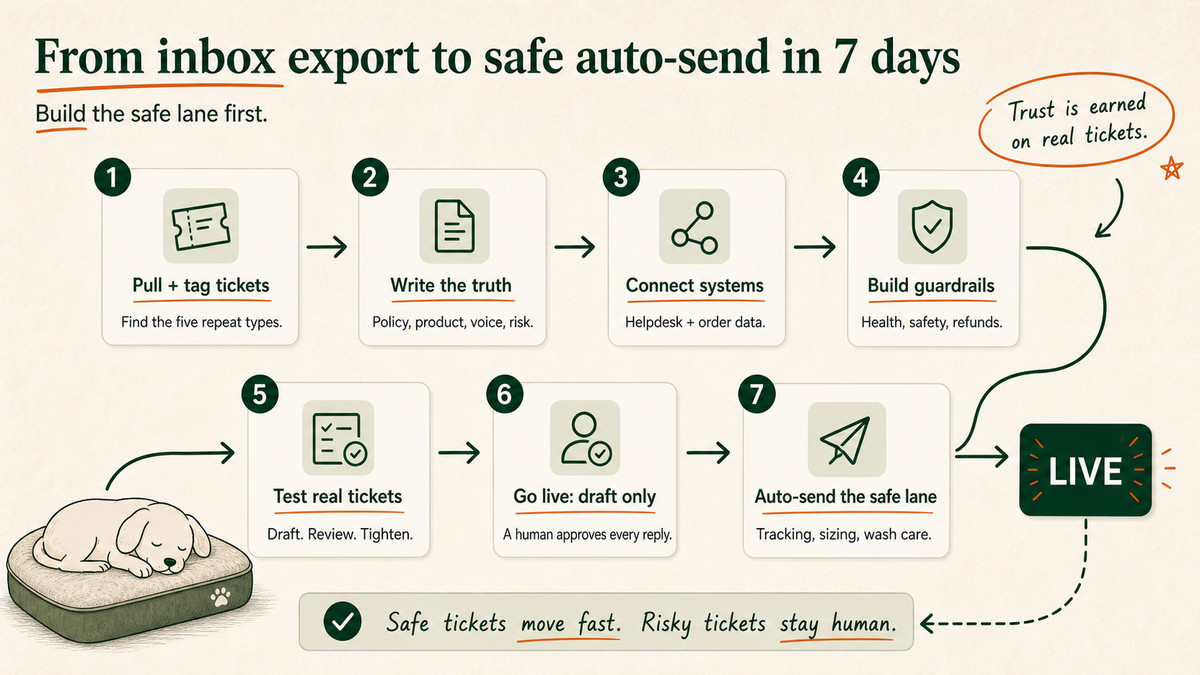
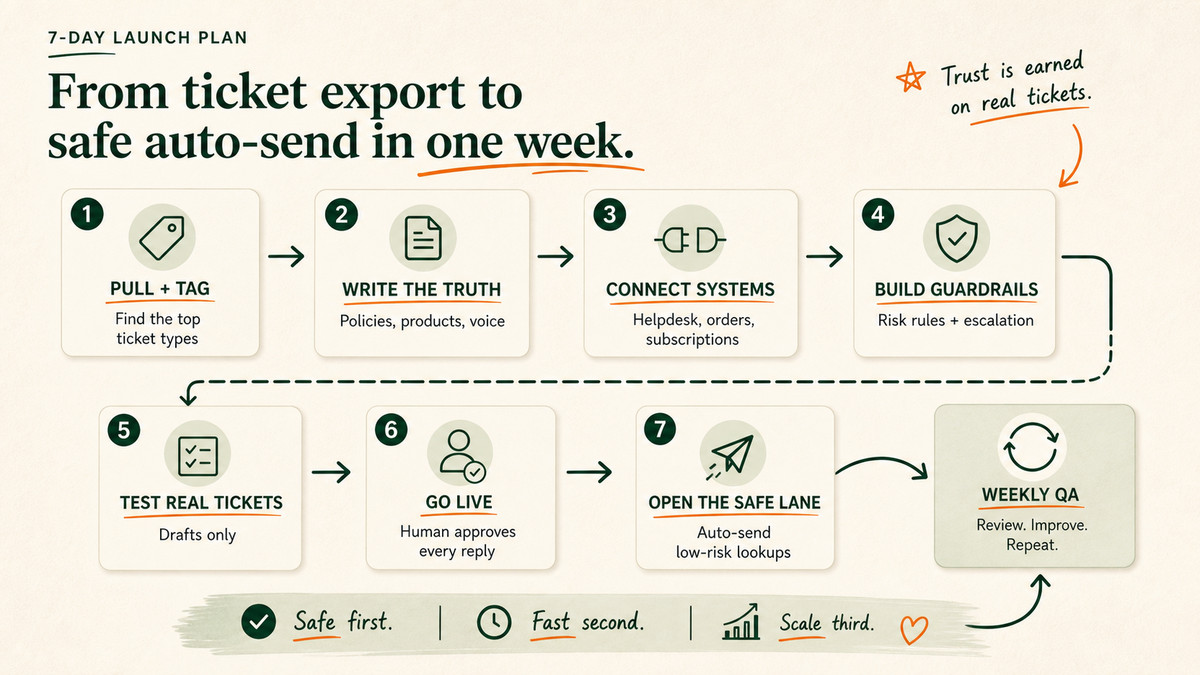
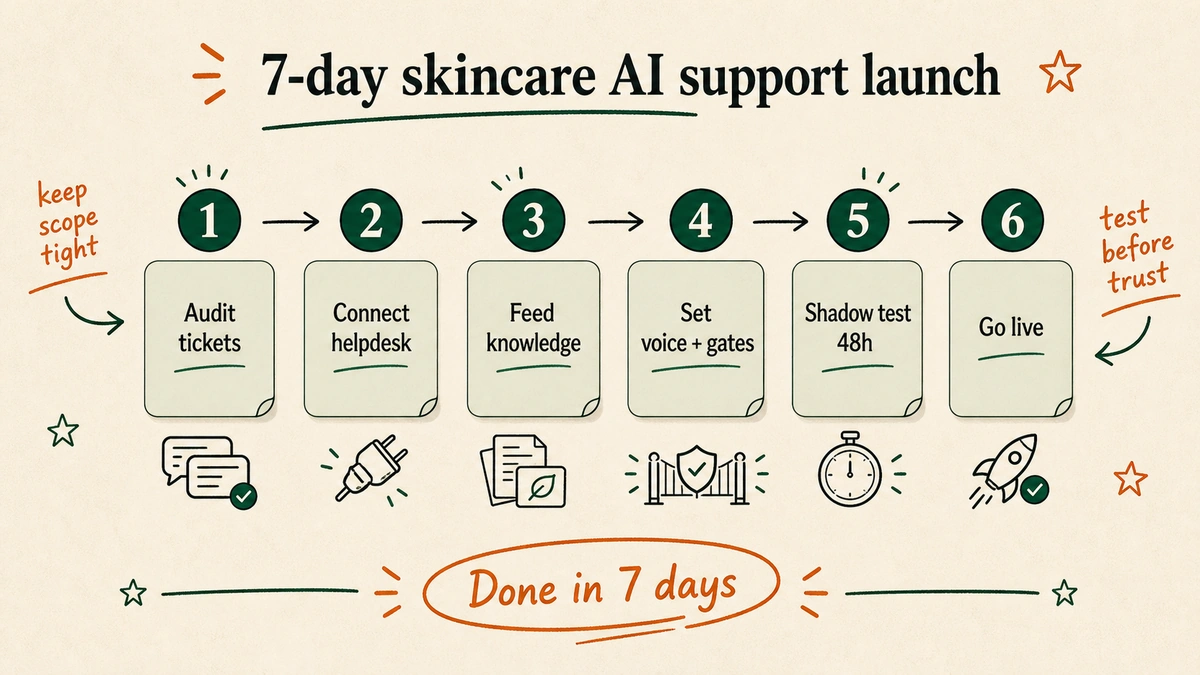
Your 7-day launch plan
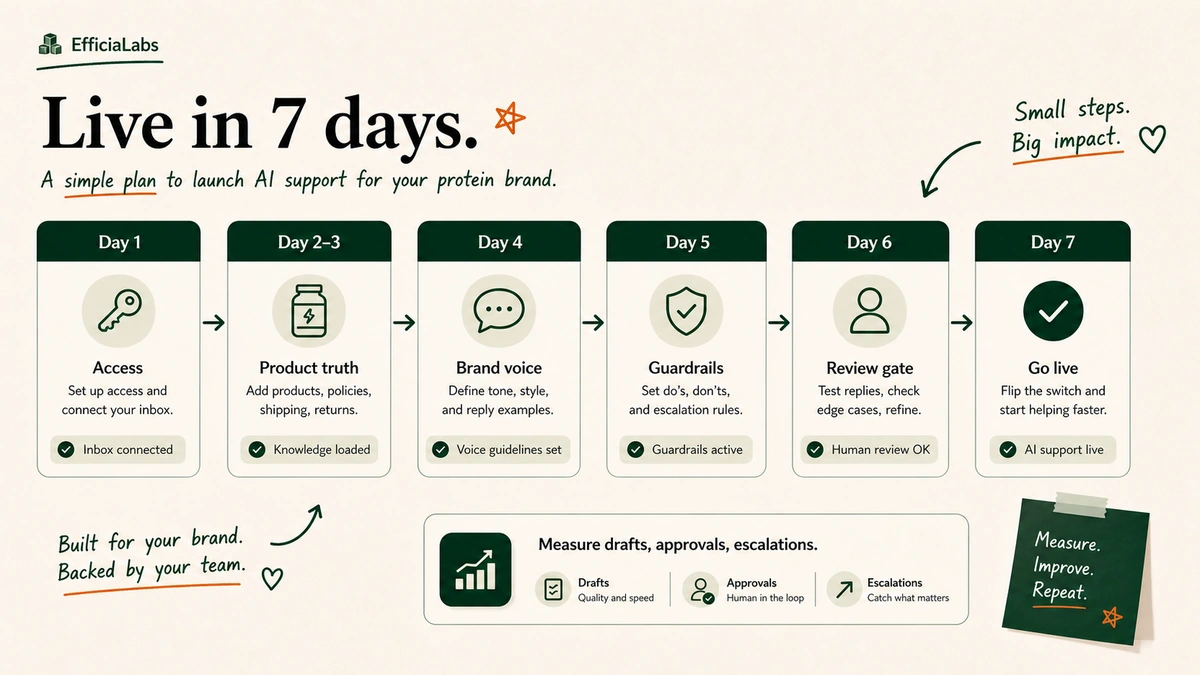
Here’s the exact week. This is the schedule we run with brands, and it’s why “7 days” isn’t marketing.
Day 1: Pull and tag the tickets
Export your last 500 to 1,000 tickets. Tag them into the buckets from the table above. Find the five types that cover most of the volume.
Day 2: Write the truth
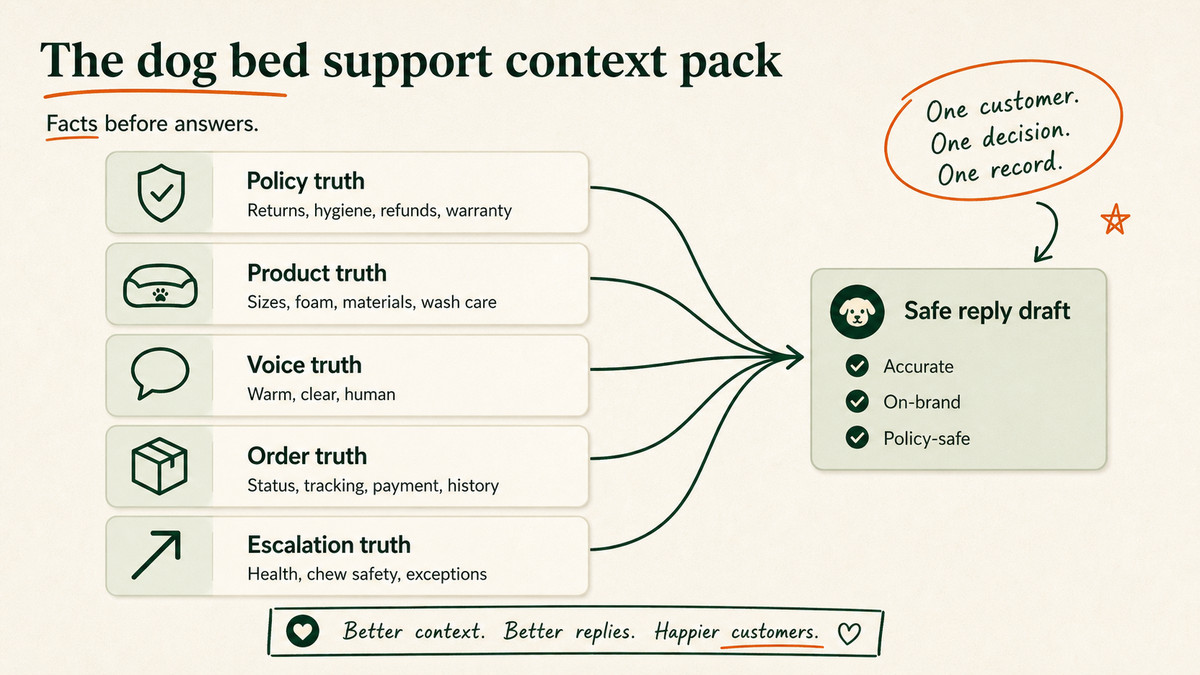
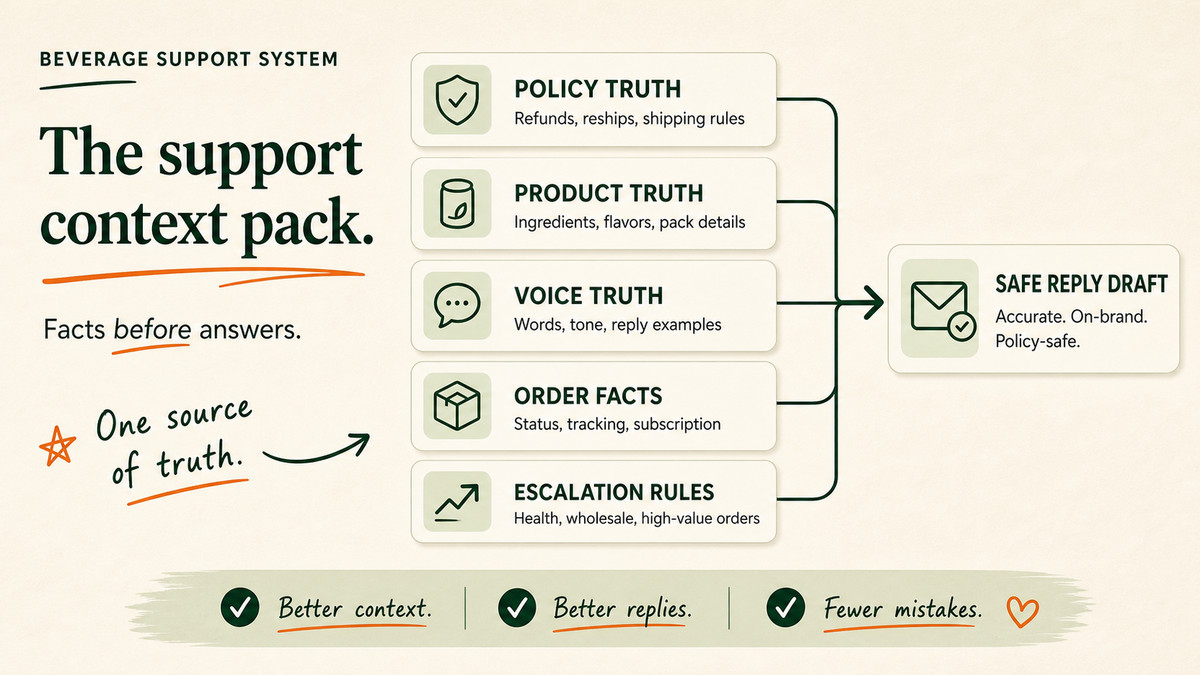
Document your policies, size chart, materials, wash-and-care rules, warranty terms, and the voice spec. This “context pack” is what the AI reads from. Most brands have it scattered across five docs and one founder’s head, so we pull it together.
Day 3: Connect the systems
Grant access to your helpdesk and Shopify. The AI needs to read orders, tracking, and autoship status to be useful. This is the only step that needs you.
Day 4: Build the guardrails
Wire in the never-do list, the orthopedic and chew-safety escalation, the refund threshold, and the voice rules. Nothing ships without these.
Day 5: Test on real tickets
Run the AI against last month’s tickets in draft mode. Read the drafts, tighten the voice, and catch the misses before a customer ever sees them.
Day 6: Go live in draft-only mode
Every reply is drafted by AI and approved by a human. You watch it for a day. Trust is earned on real tickets, not promises.
Day 7: Turn on auto-send for the safe lane
Let the lookups (tracking, sizing, wash-and-care, autoship swaps) go out automatically. Keep everything else in draft-and-approve. Done.
After launch, there’s usually no maintenance for a long time. The system runs, and we’re the ones who own it if it doesn’t.
“Ecommerce founders already have too much on their plate. My job is to take support off it, so they can rest more,” says Vaibhav Sharan, founder of EfficiaLabs.
Frequently asked questions
Is AI customer service safe for dog mattress brands making orthopedic claims?
Yes, if it’s built right. The AI should be hard-wired to never make a health, medical, or treatment claim and to escalate any orthopedic, joint, arthritis, or chew-safety ticket to a human. That keeps you on the right side of the FTC’s Health Products Compliance Guidance.
How much does it cost to run AI support for a dog bed brand?
A custom build typically costs $0.05 to $0.10 per ticket. At 2,000 tickets a month that’s $100 to $200, and it doesn’t balloon during return spikes the way per-resolution SaaS pricing does.
Will AI support replies sound robotic?
Only if you let them. With a tight voice spec and a weekly QA loop, replies match your brand. Our rule with clients is simple: if it sounds like AI, you don’t pay.
What tickets can’t AI handle for a dog mattress brand?
Orthopedic and health claims, chew-safety questions, warranty promises, used-item returns above your threshold, and anything legal. Those route to a person. AI handles the high-volume lookups so your team has time for the rest. For the broader Shopify setup, see our ChatGPT customer support guide.
Sources
Shopify, “WISMO: What it is and how to reduce it.” The share of DTC support tickets that are order-status questions. https://www.shopify.com/blog/wismo-ecommerce
American Pet Products Association, “U.S. Pet Industry Reaches $158 Billion in 2025.” Total US pet industry spending. https://americanpetproducts.org/news/u.s.-pet-industry-reaches-158-billion-in-2025-poised-for-continued-growth-in-2026
Federal Trade Commission, “Health Products Compliance Guidance” (December 2022). The substantiation standard for health-related claims. https://www.ftc.gov/business-guidance/resources/health-products-compliance-guidance
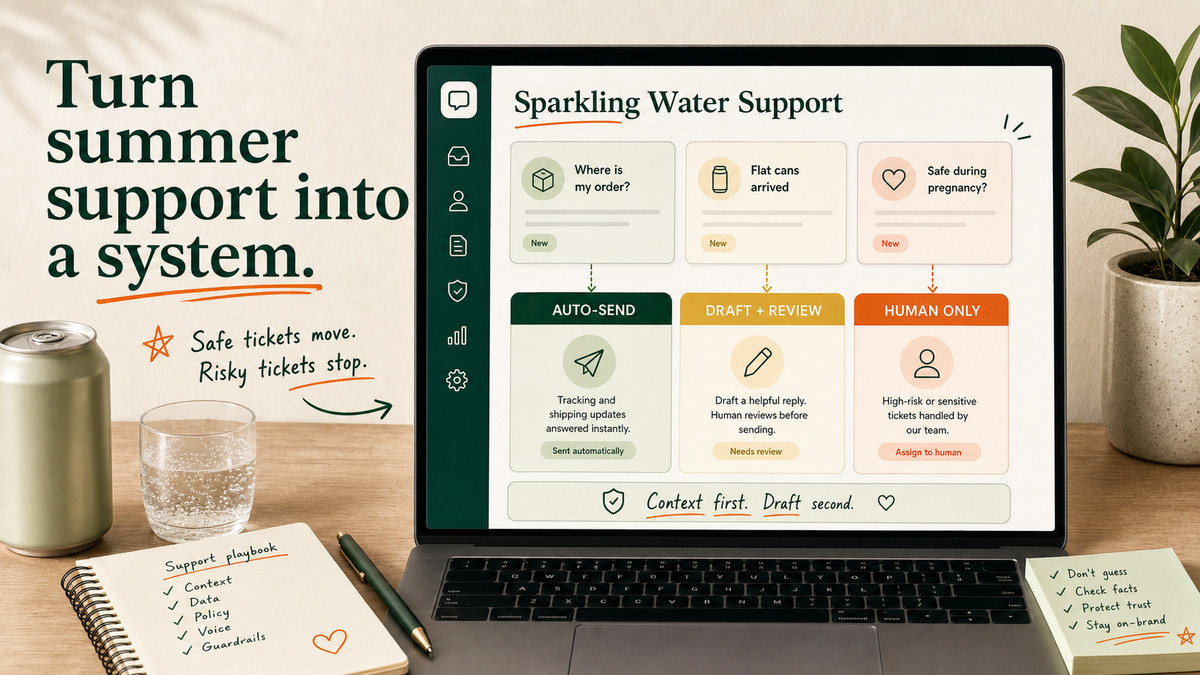
It’s a Monday in June. A heatwave just hit the East Coast. Your “where is my order” tickets tripled overnight, a wholesale buyer wants 40 cases by Friday, and somewhere in the pile is a customer asking if your grapefruit can is safe during pregnancy.
Three very different tickets. One inbox. One small team.
Here’s the short version.
AI customer service for sparkling water brands means putting an AI layer on your support inbox. It drafts replies for repeat questions, looks up real order data, and routes anything risky to a human. Set up right, it answers the boring 60% in seconds and leaves the 40% that needs a person to your team.
We build these for DTC brands every week. The setup below is the one we’d run for a seltzer brand, start to finish, in seven days.
The hard part isn’t the AI. It’s knowing which cans of worms to keep closed. So let’s go ticket by ticket.
What AI customer service for sparkling water brands actually means
It is not a chatbot bolted to your homepage that says “I’m sorry, I didn’t understand that.”
It’s a system that sits inside the helpdesk you already use, whether that’s Gorgias, Zendesk, Freshdesk, or plain Gmail. Every time a ticket lands, it does three jobs:
Reads the ticket and pulls the customer’s real order from Shopify.
Drafts a reply in your brand voice for a human to approve or send.
Routes anything risky, like a health or wholesale question, to a person.
Over weeks, the safe stuff goes out faster and the team stops re-typing the same six answers.
Why does this matter so much for a beverage brand? Volume and repetition.
“Where is my order” tickets alone run between 30% and 50% of support volume for most DTC stores in 2025 (Shopify). They spike in summer, when cans sit on hot porches. Sparkling water is a high-frequency, low-price, subscription-heavy product.
That means a flood of near-identical questions: tracking, multipacks, fizz, flavor swaps, “cancel my subscription.”
The demand is real too. 67% of consumers expect more personalized service now that AI can read their history, per the Zendesk CX Trends Report (2025), and the same report found nearly 90% of CX leaders expect AI to resolve most customer issues within a few years (Zendesk). For more numbers on where DTC teams are actually spending, we keep a running list of AI in DTC statistics.
Near-identical questions are exactly what AI is good at. In our work with beverage brands, the trick is always drawing the line between those and the questions where a wrong answer costs you money or a regulator’s attention.
Which sparkling water support tickets should you automate first?
Start with the tickets that are high-volume, low-risk, and answerable from data you already have. Leave anything involving health, money over a threshold, or a wholesale relationship to a person.
Here’s how we sort a typical seltzer inbox on day one.
Ticket type
Automate now
Keep human-in-loop
Why
Where is my order / tracking
Yes
No
Pulls straight from Shopify and the carrier. The 30 to 50% chunk.
Multipack / flavor mix questions
Yes
No
Answerable from your product catalog.
Flat or leaking cans on arrival
Draft only
Approve before send
Needs a refund or reship decision and a photo check.
Subscription swap, skip, or pause
Yes
No
Recharge or Shopify subscriptions handles the action; AI explains it.
FSA / HSA or tax questions
Draft only
Approve before send
Easy to say something wrong. Keep eyes on it.
Ingredient, allergen, or health claims
No
Human writes it
Regulated speech. More on this next.
Wholesale and bulk orders
No
Route to sales
Relationship and pricing. Not a support task.
The pattern: anything that is a lookup, automate. Anything that is a judgment call, draft and review. Anything that is a legal or revenue decision, hand to a human.
Pro tip: Pull your last 500 tickets and tag them by these buckets before you automate a single thing. You’ll usually find five ticket types cover 80% of the inbox. Build for those five and ignore the long tail until week two.
The guardrails that matter for canned beverages
This is the section the generic guides skip, and it’s the one that can actually hurt you.
Sparkling water with “prebiotic,” “gut health,” “immunity,” or “energy” on the can is a functional food in the eyes of the FTC. Any claim about what your drink does to a body has to be truthful and backed by evidence. The bar, straight from the FTC’s Health Products Compliance Guidance (December 2022), is “competent and reliable scientific evidence.”
Boring, yes. Also the part that keeps you out of trouble.
An AI that freelances a sentence like “yes, our drink will improve your digestion” is a liability. So we hard-wire the model to never make a health, medical, or safety claim.
If a ticket touches pregnancy, allergies, medication, a medical condition, or “is this safe for my kid,” it doesn’t get an AI answer. It gets escalated to a named human, every time.
The rest of the risk ladder is about money and trust. The same high-value-order logic we use for premium watch stores applies here: the bigger the dollar amount, the more a human stays in the loop.
Here is the guardrail logic we drop into every beverage build:
Never do this:
- Make any health, medical, safety, or "is it safe during X" claim
- Approve a refund or reship above $[your threshold]
- Quote wholesale or bulk pricing
- Promise a delivery date the carrier hasn't confirmed

Always do this:
- For health/ingredient/allergen questions, escalate to a human
- For damaged or leaking cans, ask for a photo, then draft for approval
- For anything you're unsure about, say a teammate will follow up
- Match the brand voice rules below
Two more worth hard-coding. Heat and freeze damage is the first: cans that ship in summer or winter arrive flat, frozen, or burst. The AI should treat a weather-damage ticket as a draft-and-approve reship, not an auto-refund.
Shipping restrictions are the second. Some carriers and states limit what you can ship where, so the AI should never promise delivery to an address it can’t verify.
How do you make AI match a playful beverage brand voice?
You write the voice down. Then you make the AI obey it.
Beverage is the most voice-driven category in DTC. Liquid Death sells water with death-metal copy. Olipop and Spindrift are bright and clean.
Waterloo is friendly and plain. A support reply that reads like a bank email breaks the spell your marketing spent millions building.
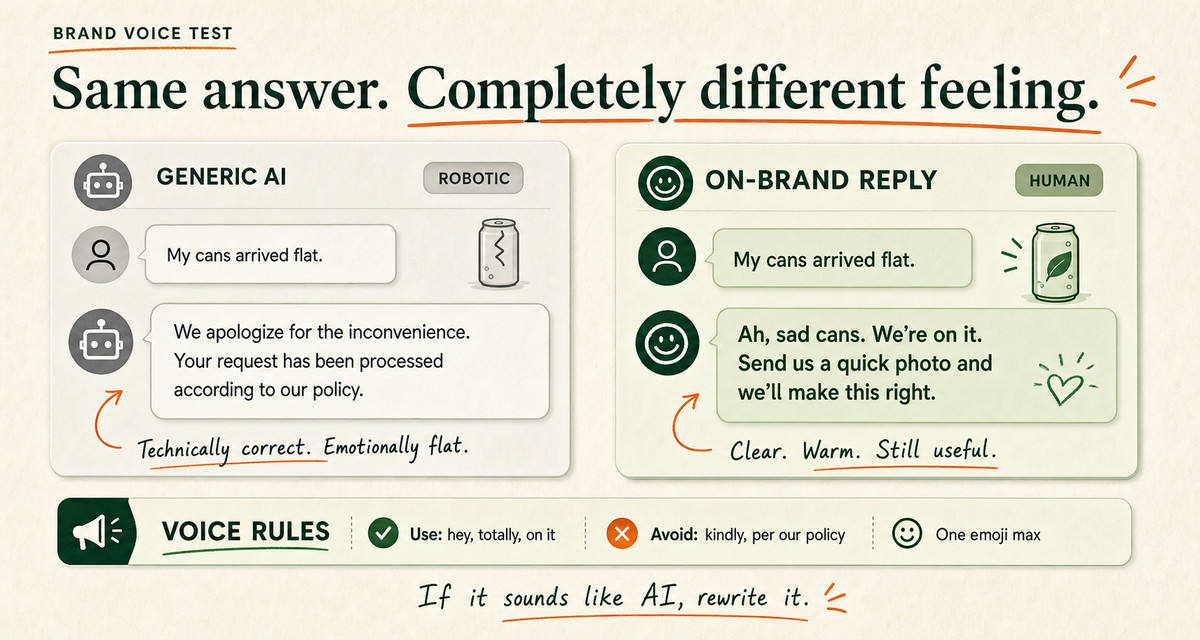
The fix is a short, specific voice spec. Not “be friendly.” Real rules with real examples.
Words we use: “hey,” “totally,” “on it,” the customer’s first name.
Words we never use: “kindly,” “we apologize for the inconvenience,” “per our policy.”
Emoji: one, max, and only the can or the wave.
One real before-and-after: a flat “Your refund has been processed” becomes “Done. Refund’s on its way back to you. Sorry your cans showed up sad.”
We built and tested this across enough beverage inboxes to know the brand-voice rules matter more than the model you pick. A cheap model with a tight voice spec beats an expensive one running on defaults. The full method, including the weekly QA loop we use to keep it on-brand, is in our guide on matching AI to your brand voice.
“If the replies sound like AI, you don’t pay. That’s the whole bar,” says Vaibhav Sharan, founder of EfficiaLabs.
What does AI customer service for a sparkling water brand actually cost?
Less than you think, and the pricing model is the part nobody explains.
Most support SaaS charges per seat or per resolution. A per-resolution tool at $0.75 to $0.90 a conversation looks fine until your summer WISMO wave hits and the bill scales with every ticket.
A custom build runs on raw model cost. We measured this across client inboxes, and we typically land between $0.05 and $0.10 per ticket. Here’s the math on a brand doing 2,000 support tickets a month.
Approach
Per-ticket cost
2,000 tickets / month
At summer peak (4,000)
Per-resolution SaaS
$0.75
$1,500
$3,000
Custom AI (EfficiaLabs)
$0.05 to $0.10
$100 to $200
$200 to $400
That gap is the difference between support being a line item you watch and one you forget about. And the custom build doesn’t charge you more in July just because more people asked where their water is.
We did the same cost breakdown for skincare brands in our 7-day skincare support guide, and the per-ticket numbers hold across categories.
Note: the per-ticket figure is the running cost, not the build. We handle the build, deploy, and upkeep, so the only thing your team spends is the hour it takes to grant portal access.
Your 7-day launch plan
Here’s the exact week. This is the schedule we run with brands, and it’s why “7 days” isn’t marketing.
Day 1: Pull and tag the tickets
Export your last 500 to 1,000 tickets. Tag them into the buckets from the table above. Find the five types that cover most of the volume.
Day 2: Write the truth
Document your policies, product facts, shipping rules, and the voice spec. This “context pack” is what the AI reads from. Most brands have it scattered across five docs and one founder’s head, so we pull it together.
Day 3: Connect the systems
Grant access to your helpdesk and Shopify. The AI needs to read orders, tracking, and subscription status to be useful. This is the only step that needs you.
Day 4: Build the guardrails
Wire in the never-do list, the health-claim escalation, the refund threshold, and the voice rules. Nothing ships without these.
Day 5: Test on real tickets
Run the AI against last month’s tickets in draft mode. Read the drafts, tighten the voice, and catch the misses before a customer ever sees them.
Day 6: Go live in draft-only mode
Every reply is drafted by AI and approved by a human. You watch it for a day. Trust is earned on real tickets, not promises.
Day 7: Turn on auto-send for the safe lane
Let the lookups (tracking, multipacks, subscription swaps) go out automatically. Keep everything else in draft-and-approve. Done.
After launch, there’s usually no maintenance for a long time. The system runs, and we’re the ones who own it if it doesn’t.
“Ecommerce founders already have too much on their plate. My job is to take support off it, so they can rest more,” says Vaibhav Sharan, founder of EfficiaLabs.
Frequently asked questions
Is AI customer service safe for sparkling water brands making health claims?
Yes, if it’s built right. The AI should be hard-wired to never make a health, medical, or safety claim and to escalate any ingredient, allergen, or “is this safe” ticket to a human. That keeps you on the right side of the FTC’s Health Products Compliance Guidance.
How much does it cost to run AI support for a beverage brand?
A custom build typically costs $0.05 to $0.10 per ticket. At 2,000 tickets a month that’s $100 to $200, and it doesn’t balloon during summer demand spikes the way per-resolution SaaS pricing does.
Will AI support replies sound robotic?
Only if you let them. With a tight voice spec and a weekly QA loop, replies match your brand. Our rule with clients is simple: if it sounds like AI, you don’t pay.
What tickets can’t AI handle for a sparkling water brand?
Health and ingredient questions, wholesale and bulk pricing, refunds above your threshold, and anything legal. Those route to a person. AI handles the high-volume lookups so your team has time for the rest. For the broader Shopify setup, see our ChatGPT customer support guide.
Sources
Shopify, “WISMO: What it is and how to reduce it.” The share of DTC support tickets that are order-status questions. https://www.shopify.com/blog/wismo-ecommerce
Federal Trade Commission, “Health Products Compliance Guidance” (December 2022). The substantiation standard for health-related claims on foods and beverages. https://www.ftc.gov/business-guidance/resources/health-products-compliance-guidance
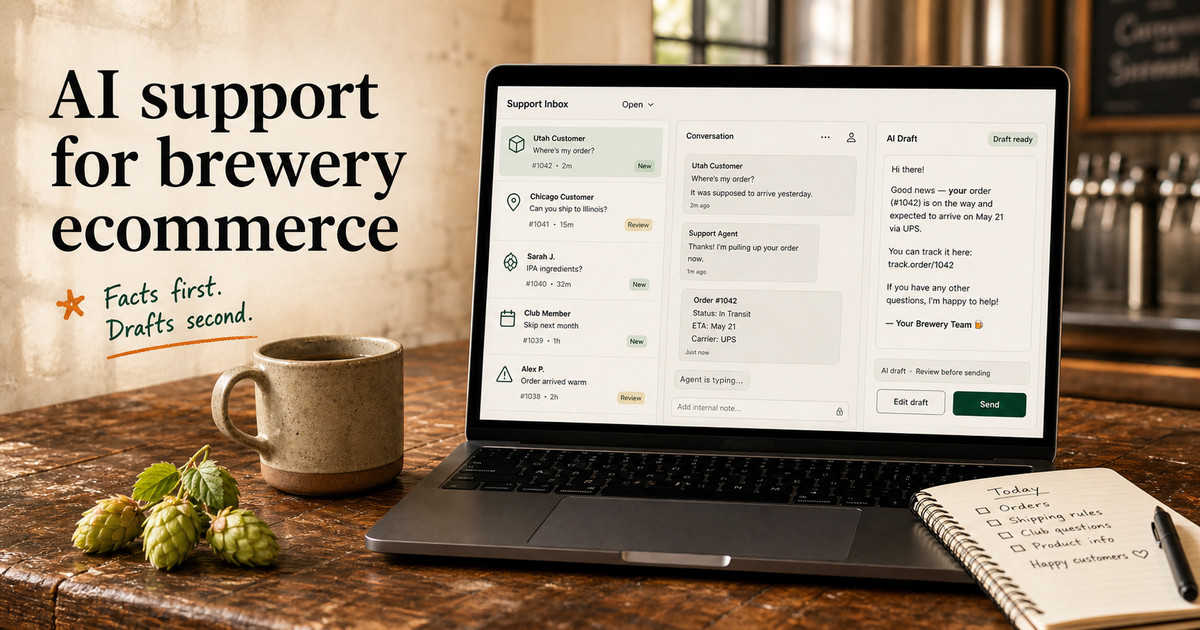
It’s 11pm, and a customer in Utah just asked your brewery why their hazy IPA hasn’t shipped. It hasn’t, and it legally can’t, which is the one thing most guides skip. Knowing that before the AI drafts a word is how you use AI customer service for brewery ecommerce stores without a fine in your inbox.
Beer is not soap. Beer is not a phone case.
Half your support questions touch a law. The wrong cheerful auto-reply isn’t a bad customer experience. It’s a compliance problem.
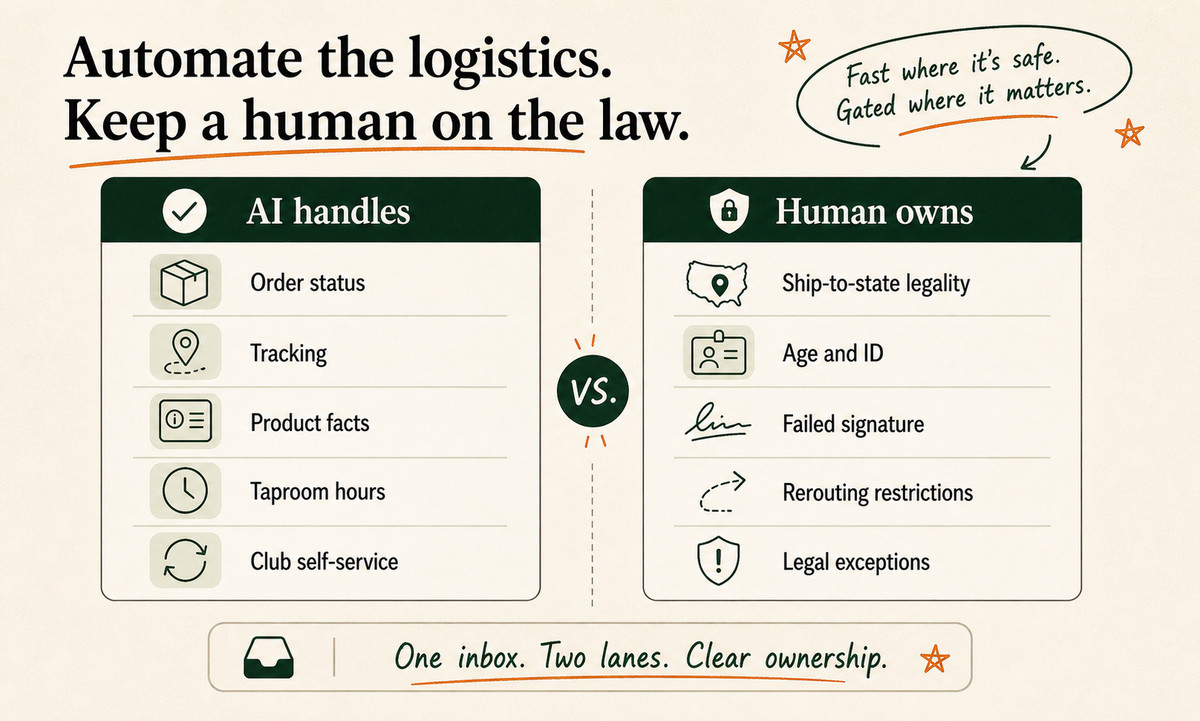
Put AI on the tickets that are safe and repetitive. Gate everything that touches alcohol law or age behind a human. Feed it your real policies, and you can launch the whole thing in about a week.
Table of Contents
Why is brewery customer service different from other ecommerce?
Which brewery tickets should AI answer, and which should it never touch?
What context does an AI need before it answers a beer question?
How do you make AI sound like your taproom, not a bot?
How to use AI customer service for brewery ecommerce stores in 7 days
What does AI customer service cost for a brewery ecommerce store?
Frequently asked questions
Why is brewery customer service different from other ecommerce?
Because most of your inbox is about something you’re not always allowed to do.
Direct-to-consumer beer shipping is legal in only 11 states plus Washington, D.C. as of 2026, per Sovos ShipCompliant. Wine ships to 48. Beer ships to a dozen.
So “can you send a case to my place?” has a different answer depending on which side of a state line your customer’s couch is on.
It gets more specific. Avalara’s state-by-state guide lists hard per-person caps: Kentucky allows 10 cases a month, Virginia allows two, Washington, D.C. allows one.
Every legal shipment needs an adult 21-or-over signature at the door. The carrier cannot leave beer on a porch.
Now stack the demand on top. 69% of regular craft beer drinkers say they’d subscribe to a DTC beer club, and 77% say they’d buy more craft beer if direct shipping were available (Sovos, 2026).
The orders are coming. The questions come with them.
So a brewery’s support inbox is really four inboxes wearing one hat:
Shipping legality (“do you ship to Texas?”)
Age and ID (“nobody was home to sign”)
The beer itself (“is this gluten-free, what’s the ABV?”)
The club (“pause my subscription, skip this month”)
A generic ecommerce chatbot answers all four the same confident way. That’s the trap.
The first two can get you fined. The second two are easy money for automation.
Pro tip: Before you automate anything, pull your last 200 tickets and tag each one by which of those four buckets it lands in. That ratio tells you exactly how much of your inbox is safe to hand to AI on day one.
Which brewery tickets should AI answer, and which should it never touch?
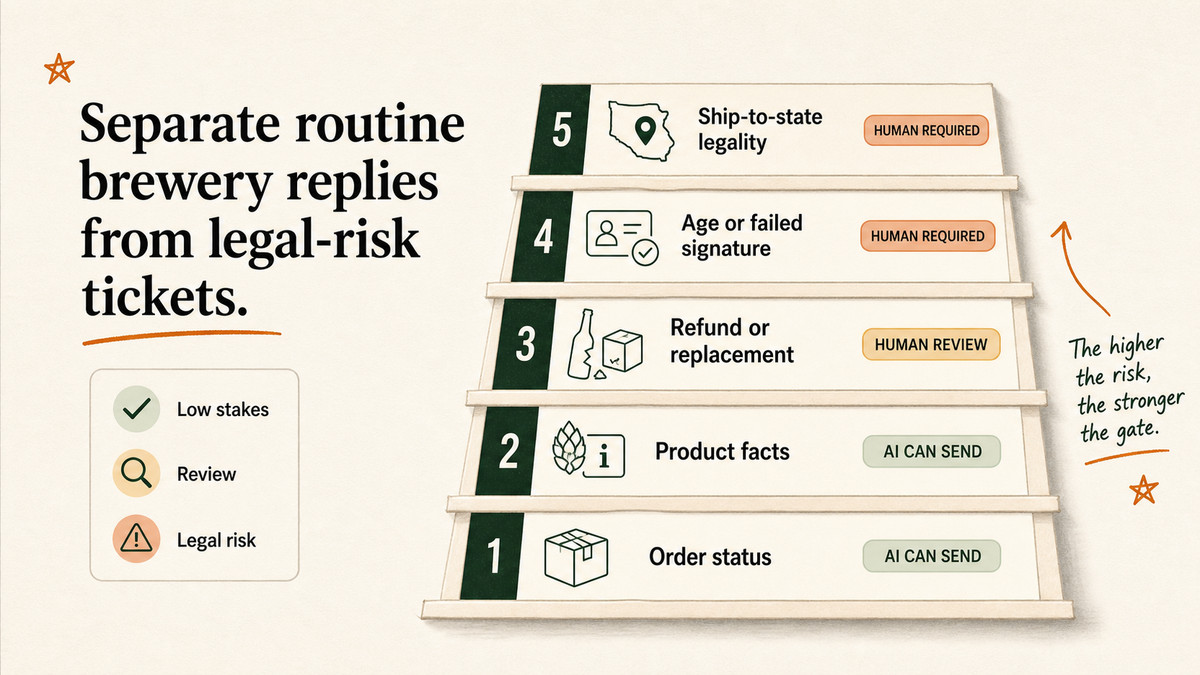
Sort every ticket by what happens if the AI gets it wrong. Low stakes, AI answers. Legal stakes, a human decides.
That’s the entire framework.
Roughly 80% of ecommerce tickets are the same nine questions asked over and over (eDesk, 2026). For a brewery, the safe, high-volume ones look like this.
Safe for AI to answer on its own:
“Where’s my beer?” Order status, tracking, delivery windows.
“What’s the ABV / IBU / is this gluten-reduced?” Straight from your product data.
“When does the taproom open?” Hours, address, parking.
“How do I pause or skip my club box?” Subscription self-service, once you’ve confirmed the rules.
Drafts only. A human confirms before send:
Refunds and replacements for breakage or a flat keg.
Club billing disputes.
Address changes on an order already in motion.
Hard human gate. AI never sends these alone:
“Can you ship to my state?” The answer is a legal one, and it changes by zip code.
Anything about age, ID, or a failed signature delivery.
A customer trying to reroute beer to a state you can’t ship to.
We’ve built this same gate for regulated verticals like supplements, where one wrong claim is an FTC problem. The build pattern is identical to the one in our protein supplements support guide: automate the boring 70%, gate the regulated 30%, never blur the two.
Beer is the only DTC category where a friendly auto-reply can technically break the law. So that’s the line we never let a bot cross.
— Vaibhav Sharan, founder, EfficiaLabs
Important note: “AI never sends these alone” doesn’t mean a human writes them from scratch. The AI drafts, pulls the order, and flags the risk. A person clicks approve.
You get the speed. You skip the liability.
What context does an AI need before it answers a beer question?
Facts. Layered, current, and yours.
An AI with no context is just a confident stranger guessing about your refund policy.
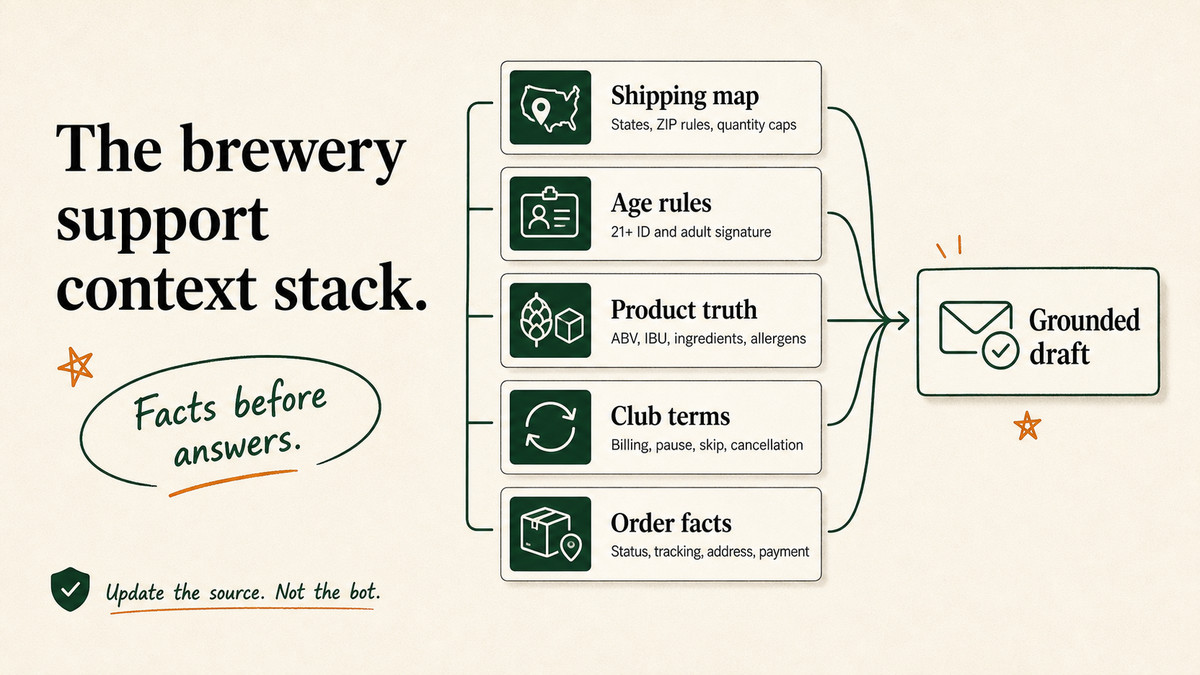
Here are the five layers we load before a brewery AI answers anything.
Shipping-state map. The exact states and zip rules you can ship to, with per-person caps. This is the layer that keeps you out of trouble.
Age and 21+ rule. ID and adult-signature requirements, plus what to tell a customer whose delivery failed.
Club and subscription terms. Billing dates, pause and skip and swap rules, cancellation windows.
Order facts. Live status, tracking, address, payment, pulled per ticket from your store.
When products or laws change, you change the source, not the bot. A new state opens up for DTC beer, you update one map. A seasonal sour sells out, you flip one flag.
The AI reads the latest version every time.
This is also where a custom build pulls away from an off-the-shelf widget. A generic tool knows shipping in the abstract.
It doesn’t know that you can ship to Ohio but not Pennsylvania, that your club bills on the 3rd, or that your west-coast IPA is brewed with wheat. That gap is the difference between a helpful reply and a fineable one.
How do you make AI sound like your taproom, not a bot?
You write the voice rules down. You give it real examples of your best replies. You test it against tickets before a single customer sees it.
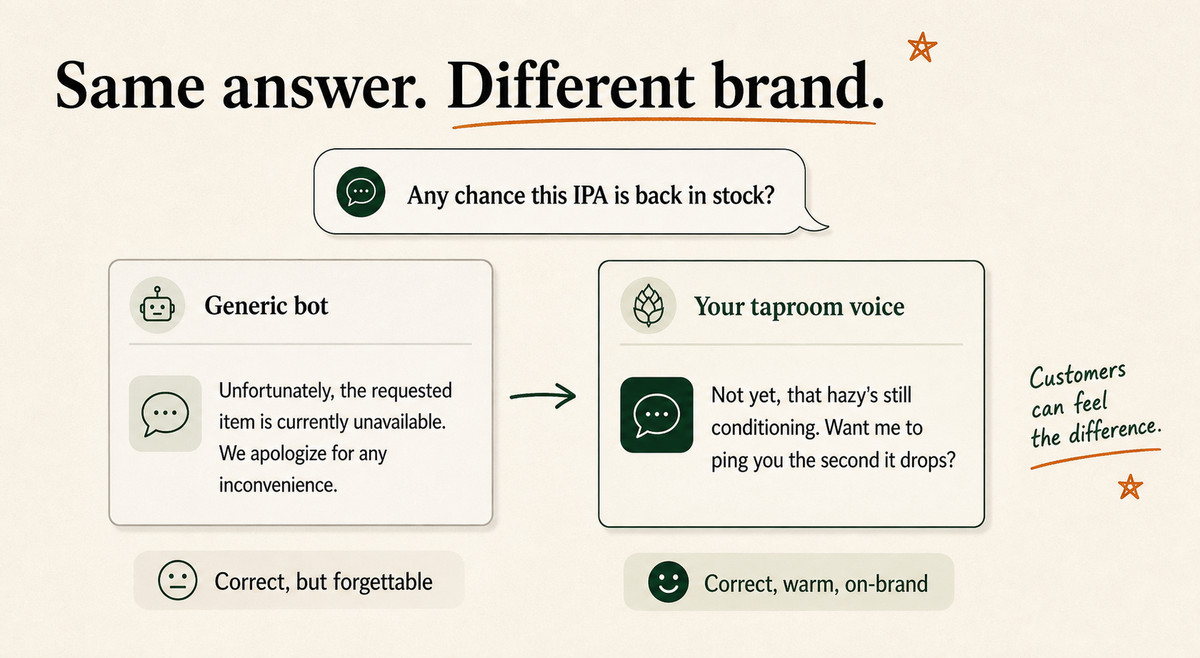
A customer asks: “Any chance this IPA is back in stock?”
A stock bot says: “Unfortunately, the requested item is currently unavailable. We apologize for any inconvenience.”
Your taproom says: “Not yet, that hazy’s still conditioning. Want me to ping you the second it drops?”
Same information. Completely different brand.
Craft beer customers can smell a corporate auto-reply from across the bar, and a flat one chips at the exact personality they bought into. We go deep on this in our guide to matching AI voice to your brand voice, but the short version is three rules.
Feed it your real replies. Twenty of your best human answers teach tone better than any style guide.
Ban the tells. No “we apologize for any inconvenience,” no “kindly,” no robotic stiffness. Write the banned list explicitly.
Keep the human in the loop early. For the first weeks, you approve drafts. The AI learns your edits.
Here’s our actual promise on this: if the replies don’t sound like your brand, you don’t pay. We don’t ship a bot that embarrasses you.
If a reply doesn’t sound like it came from your taproom, it doesn’t go out. Brand voice isn’t a nice-to-have for a brewery. It’s the product.
— Vaibhav Sharan, founder, EfficiaLabs
That’s the line I give every brewery founder on the first call.
How to use AI customer service for brewery ecommerce stores in 7 days
You don’t build this. We do.
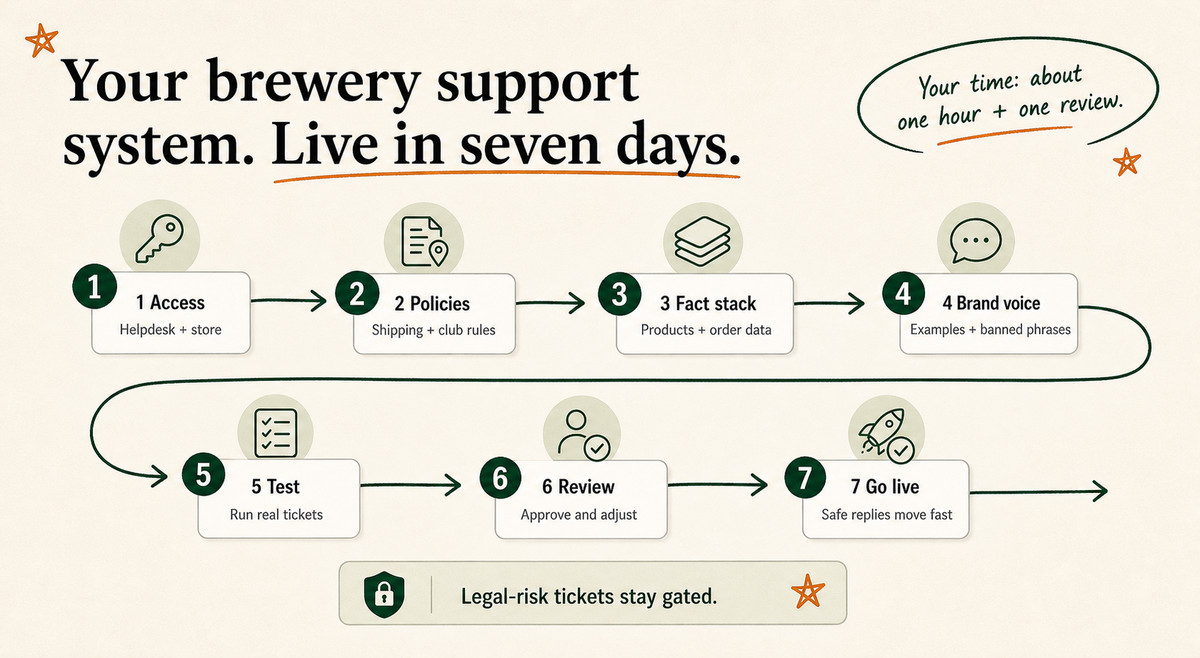
Your job is roughly one hour on day one and a review on day six. Here’s the actual schedule we run.
Day 1: You grant access
You give us read access to your helpdesk and store. Gorgias, Zendesk, Freshdesk, Gmail, Shopify, it doesn’t matter which. That’s the bulk of your effort, done.
We pull your shipping rules, club terms, and refund policy into a single source of truth. We flag every state you can and can’t ship to.
Day 3: We build the fact stack
We wire up the five context layers: shipping map, age rules, product data, club terms, live order lookups.
Day 4: We set the brand voice
We load your best replies, write the banned-phrase list, and tune tone until it reads like you.
Day 5: We test on real tickets
We run the AI against your last few hundred tickets and grade every draft. When we tested this on a brewery’s real inbox, we saw the safe buckets clear instantly while the gated ones lined up for review. The legal-gate tickets get checked hardest.
Day 6: You review drafts
You skim a batch of real drafts and tell us where it’s off. We adjust. This is your second and final time investment.
Day 7: Go live
The AI starts drafting in your helpdesk. Every reply that touches shipping legality or age waits for a human click. Everything safe goes out fast.
Note: “Go live” does not mean “walk away.” For the first two weeks the human-approval rate stays high on purpose. As the drafts prove themselves on the safe buckets, you let more of them auto-send.
The gated ones stay gated forever.
What does AI customer service cost for a brewery ecommerce store?
Less than you think. The pricing model matters more than the sticker.
For a brewery doing real club volume, those numbers compound every Q4.
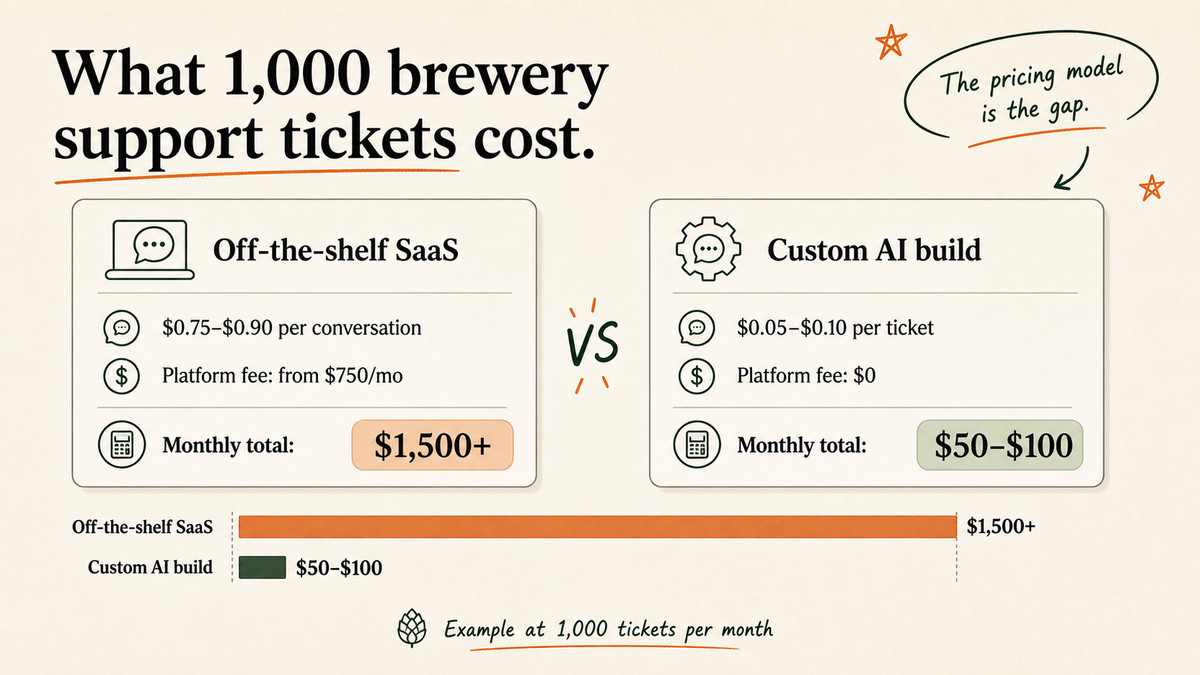
A custom build runs on raw model cost. We see $0.05 to $0.10 per ticket, with no platform fee. Here’s the gap on 1,000 tickets a month.
Approach
Per ticket / conversation
Platform fee
1,000 tickets / month
Off-the-shelf SaaS
$0.75-$0.90
From $750/mo
$1,500+
Custom AI (our builds)
$0.05-$0.10
None
$50-$100
That’s not a typo.
The bigger saving is what you don’t see. Once a custom build is tuned, it usually runs for years with no real maintenance.
The AI customer service market is forecast to grow from $12.06 billion in 2024 to $47.82 billion by 2030 (MarketsandMarkets, 2025). The SaaS tools will keep adding seats and features and line items. A build you own doesn’t.
For the full picture on where AI moves the needle for a store, our 49 AI in DTC statistics roundup is a good gut-check. Read it before you spend a dollar.
Frequently asked questions
Can AI legally handle alcohol orders for my brewery?
Yes, for the parts that don’t decide a legal question. AI can answer order status, product specs, and club logistics all day.
It should not be the thing that decides whether a shipment to a given address is legal, or that clears an age or signature issue. Those stay behind a human gate.
The AI drafts and flags. A person approves.
Will AI accidentally tell a customer I ship to a state I can’t?
Not if it’s built right. The shipping-state map is loaded as hard context, and every “can you ship here?” ticket is gated for human approval rather than auto-sent.
That combination is exactly why a generic chatbot is risky for a brewery and a custom build isn’t. The guardrail is the whole point.
Which helpdesks does this work with?
All the common ones. Gorgias, Zendesk, Freshdesk, and Gmail are the usual setups for DTC brands, and a custom build sits on top of whichever you already use.
You don’t switch tools. We integrate with what’s there.
How is this different from the AI button inside Gorgias or Zendesk?
The built-in AI tools are generic and priced per conversation. They don’t know your shipping map, your club rules, or your taproom voice unless you spend weeks configuring them, and they still charge per ticket forever.
A custom build bakes your policies in once, runs at near-raw cost, and matches your brand. We break the trade-offs down by tool across our customer support comparisons.
What happens during a Black Friday or seasonal-release spike?
This is where AI earns its keep. Ticket volume jumps fast during peak season, and the safe buckets (“where’s my beer?”) are exactly the ones that spike hardest.
The AI absorbs those instantly while your team focuses on the gated, high-value tickets. You scale without hiring seasonal temps.
Right-size the work, then hand it off
A brewery inbox is half logistics and half law. The logistics half is begging to be automated. The law half needs a human who knows the rules.
Get that line right, and AI gives you back your evenings without putting your license anywhere near a chatbot’s confidence.
We do the whole build: the fact stack, the gates, the voice, the launch. You grant access and review once.
Seven days later your safe tickets answer themselves and the risky ones wait for you. That’s the version of AI support a brewery can actually run.
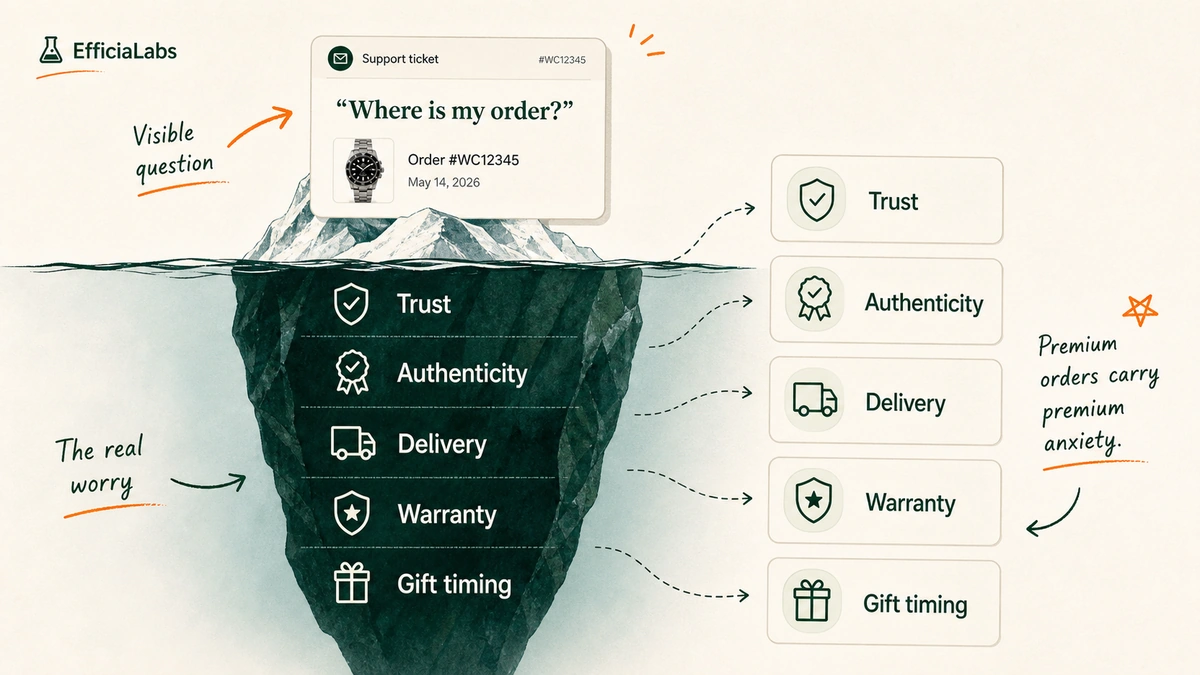
It’s 2am. A $1,900 watch shipped Tuesday, and the buyer has already emailed twice, DM’d once, and refreshed the tracking page nine times. That box is half a month of his salary, somewhere in a van.
That is the job. Here is how to use AI customer service for watch ecommerce stores. Let AI draft the routine replies from your real order and product data, and keep a human on anything risky.
That buyer isn’t being difficult. They spent two months’ worth of dinners-out on a single object, and now it’s in a van somewhere.
Premium orders carry premium anxiety.
The good news: most of what they ask is the same five things, over and over. Where is it, will it fit, is it real, what if it breaks, can I send it back.
Routine questions, sitting on top of a high emotion. That gap is exactly where AI earns its keep.
Key Takeaways
Automate the routine tickets first: order status, sizing, water resistance, returns. Keep warranty disputes and authenticity claims on a human.
Answer from your own data: order facts, the spec sheet, your policy. Never from the model’s guesses.
Custom AI runs around $0.05 to $0.10 per ticket. Per-conversation tools run closer to $0.75 to $0.90.
A done-for-you build goes live in 7 days. You grant portal access. We do the rest.
How to use AI customer service for watch ecommerce stores
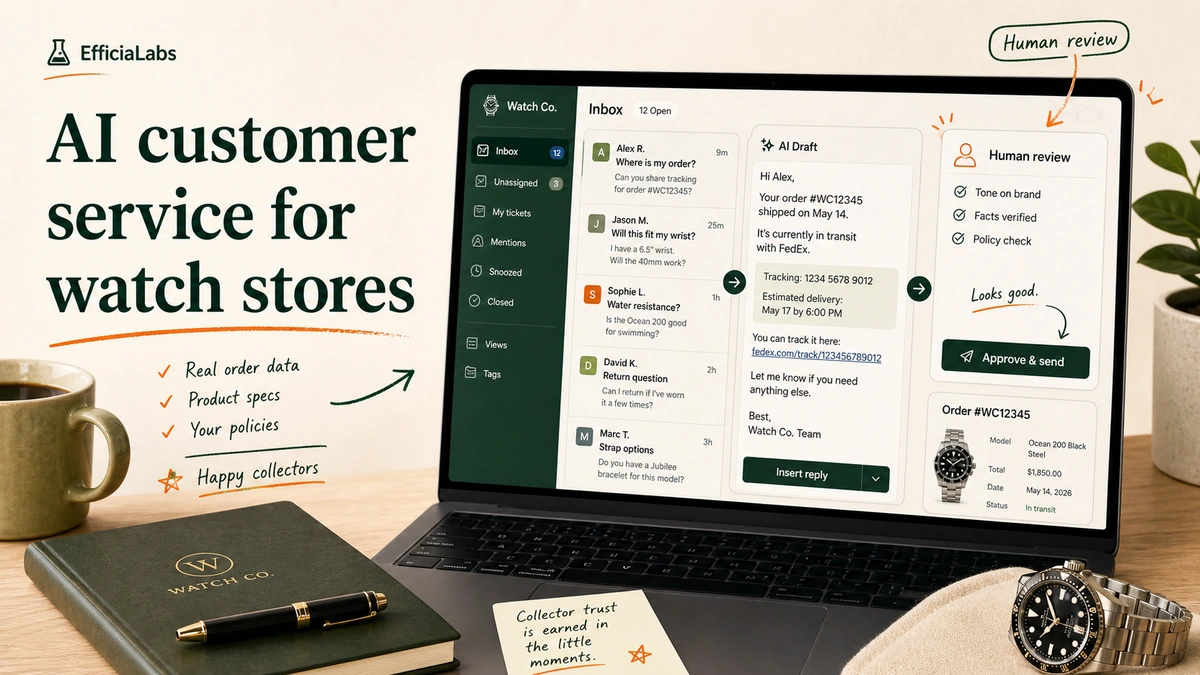
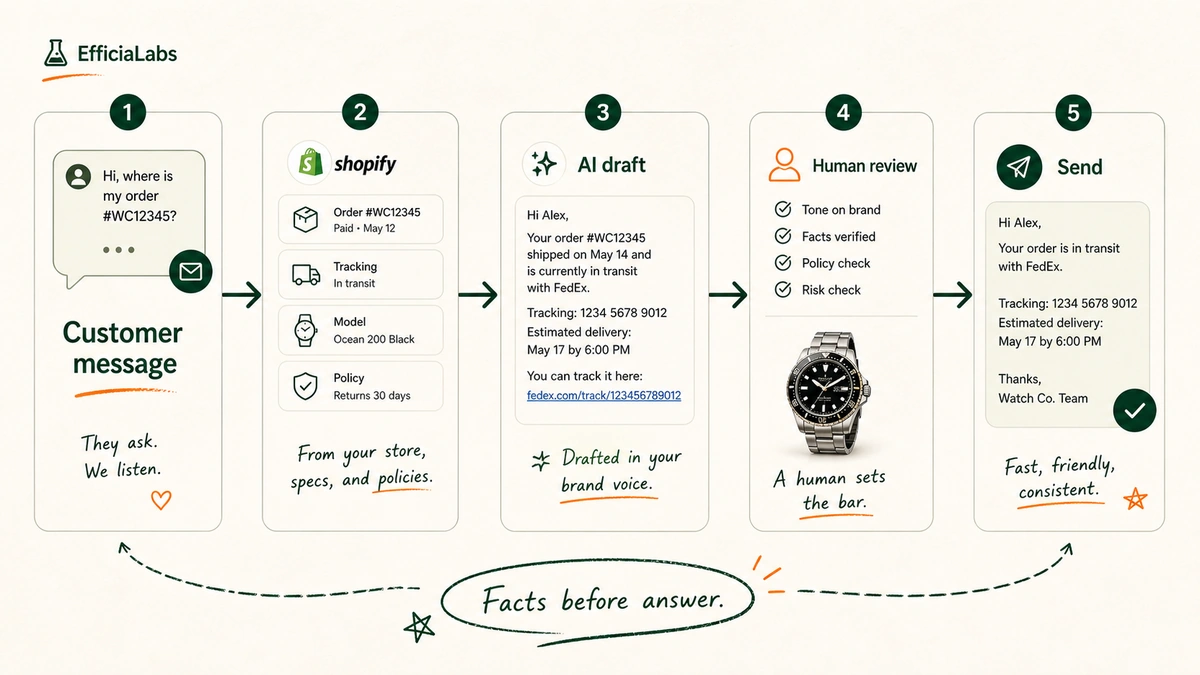
AI customer service for a watch store is not a chatbot bolted to your homepage. It sits inside your helpdesk: Gorgias, Zendesk, Freshdesk, or plain Gmail. It reads the ticket, pulls the real facts from Shopify and your tracking app (AfterShip, Wonderment), and drafts a reply in your brand voice.
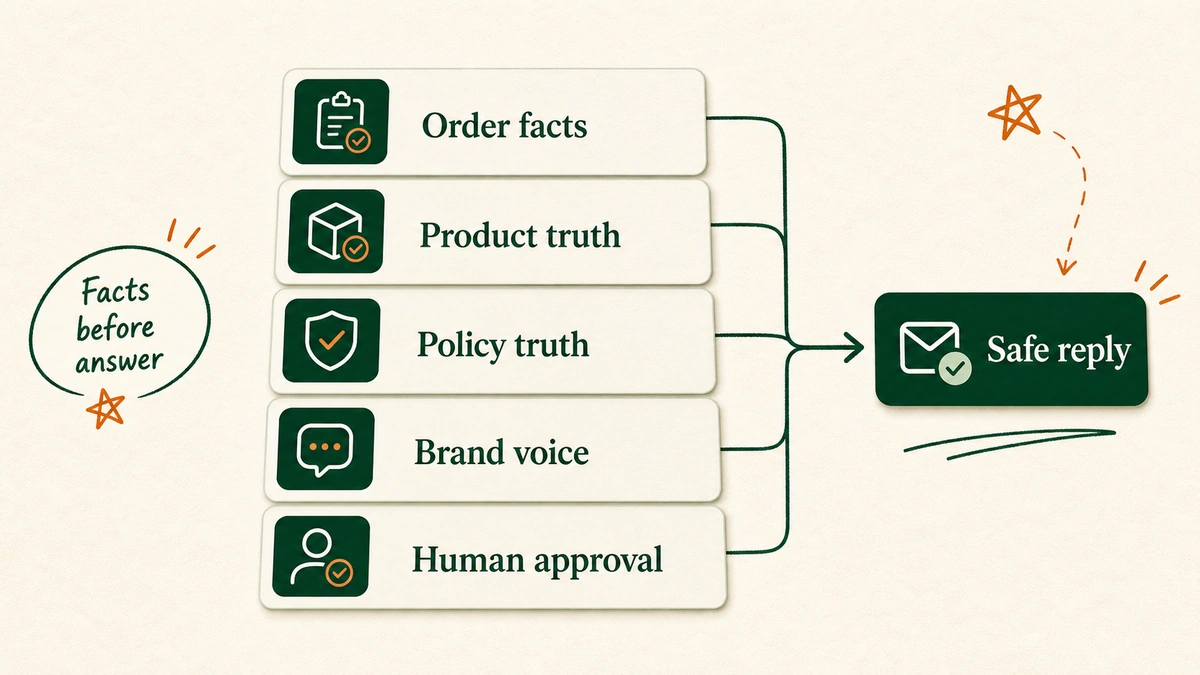
“Facts before answer. The model never invents a delivery date or a water rating. It looks them up.”
— Vaibhav Sharan, founder of EfficiaLabs
The order of those steps is the whole thing. The AI never invents a delivery date or a water rating.
It looks up the order in Shopify, reads your spec sheet, checks your policy doc, and only then drafts. Facts before answer.
The cost of a wrong answer is higher for a watch than for a $20 phone case. Tell someone their dive watch is good to 200m when the ISO 22810 rating says 50m, and you’ve got a flooded movement and a furious review.
The premium microbrands a buyer obsesses over, think Baltic, Lorier, or Christopher Ward, live and die on getting these details right. Premium tickets sit on top of premium worries.
So the system is cautious by default. It handles the boring 80% beautifully and hands you the 20% that needs a human eye.
Nearly 90% of CX leaders expect AI to resolve most issues within a few years, per Zendesk’s 2026 customer service research. For a lean watch brand, “most” is the right target. Not “all.”
Which watch tickets to automate first
Start where the volume is and the risk is low. “Where is my order” alone is 18% of incoming ecommerce requests on average, per Gorgias’s own data. That’s nearly one in five tickets that an AI can draft in seconds from your tracking data.
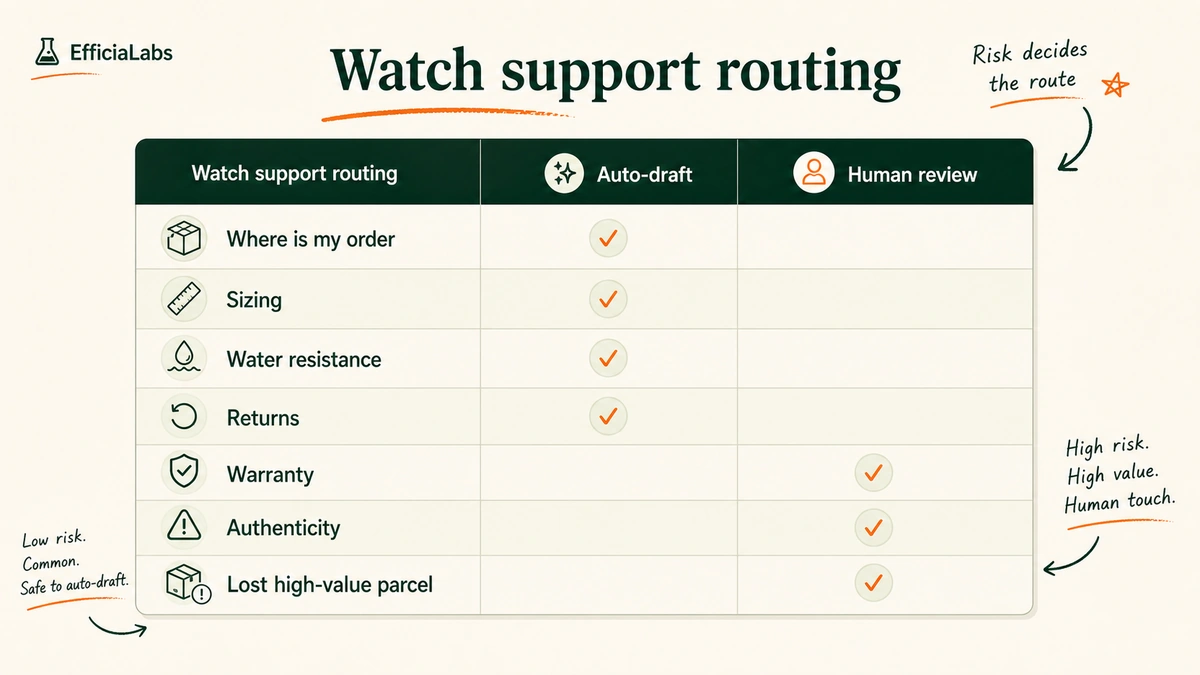
Here’s how we sort a watch brand’s inbox on day one.
Ticket type
Auto-draft
Human review
Where is my order (WISMO)
Yes
Strap, sizing, lug-to-lug
Yes
Water resistance and care
Yes
Returns and exchanges (in policy)
Yes
Warranty and movement servicing
Yes
Authenticity and serial disputes
Yes
The left column is your quick win. WISMO, sizing, water resistance, in-policy returns.
These are answerable from facts you already have. A customer would rather get a correct answer in 30 seconds than wait six hours for a human to paste the same tracking link.
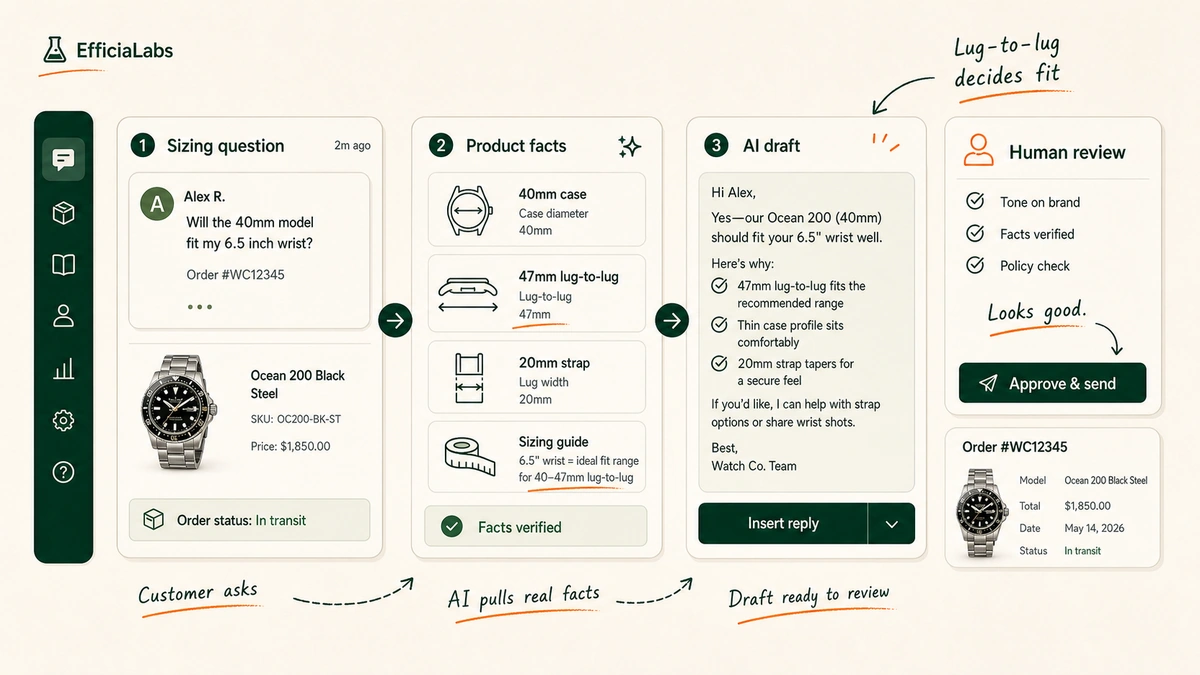
Take sizing. A buyer asks if a 40mm case will work on a 6.5-inch wrist.
The AI doesn’t guess. It pulls the case diameter, the lug-to-lug, the strap width, and your sizing guide, then writes a plain answer.
Pro tip: Lug-to-lug, not case diameter, is what decides whether a watch overhangs a wrist. Put it in your product data and your AI will stop giving vague “it depends” answers and start giving real ones. This is the same approach we use for jewelry stores, where ring sizing carries the same trap.
The right column stays human, on purpose. More on that next.
Guardrails for $500 to $5,000 watch orders
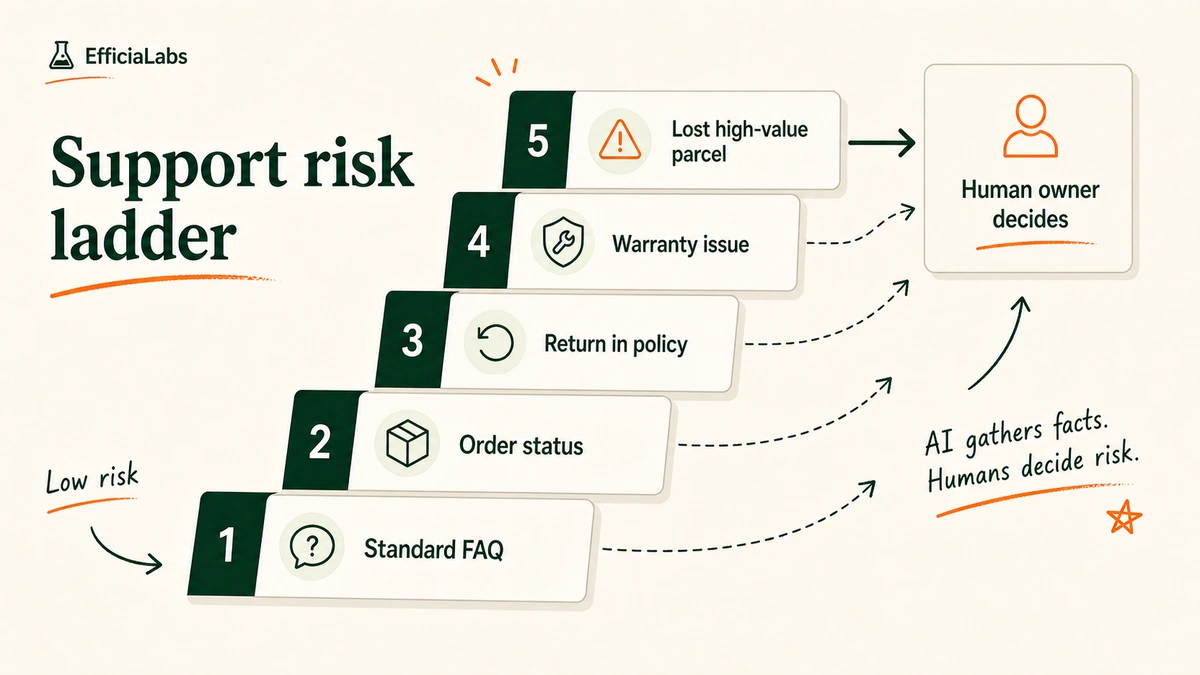
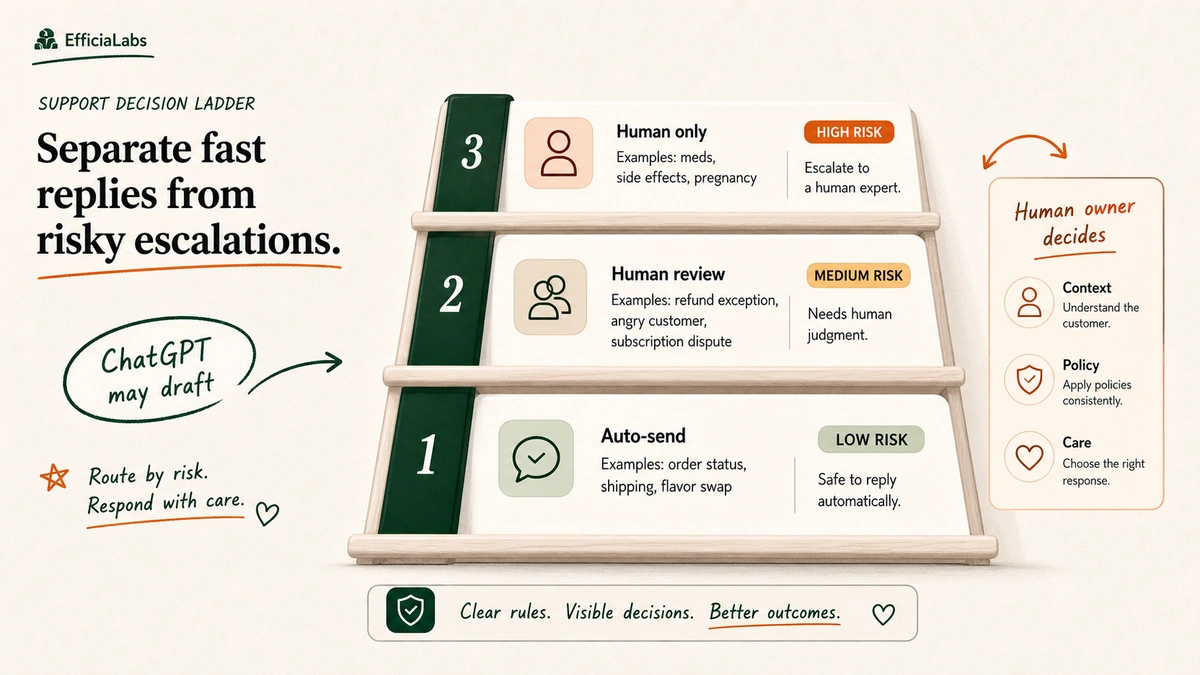
The mistake people fear is the AI confidently refunding a $4,000 chronograph it shouldn’t have. So you build the rule before you build the bot: risk decides the route.
Low risk, the AI drafts and a human glances. Standard FAQ, order status, a return inside policy.
Medium risk, a human reads every word before it sends.
High risk, the AI doesn’t draft a decision at all. It gathers the facts, flags the ticket, and a named owner handles it.
Three buckets always sit at the top of the ladder for a watch brand:
Authenticity and serial disputes. A gray-market or “is this real” claim is brand-defining. A human answers it, every time.
Warranty and servicing. Movement issues, water ingress, a crown that won’t screw down. These need judgment and sometimes a returns authorization.
Big-ticket order problems. A lost or damaged $5,000 parcel, a FedEx or UPS claim and a nervous customer, is a human conversation, not a macro.
Important note: “Human review” is not a fallback for when the AI fails. It’s a designed step. The AI does the heavy lift; the human sets the bar on tone, accuracy, and exceptions.
In our work with watch and jewelry brands, that review gate is what makes founders comfortable letting AI near a high-AOV inbox at all. We’ve built this exact setup for premium verticals. Nobody regrets the gate.
What AI customer service actually costs for a watch store
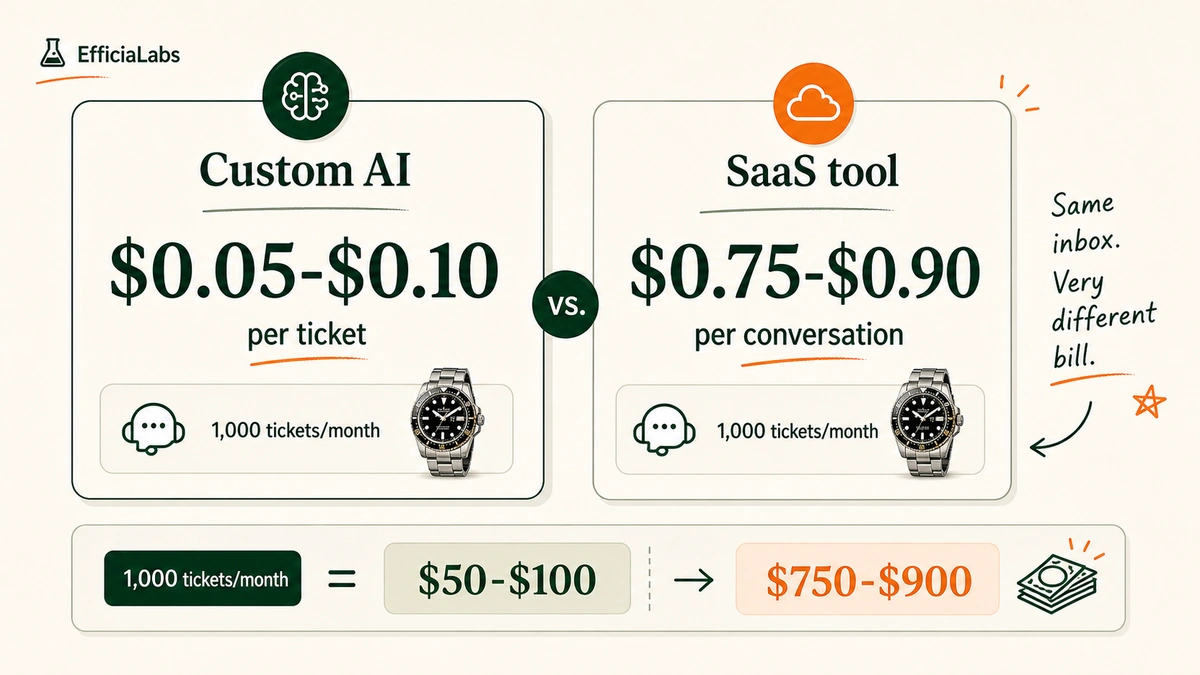
This is where the math gets fun. The model cost of drafting one support reply is tiny. We typically see $0.05 to $0.10 per ticket all-in once a custom system is running.
Compare that to the off-the-shelf tools that bill per conversation. Many land at $0.75 to $0.90 each. We did the math on a few of these tools, and the gap isn’t subtle.
Run 1,000 tickets a month:
Custom AI: roughly $50 to $100.
Per-conversation tool: roughly $750 to $900.
That’s $700 a month, give or take, for the same drafted reply. Over a year, that’s a Klaviyo plan and a new photographer for your next drop.
Note: Per-conversation pricing isn’t a scam, it’s a business model. It just stops making sense once your volume climbs. The more you grow, the more it costs you to grow.
Custom AI runs the other way. Build once, and the per-ticket cost barely moves for years.
The 7-day launch plan
Here’s the part most guides skip. The actual week.
You grant access to your helpdesk and store. We build, deploy, and maintain. That’s the deal.
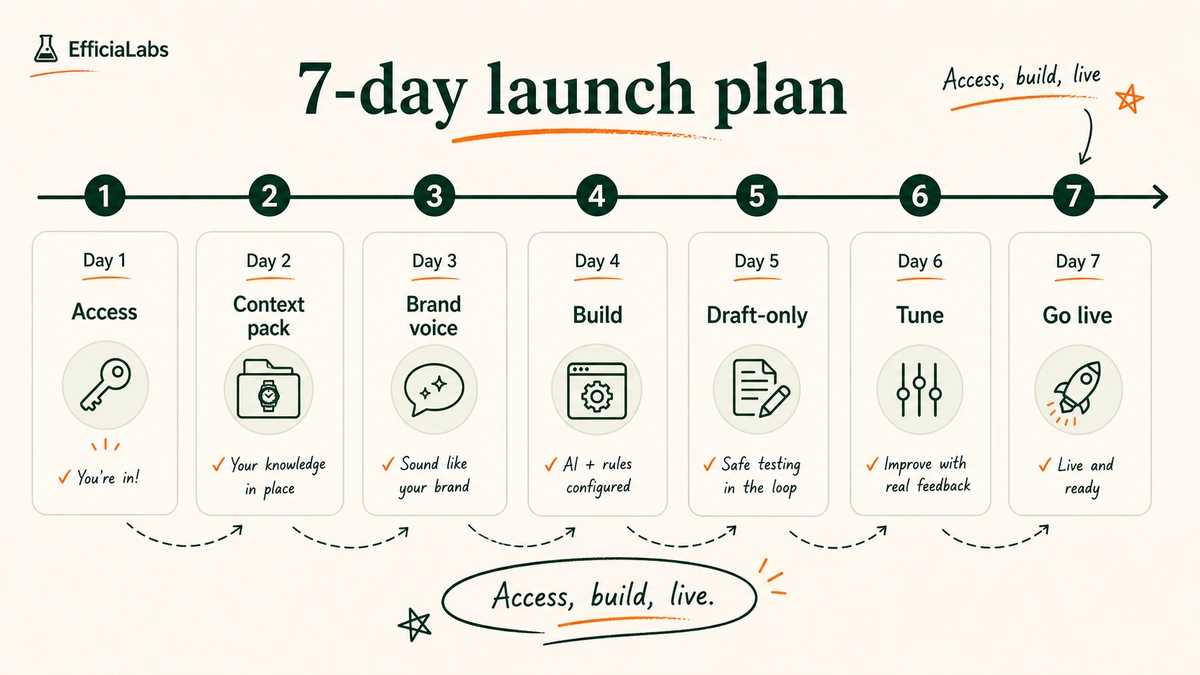
Day 1: Access and audit. You grant read access to your helpdesk and Shopify. We read 60 to 90 days of real tickets and find your top question types.
Day 2: Context pack. We assemble your order facts, product specs, policies, and FAQs into one source the AI reads from.
Day 3: Brand voice. We capture your tone, your do’s and don’ts, and 10 to 15 example replies you’d be proud to send.
Day 4: Build and connect. We wire the AI into your helpdesk and lock the escalation rules from the risk ladder above.
Day 5: Draft-only mode. The AI drafts on live tickets but sends nothing. Your team reads every draft.
Day 6: Review and tune. We fix the misses, tighten the voice, and adjust what’s auto versus human.
Day 7: Go live. Low-risk replies start sending. The high-risk ladder stays human.
Day 5 is the one founders watch closely. We tested draft-only mode across watch and jewelry inboxes.
It’s the day the team realizes the drafts already beat the rushed replies they were sending at 11pm.
Seven days. Access, build, live.
After that, most of our builds need no real maintenance for years. Once your policies and specs are in, the system holds.
Keeping replies sounding like your brand, not a bot
A watch buyer who reads Hodinkee every morning can smell a generic reply from across the room. “We apologize for any inconvenience this may have caused” is the fastest way to make a $2,000 customer feel like a ticket number.
These are people who can tell a Seiko movement from an ETA by ear. They notice tone.
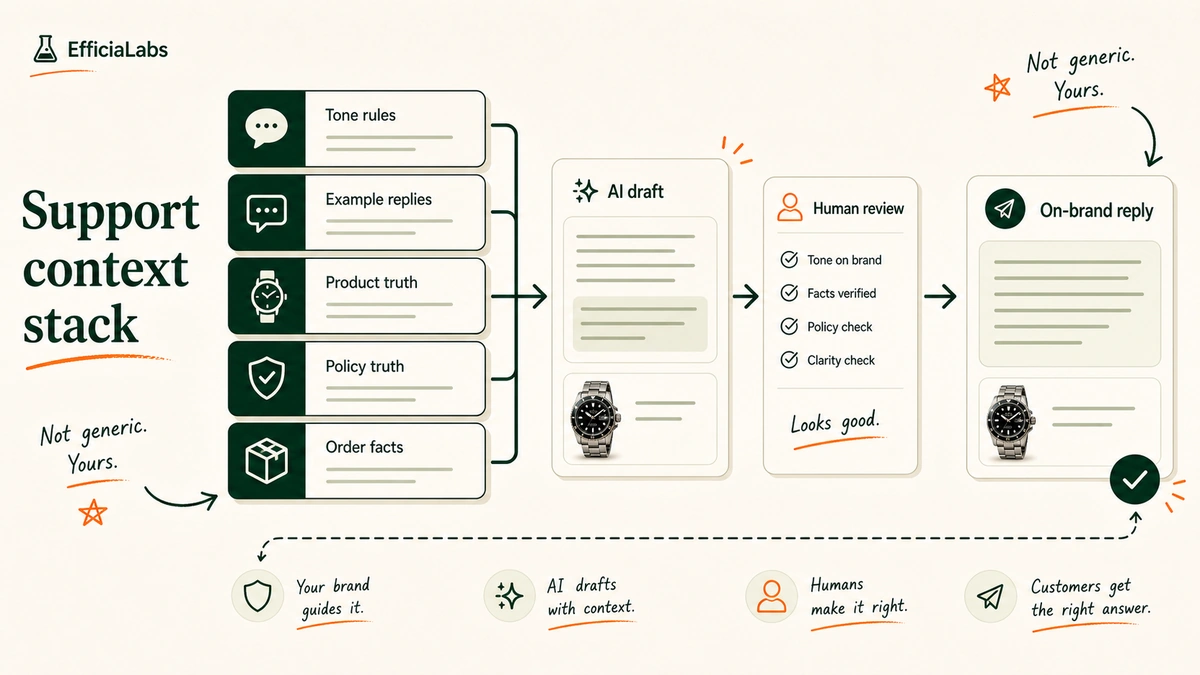
So the AI doesn’t write from a generic template. It writes from your voice, layered on your facts:
“If the replies sound like AI, you don’t pay. That’s the bar.”
— Vaibhav Sharan, founder of EfficiaLabs
This is also where being small is the feature, not the bug. I personally read what each client tells us and make sure my team follows it.
You’re not handed a success manager whose targets depend on selling you another module. You get the founder.
Every customer matters when you’re our size.
Frequently asked questions
Can AI handle “where is my order” tickets for a watch store?
Yes, and it’s the best place to start. WISMO is around 18% of ecommerce tickets. The AI reads the order and tracking data and drafts an accurate, on-brand status reply in seconds, with a human glance for anything unusual.
Is it safe to automate support for $1,000+ watch orders?
Yes, when you route by risk. Routine questions get drafted and approved, while authenticity disputes, warranty claims, and damaged high-value parcels go straight to a human. The AI gathers facts on those but never decides.
How much does AI customer service cost for a watch ecommerce store?
A custom build typically runs $0.05 to $0.10 per ticket. Per-conversation tools often charge $0.75 to $0.90. At 1,000 tickets a month, that’s roughly $50 to $100 versus $750 to $900.
Will the replies sound like a robot?
Not if it’s built right. The AI writes from your tone rules and real example replies, then a human reviews it. Our standard: if it sounds like AI, you don’t pay.
How long does it take to launch?
About 7 days for a done-for-you build. You grant helpdesk and store access; we audit tickets, build the context pack, capture your voice, run a draft-only test, then go live. Most builds need little upkeep after that.
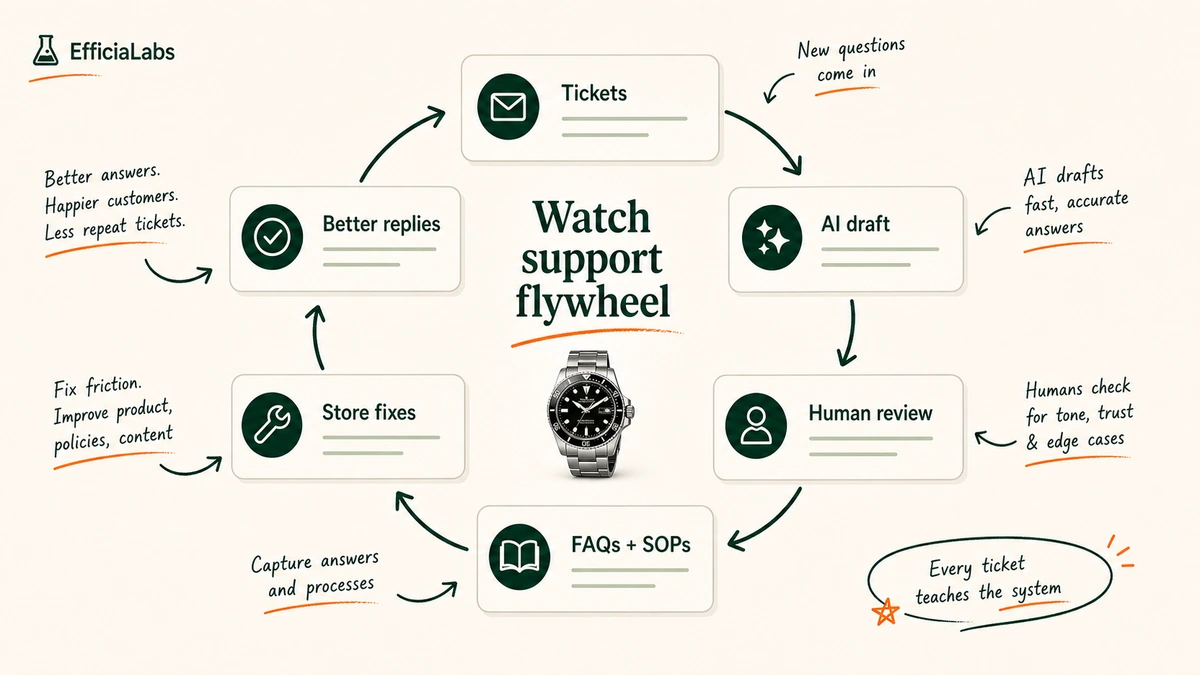
Better answers today. Fewer tickets tomorrow.
Every watch ticket you handle well teaches the system the next one. Capture once, reuse everywhere, and the inbox gets quieter while the buyer gets happier.
That’s the whole promise of AI customer service for a watch ecommerce store: routine handled in seconds, risk handed to a human, bill measured in cents. We build it, deploy it, and maintain it, so you can go back to building watches.
A ticket lands at 11:42pm. “Is the 1.2ct lab-grown in the solitaire GIA certified, and can I get it sized to a 5.5 before our anniversary on Saturday?” That’s not a support ticket. That’s a $2,400 decision with a deadline. And it sat unanswered until morning.
That gap is the whole game. AI customer service for jewelry ecommerce stores is the practice of letting an AI draft accurate, on-brand replies to the routine tickets, while a human still signs off on the high-value ones. Done right, you answer in seconds instead of hours, your replies sound like your best jeweler, and you never let a bot approve a refund on a $2,000 ring.
This is a build guide, not a pitch. By the end you’ll know which tickets to hand the AI, which ones to keep behind a human, what it actually costs per ticket, and how to get the whole thing live in a week.
In a sentence
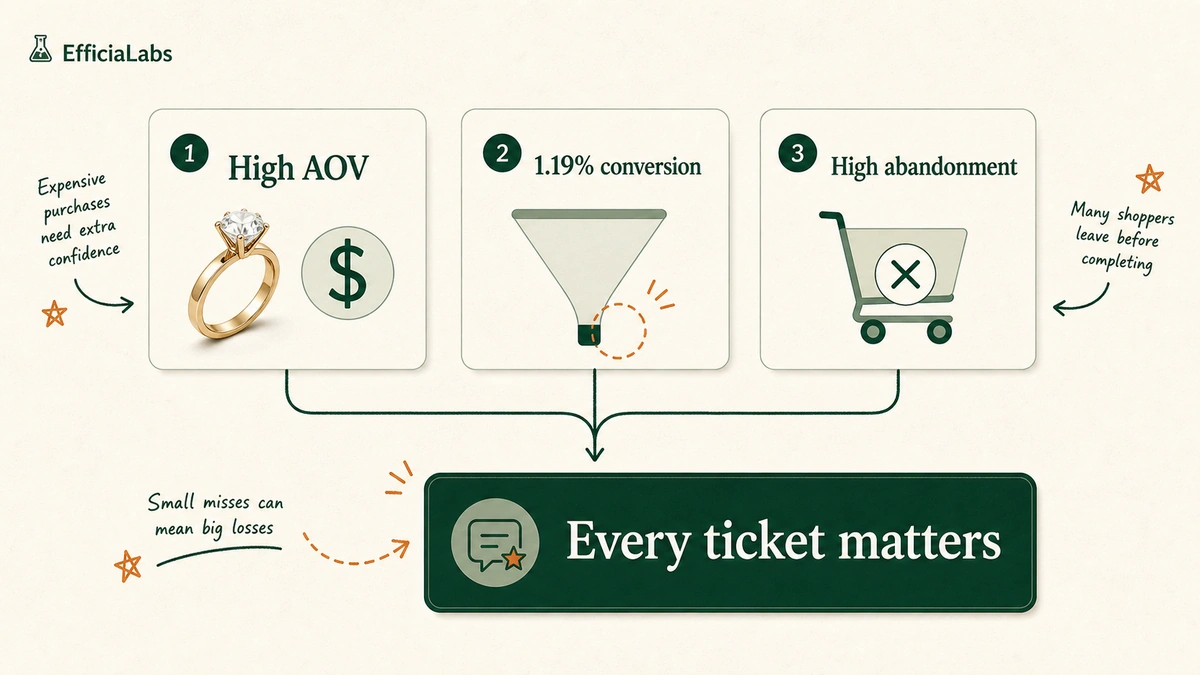
Jewelry has the highest stakes per ticket in ecommerce: high order values, the lowest conversion rate in retail, and the highest cart abandonment. Slow answers cost real money.
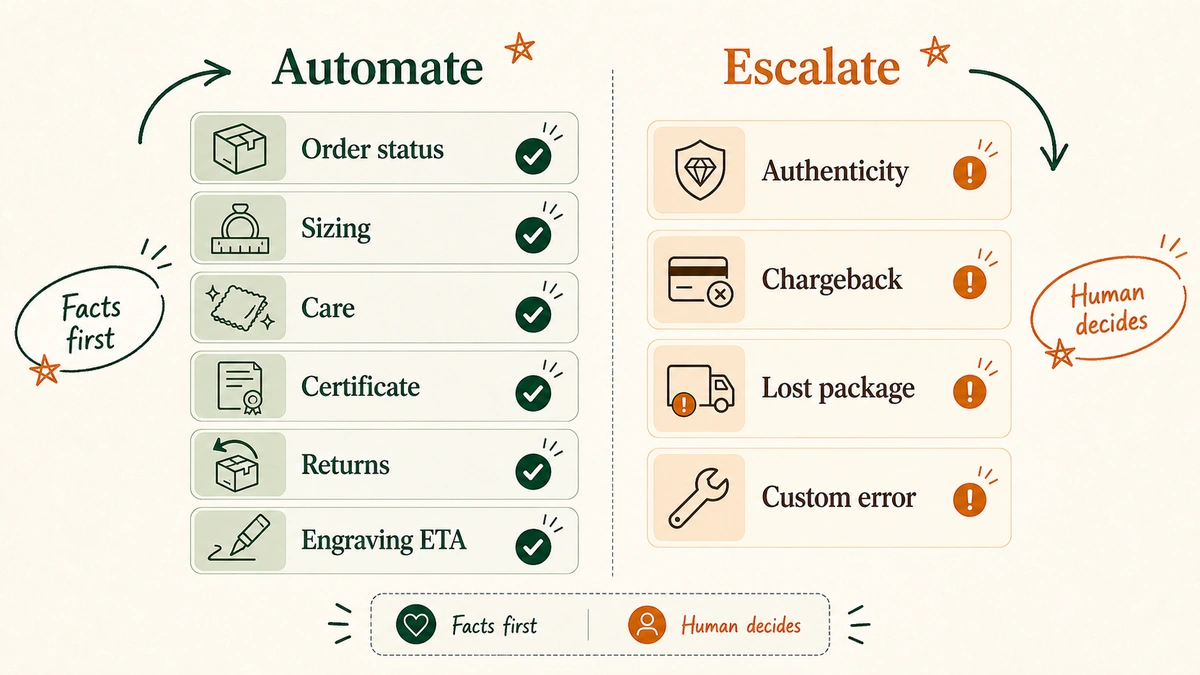
Automate the routine tickets (order status, sizing, care, certificate explainers). Keep a human on authenticity disputes, chargebacks, big lost-in-transit claims, and engraving errors.
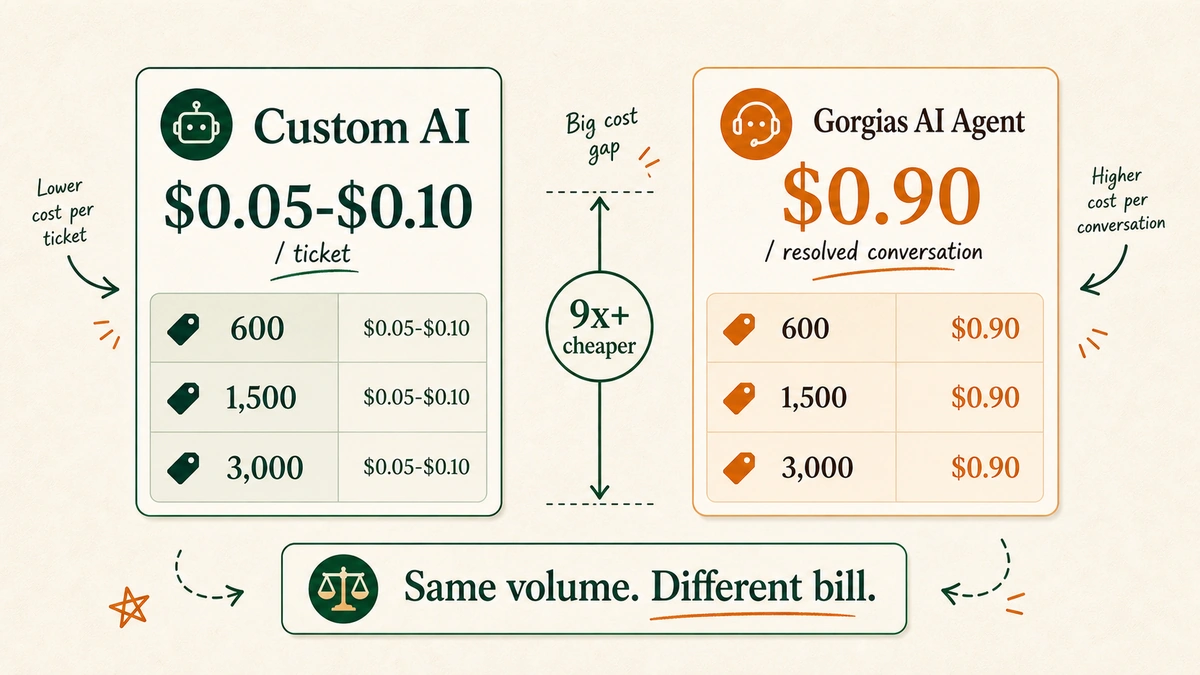
The cost difference is large. Custom AI runs about $0.05 to $0.10 per ticket. Gorgias currently lists AI Agent at $0.90 per resolved conversation.
“Facts before answer” is the rule. The AI pulls order, product, and policy facts first, then drafts in your brand voice, then a human approves the risky ones.
A focused build goes live in 7 days. You grant access. The build, tuning, and brand-voice work happen for you.
Why does jewelry support break differently from other ecommerce?
Because every ticket is attached to a high-value, high-emotion purchase, and the math is unforgiving.
Online jewelry and watch sales in the US were worth roughly $17.0 billion in 2025, per IBISWorld. But the category converts worse than almost anything else online. Triple Whale’s 2025 benchmarks put jewelry conversion near 1.19%, among the lowest in retail. And cart abandonment for jewelry and luxury runs higher than any other category, well above the roughly 70% average Baymard tracks across 49 studies.
Read those three numbers together. High prices. Low conversion. High abandonment. (We pulled more of these in our 49 AI in DTC statistics for 2026 roundup.)
It means the handful of people who do reach out are the ones closest to buying. A slow or generic answer on a $1,200 order is not a minor service miss. It’s a lost sale that already cost you ad spend to create.
Generic chatbots fail the trust test here. A shopper deciding between you and a brand with a real showroom does not want a canned “Thanks for reaching out!” They want to know the metal, the stone, the certificate, the resize window, and the delivery date. Specific facts, in your voice, fast. That’s the bar.
“Great support starts with writing clear, direct answers”
Which jewelry support tickets should AI actually handle?
Start by sorting your tickets into two piles: routine and risky. The AI gets the routine pile. A human keeps the risky one.
Most jewelry stores find that the bulk of their volume is routine and repetitive. Where is my order. Do you ship insured. What’s your return window. How do I find my ring size. What does VS1 clarity mean. These are perfect for AI, because the answer lives in your order data, your product specs, and your policy docs. Nothing is being decided. Facts are being retrieved and explained.
Here’s the split we use as a starting point.
Ticket type
Default
Why
Where is my order? (WISMO)
Automate
Pulls live order and tracking status
Ring sizing guidance
Automate
Reads your published size guide
Care and cleaning
Automate
Standard, repeatable answer
Explain the 4Cs or a certificate
Automate
Educational, drawn from product data
Return and exchange policy
Automate
Lives in your policy docs
Engraving lead time
Automate
Known production timeline
Authenticity dispute
Escalate
Brand and legal risk
Chargeback or fraud claim
Escalate
Money and compliance risk
High-value lost-in-transit
Escalate
Large refund decision
Engraving or resize error
Escalate
Custom, irreversible work
Pro tip: Don’t guess the split from memory. Export 60 days of tickets, tag them by type, and sort by volume. The top five or six types usually cover most of your inbox, and they’re almost always automatable. If you need the broader AI support setup before the jewelry-specific filters, start with our Shopify support chatbot build guide.
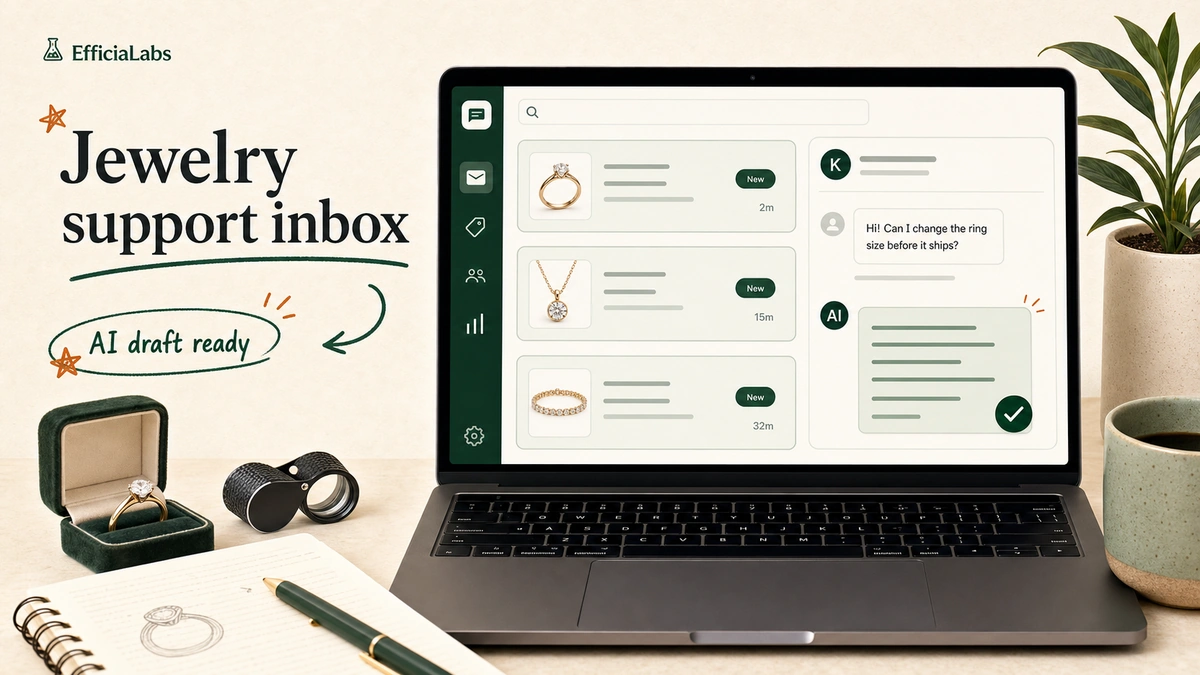
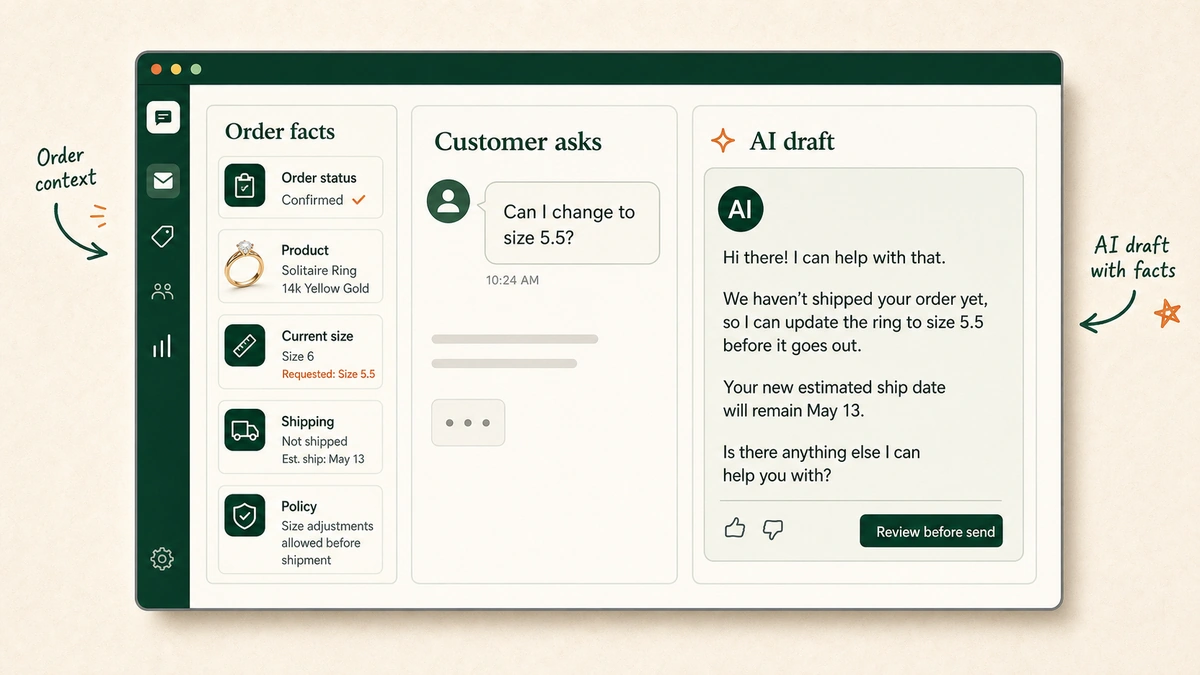
A good reply doesn’t just answer. It answers using your real facts and your real policy. Here’s what that looks like when the AI drafts a sizing question with the order context already attached.
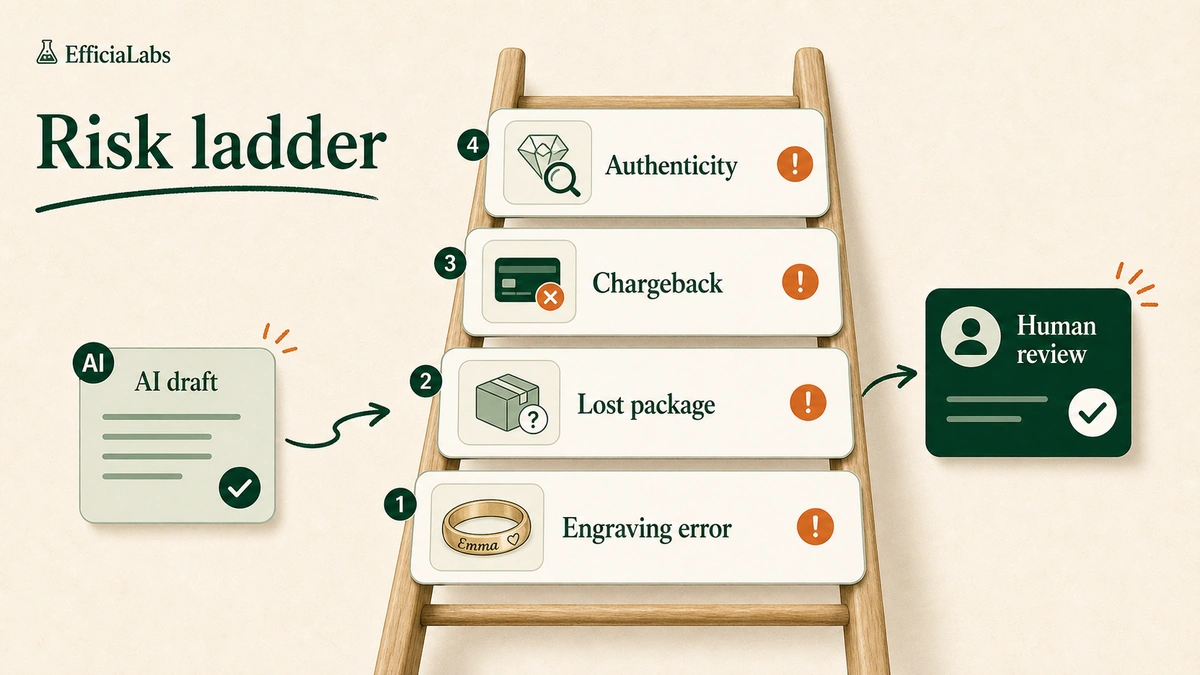
What are the four jewelry tickets where a human must review first?
Four. Authenticity disputes, chargebacks, high-value lost-in-transit claims, and engraving or resize errors. These never go out on autopilot.
This is the section almost every other guide skips, and it’s the one that protects your margin. In our work building support AI for high-value stores, we found these four are where a bad automated reply actually costs money. The risk isn’t that the AI gets a tracking number wrong. The risk is that it confidently resolves a ticket that should have been a human conversation, and you eat a $2,000 loss or a brand-damaging reply.
Authenticity disputes. “Is this a real diamond?” or “I think my hallmark is wrong.” These touch legal exposure and brand trust. The AI can gather the certificate, the order, and the product record. A human makes the call.
Chargebacks and fraud claims. Money and compliance risk. Let the AI assemble the evidence pack. Don’t let it negotiate.
High-value lost-in-transit. A $1,200 pendant marked delivered but not received is a real financial decision, often involving your insured-shipping carrier claim. Human owns it.
Engraving and resize errors. Custom work is irreversible. If a name was misspelled or a band was cut to the wrong size, that’s a remake conversation, not a templated apology.
Important note: The AI still does useful work on all four. It triages, pulls the facts, and drafts a starting reply. It just never hits send without a person. That’s the difference between AI that helps and AI that creates liability.
How do you make AI replies sound like your brand, not a bot?
You give it facts before it answers, and you write down your tone rules. That’s most of the job.
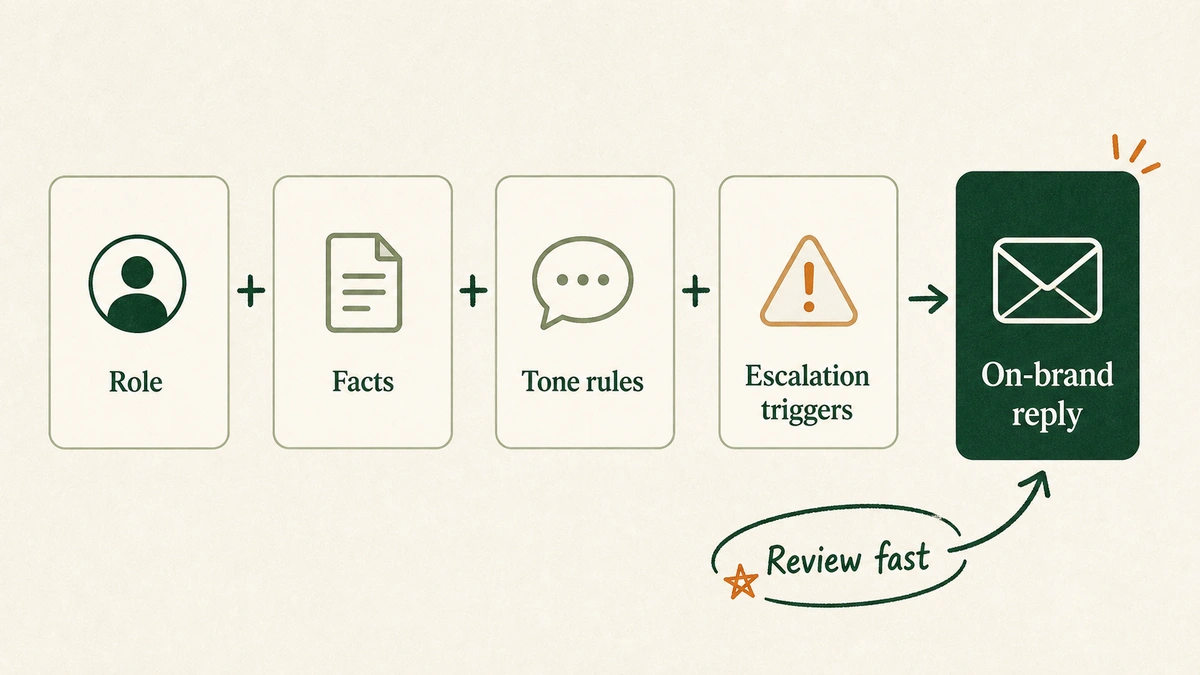
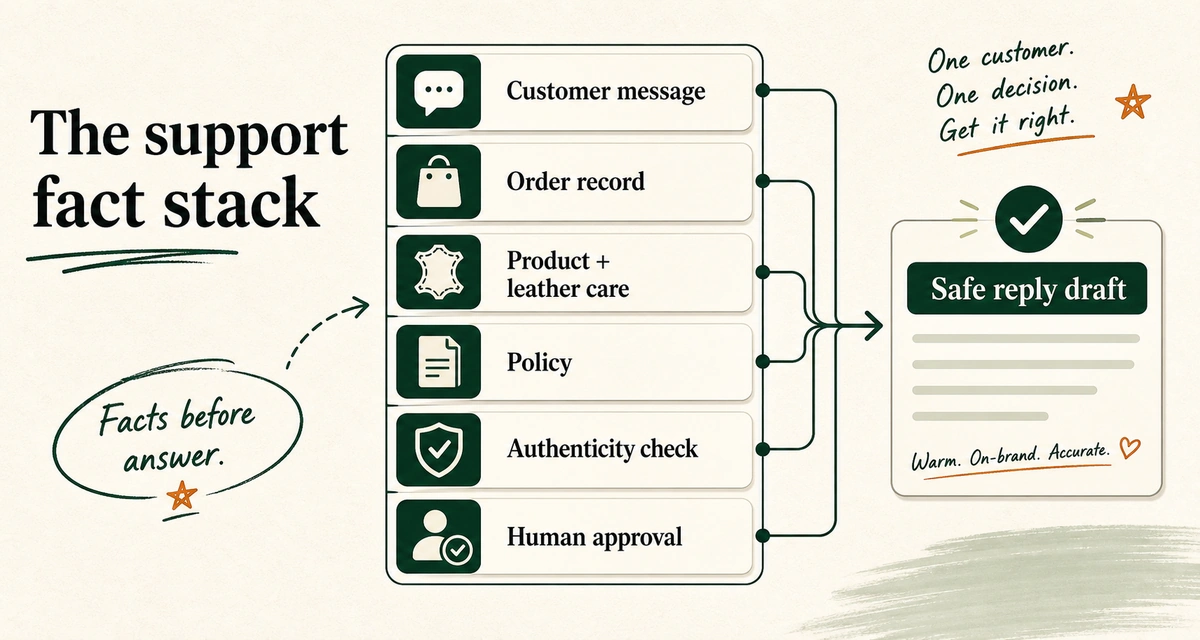
The reason AI replies sound robotic is that teams skip the inputs. They drop in a generic model and hope. We built our process the opposite way. Before the AI writes a single word, it reads a stack of truth: the order facts, the product truth, the policy truth, and your brand-voice rules. Then it drafts. Then, on risky tickets, a human approves.
Tone matters more in jewelry than almost anywhere. A heritage fine-jewelry house and a fun, colorful fashion-jewelry brand should not sound the same. One is measured and reassuring. The other is warm and quick. The voice rules are where you encode that: the words you always use, the words you never use, how you handle a nervous first-time buyer, how you talk about price.
“A sincere apology delivered on its own can often feel like a dead end”
Mitchell Rossit-Lavigne, Support Lead on Shopify’s Guru Team. Cc: Shopify
ROLE
You are the senior jeweler for [Brand]. You answer support emails
the way our best human rep would: warm, precise, never pushy.

FACTS (use only these, never invent)
- Order: {order_status, items, shipping, tracking}
- Product: {metal, stones, carat, certificate, care}
- Policy: {returns, resizing window, warranty, engraving lead time}

TONE RULES
- Reassure first, then give the specific fact.
- Use the customer's name. Keep it under 120 words.
- Never say "unfortunately." Never pressure a purchase.

ESCALATION TRIGGERS (do not send, route to a human)
- Authenticity dispute, chargeback, lost-in-transit over $1,000,
  engraving or resize error, anything legal.

OUTPUT
A short reply a human can approve in seconds, or a flag if escalated.
Pro tip: Feed the model 20 of your own past replies you were proud of. Brand voice is learned faster from your real examples than from any description of it.
What does AI customer service for jewelry ecommerce stores actually cost?
Less than you think, and the structure matters more than the headline rate. Custom AI runs about $0.05 to $0.10 per ticket resolved. Gorgias currently lists AI Agent at $0.90 per resolved conversation, paid only when the interaction is fully automated.
The reason to look at per-ticket cost, not a flat monthly fee, is that your bill should track your actual volume. Quiet month, smaller bill. Big Q4, bigger bill, but still cheap per ticket. Here’s how that scales.
Tickets / month
Custom AI ($0.05–$0.10)
Gorgias AI Agent ($0.90)
600
$30 to $60
about $540
1,500
$75 to $150
about $1,350
3,000
$150 to $300
about $2,700
At 1,500 tickets a month, that’s roughly $150 versus $1,350. Same volume. Different bill. Over a year, the gap is real money you could put into inventory or ads.
Note: Once a custom system is built and tuned, it usually needs no ongoing maintenance for a long stretch. The cost above is the run cost, not a rebuild-every-quarter cost.
What does the 7-day rollout plan look like?
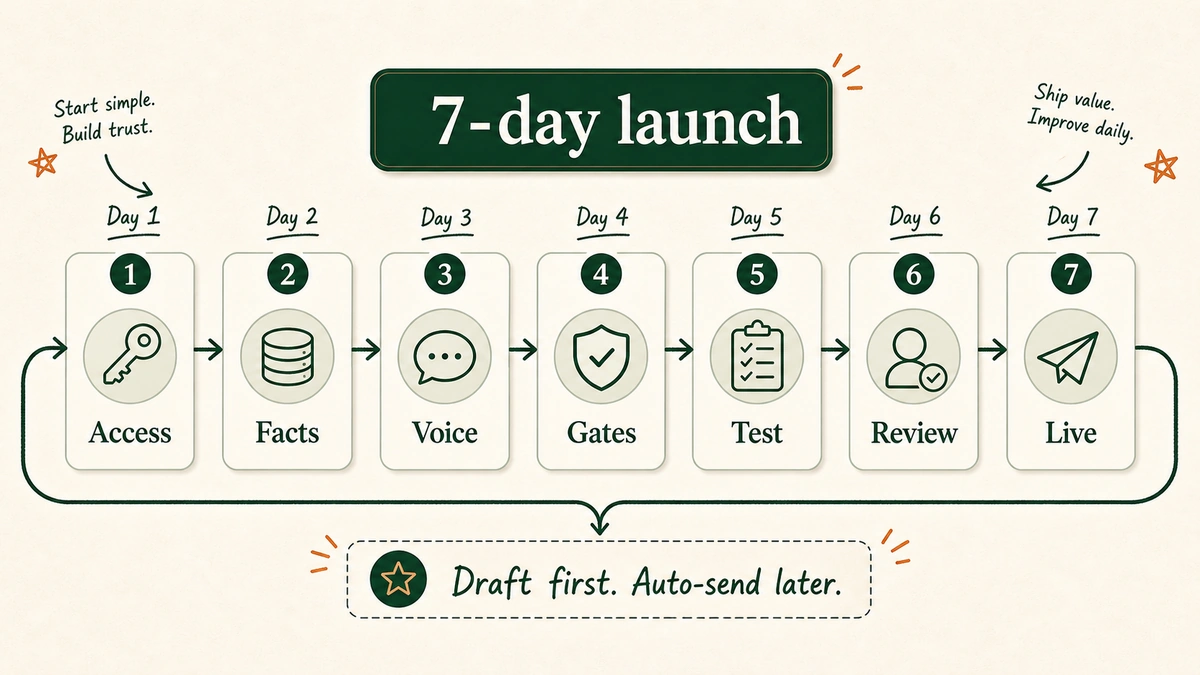
Seven days, and the heavy lifting isn’t on you. You grant access to your store and helpdesk. The build, the brand-voice work, and the testing happen for you.
Day 1: Grant access and audit the tickets
Connect your store (most jewelry stores run on Shopify) and your helpdesk: Gorgias, Zendesk, Gmail, Freshdesk, whatever you use. Pull 60 days of tickets and tag them by type. The top types become the automation list.
Day 2: Build the fact sources
Wire up the truth the AI will read: live order and tracking data, product specs and certificates, and your policy docs for returns, resizing, and warranty. Garbage in, garbage out, so this day matters.
Day 3: Write the brand-voice rules
Encode tone, phrasing, and the do-not-say list. Load 20 of your best past replies as examples.
Day 4: Set the escalation gates
Define the triggers that route a ticket to a human: authenticity, chargebacks, big lost-in-transit, engraving or resize errors. Nothing risky sends on its own.
Day 5: Test on real past tickets
Replay historical tickets through the system and grade the drafts. Accuracy, tone, policy compliance. Fix what misses.
Day 6: Run a human-in-the-loop trial
Go live in draft-only mode. Every AI reply waits for a human to approve or edit. This is where confidence is built and the last rough edges come off.
Day 7: Go live
Turn on auto-send for the safe ticket types. Keep the human gate on the risky ones. You’re answering in seconds, and the inbox finally feels calm.
What are the common mistakes jewelry stores make with support AI?
Most failures trace back to one root cause: letting the AI decide instead of draft. Here are the ones I see most.
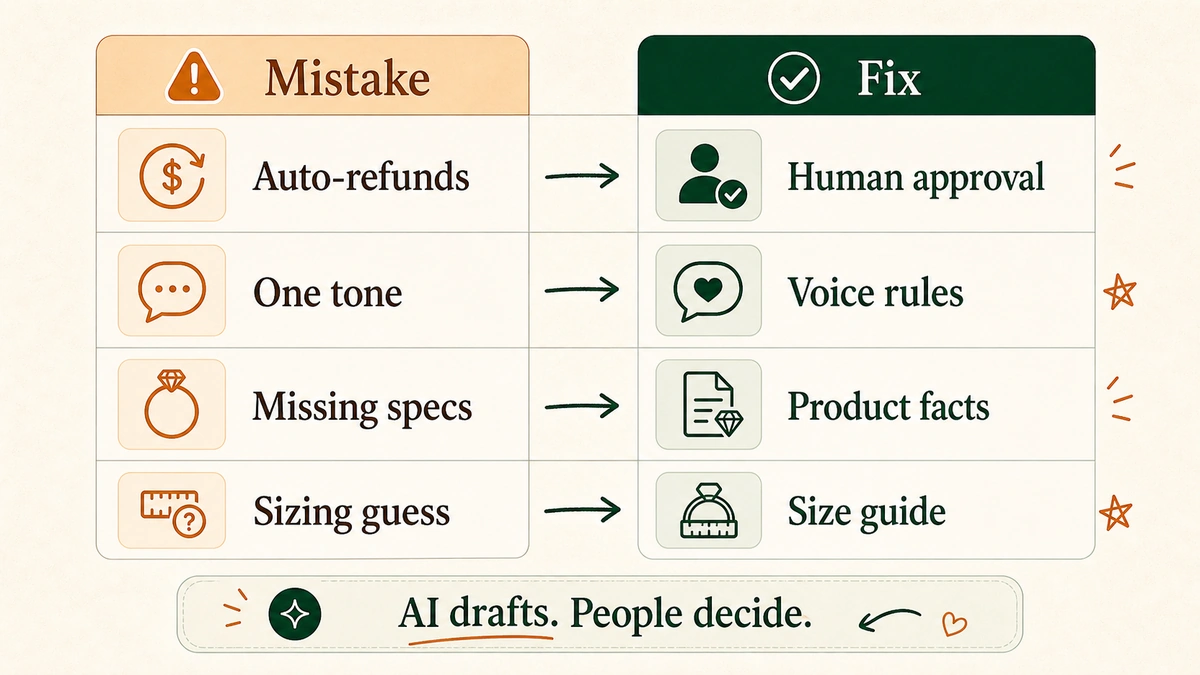
Mistake: letting AI approve refunds and disputes. On a high-AOV catalog, that’s how you lose real money to a confident wrong answer. How to avoid it: Draft-only on anything financial. A human approves every refund and dispute.
Mistake: one tone for every product. A $40 fashion piece and a $4,000 engagement ring don’t get the same voice. How to avoid it: Write voice rules per collection or tier, and let the AI pick based on the product in the order.
Mistake: no certificate or spec facts loaded. The AI invents an answer about clarity or metal, and now you’ve got a trust problem. How to avoid it: Load the real product data, the 4Cs, and the GIA or IGI documents. If a fact isn’t in the data, the AI should say so and route to a human, not guess.
Mistake: guessing at sizing. Ring sizing drives returns. A vague answer creates one. How to avoid it: Point the AI at your real, published size guide and resize policy.
Important note: AI drafts. People decide. Tape that to the wall. Every safe deployment we’ve built for a high-value store follows that one line.
Frequently asked questions
Is AI customer service safe for high-value jewelry orders?
Yes, when it’s set up to draft rather than decide. The AI handles routine tickets end to end and prepares risky ones for a human. Authenticity disputes, chargebacks, large lost-in-transit claims, and custom-work errors always get a human sign-off. That structure is what keeps a high-AOV catalog protected.
Will the AI replies sound like a robot?
Not if you feed it facts and tone rules. The robotic feeling comes from generic models with no context. A custom build reads your order data, product specs, and policy first, then drafts in your brand voice using examples of your own past replies. A human reviews the risky ones before they send.
How much does AI customer service for a jewelry store cost?
Custom AI typically runs about $0.05 to $0.10 per ticket resolved. At 1,500 tickets a month, that’s roughly $75 to $150. Gorgias currently lists AI Agent at $0.90 per resolved conversation, which lands around $1,350 at the same volume. Per-ticket pricing means your bill tracks your real volume.
Does it work with Shopify and my helpdesk?
Yes. Most jewelry stores run on Shopify, and a custom build connects to your store plus your helpdesk, whether that’s Gorgias, Zendesk, Gmail, or Freshdesk. You grant access to those portals, and the build happens around them. Our Shopify support chatbot build guide covers the setup in more depth.
How long until it’s live?
About seven days for a focused build. One week to connect your systems, load your facts, write your voice rules, set escalation gates, test on real tickets, and go live with a human-in-the-loop trial first.
Get your jewelry store answering in seconds
The stores that win the high-value sale are the ones that answer fast, sound human, and never let a bot make a $2,000 call. That’s the whole point of building AI customer service for jewelry ecommerce stores the careful way: automate the routine, protect the risky, keep your voice, and launch in a week. You’ve already got enough on your plate. This is one stack of tickets you can hand off and stop carrying.
See you in the next one. — Vai
P.S. The 11:42pm anniversary ticket from the intro? With the fact sources wired up, that one’s a 12-second draft. Answered before the customer closes the laptop.
Friday night. A founder I know is still in her inbox at 11pm, answering the same three questions she answered at 9am. “Where’s my order.” “How do I condition the leather.” “Is this real.” Beautiful bags. A queue that never sleeps.
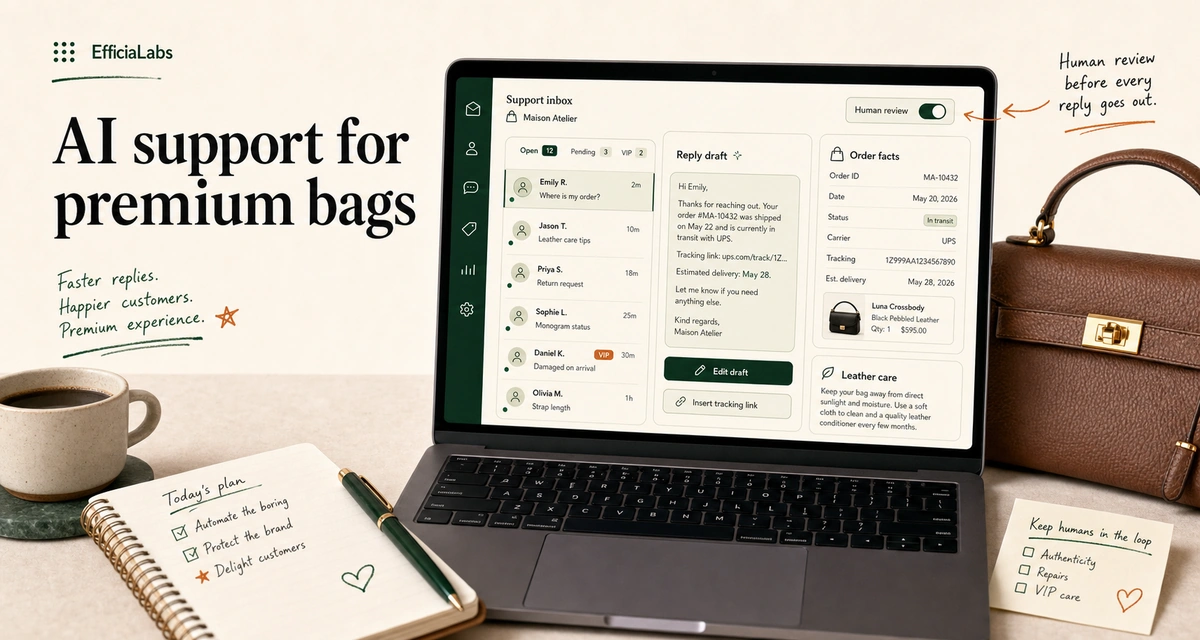
You can use AI customer service for a premium handbag and leather goods brand by drafting replies from your real order, product, and policy data, keeping a human approval gate on anything risky, and routing authenticity, repair, and VIP tickets to a person. Built right, it goes live in about a week.
In a sentence
Automate the boring 60%. Keep humans on the 40% that protects the brand.
Premium support lives or dies on voice, authenticity, and repairs. Build guardrails for those first.
Custom AI runs at roughly $0.05 to $0.10 per ticket, not per seat.
A focused build ships in 7 days and needs almost no upkeep after.
What does AI customer service mean for a premium handbag and leather goods brand?
Two different things wear the same name. Don’t confuse them.
One is styling. The pre-purchase assistant that helps someone pick a crossbody for a wedding. Mango shipped exactly this with Mango Stylist in July 2025, and tied it to their existing after-sales assistant, Iris.
“Mango Stylist consolidates the vision of a single conversational point of contact for customers.”
— Mango Stylist launch, July 2025
Lovely. Not what this post is about.
The other is support. The post-purchase inbox. Order status, returns, leather care, repairs, warranty, “did my monogram ship.” The unglamorous tickets that pile up while you’re trying to design the next collection. That’s what we’re automating here.
The mechanics are simple. The AI reads the customer’s message, pulls the real facts behind it (their order, your policy, the product details), drafts a reply in your voice, and a human approves before it sends. Same way DTC brands already run Tier-1 tickets through ChatGPT and Claude, the workhorse models from OpenAI and Anthropic.
The hard part was never the model. In our work it’s always the same two things. The context and the guardrails.
Which support tickets should you automate first?
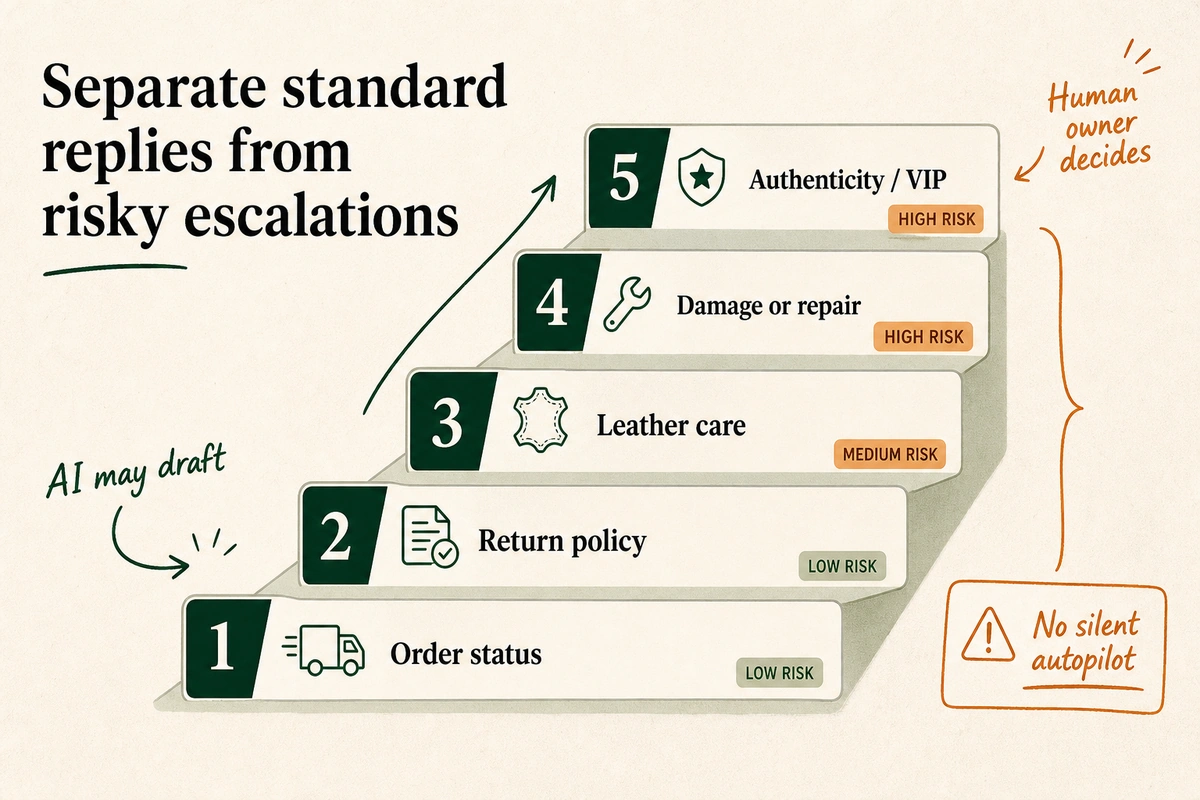
Start with the tickets that are high-volume and low-risk. Leave the ones that touch money, authenticity, or a customer’s feelings to a person, at least at first.
Returns are the loudest of the low-risk pile. Online returns ran 17.6% in 2024, higher than the in-store rate, and apparel and accessories sit above even that. Cc: NRF, 2024. Every one of those lands as a “how do I send it back” ticket.
For a handbag and leather brand, the safe-to-automate list is longer than you’d think:
Order status and tracking. “Where is it.” The single most common ticket in ecommerce.
Returns and exchange policy. What qualifies, the window, how to start one.
Leather care. How to condition it, store it, keep the hardware from tarnishing.
Product details. Dimensions, strap drop, what fits inside, materials.
Gifting basics. Lead times, gift notes, what’s in stock for the date they need.
Now the escalation list. The tickets AI should never close on its own:
Authenticity disputes. Someone questioning whether their bag is real, or reselling one. Brand-defining. Human only.
Damaged on arrival. A scuffed corner on a $600 bag is an emotional ticket, not a logistics one.
Repairs and warranty claims. Real money, real turnaround promises, real liability.
Chargebacks and refunds above your threshold. Set a dollar line. Above it, a person decides.
VIP and press. Your best customer should never feel like she’s talking to a bot.
Pro tip: Sort one month of tickets by type before you build anything. Most brands find that order status, returns, and care questions alone are over half the queue. That half is your week-one win.
How do you keep AI replies on-brand and safe for a premium brand?
This is where premium is different. A discount brand can sound a little robotic. You can’t. The whole product is the feeling of being looked after.
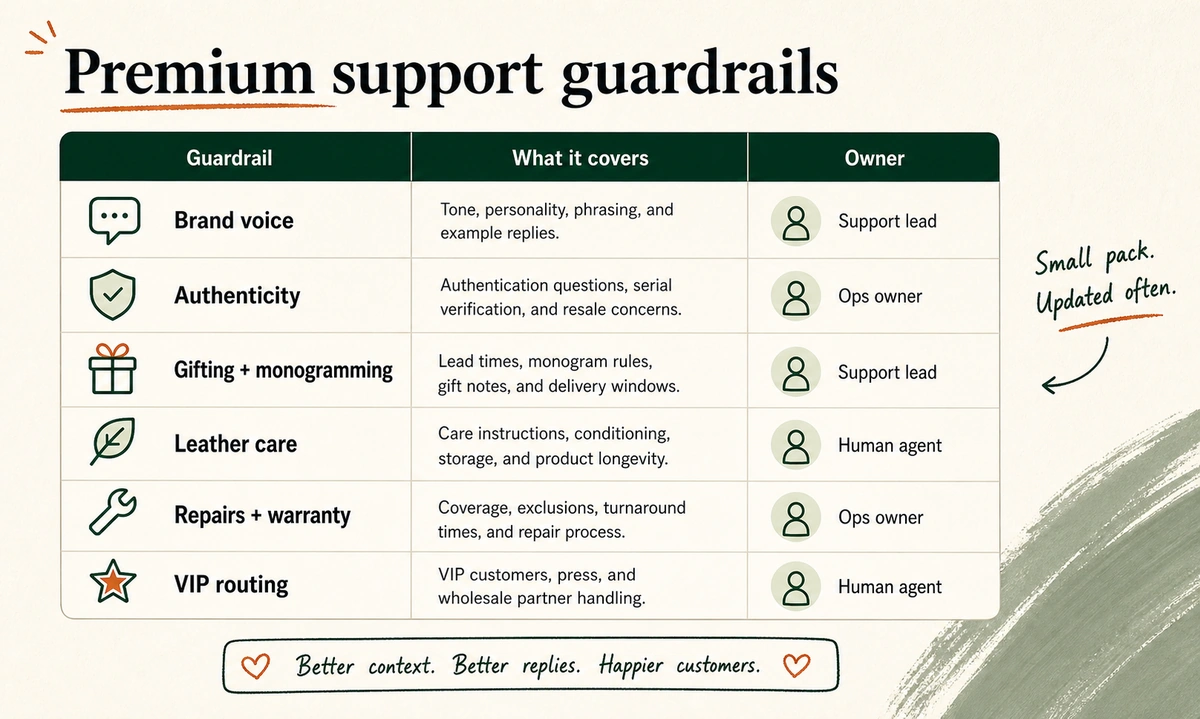
So the guardrails matter more than the model. Six of them carry most of the weight.
Brand voice. The AI has to sound like you wrote it at your desk, not like a help center. That means real rules, real example replies, and a tone your customer already recognizes. In our work this is the single most common reason AI support feels cheap, and it’s fixable.
Authenticity. Counterfeits are a luxury-adjacent fact of life. Your AI needs a scripted, careful path: verify serials or proof of purchase, never accuse, always route to a human for the actual call.
Gifting and monogramming. High-emotion, deadline-driven, easy to get wrong. The AI should know lead times cold and flag anything tight to a person.
Leather care. Real answers, not generic ones. Full-grain and suede are not the same conversation. This is content your product team already owns.
Repairs and warranty. What’s covered, what’s not, turnaround, cost. The AI states policy. A human owns the promise.
VIP routing. Your top spenders and your press contacts skip the queue, every time.
Note: Keep this pack small and update it often. A two-page, current context pack beats a fifty-page one nobody maintains. Small. Sharp. Owned.
How to deploy AI customer service in 7 days
Here’s the build. It’s the same seven-day shape we’ve shipped for other verticals, including the skincare and protein supplements brands we deployed it for. The vertical changes. The rhythm doesn’t.
Days 1 to 2: Access and the context pack
You grant access to your helpdesk and store. We pull the raw material: your last few hundred tickets, your policies, your product and care docs, your order data. Then we build the context pack the AI reads from. This is 80% of the quality and it’s mostly your existing knowledge, organized.
Days 3 to 4: Voice rules and draft logic
We write the voice rules and example replies, then wire the drafting. The AI starts producing replies that pull real order facts and read like your brand. You’re not live yet. You’re reviewing drafts side by side with how you’d have answered.
Day 5: Escalation gates
We set the hard lines from your decision ladder. Authenticity, damage, repairs, refunds over your threshold, VIP. Each gets a rule that stops the AI and hands the ticket to a named human. This is the part that protects you.
Day 6: QA on real tickets
We ran the AI against real, recent tickets and read every reply. Wrong tone gets fixed. A missed policy gets added.
You launch quietly. The AI drafts, a human approves every reply for the first stretch, and you watch. As trust builds, you let the safest categories auto-send. Nobody finds out by getting a bad reply first.
Pro tip: Don’t skip shadow mode to save two days. The first week of human-approved drafts is also how the system learns your edge cases. It pays for itself.
What does AI customer service actually cost per ticket?
Here’s the number nobody on the search results page will give you. Custom AI costs roughly $0.05 to $0.10 per ticket to run. That’s the model cost to read a ticket and draft a reply. Not per seat. Not a tier you outgrow.
Run the math at your volume. A brand doing 1,000 support tickets a month is looking at $50 to $100 in run cost for the AI to draft all of them.
The expensive part of support was never the software. It was the hours.
Path
What you pay
How it scales
Custom AI
~$0.05 to $0.10 per ticket
Flat. Volume barely moves it
Per-seat SaaS
Monthly fee plus per-resolution add-ons
Climbs with tickets and seats
Status quo
Agent hours
Every ticket costs a person’s time
The payoff isn’t only cost. It’s revenue. A UK studio, Lotusbrains Studio, rebuilt a premium beaded-bag brand’s chat and reported conversion going from 28% to 42%, response time dropping from 4.5 hours to 1.5, and average order value up about 73%.
“What Lotusbrains Studio did for us was not just automate our replies. They helped us turn WhatsApp into a lucrative inbound sales channel.”
— Riona Atelier, h/t Lotusbrains Studio
That’s one case, on one channel. But the direction is the whole industry’s. McKinsey estimates generative AI could add $150 billion, conservatively, and up to $275 billion to the apparel, fashion, and luxury sectors’ operating profits over the next three to five years. Cc: McKinsey, 2023.
And the volume isn’t slowing. U.S. shoppers returned $247 billion of online orders in 2024 alone, every one a support ticket waiting to happen. Cc: NRF, 2024. If you want the broader picture, we keep a running list of the DTC AI numbers.
If you’d rather not stand it up yourself, this is the part we do for brands: build it, deploy it, maintain it, and match your voice so replies don’t sound like AI. The honest cost math is the same reason we wrote up Gorgias’ AI versus a custom build.
How do you measure AI support without vanity metrics?
Deflection rate is the vanity metric of support AI. A ticket the AI “deflected” that comes back angry two days later wasn’t deflected. It was delayed.
Measure the things that actually tell you it’s working:
Resolved and stayed resolved. Did the customer come back about the same issue? If not, it worked.
First response time. Minutes, not hours. This is where premium customers judge you.
Escalation accuracy. Did the AI correctly hand off the authenticity and repair tickets? Misses here are the only ones that hurt.
CSAT on AI-handled tickets. Track it separately from human-handled. You want them indistinguishable.
Repeat-contact rate. The truest signal. Good support makes the second ticket disappear.
Watch escalation accuracy hardest. On a premium brand, a fast wrong answer about whether a bag is authentic costs you more than ten slow right ones.
Frequently asked questions about AI customer service for handbag and leather goods brands
Will AI replies sound robotic to luxury customers?
Only if you skip the voice work. The reason most AI support feels cheap is a thin or generic context pack. Built from your real replies, your tone rules, and your product knowledge, customers can’t tell. That’s the bar. If they can tell, it isn’t done.
Can AI handle authenticity and repair questions?
It can gather the facts. It should not make the call. Authenticity disputes, repairs, and warranty claims carry brand and legal weight, so the right setup has the AI verify details and route straight to a human. Speed on the easy stuff. Care on the sensitive stuff.
How fast can a small brand actually launch this?
About a week for a focused build, then a shadow-mode period before anything auto-sends. The slow part isn’t the technology. It’s deciding which tickets you trust it with and writing the escalation rules. Do that well and the build is fast.
Does this work with Gorgias, Zendesk, Gmail, or Freshdesk?
Yes. A custom build sits on top of the helpdesk you already use, including Gorgias, Zendesk, Gmail, and Freshdesk. You don’t rip anything out. You grant access, and the AI drafts inside the inbox your team already works in.
Get a week back
You started a handbag brand to make beautiful things, not to answer “where’s my order” at 11pm. Used well, AI customer service hands you the boring 60% of the inbox and keeps a human on the 40% that protects the brand. Cheap to run, fast to launch, quiet about it.
Start with one month of tickets and the five questions you’re tired of answering. Build from there.
See you in the next one.
— Vai
P.S. The best support reply I read last month was four words long: “Already on its way.” Speed is a luxury too.
Sources
Lotusbrains Studio, AI WhatsApp Shopping Concierge case study (Riona Atelier): https://lotusbrainsstudio.com/case-studies/ai-automation-case-study/
McKinsey, “Generative AI: Unlocking the future of fashion,” 2023: https://www.mckinsey.com/industries/retail/our-insights/generative-ai-unlocking-the-future-of-fashion
National Retail Federation and Happy Returns, “2024 Retail Returns to Total $890 Billion,” 2024: https://nrf.com/media-center/press-releases/nrf-and-happy-returns-report-2024-retail-returns-total-890-billion
11:42pm. Two tickets land in the same minute. One: “where’s my order, it’s been 9 days.” Easy. The other: “can I take your pre-workout with my blood pressure meds?” Not easy. One belongs to a machine. One belongs to a human, fast.
Most supplement brands answer both the same way, slowly, the next morning. That is the whole problem in one screenshot.
To use AI customer service for a protein supplements brand, you put an AI agent on your existing helpdesk to draft replies to repetitive tickets, wire compliance guardrails so it never makes a disease claim, and keep a human review gate for anything touching health. Order status, flavor swaps, subscriptions: automated. “Is this safe with my medication”: routed to a person. You can have this live in about a week.
Automate the facts (orders, flavors, subscriptions, “is it third-party tested”). Escalate the health.
The FTC and FDA hold you liable for what your chatbot says. Guardrails are not optional for supplements.
A human review gate is the difference between fast and reckless.
Custom AI runs at roughly $0.05 to $0.10 per ticket. Per-resolution SaaS bots run 8 to 18 times that.
What it means to use AI customer service for a protein supplements brand
AI customer service is software that reads an incoming ticket, pulls the relevant facts (order record, product label, return policy), and drafts a reply in your brand voice. A person approves it or it sends on its own, depending on risk. It is not a generic chatbot widget bolted to your homepage. It lives inside the helpdesk you already use.
For a protein brand, the job splits cleanly. There are facts, and there are health questions. The facts are repetitive and safe to automate. “Where is my order.” “Can I swap chocolate for vanilla.” “Pause my subscription.” Same questions, every day, on a loop.
The health questions are different. “Will this help my joint pain.” “Is creatine safe for my kidneys.” Those carry regulatory and human risk, and they are where automation has to stop and a person has to step in.
In our work building these systems for Shopify brands, the pattern repeats across every protein account: when we measured the inbound, about 70% to 80% of tickets were pure logistics. That is the slice you automate first. The rest you protect.
The US protein supplements market hit roughly $10.88 billion in 2025 (Fortune Business Insights, 2025). More volume, more tickets, more “where’s my scoop.” Support is the tax you pay on growth, and the adoption numbers across DTC say most brands are already moving on it. AI is how you stop paying that tax twice.
Which protein support tickets to automate first
Start with the tickets that are high-volume and low-risk. A flavor swap cannot hurt anyone. A dosage-with-medication question can. Sort your inbox by that line, not by ticket count alone.
Here is the split we use on a new protein account:
Ticket type
Automate now?
The guardrail
Where’s my order (WISMO)
Yes
Read order facts only, never guess a date
Flavor swap or exchange
Yes
Quote the real return policy
Subscription pause or skip
Yes
Confirm the change back to the customer
Blendability and mixing
Yes
Stick to label and FAQ guidance
“Is it third-party tested?”
Yes
Cite the actual certification, not a claim
Allergen or dairy check
Yes
Read the verified label, nothing more
Dosage timing
Yes
Label guidance only, no personalized advice
“Safe with my meds?”
No
Escalate to a human, never advise
Side effect or reaction
No
Human only, flag for follow-up
Notice the pattern. The “yes” rows are facts your AI can look up and repeat. The “no” rows are judgment calls with a health consequence. h/t the Clootrack analysis of 10,000 protein reviews, the loudest customer pains are taste, blendability, and ingredient transparency. All three are safe to automate. Good news: that is most of your volume.
Pro tip: Automate the question, not the answer. The AI does not invent whether your whey is third-party tested. It reads the certificate you uploaded, names the program (Informed Sport, NSF Certified for Sport), and repeats what is true. Same with subscriptions: when a customer wants to skip a month, the AI reads your Recharge rules and confirms the change instead of guessing. Facts in, facts out.
This is also where a custom build pulls ahead of an off-the-shelf bot. Your flavors, your tubs, your subscription rules, your return window: all different. A generic widget guesses. A system trained on your catalog and policies does not. The same logic we use to build a customer service AI chatbot for Shopify applies here, with supplement guardrails layered on top.
The compliance guardrails that keep you out of FTC trouble
This is the part the generic chatbots skip, and it is the part that can cost you real money. Supplements are not t-shirts. What your AI says is regulated.
The FDA draws a hard line between two kinds of statement. A structure/function claim describes how an ingredient affects the normal body. “Supports normal energy metabolism.” That is allowed. A disease claim says the product can diagnose, treat, cure, or prevent a disease. “Treats fatigue.” “Prevents illness.” That is not allowed, and it does not matter whether a human or your chatbot typed it.
The FDA’s own mandatory language is the tell:
“This statement has not been evaluated by the Food and Drug Administration. This product is not intended to diagnose, treat, cure, or prevent any disease.”
U.S. Food and Drug Administration
That sentence exists because the line is enforced. In September 2024 the FTC launched Operation AI Comply, a sweep against companies using AI to make deceptive claims.
“Using AI tools to trick, mislead, or defraud people is illegal.”
Samuel Levine, FTC Bureau of Consumer Protection
Civil penalties run up to $53,088 per violation (FTC, 2025). One badly worded auto-reply, sent a thousand times, is not a typo. It is a thousand exposures. I saw a single template line cause a week of cleanup once, and that was a human who wrote it.
So you write the guardrails into the system before it goes live. Three rules cover most of it:
Structure/function only. The AI may describe what an ingredient supports. It may never say the product treats, cures, or prevents anything.
Auto-disclaimer. Any reply that touches health appends the FDA disclaimer, automatically, every time.
Escalate medication and conditions. Any question about drugs, pregnancy, or a medical condition leaves the automation and goes to a person.
Important note: A generic model trained on the open web will happily tell a customer that magnesium “treats” their cramps, because it learned that from a thousand unvetted blogs. A custom system grounded in your verified labels will not, because you told it not to. That difference is the entire compliance story.
The human-review gate: a decision ladder for health-risk replies
Automation without a brake is not efficiency. It is liability at scale. The fix is a review gate that routes replies by risk, not by volume.
Three rungs:
Low risk: auto-send. Order status, flavor swaps, FAQ, “do you ship to Canada.” The AI drafts and sends. No human needed.
Medium risk: human review. Refunds outside policy, subscription disputes, an angry customer. The AI drafts, a person approves before it goes out.
High risk: human only. Medication interactions, side effects, pregnancy, anything that reads like an adverse event. The AI does not draft an answer. It tags the ticket, alerts a human, and steps back.
The higher the risk, the slower the reply. That is the right trade. A customer waiting twenty minutes for a careful human answer on a medication question is a customer you kept. A customer who got a fast, wrong, automated one is a customer you might hear from again through a lawyer.
Note: the gate is also how you protect brand voice. Replies that sound like a robot erode trust fast, and supplement buyers are already skeptical. Getting the AI to match your brand voice in customer support is its own discipline, and the review gate is where you catch the misses while the system learns.
We will not ship a system whose replies sound like AI. If it does, you should not pay for it.
What AI customer service actually costs for a supplements brand
Most “AI support” pricing hides the meter. You sign up for a flat fee, then pay again per resolution, and the bill scales with your success. Sell more, get more tickets, pay more. The model is upside down.
A custom system inverts the meter. You pay to build it once. After that, the running cost is the model tokens, which land around a nickel a ticket. It does not need rebuilding every year, and there is no per-resolution tax sitting between you and your own customers. If you are weighing a platform bot against a build, our Gorgias customer support AI vs custom AI breakdown runs the same math in more detail.
Pro tip: when a vendor quotes “per resolution,” multiply by your monthly ticket volume, then by twelve. That is the number that matters, and it is the one the pricing page buries. For more on where the money actually goes, see our breakdown of how Shopify stores use AI to improve profitability.
How to launch in 7 days
You do not need a six-month project. The reason it goes fast is that you do almost none of the work. You grant access. The build, the guardrails, the testing: handled. Here is the week.
Day 1: Grant access
Connect the AI to your helpdesk (Gorgias, Zendesk, Freshdesk, or Gmail), your Shopify store, and your product catalog. This is the only step that needs you, and it takes an hour.
Day 2 to 3: Ingest product and policy truth
The system reads your real facts. Labels, ingredients, certifications, return policy, shipping rules, subscription logic. This becomes the only thing it is allowed to repeat. No open-web guessing.
Day 4: Set the brand voice
Feed it 20 to 30 of your best past replies. It learns your tone, your phrasing, your sign-off. The goal is simple: a customer should not be able to tell.
Day 5: Write the compliance guardrails
Lock in the structure/function rule, the auto-disclaimer, and the escalation triggers from the section above. Test it against the worst questions you can think of before a real customer asks them.
Day 6: Wire the human-review gate
Set the low, medium, and high rungs. Decide what auto-sends and what waits for a person. Point the high-risk tickets at the right inbox.
Day 7: Go live and measure
Turn it on for a slice of traffic first. Watch the drafts. Approve, correct, and let it learn. Within days it is handling the bulk of your logistics tickets while your team handles the humans who need a human.
Can AI customer service handle supplement compliance on its own?
No, and you should not want it to. AI handles the volume safely when it is grounded in your verified labels and wrapped in guardrails. But a human stays in the loop for medication, conditions, and adverse events. The system makes the safe 80% fast and routes the risky 20% to a person.
Will AI replies sound robotic to my customers?
Only if it is built lazily. A custom system trained on your past replies matches your tone closely enough that customers cannot tell. The human-review gate catches the misses early. If the replies sound like AI, the build was done wrong.
How much does AI customer service cost for a protein brand?
A custom build runs roughly $0.05 to $0.10 per ticket to operate after it is built. Per-resolution SaaS bots typically charge $0.75 to $0.90 per ticket plus a monthly fee. At 1,000 tickets a month, that difference is several hundred dollars every month.
What tickets should I never automate for a supplements brand?
Anything with a health consequence. Medication interactions, dosing for a medical condition, pregnancy questions, and side effect or reaction reports. These get tagged and routed to a human. Everything logistical, which is most of your inbox, is safe to automate.
Live in 7 days, not 7 months
You already have the tickets. You already have the labels, the policies, the return window. The work is not creating any of that. It is putting a system between your inbox and your team so the repetitive stuff answers itself and the risky stuff reaches a person fast.
Automate the facts. Guard the health. Keep a human on the rung that matters. Do that and your support stops being the tax on your growth.
See you in the next one.
— Vai
P.S. Those two tickets from the top. The order question got answered in 11 seconds. The medication question reached a human in two minutes, with the AI’s note already attached. Both customers stayed.
Here is exactly how to deploy AI customer service to skincare ecommerce brands on Shopify in 7 days. Six steps: audit tickets, connect your helpdesk, feed the AI your product knowledge, set brand voice rules, run a 48-hour shadow test, go live. Every step is below.
One thing before we start. This post is about custom AI customer service. Not the AI features built into platforms like Gorgias AI or Zendesk AI. Those are helpdesk add-ons. Useful for some things. Custom AI is a different animal: a standalone system built around your brand. Your ingredient lists. Your return policy. Your tone of voice. Your escalation rules. Different category. Very different results.
It’s a Tuesday afternoon. A skincare founder messages me. “My team is drowning. 400 unread tickets. Three people. All doing the same thing: rewriting the same return policy into a reply box, over and over.”
She’s running a 15-person Shopify brand. Good products. Real customers. No developer on the team.
Six days later, her AI was live.
TL;DR
Deploy AI customer service for a skincare Shopify brand in six steps: audit tickets, connect the helpdesk, feed product knowledge, set voice rules, shadow test, then go live.
Let AI answer low-risk tickets: order status, returns, shipping, discount codes, subscriptions, and basic ingredient FAQs.
Route skin reactions, medical questions, refund exceptions, and angry customers to humans.
Custom AI usually costs $0.05-$0.10 per ticket when the scope is narrow and the escalation gates are clear.
What does AI customer service actually do for a skincare brand?
The custom vs. platform AI distinction matters here.
Gorgias AI and Zendesk AI are features built into their respective platforms. They use generic training and work within those platforms’ feature constraints. Useful for basic suggested replies. Not built for a brand that sells a 12-step routine with 40 SKUs and needs precise ingredient-query handling. Custom AI is a different category: a standalone system built from the ground up around your brand. Not a toggle you flip on. A system you deploy. (See how Zendesk AI compares to custom AI in detail.)
For a skincare Shopify store, a properly deployed custom AI handles:
Order status and tracking updates
Return and exchange requests (policy-driven, no judgment calls needed)
Basic ingredient questions (“Is this fragrance-free?”, “Is this vegan?”, “Does this contain parabens?”)
Shipping policy, delivery windows, and international shipping queries
Discount code issues and subscription management
Skin type routing FAQs (“Which moisturizer is best for dry skin?”)
The goal is not to replace your support team. It’s to remove the 60-70% of tickets that don’t require human judgment. Learn how custom AI differs from platform-based tools in our breakdown of Gorgias customer support AI vs. custom AI.
Tatcha, the luxury skincare brand, reported via Alhena AI that 11.4% of total site revenue ran through AI-assisted conversations (2025), with a 38% average order value uplift from those interactions. Sephora, The Ordinary, and Drunk Elephant have all trained customers to expect product-specific answers before purchase. These are not chatbots answering “where’s my order.” These are fully deployed systems doing real commercial work. Gartner projects that by 2028, 70% of customers will use conversational AI to begin a support journey.
Why is skincare support harder to automate than most ecommerce categories?
“Will this serum work for my rosacea?”
That’s not a shoe size question. Answered wrong, it irritates a customer’s skin and ends the relationship.
Skincare support has unique stakes. Ingredient allergy queries. Sensitive skin concerns. Shade matching. “Is this safe during pregnancy?” Questions like these require human judgment. At minimum: a careful escalation gate. Generic AI support, the kind that comes baked into your helpdesk plan, was not designed for this.
Brand voice matters more in skincare than most verticals, too. A luxury dermatology brand sounds different from a playful clean beauty brand. The AI your customers talk to needs to sound exactly like you. Not like a customer service bot.
This is what makes most skincare founders put off deployment. The setup feels risky. The questions feel too nuanced.
But the cost of waiting is real. Gorgias’s 2025 ecommerce customer service benchmarks show that brands with zero support automation average a 736-minute first-response time. Over 12 hours. Brands with 40%+ automation average 12 minutes. Same ticket. Wildly different experience.
“The average first response time for a Shopify brand with no automation is over 12 hours. With AI handling 40% of tickets, that drops to 12 minutes.”
A 15-person US skincare brand we worked with averaged over 11 hours first-response time. Three people. 900 tickets a month. Most of it automatable.
The problem wasn’t the team. It was the system.
How to deploy AI customer service to skincare ecommerce brands: Step by step
Six steps. Seven days. Here is the exact order.
Step 1: Audit your top 20 support ticket types
Open your inbox (Gorgias, Zendesk, Freshdesk, Gmail, or Re:amaze) and pull the last 30 days of tickets. Sort by volume. What are your top 20 questions?
For most skincare brands, the top five will be some version of: order status, return request, shipping delay, a basic ingredient question, and a skin type routing question. That is your Tier 1. These are the tickets AI can handle automatically from day one.
Mark everything else. Skin reactions. Medical questions. Refund disputes. Formulation complaints. These become your escalation gates in Step 4.
This audit takes two hours. It is the most important step in the whole process.
Step 2: Connect your helpdesk
Custom AI connects directly to your helpdesk. Gorgias, Zendesk, Freshdesk, Gmail: all support API or webhook-based integrations. The AI reads incoming tickets and writes draft replies, or sends them automatically depending on your confidence settings.
No coding required if you use a fully managed deployment. You grant API access to your helpdesk and Shopify store. The integration handles the rest. Brands using Klaviyo for email, Recharge for subscriptions, Yotpo for reviews, or Okendo for post-purchase feedback can also connect that data to give the AI fuller purchase history context. See how this works in detail in our guide to building a customer service AI chatbot for Shopify.
If you would rather skip the entire setup, a fully managed service handles every step from here. You grant access. They build and launch.
Step 3: Feed it your product knowledge and policies
The AI is only as accurate as what you give it. For a skincare brand, that means:
Return and shipping policy (the full document, not a summary)
Ingredient lists for every SKU (formatted clearly; the AI reads these to answer ingredient queries)
Skin type guide (which products are safe for sensitive skin, rosacea, oily skin, etc.)
FAQ document (every question your team has answered more than three times)
Brand copy and tone examples (10 real support replies that sound right; these calibrate the voice)
This is your AI’s truth base. Everything it says will reference this material. Get it right here and the replies are accurate from day one.
In our work with skincare brands, the step that gets skipped most is the skin type guide. Teams assume the AI will figure it out from product descriptions. It won’t. A dedicated skin type guide (even one page) cuts misrouting dramatically. We’ve built this for brands on Shopify, Gorgias, and Zendesk. Every time, the same pattern: skip the guide, fix misrouted tickets for weeks. Write the guide, get it right from day one.
Step 4: Set brand voice rules and escalation gates
Write 5-8 brand voice rules. Keep them concrete:
“Never use clinical jargon unless the customer uses it first”
“Always suggest a next step at the end of every reply”
“Match the customer’s energy. If they are frustrated, do not open with ‘Great news!'”
“Sign off with [brand’s standard closing line]”
Then set hard escalation gates. These are the tickets that skip AI entirely:
Any mention of a skin reaction or allergic response
Any request for medical or dermatologist advice
Customers who have written in more than twice about the same issue
Refunds over a set dollar threshold
The escalation gates are what make custom AI safe for skincare. The AI does not guess on sensitive questions. It routes to a human and drafts an acknowledgment so the customer is not left waiting. Setting the right voice rules is covered step by step in this guide to matching AI voice to your brand voice in customer support.
Step 5: Run a shadow test for 48-72 hours
Before the AI sends a single reply, run it in shadow mode. Every incoming ticket: AI drafts a reply but does not send it. Your team reviews every draft.
What you are looking for: accuracy (did it answer the question?), tone (does it sound like you?), and escalation (did it flag the right tickets?).
Most deployments we run surface 3-8 fixes at this stage. Common ones: the AI over-explains a simple answer, or misclassifies a product complaint as a standard inquiry. We tested this consistently across multiple Shopify skincare deployments. The shadow test cuts post-launch fire-fighting by roughly 80%. Fix the issues here, before go-live. This is where you earn confidence.
CSAT: is reply quality holding up? Aim for your pre-AI CSAT baseline or better. Industry benchmark: 80-85%.
Review both weekly for the first month. Update your knowledge base and voice rules as patterns emerge.
The 15-person skincare brand we described earlier: after 7 days live, they were resolving 58% of tickets without a human. First-response time: from over 11 hours to under 12 minutes. CSAT: 83%, two points above their pre-AI baseline. Gorgias benchmarks (2025) put the top-quartile ecommerce brand at 65% deflection. They were tracking toward that by week four.
Accurate. On-brand. Policy-safe.
“Building and deploying custom AI customer service for a skincare brand takes one week. Maintaining it takes almost nothing. The founders I work with are surprised by how quiet it gets after launch.”
— Vai S., founder, EfficiaLabs
What AI should handle vs. what a human must always answer for skincare brands
The escalation framework for skincare is different from a general ecommerce store. Here is the breakdown:
AI handles automatically:
– Order status and tracking
– Return requests that match your policy exactly
– “Is this product fragrance-free / vegan / cruelty-free?”
– Basic skin type routing (“Which moisturizer is best for dry skin?”)
– Shipping policy and delivery windows
– Discount codes and subscription management
AI drafts, human approves:
– Complex layering questions (“Can I use this with retinol?”)
– Customers who have contacted you before about the same issue
– Refunds or exceptions outside your standard policy window
Human only, no exceptions:
– “I used your product and my skin reacted”
– “Is this safe if I have eczema / psoriasis / rosacea?” (specific medical conditions)
– “My doctor said not to use X. Will your product work?”
– Angry or escalated customers, regardless of issue type
– Press, influencer, or wholesale inquiries
The middle tier matters. AI drafting a reply for human approval is not the same as AI sending it. Speed benefit, no risk.
What it actually costs to run AI customer service for a skincare brand
The honest comparison: SaaS AI tools vs. custom AI.
Custom AI (built specifically for your brand, your products, your voice) runs $0.05-$0.10 per ticket. No monthly seat fees. No per-feature tiers.
SaaS AI tools
Custom AI
500 tickets/month
$375-$450/mo
$25-$50/mo
2,000 tickets/month
$1,500-$1,800/mo
$100-$200/mo
At 2,000 tickets a month, the difference is $1,300-$1,700. Every month. That is not a rounding error.
Fully managed custom AI (where a provider builds, deploys, and maintains the entire system) still runs $0.05-$0.10 per ticket. No engineering on your side. No configuration work. The cost does not change whether you build it yourself or use a managed service. What changes is who does the work. See how this compares across providers in our guide to the best companies for ecommerce AI customer care.
FAQs about deploying AI customer service for skincare brands
How long does it take to deploy AI customer service for a skincare brand?
Seven days is realistic if you have your product knowledge, policies, and FAQ documents ready. Audit and setup: 2-3 days. Shadow testing: 48-72 hours. Day 7, go live. Fully managed service: same timeline, you grant access instead of doing the setup.
Will AI customer service sound robotic to my customers?
Only if the voice setup is skipped. The brand voice rules in Step 4 prevent this. The shadow test catches anything that sounds off. Goal: your customers should not notice a difference. If they can tell it is AI, the voice calibration needs another pass.
What helpdesks does AI customer service integrate with?
Gorgias, Zendesk, Freshdesk, and Gmail all support API or webhook-based integrations. If your team uses it to manage tickets, it can connect. Most integrations are read/write: the AI reads the incoming ticket and writes a draft or sends a reply directly.
What happens if the AI gives a customer wrong skincare advice?
This is what the escalation gates in Step 4 prevent. For anything beyond basic product FAQs, the AI routes to a human, drafts an acknowledgment, and flags the ticket. It does not guess on sensitive skin or medical questions. See how to set this up in detail with the ChatGPT for Shopify customer support guide.
Do I need to maintain the AI after it goes live?
Minimal. New products, updated policies: update the knowledge base. Usually a 15-minute task. Fully managed service: your provider handles it. Most clients do not touch anything for months after launch.
Deploy it yourself, or let us handle it
If you want to do this yourself, this post is your roadmap. Six steps. Seven days. You have everything you need here.
If you would rather spend your next 7 days on the brand instead of the build, that is what we do at EfficiaLabs. We take care of everything: helpdesk connection, knowledge feeding, brand voice setup, shadow testing, launch. You do not touch a line of code. Most clients are live in a week. And after that, the system runs itself. Maintenance is minimal. Cost per ticket: $0.05-$0.10. You only pay if it works.
Most founders tell me the same thing a week after launch. “I wish I had done this six months ago.”