

A line sits halfway down Shopify’s documentation for AI suggested replies. Small. Easy to skim past.
“You’re responsible for the accuracy of the information that you provide your customers.”
Policy in one tab. Customer message in another.
Generated reply in the middle. Cc: Shopify Inbox docs.
That is customer support with AI in three windows. Claude can sort the mess, draft the calm answer, package the escalation, and turn repeated tickets into better store pages. It cannot own the promise you make to the customer.
Context first. Drafts second. Weekly fixes after.
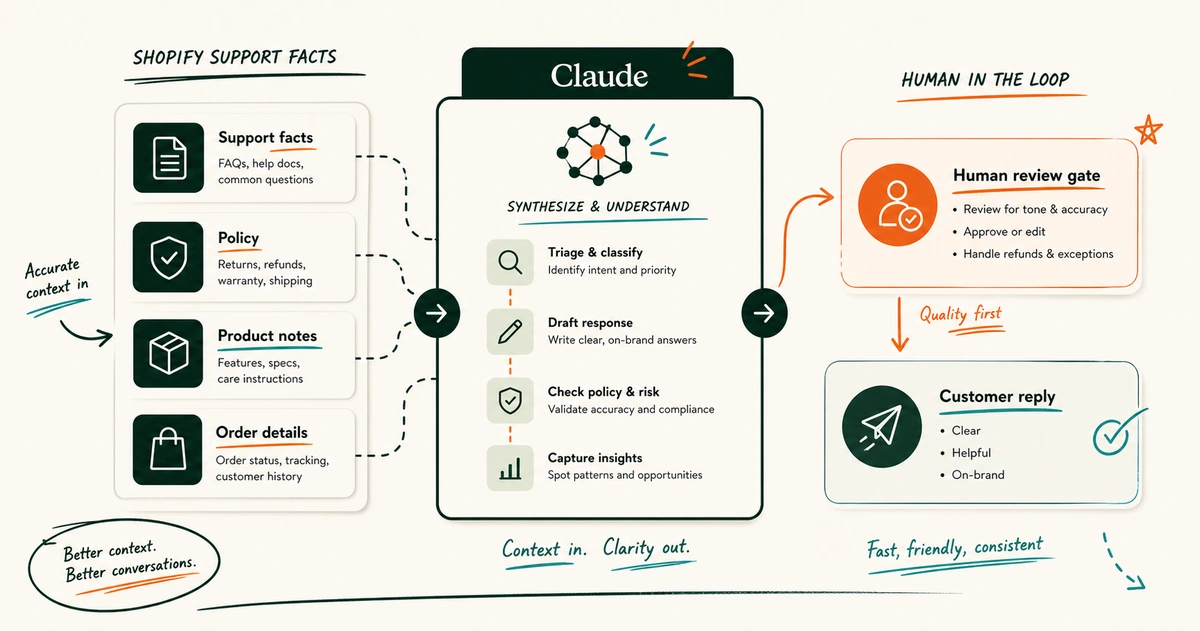
Table of Contents
- Executive summary
- Why support breaks on lean Shopify teams
- What should Claude do in Shopify customer support?
- What Claude needs before it can help
- The Claude workflow for Shopify customer support
- Copy these prompts into Claude
- Guardrails for using Claude with customer support data
- Claude vs Shopify Inbox, helpdesk AI, and custom agents
- Frequently asked questions about Claude for Shopify customer support
- How I would make Claude earn its place in support
Executive summary
Use Claude as a support ops layer before you treat it like a customer-facing support agent.
- Build a support context pack so Claude sees the policy, product, voice, and escalation facts that a good support lead uses.
- Ask Claude to triage, draft, review, document, and analyze support work in separate steps.
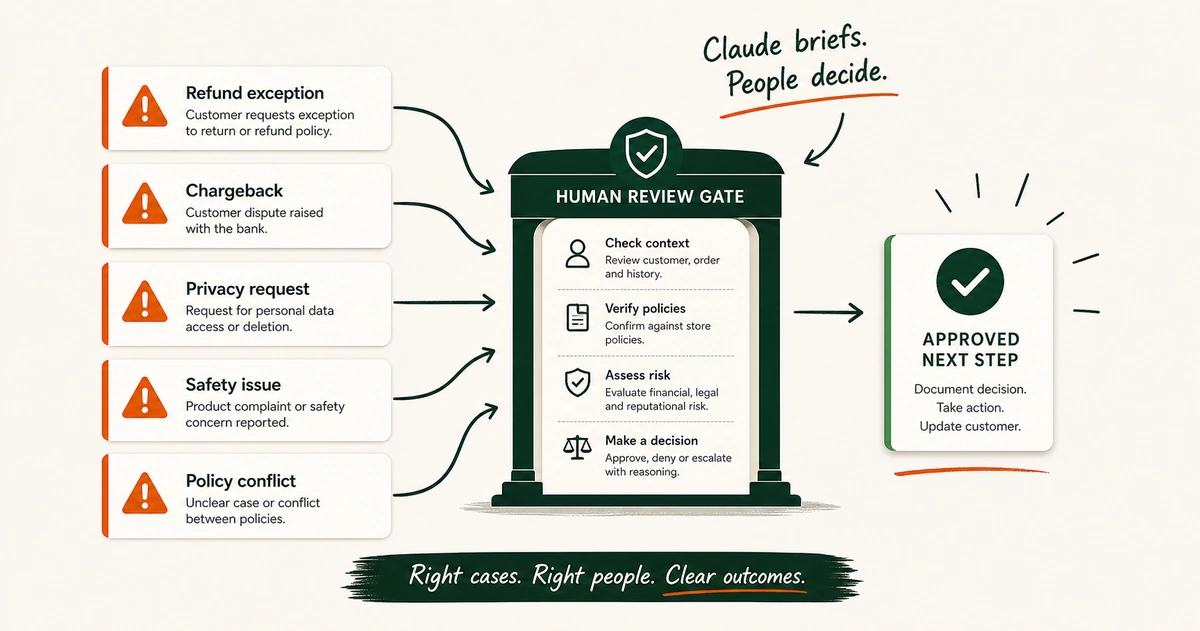
- Keep refunds, chargeback threats, privacy requests, safety issues, and policy exceptions with a human owner.
- Feed repeated ticket patterns back into FAQs, product pages, support macros, and SOPs.
EfficiaLabs guide to support operations for lean DTC teams
Why support breaks on lean Shopify teams
Support looks simple from far away.
A customer asks a question. Someone answers it.
Then the questions start stacking.
- “Where is my order?”
- “Can I change my address?”
- “Your size guide said medium.”
- “The tracking says delivered. I do not have it.”
- “I bought the bundle yesterday. Now it is on sale.”
- “Can I return a used product?”
Same inbox. Different risk.
A founder sees five messages and thinks, “We can handle this.” A head of ops sees 50 and starts forwarding screenshots. A support lead sees 500 and learns the hard part is not typing faster.
The hard part is keeping the answer correct when every answer depends on context.
Shopify support touches:
| Support question | Context needed before answering |
|---|---|
| Order status | Order history, fulfillment status, carrier tracking, shipping policy |
| Return request | Return window, product condition, country rules, exceptions |
| Product question | Product page, usage notes, size or ingredient details |
| Subscription issue | Subscription platform records, cancellation policy, prior messages |
| Damaged item | Evidence required, replacement policy, warehouse or carrier path |
| Discount complaint | Promotion terms, order date, margin guardrails |
This is where lean teams wobble.
The customer asks for one reply. The business needs one decision, one record, one consistent rule, and one clue about what should be fixed upstream.
Human memory becomes the system:
- The support lead remembers the refund exception that was approved last month.
- The ops manager remembers which shipping promise changed for Canada.
- The founder remembers the tone they want when a loyal customer is upset.
- The newest agent does not remember any of it yet.
Crickets when someone is off.
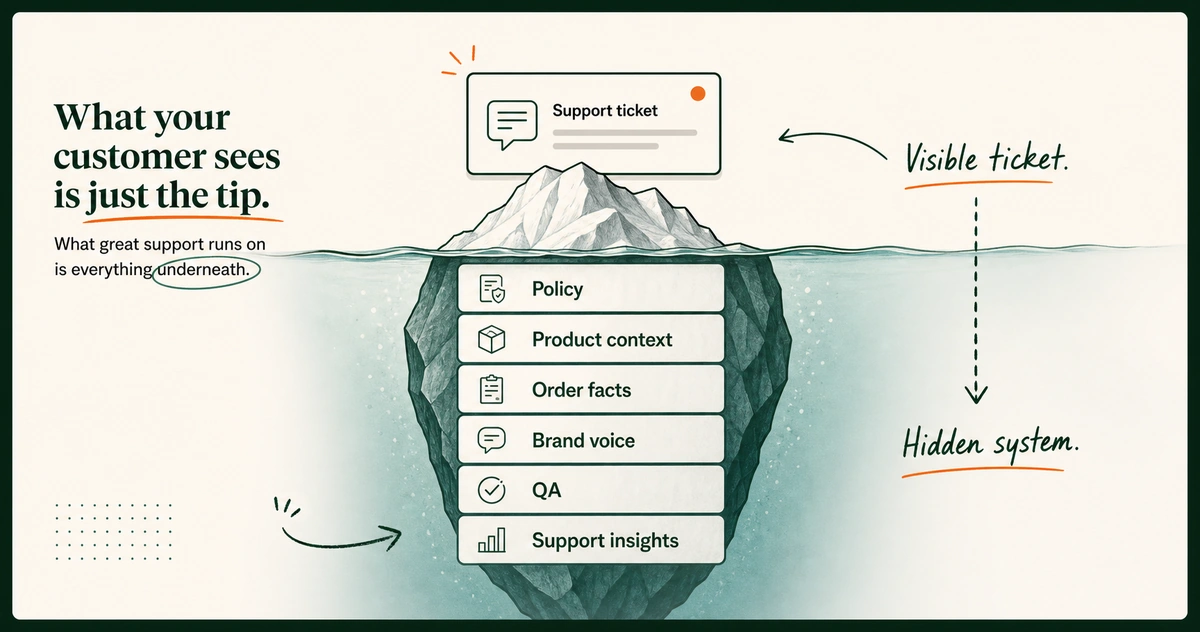
That is why “use AI to answer support tickets” is a weak brief. The ticket is the visible bit. Under it sits the support system:
- Policy truth tells the team what it may promise.
- Product truth stops vague or incorrect product answers.
- Order truth keeps one customer case separate from another.
- Brand voice makes the reply sound like the store.
- Escalation rules show who owns the hard call.
- Quality review catches risk before the customer sees it.
- Feedback into the store reduces the next repeated ticket.
Pro tip: If your team keeps answering the same question with slightly different wording and slightly different rules, do not start with automation. Start with the source of truth. Claude is useful after the source of truth exists.
The opportunity is simple. Give Claude the context a good support lead uses. Then ask it to help across the loop, not only at the reply stage.
That loop matters for the brands EfficiaLabs writes for. DTC teams with 5 to 50 people do not have spare layers of support operations. One person may own inbox health, review return exceptions, update FAQs, and join the Monday ops call.
A tool that saves a few reply minutes helps. A workflow that turns support into an operating system helps more.
EfficiaLabs post on AI workflows for lean DTC teams
What should Claude do in Shopify customer support?
Claude should sit beside the person responsible for the support outcome.
That person might work in Shopify Inbox. They might live in Gorgias. They might run a Zendesk queue with order tabs open beside it.
The tool changes. The jobs do not.
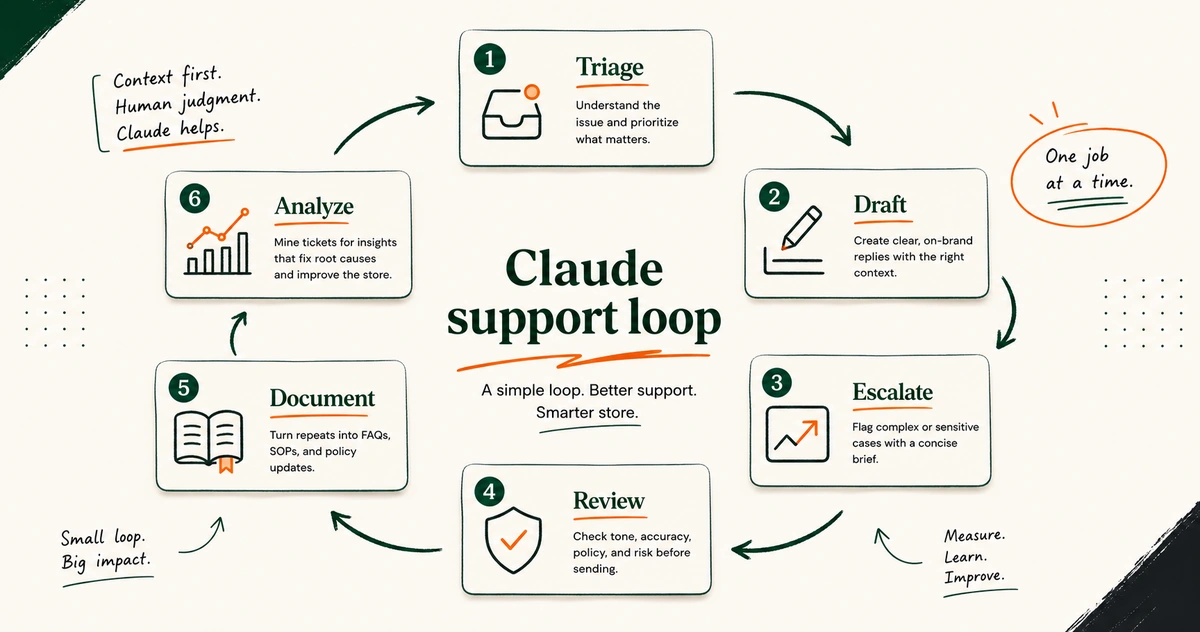
For this guide, Claude has six jobs.
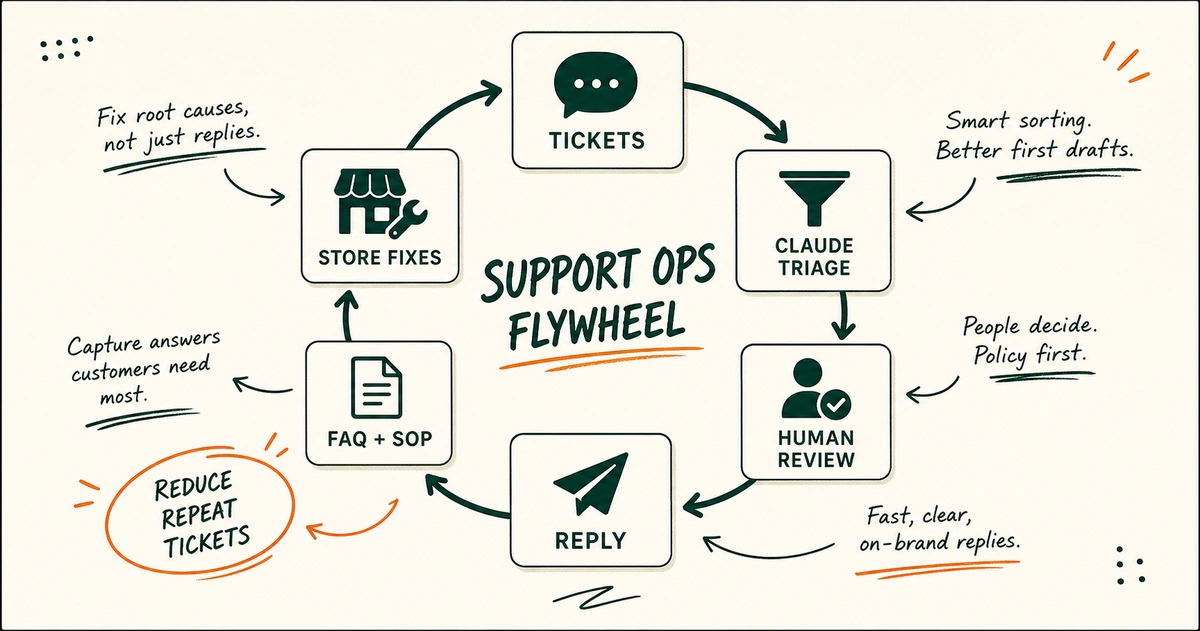
- Triage tickets by intent, urgency, risk, and next owner.
- Draft customer-ready replies from the facts and policies you provide.
- Package problems so ops, warehouse, product, or a founder can decide quickly.
- Review replies against policy, tone, missing facts, and risky promises before they are sent.
- Turn repeated answers into FAQ drafts, macro drafts, SOPs, and training notes.
- Mine support patterns for product page fixes, policy confusion, shipping issues, and recurring failure points.
Anthropic describes a similar support co-pilot pattern in its own Customer Support plugin page: triage, research, draft responses, escalation briefs, and knowledge base content.
Its developer guide for a customer support agent adds the part non-technical teams should not skip. Break support into tasks and define success criteria.
Then evaluate the results.
That is useful.
It is also where this article draws the line. This is not a guide to building a customer-facing Claude agent with APIs, tool calls, deployment, and evaluations in production. That path exists.
It is not where a non-technical Shopify team should start.
Claude is good at synthesis
Support is full of messy inputs:
- A customer message may carry emotion but omit the order number.
- A product page may bury the answer in a size note.
- A shipping policy may have three country exceptions.
- A prior ticket thread may already contain a promise from an agent.
Claude is useful when the facts are scattered and the work is language-heavy.
Ask it to summarize. Ask it to compare a reply with the policy. Ask it to format an escalation.
Ask it to turn 40 similar tickets into a list of repeated customer confusions.
Claude is bad at missing truth
If you do not give it the refund policy, it cannot know your refund policy.
If your product page says one thing and your agent macro says another, Claude can help spot the conflict once both are provided. It cannot repair a source of truth it has never seen.
If a customer asks whether a late birthday gift can be refunded, Claude can draft the apology. Your policy and your team decide the exception.
That distinction matters.
Important note: Claude should be invited into support decisions with context, not used as a replacement for policy ownership. The fastest wrong reply is still wrong.
Claude is more than a Shopify reply writer
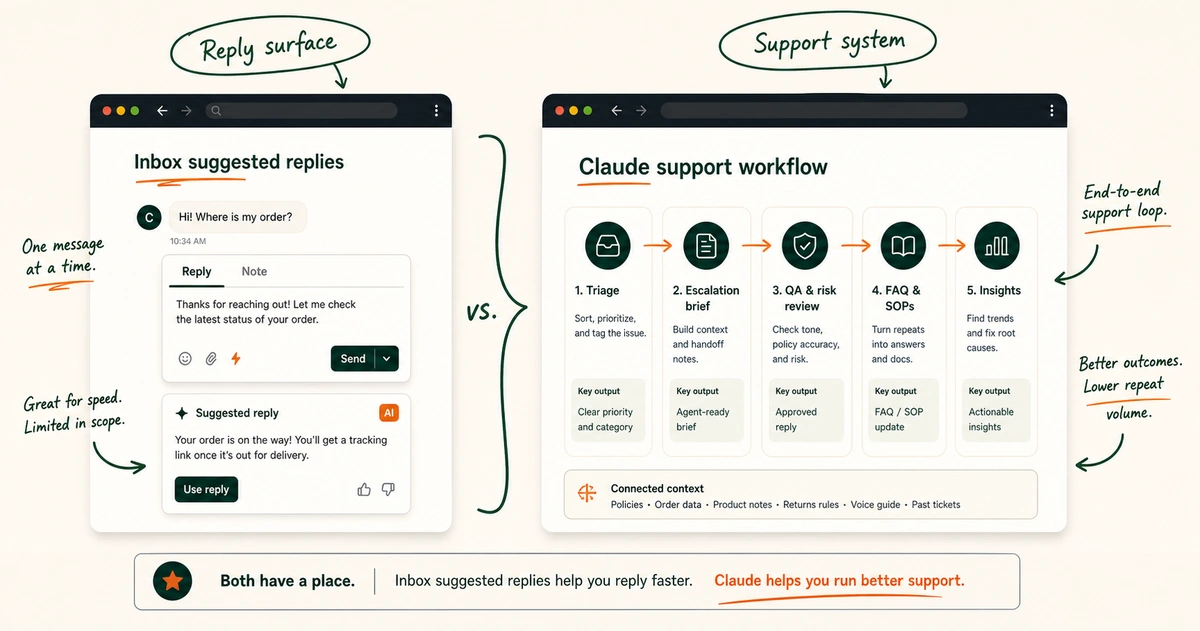
Shopify already has its own AI support surface. The Shopify Inbox suggested reply documentation says Shopify Magic can propose replies from store information. The store needs enough information to answer the customer question.
That is handy for a live Inbox conversation.
Claude belongs in the broader jobs:
- Claude can help prepare the support context pack.
- Claude can compare ticket clusters with store pages.
- Claude can review difficult reply drafts.
- Claude can convert resolved cases into internal SOPs.
- Claude can create escalation briefs with the business impact included.
- Claude can review the whole support week for upstream fixes.
One tool helps at the composer bar.
The other can help organize how the team thinks.
EfficiaLabs comparison of AI reply drafting and support operations workflows
What Claude needs before it can help
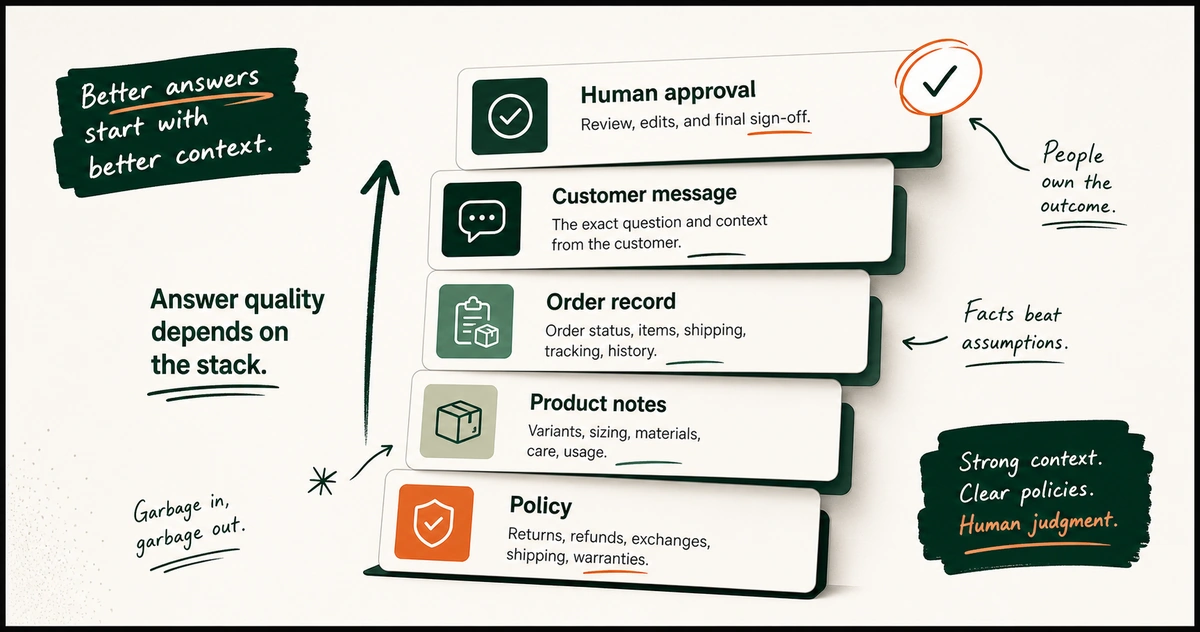
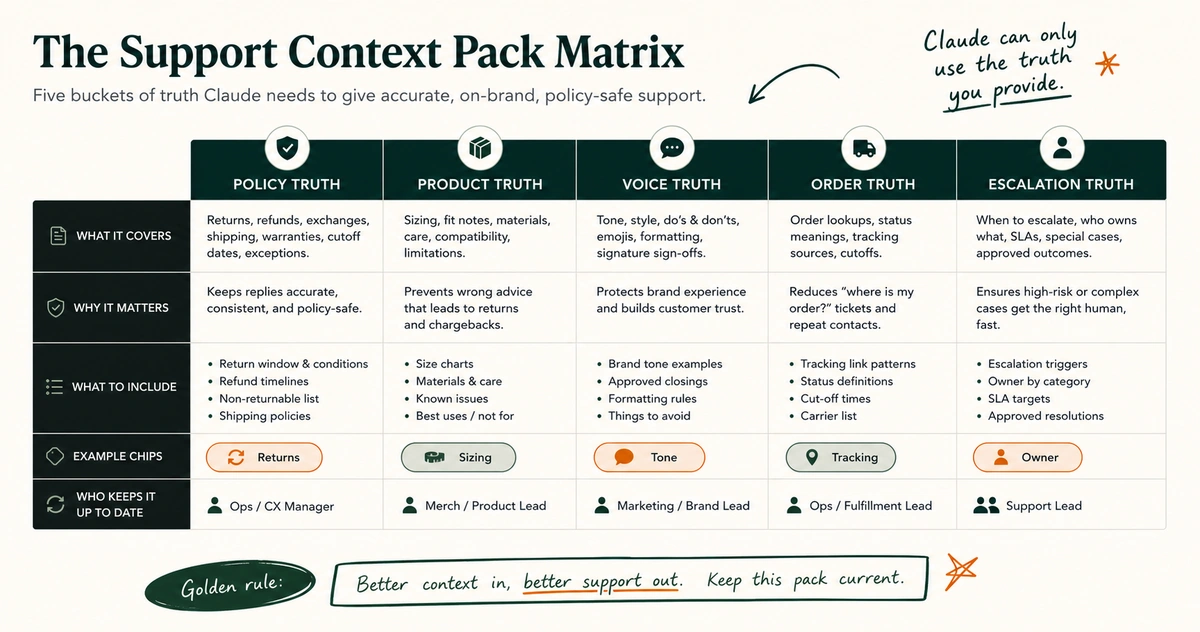
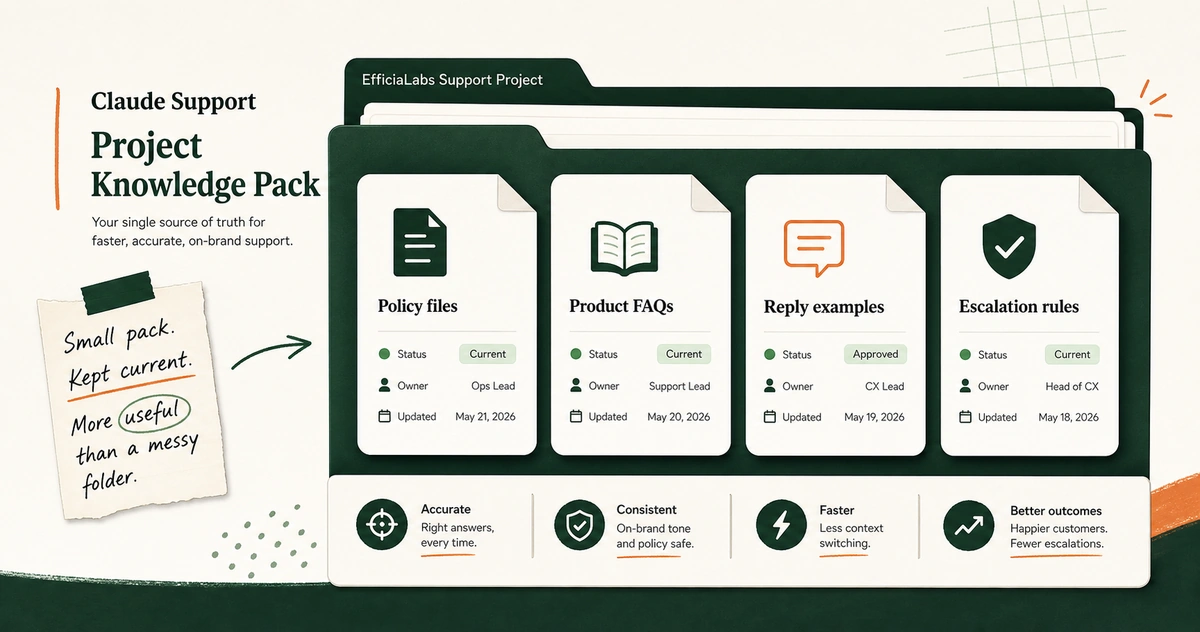
Before prompts, build the support context pack.
Not a 90-page manual nobody updates. Not a folder named “Final Final Support Docs 2024.” A tight pack of source material that lets Claude work from your rules instead of making them up.
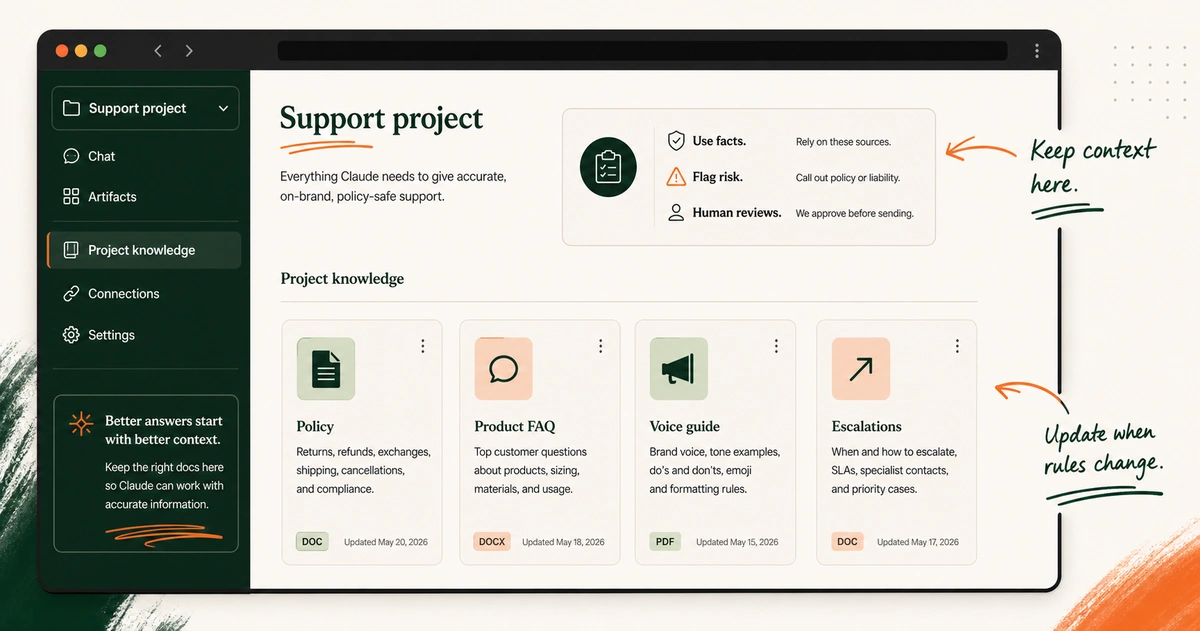
Claude Projects are a practical place to keep this for repeat work. Claude says project knowledge is used across chats inside that project, and project instructions apply to the chats in that project. That is exactly what a support workflow needs: stable context, stable rules, repeatable tasks.
Create one project for support. Name it plainly:
Shopify Customer Support - [Brand Name]
Then load the inputs in layers.
Layer 1: policy truth
Upload or paste the rules customers feel first.
- Add the current shipping policy.
- Add the current return and exchange policy.
- Add the refund policy that support should follow.
- Add the damaged item process.
- Add the lost parcel process.
- Add the subscription change or cancellation policy if the brand needs one.
- Add the warranty policy if the product has one.
- Add the promotion and price-adjustment rule if one exists.
Name every file clearly. Add the last updated date inside the file. If a rule differs for the US, UK, Australia, or Canada, show that difference in a table.
Note: If the policy is unclear to Claude, it is probably unclear to a new support hire too. Fix the policy before scaling the workflow.
Layer 2: product truth
Support does not stop at shipping.
Customers ask about fit, ingredients, compatibility, care, assembly, use cases, allergens, bundle contents, gift notes, and product differences. Product pages often hold some answers. The support lead holds the rest.
Add:
- Add product FAQ pages for the questions support sees in the inbox.
- Add size guides that agents already reference.
- Add ingredient or material notes that customer replies depend on.
- Add care instructions that reduce preventable complaints.
- Add bundle maps so support knows what each offer contains.
- Add common pre-purchase objections when support answers them repeatedly.
- Add known product limitations that support should state clearly.
For a catalog with many SKUs, start with the products that drive the most support volume. Ten accurate product notes beat 200 scraped pages nobody trusts.
EfficiaLabs guide to product knowledge for DTC AI workflows
Layer 3: voice truth
The reply must sound like the brand.
That does not mean “friendly, helpful, professional.” Every support inbox says that. Give Claude something it can inspect.
Add:
- Add five excellent past replies.
- Add five replies you would not send again, with notes.
- List the terms the brand uses in support.
- List the terms the brand avoids in support.
- Explain how direct the team should be about delays.
- State whether replies use emojis, first names, contractions, or sign-offs.
- Show how an apology sounds when the brand caused the problem.
If your brand tone is warm but not syrupy, say it. If you do not say “we totally understand your frustration,” ban it. If you prefer one clear next step over a paragraph of reassurance, say that too.
EfficiaLabs guide to brand voice instructions for AI
Layer 4: decision truth
This is where many AI support experiments fail.
The team uploads policies. Then the difficult ticket arrives:
Customer is outside the return window by four days. They are a repeat buyer. The item arrived with a small defect.
The agent wants to keep the relationship. The warehouse wants fewer exceptions.
Policy alone may not answer that.
Build a decision ladder:
| Decision type | Claude may do | Human owner |
|---|---|---|
| Standard FAQ reply | Draft from source material | Support agent reviews |
| Order fact summary | Summarize provided order facts | Support agent checks facts |
| Refund inside clear policy | Draft the response | Agent or lead follows policy |
| Refund exception | Flag and brief | Support lead or founder decides |
| Chargeback threat | Flag urgent | Support lead owns path |
| Safety, allergy, legal, privacy issue | Do not improvise | Escalate by rule |
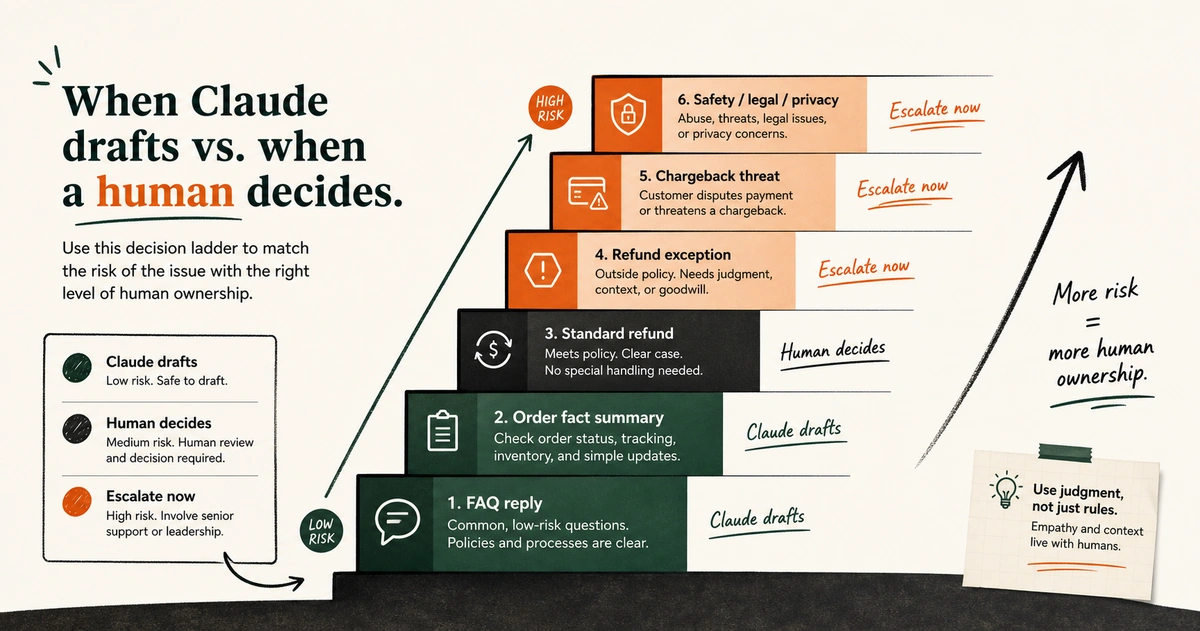
Put the dollar thresholds in if your team has them.
Put the owner names or roles in if you know them.
Specific beats motivational.
EfficiaLabs guide to refund and escalation guardrails for AI support
Layer 5: ticket truth
Give Claude examples of the actual mess.
Export or paste a small, cleaned sample of recent support conversations:
- Include common shipping questions.
- Include return requests.
- Include product confusion cases.
- Include subscription issues if subscriptions matter to the store.
- Include angry customer threads that need better handling.
- Include excellent resolutions that show the expected standard.
- Include threads that should have escalated sooner.
Remove data you do not need. Replace names with labels if the task does not require the identity. Keep the message order.
Keep the policy facts. Keep the outcome.
EfficiaLabs guide on preparing business context for AI workflows
The Claude workflow for Shopify customer support
Now build the workflow.
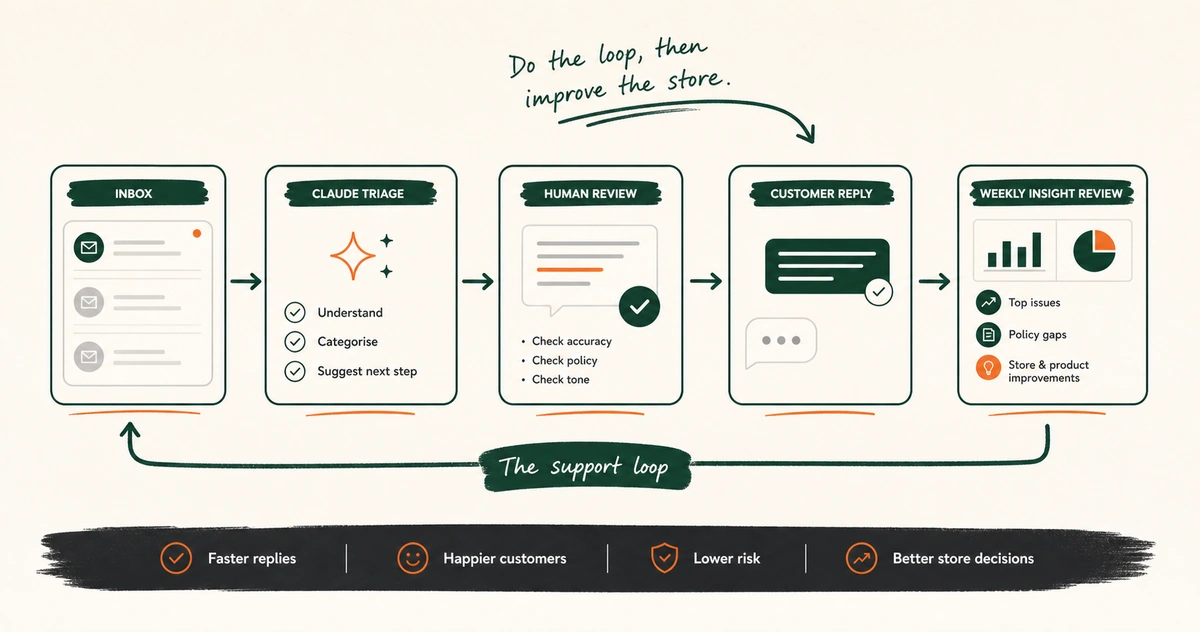
The best version is boring in a good way. It does the same steps every day. The support lead can audit it.
A new teammate can follow it. Claude helps at each step because the task is clear.
Step 1: Triage the ticket before writing
Bad support starts with the wrong problem label.
A “where is my order” message can be:
- It can be a standard WISMO ticket.
- It can be a late carrier scan.
- It can be a replacement issue after a failed delivery.
- It can be a fraud or address mismatch risk.
- It can be a VIP relationship problem because the customer already emailed twice.
Claude can look at the message, the prior thread, and the facts you paste in. Ask for:
- Ask Claude to name the customer intent.
- Ask Claude to rate the urgency.
- Ask Claude to list the missing facts.
- Ask Claude to identify the policy areas involved.
- Ask Claude to say whether the ticket can be drafted or needs escalation.
The output should help the agent decide the next move. It should not pretend the next move is already approved.
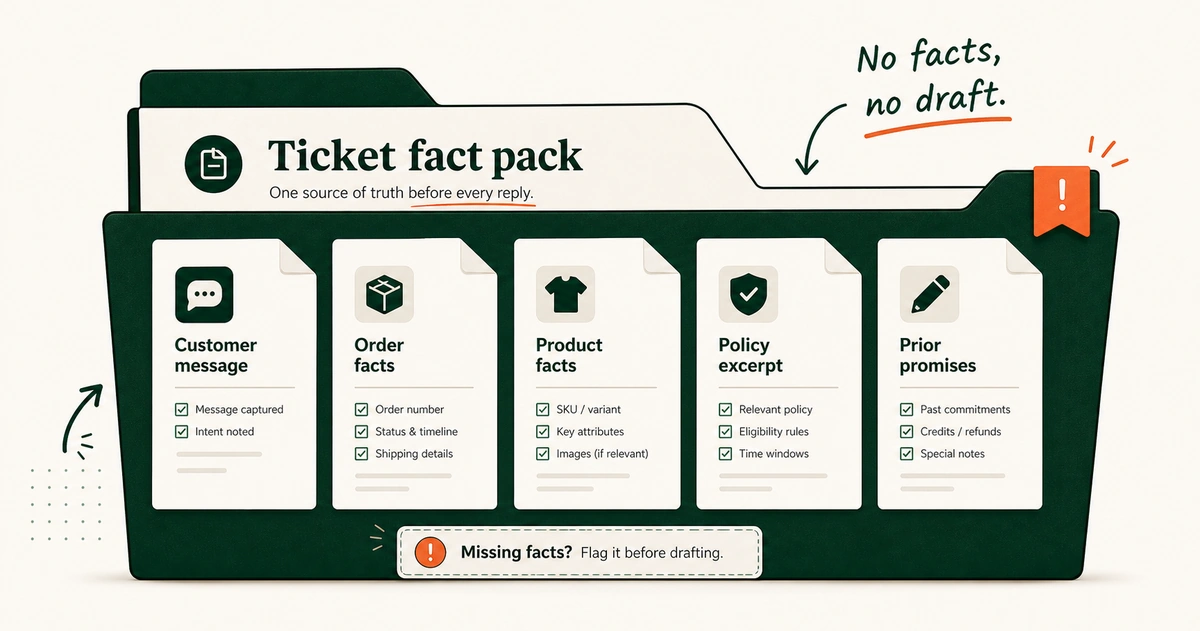
Step 2: Collect the minimum facts
Claude cannot fetch what you have not provided unless you intentionally use a connected tool.
For a non-technical workflow, begin with manual fact packs. Copy in only what the ticket needs:
- Copy the customer message and the prior thread that matters.
- Copy the order status or the relevant order notes.
- Copy the product details tied to the question.
- Copy the policy excerpt the reply must follow.
- Copy any prior promise from the team.
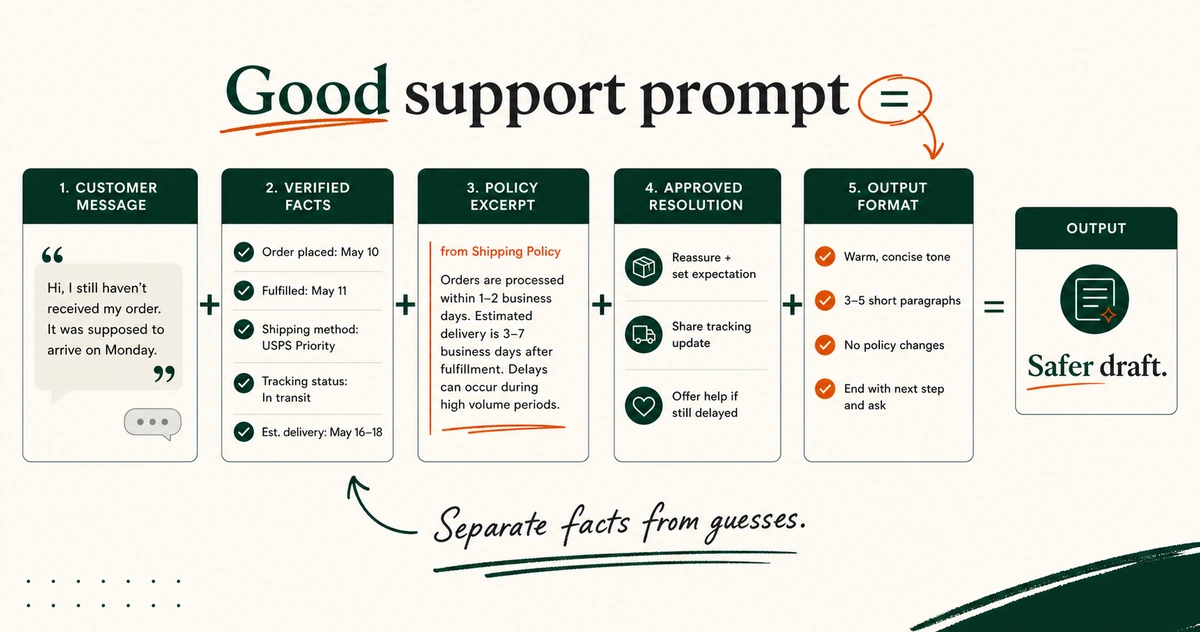
The order matters. Message first. Facts next.
Rules next. Ask last.
That structure keeps Claude from writing around missing information.
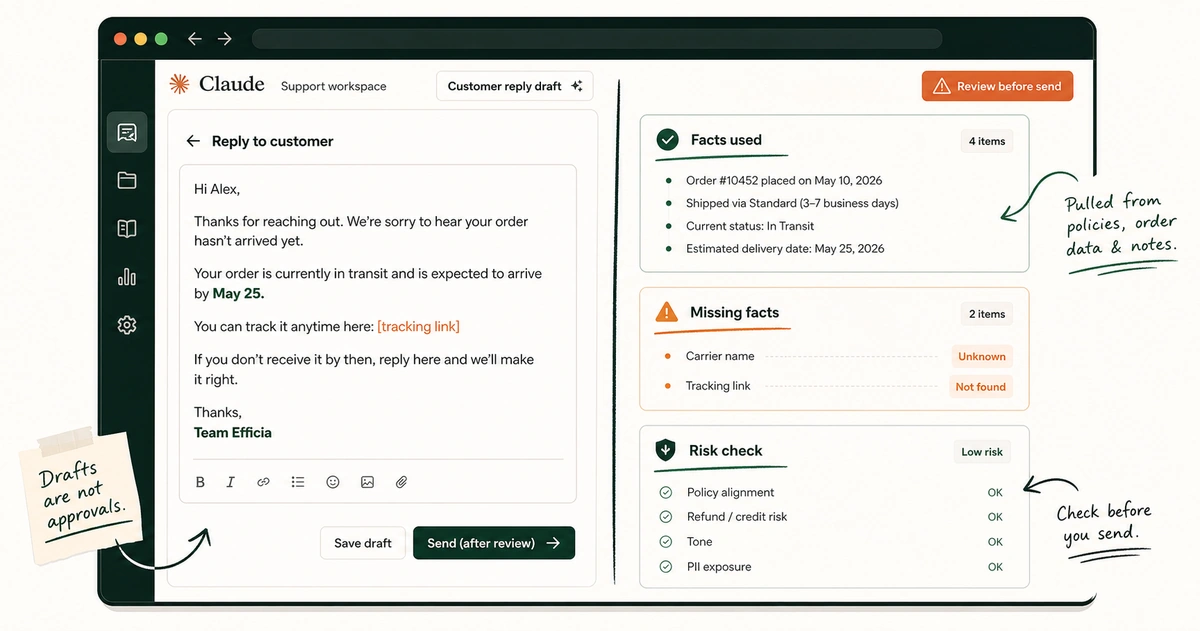
Step 3: Draft the reply with evidence
The reply is not the first action. It is the third.
When you ask Claude to draft, tell it what it can and cannot claim. Good support drafts usually have:
- A good draft gives the customer a direct answer.
- A good draft adds a short empathy line where the situation needs one.
- A good draft states the next step clearly.
- A good draft does not invent order facts.
- A good draft does not grant a policy exception unless it was approved.
- A good draft gives the agent an escalation note when the ticket is risky.
Make Claude show its work outside the customer-facing draft. Ask for a private “check before send” note listing the facts it relied on and anything it could not verify.
Useful reply. Visible uncertainty.
EfficiaLabs guide to support prompt design for DTC teams
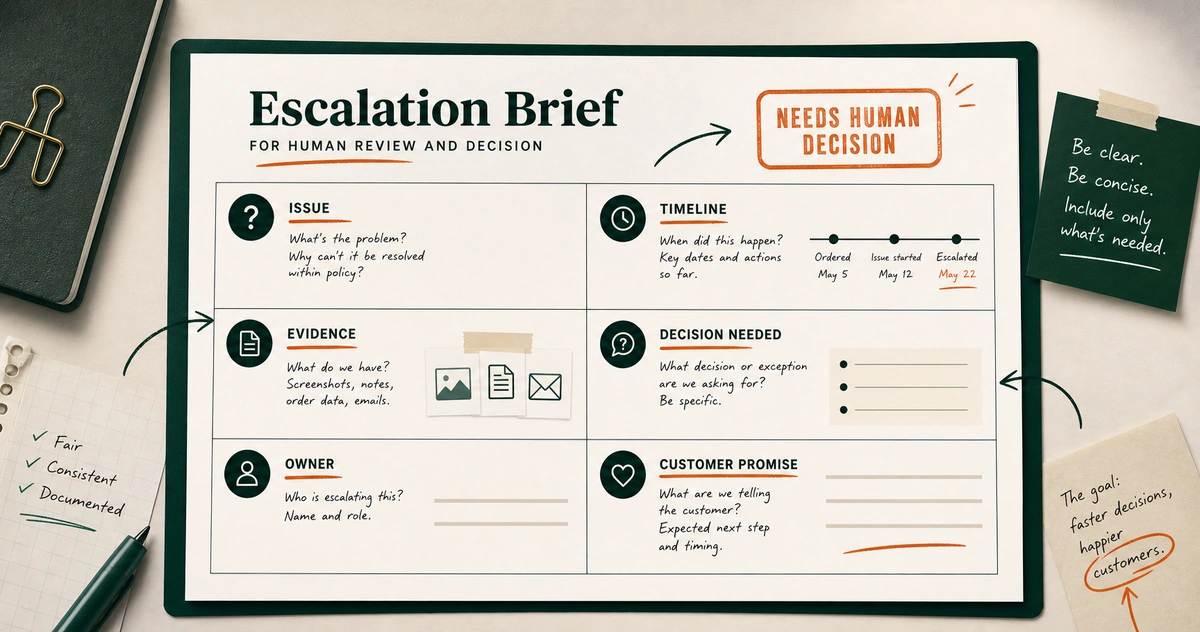
Step 4: Escalate without forwarding chaos
Escalations die in screenshots.
The ops person gets a message. The founder gets a Slack thread. The warehouse gets half the facts.
Everyone spends ten minutes asking what happened.
Claude can package the case:
- Include the customer and order reference when the owner needs it.
- State the issue in one sentence.
- Lay out the timeline.
- Show which evidence is attached or missing.
- Name the policies involved.
- State the decision needed.
- Recommend the next owner.
- Capture any customer promise already made.
- Explain the business risk.
That last line matters. “Customer is angry” is emotion. “Customer says they will file a chargeback tomorrow if no replacement ships” is operating context.
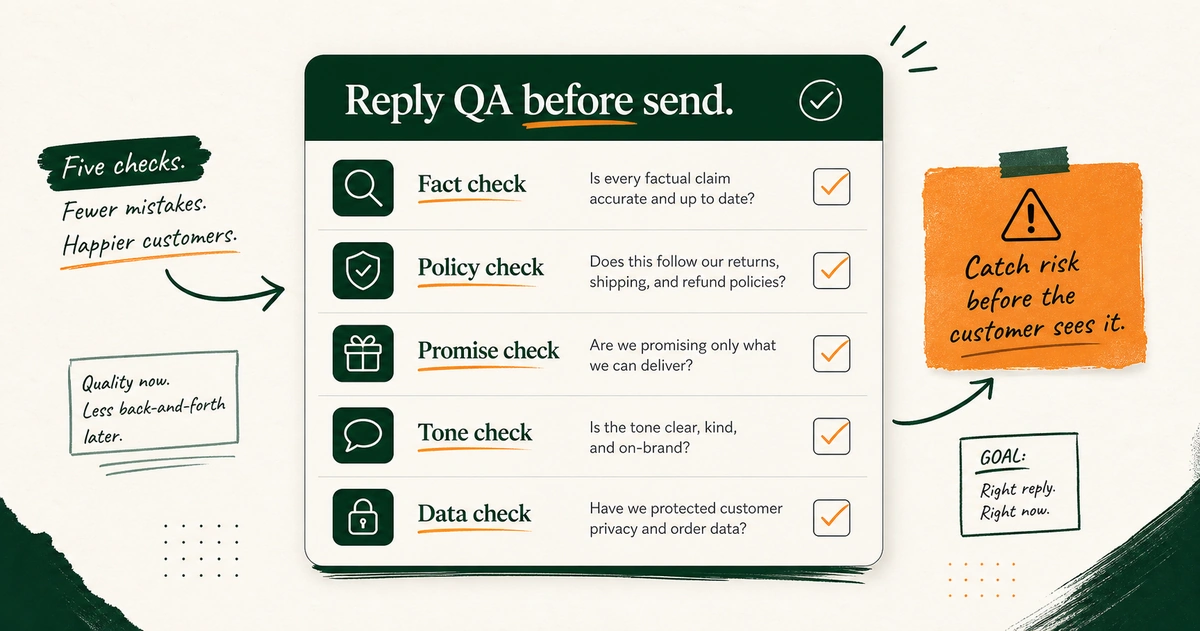
Step 5: Review before send
Claude should also criticize its own draft.
Not with a vague “improve this” prompt. Give it the review standard:
- Does this contradict the provided policy?
- Does this promise a refund, replacement, shipping date, or discount that was not approved?
- Does this answer the customer’s actual question?
- Does it sound like the brand examples?
- Does it ask for unnecessary information?
- Does it reveal internal notes?
Then a human reviews the result.
Shopify gives the same core warning for its own AI suggested replies. The merchant remains responsible for the customer-facing information. Claude does not remove that responsibility.
It helps make the review less lazy.
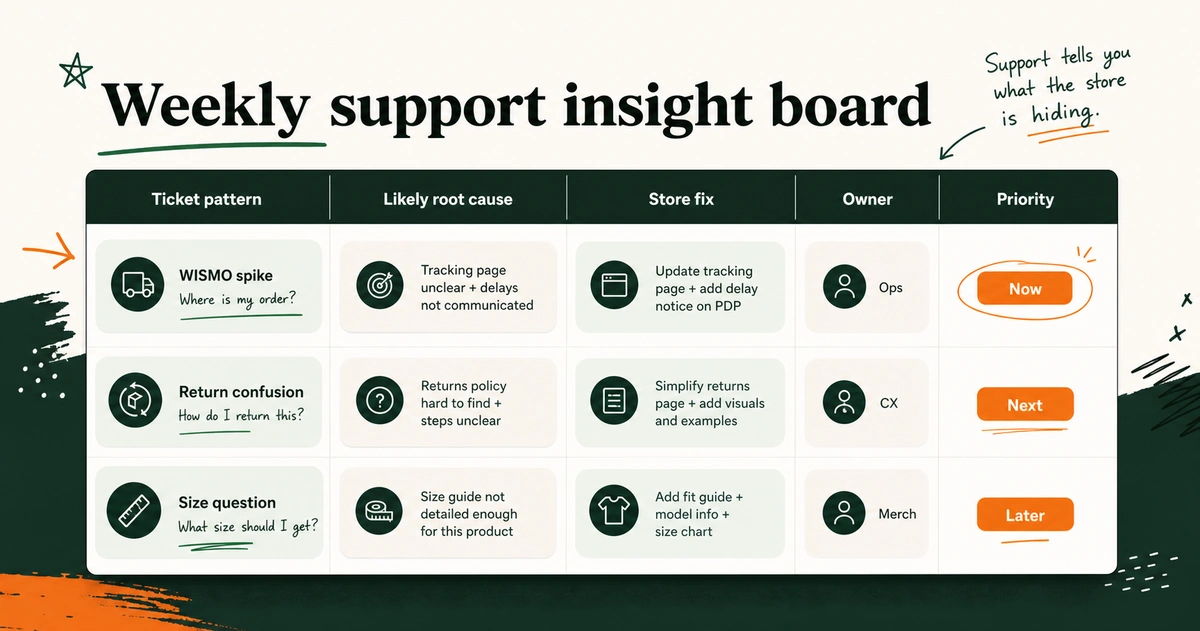
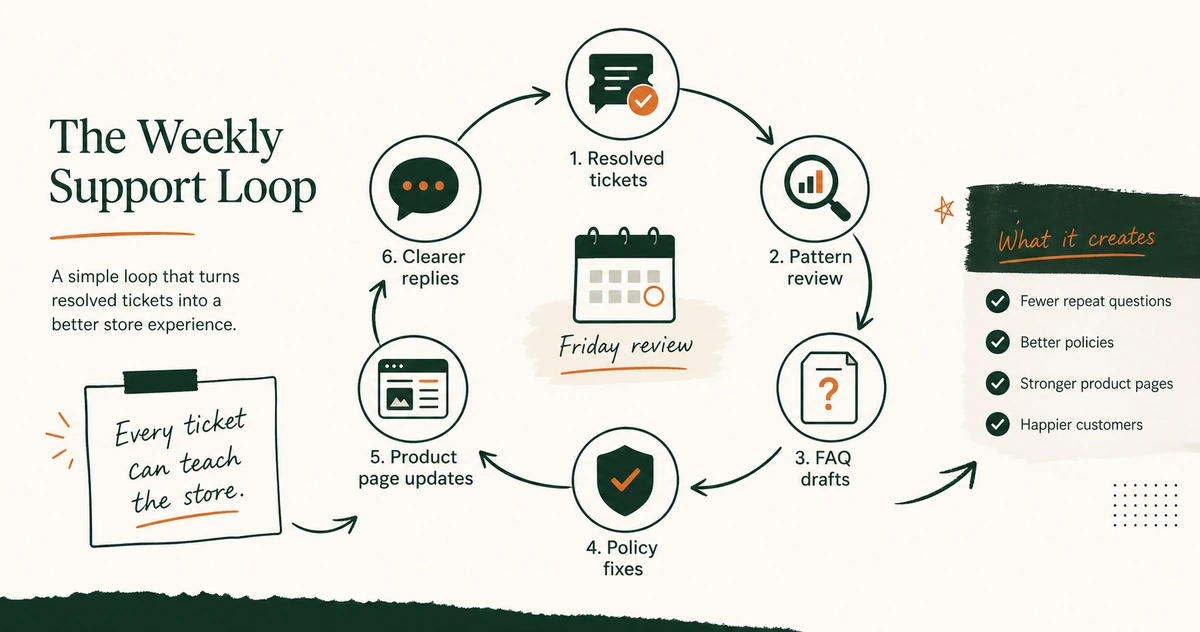
Step 6: Close the loop every week
This is the part most teams skip.
Friday arrives. Inbox zero feels like victory. The same tickets come back Monday.
Take a batch of resolved tickets and ask Claude:
- Ask which questions repeated.
- Ask which questions came from missing or confusing store information.
- Ask which policies created agent uncertainty.
- Ask which product pages need a clearer answer.
- Ask which macro, FAQ, or SOP would reduce next week’s confusion.
Support is a research feed. Paid for by customer attention.
Treat it like one.
EfficiaLabs guide to mining support tickets for DTC insights
Copy these prompts into Claude
Prompts are not magic. They are job descriptions.
Use these after your support context pack exists. Replace the bracketed text. Keep the outputs structured until the team trusts the workflow.
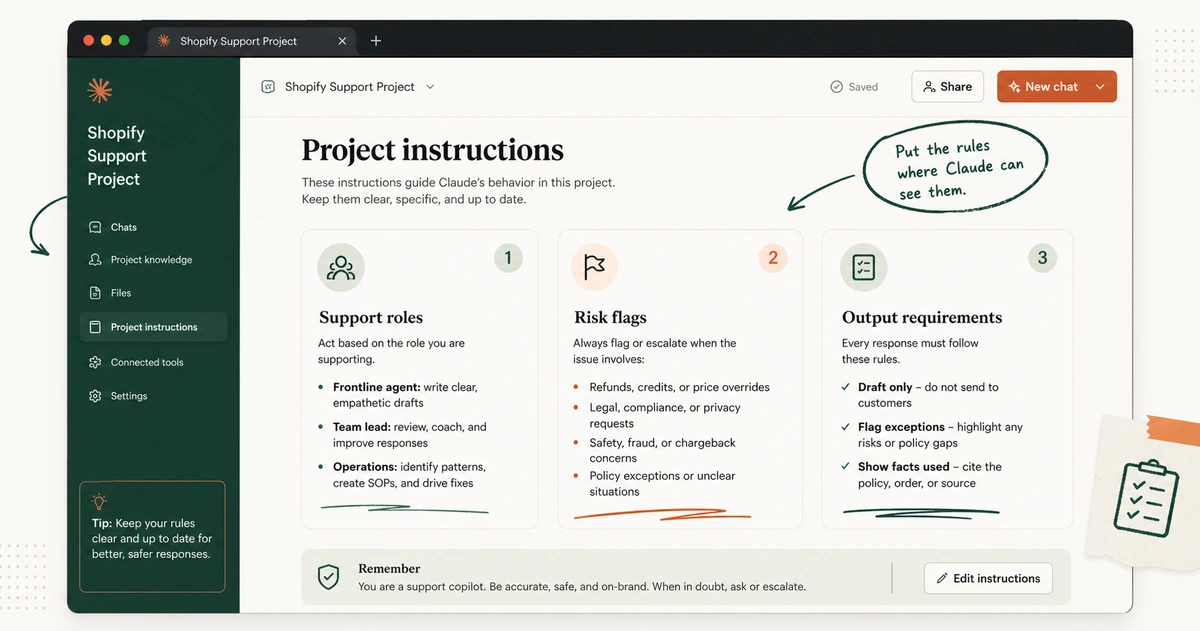
Prompt 1: Set the support project rules
Paste this into Claude Project instructions or the first chat you use for support work.
You are helping a Shopify customer support team work faster and more consistently.

Your job is to help with triage, reply drafts, escalation briefs, quality review, FAQs, SOP drafts, and support insight summaries.

Work only from the facts, policies, product notes, order details, examples, and instructions I provide in this project or chat.

Do not invent order status, tracking updates, return eligibility, refund approvals, discount promises, product facts, legal claims, or policy exceptions.

If a customer-facing reply depends on missing information, state what is missing before drafting.

If the issue involves a refund exception, chargeback threat, privacy request, safety concern, legal concern, allergy or health concern, or abusive behavior, flag it for human review.

Do the same when a requested promise conflicts with policy.

For every customer-facing draft, provide:
1. Draft reply
2. Facts used
3. Missing facts or assumptions
4. Risk check before send

Use the brand voice examples and support policies in this project as the source of truth.
That instruction does not make Claude correct by force.
It makes the failure mode easier to see.
Prompt 2: Triage one ticket
Triage this Shopify support ticket before drafting a reply.

Ticket thread:
[PASTE CUSTOMER MESSAGE AND RELEVANT PRIOR THREAD]

Known order facts:
[PASTE ONLY THE RELEVANT ORDER FACTS OR WRITE "NOT PROVIDED"]

Relevant policy or product notes:
[PASTE THE POLICY EXCERPT OR PRODUCT NOTE]

Return:
1. Customer intent
2. Ticket category
3. Urgency: low, normal, high, or critical
4. Risk flags
5. Missing facts
6. Whether this can be drafted now or should be escalated
7. The next best action for the support agent
Use this before a new agent starts composing.
Use it on ugly threads where five replies already happened and nobody has summarized the case.
EfficiaLabs checklist for first-pass ticket triage with AI
Prompt 3: Draft the customer reply
Draft a customer-facing reply for this Shopify support case.

Customer message:
[PASTE MESSAGE]

Prior conversation that matters:
[PASTE OR WRITE "NONE"]

Verified facts:
[PASTE ORDER, PRODUCT, SHIPPING, OR ACCOUNT FACTS]

Policy excerpt:
[PASTE THE RELEVANT POLICY]

Approved resolution:
[PASTE THE APPROVED ACTION OR WRITE "NO EXCEPTION APPROVED"]

Voice notes:
[PASTE ANY TONE NOTE THAT MATTERS]

Requirements:
- Answer the customer directly.
- Keep the reply clear and concise.
- Do not promise anything outside the verified facts or approved resolution.
- Do not mention internal review, Claude, uncertainty, or policy debate in the customer reply.

Return:
1. Draft reply
2. Facts used
3. Missing facts
4. Risk check before send
The line most teams need is “Approved resolution.”
It stops the model from writing the generous answer you have not approved.
Prompt 4: Build an escalation brief
Create an internal escalation brief for this support case.

Case material:
[PASTE TICKET THREAD, RELEVANT ORDER FACTS, AND POLICY EXCERPT]

Escalation target:
[SUPPORT LEAD / OPS / WAREHOUSE / PRODUCT / FOUNDER / OTHER]

Return:
1. Issue in one sentence
2. Customer request
3. Timeline
4. Verified facts
5. Missing evidence
6. Policies involved
7. Customer promise already made, if any
8. Decision needed
9. Risk if delayed
10. Suggested next reply after the decision

Do not decide the exception for the escalation owner.
Screenshots become a brief. Forwarded emotion becomes a decision request.
Prompt 5: QA a draft before send
Review this support reply before a human sends it.

Draft reply:
[PASTE DRAFT]

Customer question:
[PASTE MESSAGE]

Relevant facts:
[PASTE FACTS]

Relevant policy:
[PASTE POLICY]

Brand voice examples or notes:
[PASTE IF NEEDED]

Check for:
1. Policy contradiction
2. Unapproved refund, replacement, discount, delivery, or legal promise
3. Missing answer to the customer's question
4. Tone mismatch
5. Unnecessary or sensitive information request
6. Internal information leaking into the customer reply

Return:
1. Send / revise / escalate recommendation
2. Issues found
3. Revised draft if revision is enough
4. Human check required before send
This is not approval. It is a second pass with a checklist.
Prompt 6: Turn resolved tickets into FAQ and SOP drafts
Review these resolved Shopify support conversations.

Ticket batch:
[PASTE CLEANED TICKETS OR SUMMARIES]

Existing FAQ or SOP material:
[PASTE RELEVANT CURRENT CONTENT OR WRITE "NONE"]

Identify repeated questions or repeated agent decisions.

Return:
1. FAQ drafts customers could read
2. Internal macro or quick-reply drafts
3. SOP draft steps for agents
4. Source tickets that support each draft
5. Gaps where policy or product owners must decide before publishing
FAQ for customers. SOP for agents. Macro for speed.
Three different assets. One repeated question.
EfficiaLabs guide to turning repetitive tickets into FAQs and SOPs
Prompt 7: Run the weekly support insight review
Analyze this batch of Shopify support tickets for upstream fixes.

Ticket batch:
[PASTE CLEANED TICKETS, SUMMARIES, OR TAGGED EXPORT]

Store context:
[PASTE RELEVANT PRODUCT PAGE TEXT, SHIPPING PAGE TEXT, RETURN PAGE TEXT, OR PROMOTION TERMS]

Group the findings into:
1. Repeated customer questions
2. Likely root cause
3. Store page or process that may need updating
4. Suggested fix
5. Owner: support, ops, product, marketing, fulfillment, or founder
6. Priority: now, next, later

Separate evidence from inference. Quote short ticket fragments only when they help explain the pattern.
The phrase to keep is “separate evidence from inference.”
Claude may notice a pattern. Your team still checks whether the pattern is true enough to act on.
EfficiaLabs prompt library for DTC support workflows
Guardrails for using Claude with customer support data
Support data is not harmless text.
It can include names, addresses, order details, product complaints, health references, payment confusion, angry threats, and private business notes. Treat that as operating data. Not pasteboard confetti.
The guardrails are not here to scare you away from Claude. They are here so the workflow survives contact with real customers.
Minimize what you paste
Do not paste a whole account history because one customer asked for a delivery update.
Use the minimum facts needed:
- Include the relevant message thread.
- Include the relevant order or product facts.
- Include the relevant policy excerpt.
- Include the decision already approved, if one exists.
If identity is not needed for the task, replace it. Customer A is enough for many QA and insight reviews.
Check the data path before you connect tools
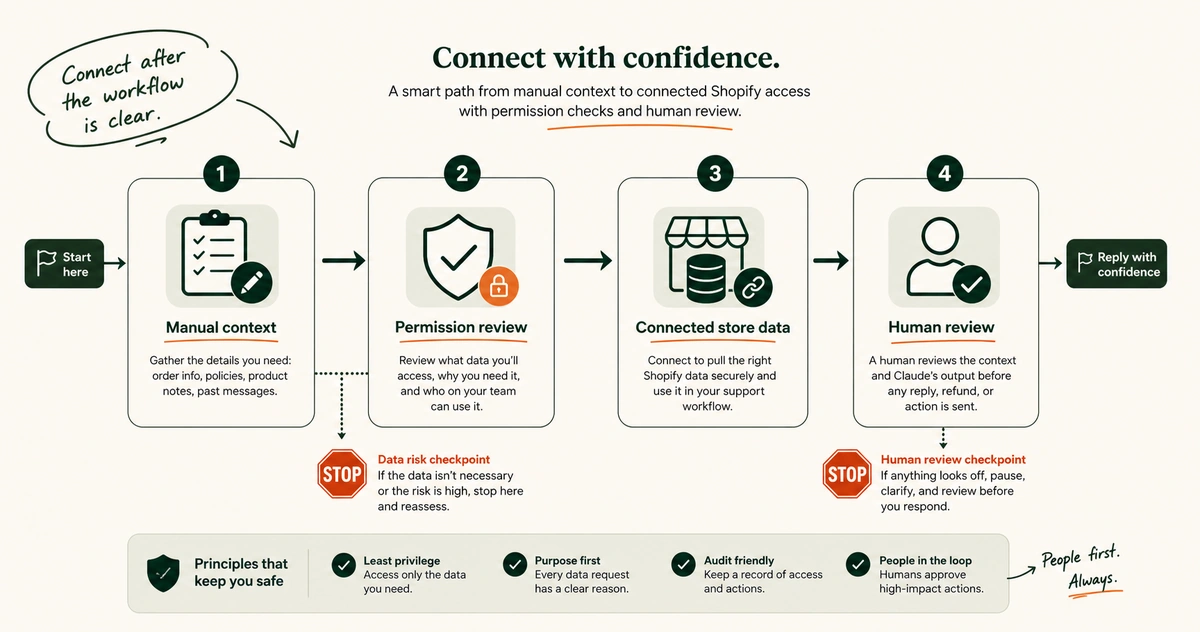
As of May 2026, Shopify documents a Shopify app for Claude among its AI tool connections. The same Shopify page says connected AI tools can access the Shopify data you authorize. It also says the data leaves the Shopify environment after sharing.
The merchant remains responsible for reviewing permissions, terms, privacy, and the resulting actions.
Claude’s Shopify connector page says Claude can help browse recent orders and view customer details once a store is connected. Useful. Also meaningful.
Start manual if your team is still defining the workflow. Connect only after you know:
- Name the support tasks that need store data.
- Name the user role that should have that access.
- Decide which permissions are acceptable.
- Decide which tasks still require a human check.
Know your Claude privacy settings and plan
Do not write a privacy rule from vibes.
Anthropic’s current consumer privacy guidance says chats and coding sessions may be used to improve Claude in specific cases. That includes when you allow it, when a conversation is flagged for safety review, or when you otherwise opt in.
Its sensitive data guidance tells users to be thoughtful about highly sensitive information. The examples include financial details, health records, passwords, and confidential documents.
If you are using Claude for support work:
- Review the settings and terms for the Claude plan your team uses.
- Set an internal policy for what can be pasted.
- Decide whether a connected flow or a manually minimized flow is appropriate.
- Do not treat a tool label as a substitute for a data policy.
For some work, an incognito chat may be useful. Anthropic says incognito chats are not saved to chat history or memory and are not used for training, while also noting retention details and that incognito mode is outside Projects. Read the current details before you make it part of a team rule.
Keep high-risk decisions human
Claude can help prepare the decision. That is different from owning it.
Escalate when a ticket touches:
- Escalate refund or replacement exceptions.
- Escalate chargeback threats.
- Escalate legal claims.
- Escalate privacy requests.
- Escalate safety, allergy, or health concerns.
- Escalate harassment or abuse cases.
- Escalate high-value loyalty recovery calls.
- Escalate policy conflicts you have not resolved.
You can add your own list. You should.
Review customer-facing output
Review for facts first. Tone second.
The reply can sound lovely and still promise the wrong shipping date. It can match the brand and still contradict the return window. It can apologize beautifully and ask the customer for data you do not need.
Use the QA prompt. Then use human judgment.
EfficiaLabs policy for human review in customer-facing AI workflows
Keep source material current
Claude Projects help reuse knowledge. Old knowledge is still old.
Create a tiny maintenance rhythm:
- Policy owner updates the source file when a policy changes.
- Support lead adds a dated note when a repeated edge case becomes a rule.
- Product owner updates product notes after a material product page change.
- Someone reviews the support context pack before peak season.
AI failure often starts as documentation debt wearing a cleaner shirt.
EfficiaLabs guide on data-safe AI adoption for DTC teams
Claude vs Shopify Inbox, helpdesk AI, and custom agents
There is a temptation to turn this into a tool war.
Do not.
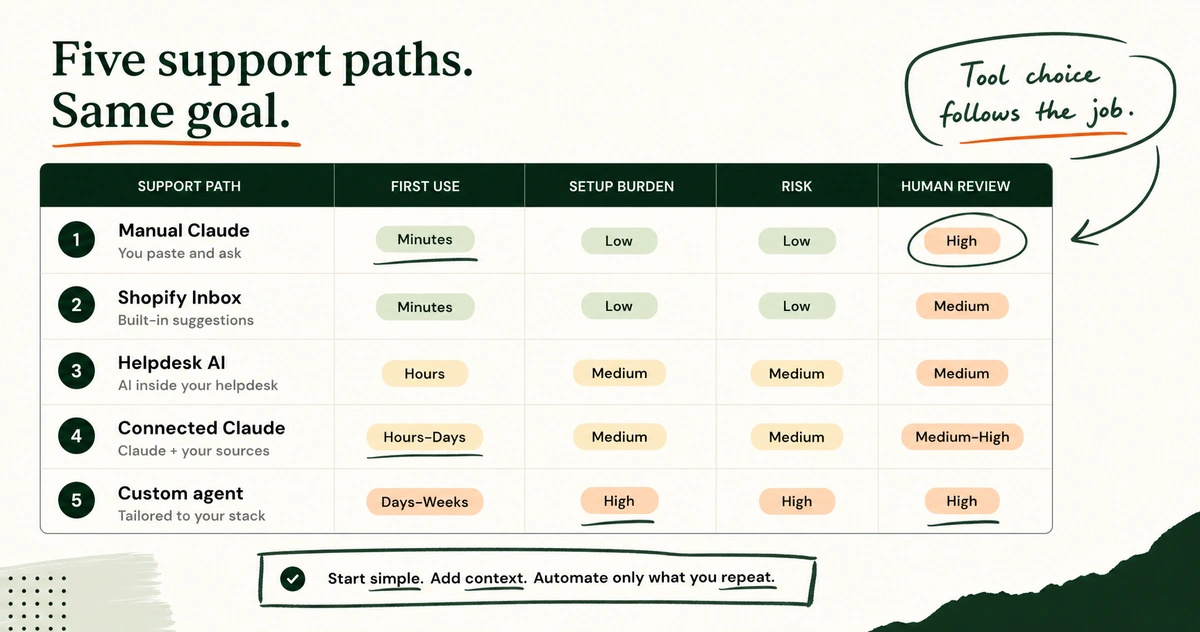
The useful question is where each tool sits in the support system.
| Tool path | Best first use | What it does not solve alone |
|---|---|---|
| Claude with manual context | Triage, drafts, QA, escalations, FAQs, support insights | Live queue routing and verified store facts unless provided or connected |
| Shopify Inbox suggested replies | Fast drafts inside Inbox for eligible conversations | Broader SOP, QA, and cross-ticket insight workflows |
| Helpdesk AI in Gorgias, Zendesk, or another support stack | Queue workflows, macros, routing, integrated support operations | Policy clarity and team decision rules |
| Connected Claude plus Shopify access | Conversational store-aware work where permissions are understood | Human ownership of customer promises and risky actions |
| Custom customer-facing agent | Scaled automation after scope, knowledge, QA, and escalation rules are mature | A quick fix for a messy support system |
Use Shopify Inbox when the reply surface is the problem
If you are answering live Shopify Inbox conversations and need suggested reply help inside that inbox, use the tool made for that surface. Shopify says its suggested replies can use store information where enough information exists, but they are only available in English and still require merchant review.
Fast reply layer.
Useful.
Use Claude when the support system is the problem
Use Claude when you need to think across messages, policies, examples, and recurring patterns.
- “Why do agents keep hesitating on this return case?”
- “Draft a clean escalation brief from this thread.”
- “Compare these 30 product questions with the PDP copy.”
- “Turn this resolved case into a customer FAQ and an internal SOP.”
That is a broader job than autocomplete in a message box.
Use helpdesk AI when workflow and queue operations matter
If support already lives in Gorgias, Zendesk, or another helpdesk, the team may need native automation, routing, macros, ticket fields, SLA views, and agent workspace controls. Claude can still help in the workflow. It does not need to replace the system of record.
“Automating low-stakes, high-volume tickets lets my team focus on meaningful, personalized conversations.”
Clara Zaoui, Head of CRM and Customer Care at Joone.
Support teams get in trouble when they use a text tool as a queue system, or a queue system as a policy brain.
Different jobs.
EfficiaLabs guide to choosing the right AI layer for DTC operations
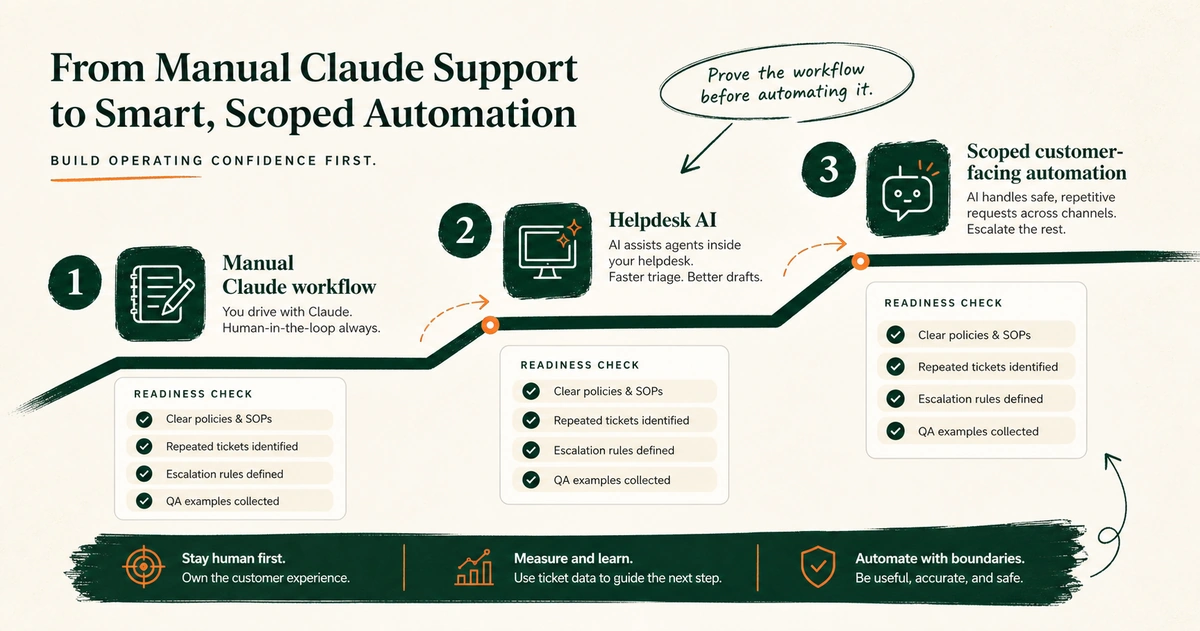
Consider automation after the manual workflow proves itself
Graduation signs are plain:
- You know the ticket types that are safe to standardize.
- Your FAQ and policy sources are current.
- Your escalation rules are written.
- You review support quality with examples, not feelings.
- You can name the failures automation must avoid.
Then explore connected tools or a customer-facing agent.
Before that, use Claude to build the support system you wish automation could inherit.
Frequently asked questions about Claude for Shopify customer support
Can Claude help with Shopify customer support without coding?
Yes.
You can use Claude manually for support work by pasting the relevant customer message, verified facts, policy excerpt, and output format you need. Claude Projects make repeat support work easier because you can keep project knowledge and project instructions together for chats inside that project.
Start with triage, reply drafts, QA checks, escalation briefs, FAQ drafts, and weekly support insight reviews. None of those requires you to build an API integration.
How does Claude connect to Shopify?
Yes, with a meaningful caveat.
Shopify currently lists a Shopify app for Claude among its AI tool connections. Claude’s Shopify connector page describes store-management tasks such as browsing recent orders and viewing customer details.
Connected access changes the data path and permission question. Review the current permissions, terms, privacy handling, and user access before using a connection in support work.
Should Claude send customer replies automatically?
Not at the start of this workflow.
Use Claude to draft. Use a human to review. Keep exception decisions human.
Once your ticket categories, source material, QA standards, and escalation rules are stable, you can evaluate where automation is safe. The non-technical path should prove the workflow before it automates the customer-facing moment.
Is Claude better than Shopify Inbox suggested replies?
They solve different first problems.
Shopify Inbox suggested replies help inside Shopify Inbox conversations when the store setup and conversation meet Shopify’s requirements. Claude is more useful for broader support operations work such as ticket triage, escalation formatting, reply QA, FAQ drafts, SOP drafts, and support insight analysis.
Use the tool that matches the job.
What should I upload to a Claude support project?
Start with a small support context pack:
- Add shipping, return, refund, damage, and lost-parcel rules.
- Add product FAQs and product notes for high-support SKUs.
- Add brand voice examples.
- Add an escalation matrix and refund exception ladder.
- Add excellent past replies.
- Add cleaned examples of recurring ticket types.
Add more only when it improves a real support task.
What should I never let Claude decide on its own?
Do not let Claude invent or independently approve:
- Do not let Claude approve refund or replacement exceptions.
- Do not let Claude make delivery promises unsupported by facts.
- Do not let Claude improvise legal, privacy, safety, allergy, or health answers beyond approved policy.
- Do not let Claude offer discounts or credits outside approved rules.
- Do not let Claude change policy.
- Do not let Claude own high-risk customer recovery decisions.
Claude can brief the decision. Your business owns the decision.
Can Claude help reduce support tickets?
It can help you find the work that may reduce them.
Ask Claude to group repeated questions, compare those questions with your FAQs and store pages, and suggest the page, policy, macro, or SOP that may need fixing. Then have the right owner verify the cause and publish the fix.
That loop is the point.
EfficiaLabs guide to reducing support volume with better DTC content
How I would make Claude earn its place in support
If I were starting next week, I would not launch a customer-facing bot first. I would build the context pack, triage five difficult tickets, draft five replies with the facts exposed, and turn one escalation into a proper brief.
Then I would review one batch of solved tickets for the store fixes hiding inside them.
That week would show where Claude helps. It would also show where the support system still survives on memory, heroics, and “ask Sam, she knows.”
Fix that part.
Then the AI gets useful.
– Vai S.

No comment yet, add your voice below!