

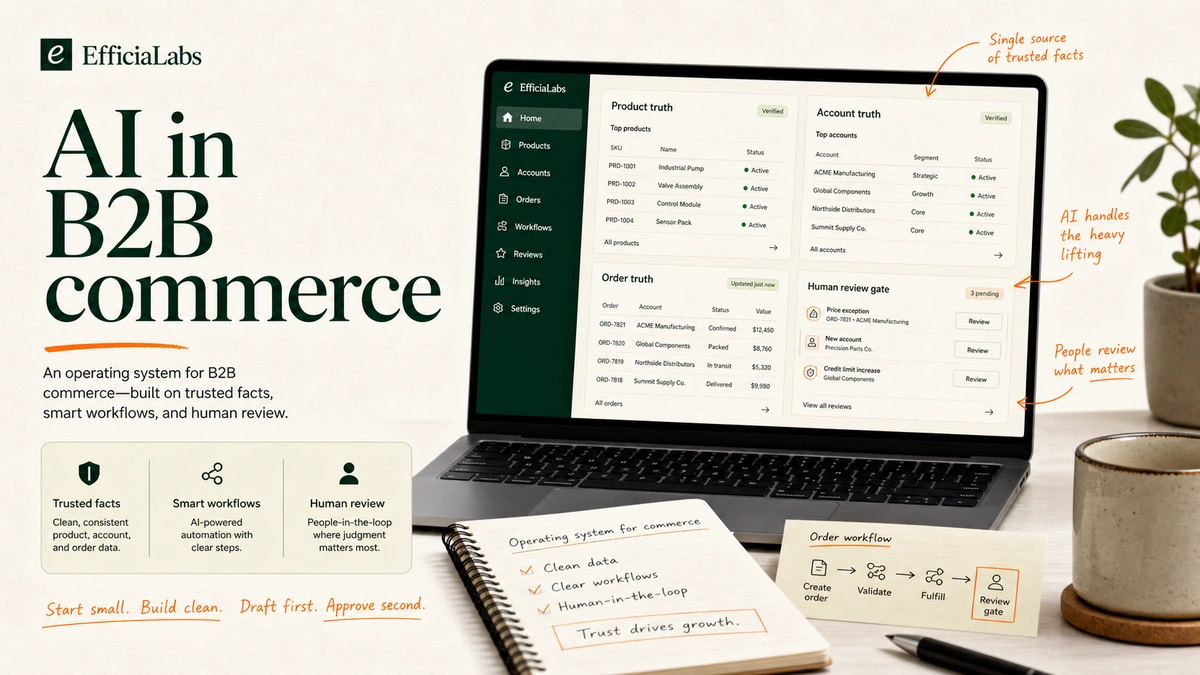
A founder sends a Slack message at 7:14 p.m.
“Can AI handle our wholesale reorders?”
Simple question. Messy answer.
Because “wholesale reorders” usually means product rules in one place, account pricing in another, purchase orders in email, payment terms in Shopify, and a sales rep who knows that one boutique always orders late but pays fast.
So the real question is not “can AI do B2B commerce?”
The real question is: where can AI help without making a quiet mess?
In our work with small commerce teams, we saw the same pattern: AI fails when the workflow is vague, not when the model is weak.
Key Takeaways
- AI works best in B2B commerce when it is attached to a narrow workflow, a named owner, and trusted source data.
- The safest early use cases are draft-first: product recommendations, reorder prompts, quote drafts, support summaries, and content drafts.
- Do not let AI silently change pricing, discounts, payment terms, refunds, or account permissions.
- Start where the workflow already hurts. One data source. One review gate. One weekly measure.
Table of Contents
- What is AI in B2B commerce?
- How should lean DTC teams prioritize AI in B2B commerce?
- 9 AI in B2B commerce use cases worth considering
- Common mistakes when using AI in B2B commerce
- Start with the workflow that already hurts
- Sources
What is AI in B2B commerce?
AI in B2B commerce is the use of machine learning, language models, and automation to help business buyers find products, place orders, reorder, request quotes, get support, and manage account-specific rules.
Not magic. Not “set and forget.”
A DTC brand selling wholesale has more rules than a normal online store:
- Different prices by account.
- Different catalogs by buyer type.
- Different payment terms by company location.
- Different minimums, pack sizes, deposits, and shipping rules.
- Different people placing orders for the same company.
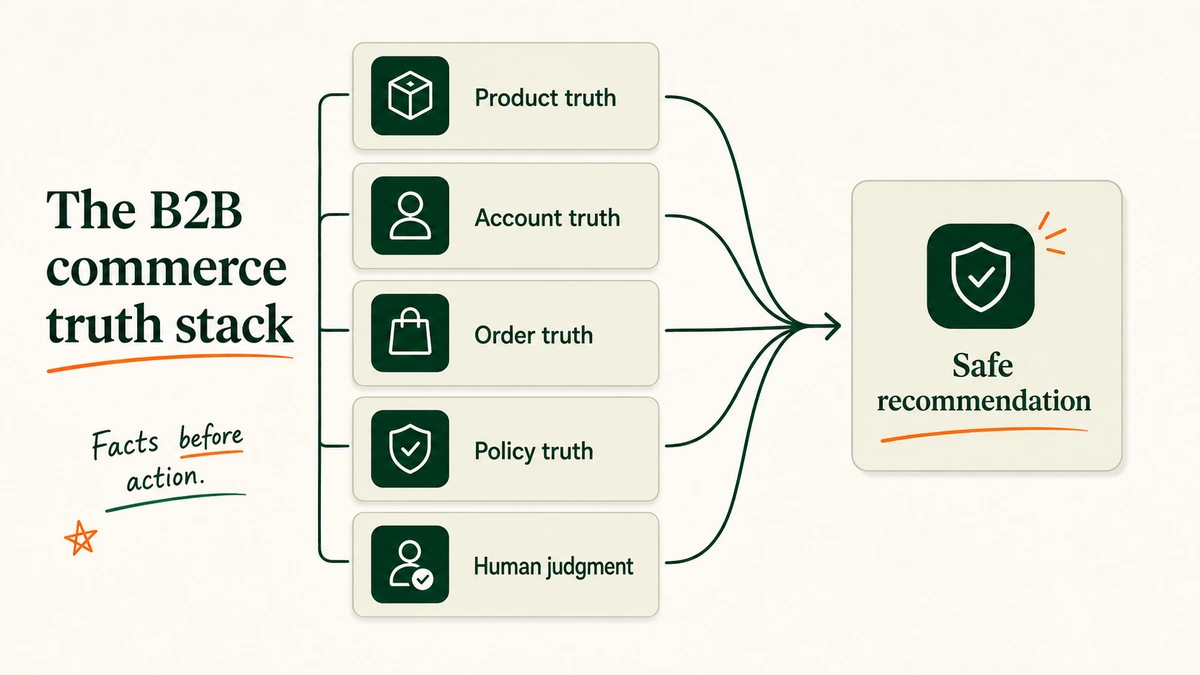
Shopify’s current B2B documentation is a useful reality check. Shopify B2B lets merchants create companies and company locations, assign catalogs, configure payment terms, use draft orders, accept purchase order numbers, and support reorders from customer accounts. Cc: Shopify B2B features and Shopify B2B terminology.
That is why generic AI advice breaks.
“Use AI for personalization” sounds neat until the model recommends a product the buyer cannot purchase, at a price they should not see, with a lead time your warehouse cannot meet.
Fun little problem.
How should lean DTC teams prioritize AI in B2B commerce?
Use four filters:
| Filter | Good sign | Bad sign |
|---|---|---|
| Value | The workflow wastes hours every week or blocks revenue | The workflow is merely annoying |
| Risk | AI can draft, rank, summarize, or recommend | AI would silently approve money, legal, or trust decisions |
| Data readiness | Product, account, order, and policy facts live somewhere reliable | The “truth” is tribal knowledge in Slack |
| Ownership | One person can review and improve the workflow weekly | Everyone owns it, so nobody does |
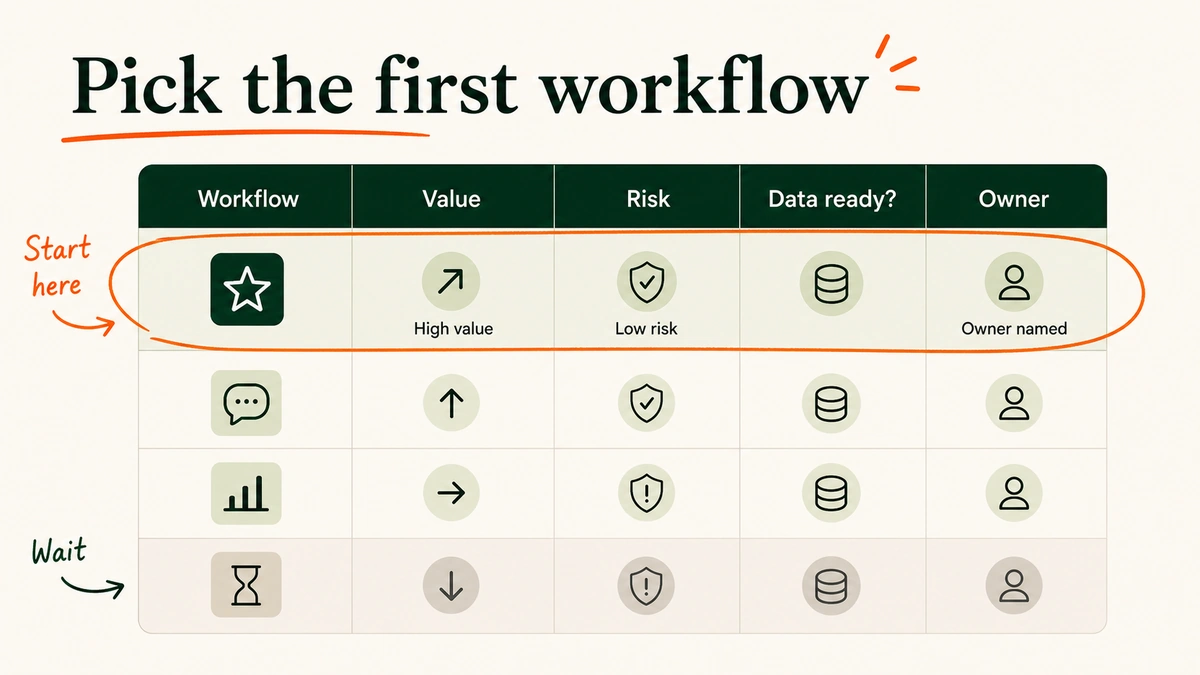
The boring filter wins.
McKinsey’s 2025 State of AI survey found 88% of respondents said their organizations regularly used AI in at least one business function, up from 78% a year earlier. But only about one-third said their companies had begun to scale AI programs. Cc: McKinsey State of AI 2025.
Translation: adoption is easy. Scaling is where the bodies are buried.
McKinsey also found AI high performers were nearly 3x as likely as others to fundamentally redesign individual workflows, and more likely to define when model outputs need human validation. That is the pattern to copy.
Workflow first. Tool second.
We’ve seen this work best when one person owns the workflow and one person can veto the output.
9 AI in B2B commerce use cases worth considering
These are not ranked by trendiness.
They are ranked by how often they show up as real work inside lean commerce teams.
1. Build the product and account truth layer first
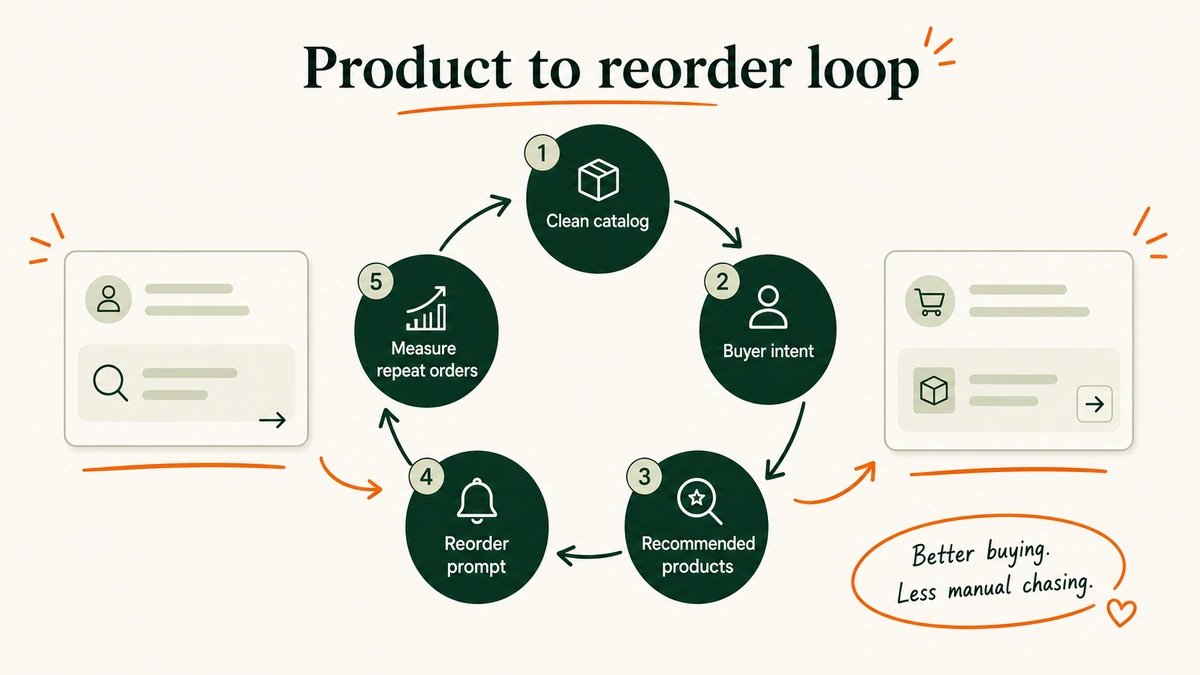
What it does: AI helps reconcile product facts, account rules, pricing logic, order history, and policy notes into a usable operating layer.
This is not glamorous. It is also the highest-leverage starting point.
Before AI recommends anything, it needs to know:
- Which products each account can buy.
- Which prices, terms, and discounts apply.
- Which SKUs have pack sizes, minimums, or quantity rules.
- Which products are low-stock, discontinued, seasonal, or region-limited.
- Which account notes matter.
Data required: Product catalog, cost and margin data, customer/company records, company locations, order history, catalogs, price lists, payment terms, support policies, inventory status.
Owner: Ops lead or ecommerce lead.
Safe first build: A weekly “B2B truth check” that flags missing product attributes, stale account notes, catalog conflicts, and accounts with outdated payment terms.
Human review gate: A person approves changes to catalogs, pricing, payment terms, permissions, and account notes.
Watch out for: AI confidently cleaning the wrong field. A product description typo is annoying. A wrong case-pack rule creates bad orders.
You might need it if: Your team cannot answer “what is this account allowed to buy?” without asking three people.
What I like: This is the work nobody wants to call AI. Good. It is exactly where AI earns trust.
For a deeper profit-first version of the same idea, read our guide on how Shopify stores use AI to improve profitability.
2. Improve B2B product search and recommendations
What it does: AI turns messy buyer intent into better product discovery.
A buyer does not always search like your catalog is written.
They search by job:
- “refill for hotel bathrooms”
- “summer display packs”
- “case of the 12 oz best seller”
- “same as last time but lavender”
AI can map that intent to product attributes, account-specific catalog access, purchase history, and margin rules.
Data required: Product titles, descriptions, variants, tags, attributes, prior orders, account catalogs, inventory, margin bands, substitutions, and excluded SKUs.
Owner: Merchandising lead.
Safe first build: A recommendation assistant that suggests 3-5 products for a buyer request, with evidence and exclusions.
Human review gate: Merchandising approves recommendation rules before they appear in a buyer-facing surface.
Watch out for: “Personalization” that ignores business rules. Gartner’s 2025 survey of 632 B2B buyers found 61% preferred an overall rep-free buying experience, but 69% reported inconsistencies between website information and seller-provided information. Cc: Gartner Sales Survey, June 2025.
That is the trap. Buyers want self-serve. They still punish inconsistent answers.
“Bad prospecting actively damages relationships with potential customers.”
- Robert Blaisdell, VP Analyst, Gartner Sales Practice
You might need it if: Your B2B buyers ask reps to find products that already exist on the site.
What I like: Good AI search does not feel like AI. It feels like the store finally understands how buyers talk.
3. Suggest account-specific reorders and replenishment
What it does: AI predicts what a business account may need next based on order history, seasonality, consumption patterns, and current availability.
This is the most DTC-friendly B2B use case.
If you sell consumables, apparel basics, beauty replenishment, food and beverage, home goods, or retail display packs, your buyers often reorder the same families of products.
AI can draft the nudge:
Review this account's last 12 months of B2B orders.

Suggest the next reorder based on:
- products ordered repeatedly
- time since last order
- seasonal patterns
- current inventory
- account-specific catalog access
- margin and shipping constraints

Return:
- recommended SKUs
- reason for each recommendation
- confidence level
- risks or missing data
- message draft for the sales rep
Data required: Account order history, SKU velocity, replenishment interval, inventory, current catalog, discontinued items, substitutions, and buyer notes.
Owner: Wholesale lead or sales rep.
Safe first build: A Monday reorder digest for reps. AI drafts recommendations. Reps decide what to send.
Human review gate: The rep approves every buyer-facing message.
Watch out for: Recommending unavailable products. Nothing says “we do not know your account” like pushing an out-of-stock SKU.
You might need it if: Reorders depend on a rep remembering who usually buys what.
What I like: It turns memory into a system. Still human. Less fragile.
4. Turn emails, PDFs, and spreadsheets into draft orders
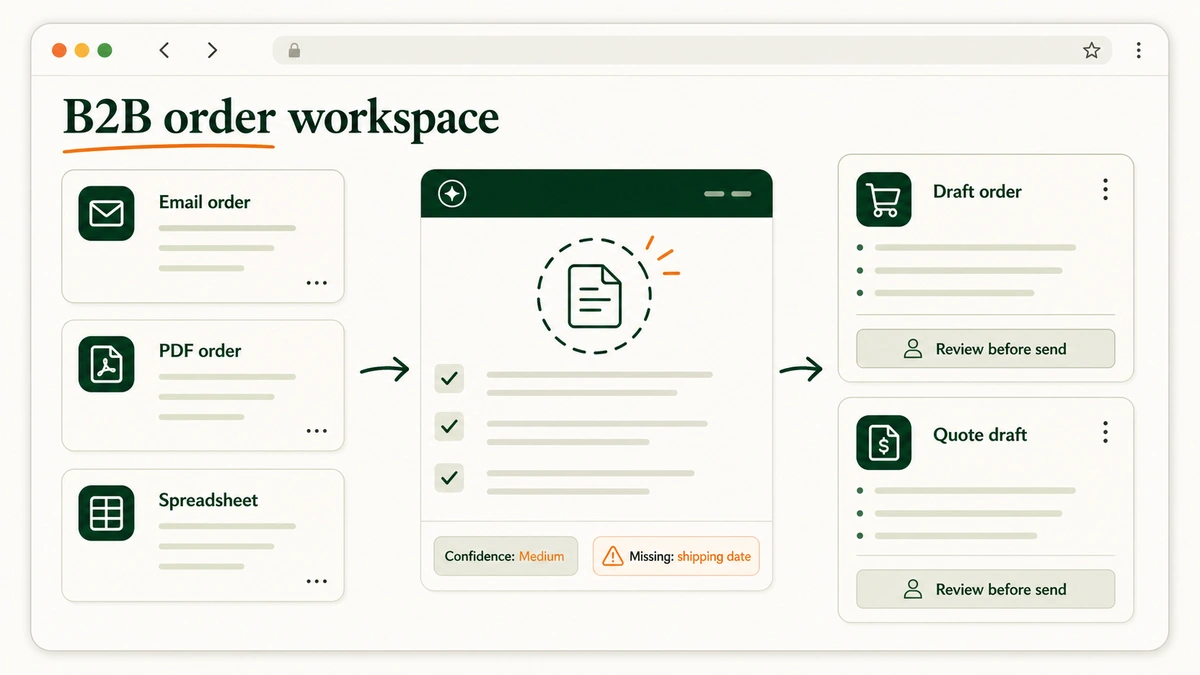
What it does: AI reads unstructured order requests and turns them into structured draft orders for review.
This is where B2B commerce gets beautifully ugly.
One buyer sends a spreadsheet. Another sends a PDF. Another replies to a three-month-old email thread with “same as March but add two cartons of the green one.”
AI can extract:
- Account name.
- Buyer contact.
- Shipping location.
- Product names or SKUs.
- Quantities.
- Requested delivery date.
- Missing fields.
- Conflicts with catalog, price, or inventory.
Data required: Email inbox, PDF/spreadsheet attachments, product catalog, customer/company records, account pricing, shipping addresses, inventory, and draft-order rules.
Owner: CX ops or wholesale operations.
Safe first build: AI creates a draft order summary, not an order. The human clicks into the ecommerce admin and creates or approves the order.
Human review gate: Every draft order is reviewed before confirmation, invoice, payment capture, or inventory reservation.
Watch out for: Ambiguous product names. “The green one” is not a SKU.
You might need it if: Your team manually retypes B2B orders from email into Shopify, an ERP, or a spreadsheet.
What I like: This is grunt-work compression. Not strategy theater. Just fewer copy-paste errors.
Shopify already supports B2B draft orders, PO numbers, price locks, inventory reservations, invoices from drafts, and payment terms. Cc: Shopify B2B features. AI’s job is to prepare the work. Your system of record still decides.
5. Draft quotes and sales-rep follow-ups
What it does: AI helps reps respond faster with quote drafts, account summaries, reorder notes, and follow-up emails.
The rep should not spend 20 minutes finding the last order, checking what was quoted, scanning the buyer’s catalog, and writing “just following up.”
AI can create the briefing:
- Account summary.
- Last 3 orders.
- Open quote or draft order.
- Products discussed.
- Stock constraints.
- Suggested next message.
- Questions the rep should ask.
Data required: CRM notes, order history, quote history, email thread, product availability, pricing rules, account catalog, and payment terms.
Owner: Sales lead.
Safe first build: A rep copilot that drafts internal account briefs and follow-up messages.
Human review gate: Reps approve all external emails, quote terms, discounts, and delivery promises.
Watch out for: Generic sales language. B2B buyers do not need more “checking in.” They need an answer, a price, a next step, or a reason to wait.
You might need it if: Reps are spending more time preparing follow-ups than having useful buyer conversations.
What I like: The best version gives reps more context, not more spam.
Gartner’s same 2025 survey found 73% of B2B buyers actively avoid suppliers that send irrelevant outreach. That should be printed above every AI email workflow.
“Sellers should offer unique guidance.”
- Alice Walmesley, Director Analyst, Gartner Sales Practice
6. Route B2B support and account-service requests
What it does: AI classifies account-service requests, drafts replies, and escalates risky cases.
B2B support is different from normal DTC support.
A “where is my order?” ticket might affect a retail launch date. A return request might involve a buyer, a store manager, a sales rep, and a payment term. A pricing complaint might expose an account rule problem.
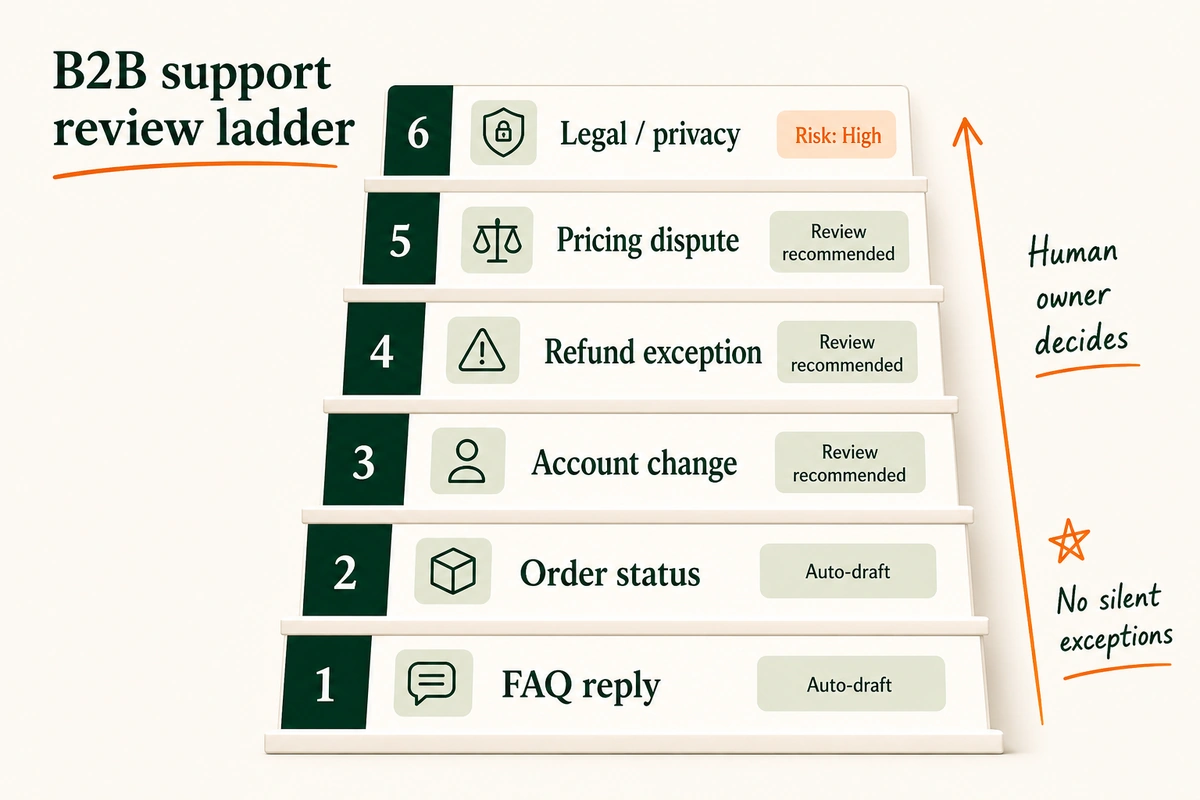
Use a ladder:
- Auto-draft: FAQs, order status, invoice copy, reorder instructions.
- Review recommended: account changes, address changes, returns, damaged goods.
- Human owner decides: refund exceptions, pricing disputes, chargebacks, legal/privacy issues, VIP accounts.
Data required: Support inbox, order data, company/location data, policy docs, tone guide, escalation contacts, SLAs, and account notes.
Owner: CX lead or support lead.
Safe first build: AI drafts internal ticket summaries and proposed replies. A human sends.
Human review gate: Any refund, exception, pricing, safety, legal, privacy, or angry-customer case goes to a human.
Watch out for: Silent exceptions. The model should not “be helpful” by inventing policy.
You might need it if: Your support team keeps asking sales, ops, or finance for the same account context.
What I like: It separates standard replies from judgment calls.
For Shopify support-specific workflows, see our guides on using ChatGPT for Shopify customer support and using Claude for nuanced Shopify support tickets.
We built the ladder this way because support AI should shrink the queue, not hide the scary cases.
7. Guard pricing, discounts, and margin decisions
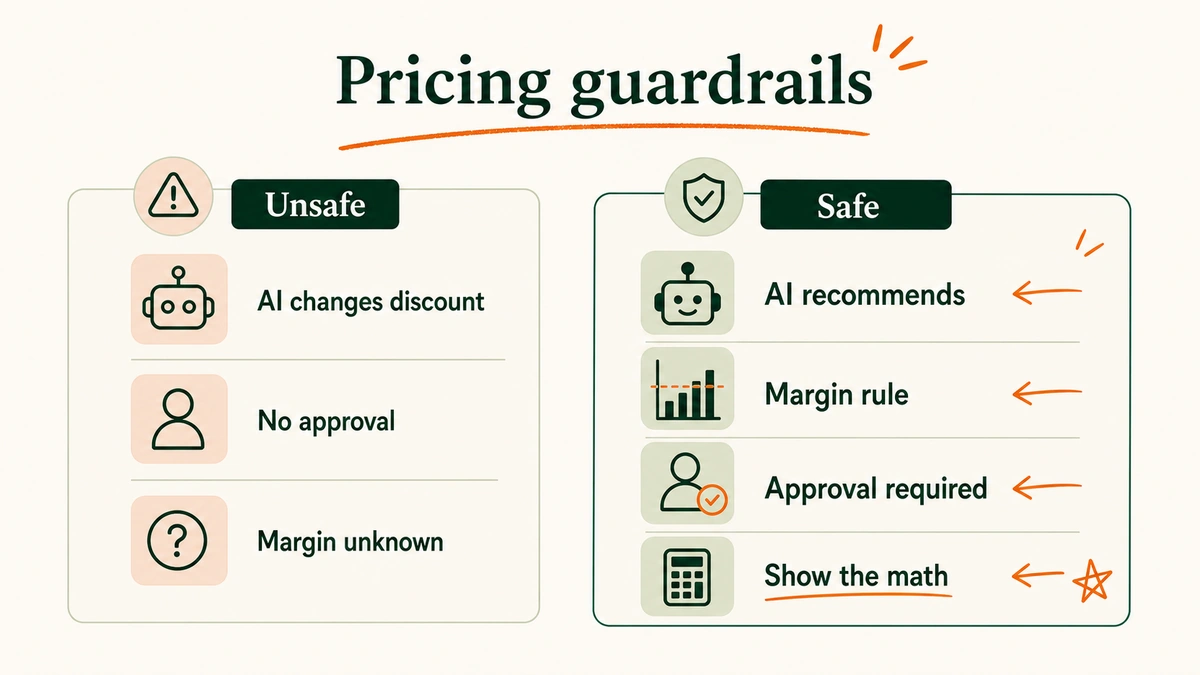
What it does: AI flags pricing conflicts, discount leakage, and margin risk before a person approves the action.
This is where I get boring on purpose.
Do not let AI silently change B2B prices.
Let it recommend. Let it show the math. Let a person approve.
Data required: Cost of goods, margin targets, account price lists, volume breaks, discount rules, shipping costs, payment fees, returns, and current inventory.
Owner: Finance, ecommerce, or revenue operations.
Safe first build: A pricing review assistant that flags orders or quotes where margin falls below a threshold.
Human review gate: Humans approve price changes, discount rules, payment terms, and exception pricing.
Watch out for: Revenue pretending to be profit. A huge wholesale order can still be a bad order if discounts, freight, payment terms, and returns kill margin.
You might need it if: Reps negotiate from instinct and finance finds out later.
What I like: AI is useful here as a brake, not a gas pedal.
8. Forecast inventory and demand risk
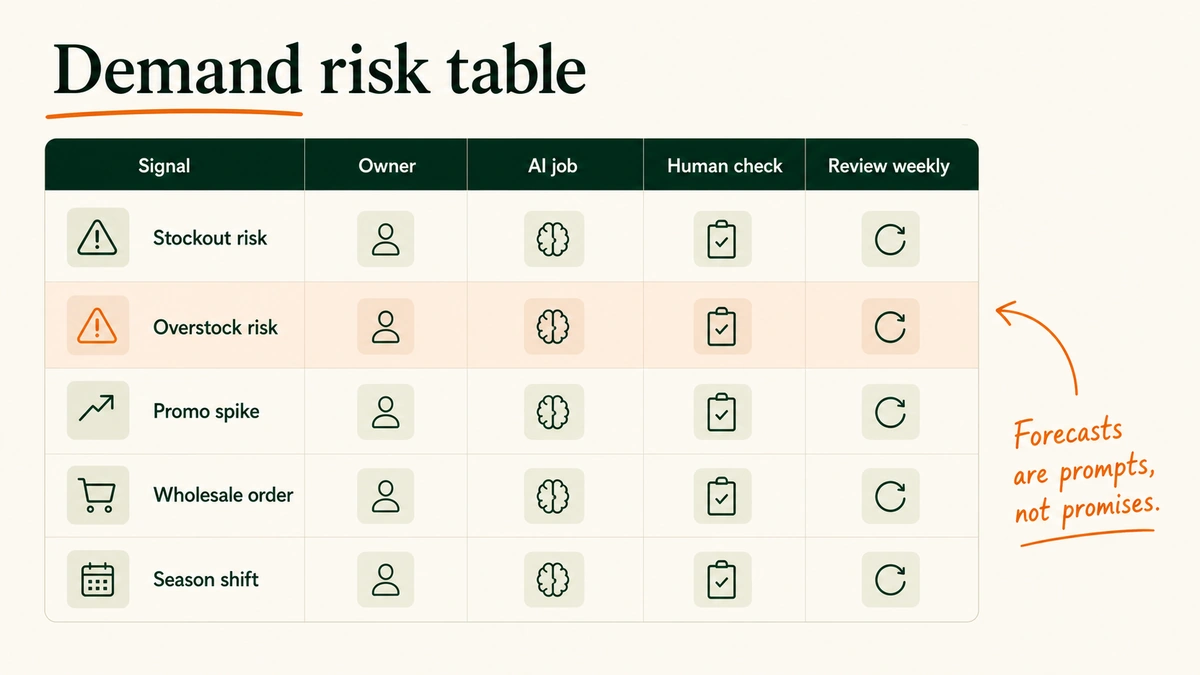
What it does: AI flags stockout risk, overstock risk, preorder risk, and fulfillment constraints earlier.
B2B demand is lumpy.
One account can distort a week. A retailer promo can drain stock. A distributor reorder can arrive late, then need everything tomorrow.
McKinsey’s 2024 logistics analysis found blind handoffs may drive 13% to 19% of logistics costs, up to $95 billion in annual US losses. It also estimated that combining visibility, AI workflow automation, and generative AI contextual communication could reduce direct costs by 35% to 40% for carriers. Cc: McKinsey logistics handoffs analysis.
For a lean DTC brand, the takeaway is smaller:
Do not forecast in a vacuum.
Connect B2B demand signals to inventory, operations, and customer communication.
Data required: Sales history, wholesale pipeline, confirmed POs, open quotes, inventory, inbound stock, lead times, shipping constraints, marketing calendar, and account notes.
Owner: Ops lead or inventory planner.
Safe first build: A weekly risk report with three labels: stockout risk, overstock risk, and promise risk.
Human review gate: A person approves purchase orders, customer promises, allocation rules, and inventory holds.
Watch out for: Forecast certainty. AI should say “risk,” “confidence,” and “missing data.” Not “truth.”
You might need it if: Wholesale orders regularly surprise your inventory plan.
What I like: The goal is not perfect prediction. The goal is fewer preventable surprises.
9. Generate product content, spec sheets, and localized copy
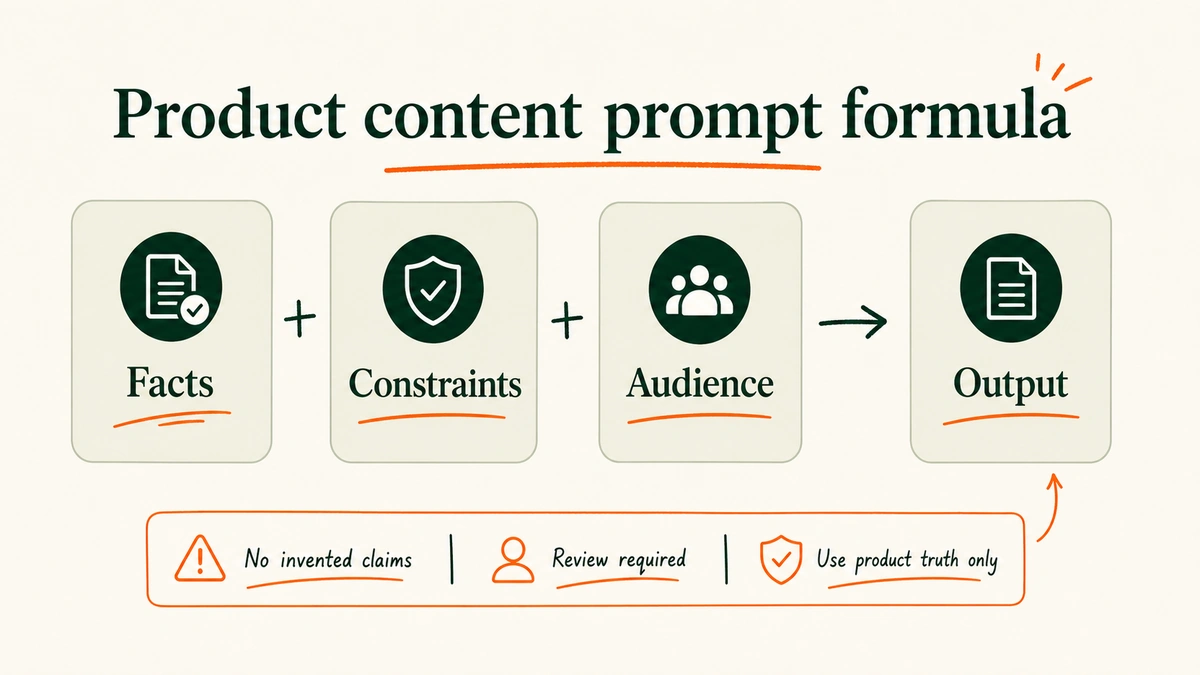
What it does: AI drafts product descriptions, spec sheets, merchandising copy, sales blurbs, and localized account content from verified facts.
This is the use case everyone starts with.
It is fine. Just do it properly.
The prompt should not say:
“Write a product description for this SKU.”
It should say:
Use only the product facts below.

Audience: B2B buyer for a retail store.
Goal: Help the buyer understand fit, use case, pack size, and reorder logic.
Tone: clear, specific, no hype.

Do not invent:
- claims
- certifications
- materials
- dimensions
- compliance language
- performance results

Output:
- 60-word product description
- 5 bullet spec sheet
- 1 sales-rep note
- missing facts to confirm
Data required: Product attributes, dimensions, materials, pack size, case count, certifications, usage notes, care instructions, region limitations, and brand voice.
Owner: Merchandising or content lead.
Safe first build: Draft spec sheets for 20 high-volume wholesale SKUs, with missing-fact flags.
Human review gate: Merchandising approves factual accuracy; legal/compliance reviews regulated claims.
Watch out for: Invented claims. Especially around materials, safety, performance, sustainability, and compliance.
You might need it if: Your B2B buyers keep asking for the same product details your PDPs do not answer.
What I like: Done well, this turns product knowledge into reusable assets. Done badly, it creates liability with nicer grammar.
Common mistakes when using AI in B2B commerce
Mistake 1: Starting with the model.
Start with the workflow. Then pick the tool.
Mistake 2: Letting AI act before it can explain.
For B2B, “show the evidence” is not optional. It is the review surface.
Mistake 3: Treating B2B like a bigger DTC cart.
B2B has account rules, buyer permissions, payment terms, POs, catalogs, locations, reps, and negotiated exceptions.
Mistake 4: Skipping ownership.
Every AI workflow needs one owner. Not a committee. One person who checks the output weekly.
Mistake 5: Hiding AI in the messy parts.
The mess is where review matters most: pricing, refunds, terms, catalog access, delivery promises, and account exceptions.
Start with the workflow that already hurts
The best first AI build is not the fanciest one.
It is the workflow your team already complains about.
For one brand, that is quote prep. For another, it is wholesale reorders. For another, support routing. For another, product spec sheets.
Pick one.
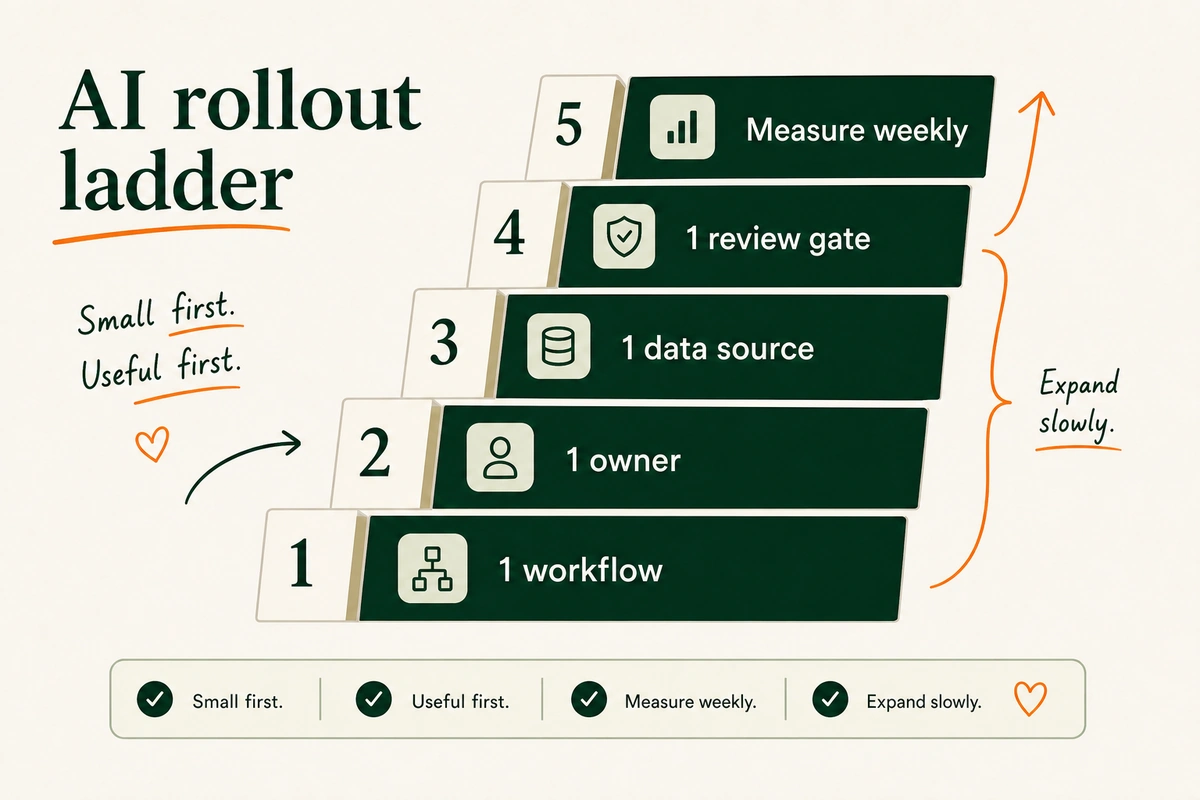
Give it:
- One data source.
- One owner.
- One review gate.
- One weekly metric.
- One rule for when AI must stop and ask.
Then run it for four weeks.
Small first. Useful first.
See you in the next one – Vai
Sources
- Shopify Help Center: Overview of B2B features on Shopify
- Shopify Help Center: B2B terminology
- Gartner: 61% of B2B buyers prefer a rep-free buying experience, 2025
- McKinsey: The State of AI in 2025
- McKinsey: Digitizing mid- and last-mile logistics handovers to reduce waste, 2024
- BigCommerce: AI for B2B Ecommerce in 2026
- IBM: AI in commerce: Essential use cases for B2B and B2C

No comment yet, add your voice below!