

If you are asking how to eliminate Shopify inventory Excel chaos, the fix is one loop: export Shopify data, merge vendor context, flag exceptions with AI, approve changes, then update Shopify from a clean source.
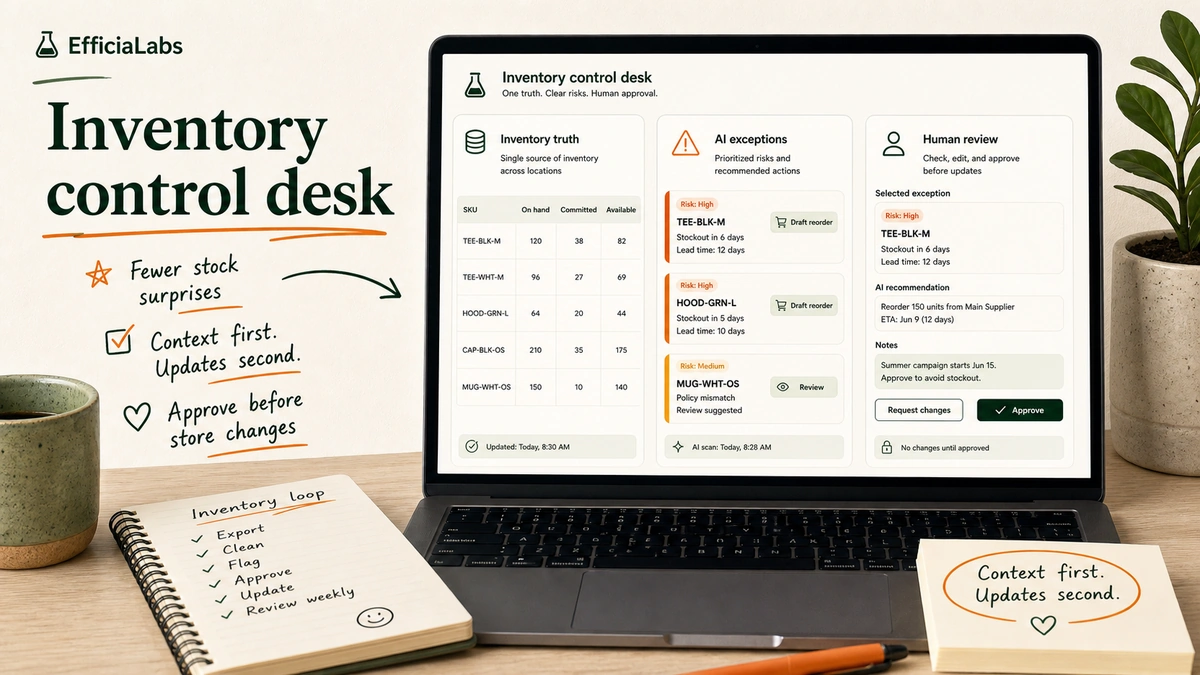
7:08am. Shopify Admin open. Vendor sheet open. Warehouse CSV open. Someone has named a tab final_final_reorder_v3.
This is how inventory chaos usually starts. Not with a broken system. With one helpful spreadsheet that becomes the shadow system.
This guide shows the operating loop I would install first: one truth table, a small set of risk rules, AI for exception review, and humans approving any Shopify-changing action.
In our work, the best fix is rarely a big bang. It is a clean small loop that the team can trust by Friday.
Table of Contents
- In a sentence
- Why Shopify inventory Excel chaos starts quietly
- What should replace the spreadsheet?
- How do you eliminate Shopify inventory Excel chaos?
- Shopify Flow vs. an AI mini-app
- Common Shopify inventory Excel mistakes to avoid
- My final take on boring inventory
In a sentence
To eliminate Shopify inventory Excel chaos, stop using spreadsheets as the decision layer. Use them as a staging layer. Shopify stays the inventory system, one truth table holds context, AI drafts exceptions, and a human approves every update.
Source checks used in this guide:
- As of 2026-05-28, Shopify says inventory CSV imports can’t exceed 15 MB.
- As of 2026-05-28, Shopify lists Flow on 4 plans: Basic, Grow, Advanced, and Plus.
- In a 2026 Shopify Community thread, one merchant described the problem at 20+ orders a day.
Note: This is not an ERP replacement plan. It is the lean version you can run before the team is ready for a larger inventory platform.
Small team. Clear owner. No mystery rows.
Why Shopify inventory Excel chaos starts quietly
The first sheet is innocent.
One tab for reorder points. One tab for vendor lead times. One tab for returns. Then a VA checks Shopify every morning because the sheet is never quite current.
Shopify’s inventory CSV guide explains the tension. Inventory exports can include product identifiers, locations, inventory states, and On hand (current) / On hand (new) columns. Shopify can also reject stale rows when current quantities no longer match the export.
“Effective inventory management helps you avoid selling products that have run out of stock.”
- Shopify Help Center, Managing inventory
Good. Useful. Protective.
But it means the spreadsheet has to respect Shopify’s logic. If the sheet uses loose SKU names, fuzzy location labels, or stale vendor notes, it becomes a weaker admin panel.
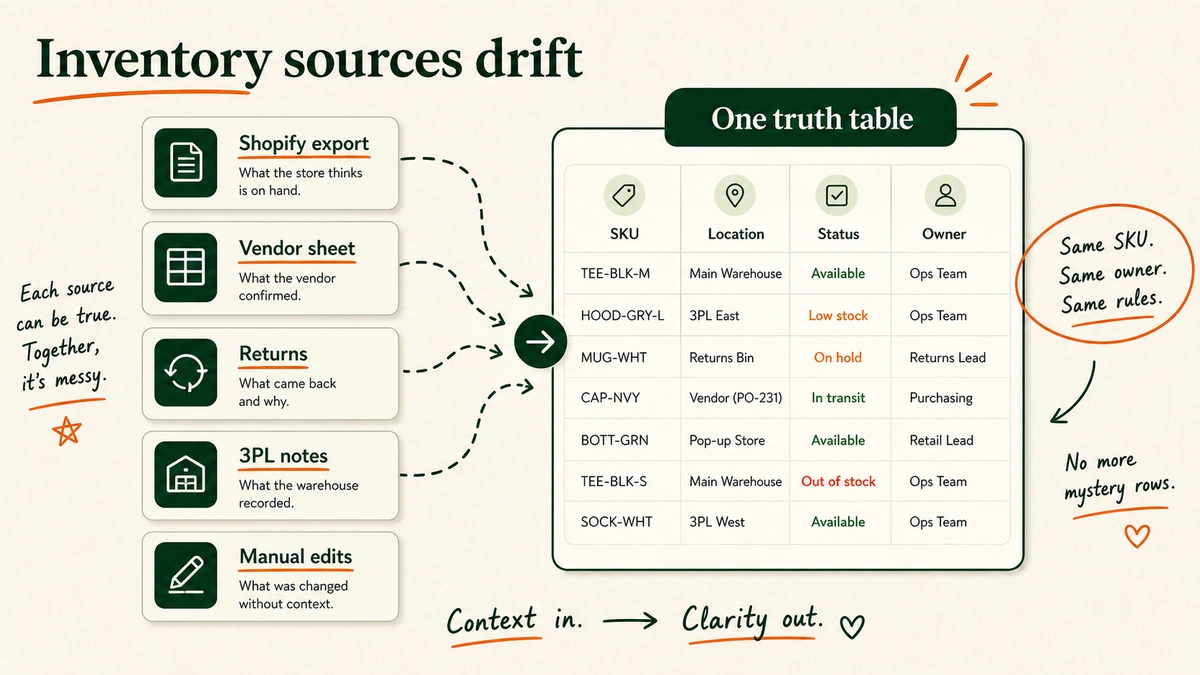
The pain is visible in Shopify’s own community. In 2026, a merchant doing 20+ orders a day described the pattern: a zero-inventory SKU kept taking orders, a vendor moved from 3-day to 8-day fulfillment, and the issue was found days later in a sheet.
Crickets. Then refunds.
What should replace the spreadsheet?
Replace the spreadsheet with an inventory control loop.
The loop can still use a sheet. The difference is that the sheet now has a job: collect context before a reviewed Shopify update.
| Layer | What it answers | Owner |
|---|---|---|
| Product truth | Which SKU, variant, and location is this? | Ops |
| Stock truth | What does Shopify say today? | Ops |
| Context truth | What did vendors, returns, or 3PLs change? | Ops + supply |
| Risk rules | Which rows need attention? | Ops lead |
| Review gate | Who can approve the update? | Manager |
| Audit trail | What changed, and when? | Owner |
This is where AI helps. Not as an inventory boss. As a fast reader.
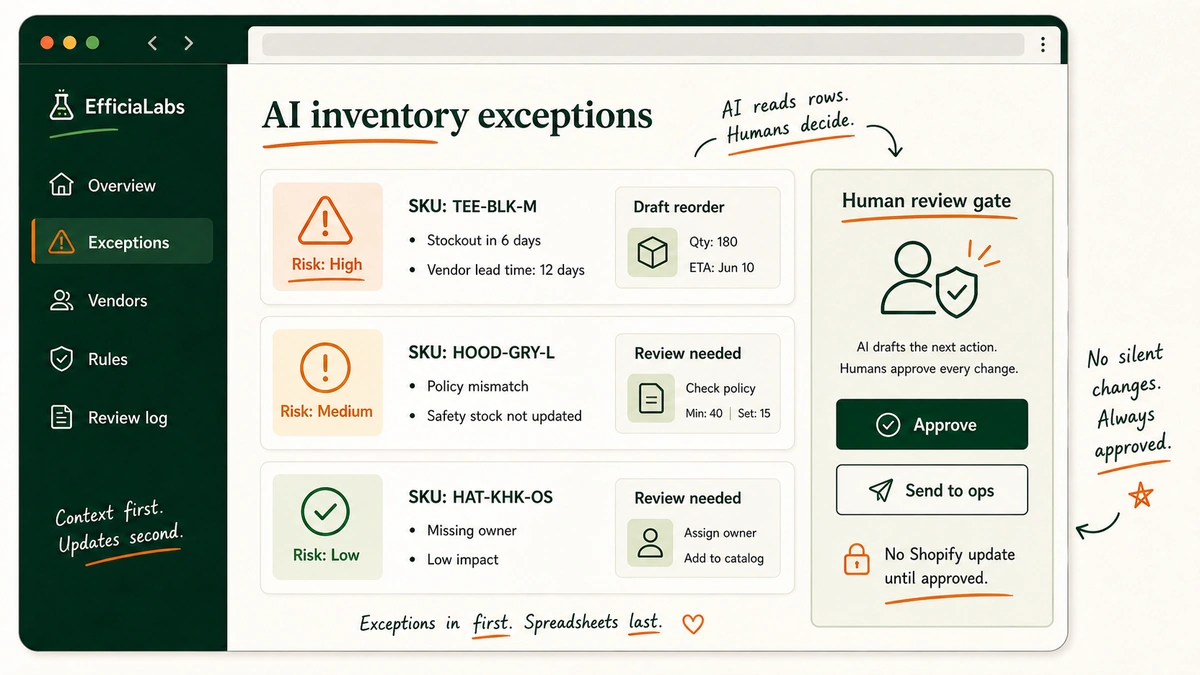
It can scan the truth table, compare vendor lead times with Shopify quantities, and return only the rows that need review today. Same pattern as AI profitability loops: find the leak, show the exception, make the next action obvious.
Important note: If the source data is messy, AI makes the mess faster. Clean the row model first.
In our work with lean teams, this is the line that matters most. AI should make the review faster. It should not make the final call.
How do you eliminate Shopify inventory Excel chaos?
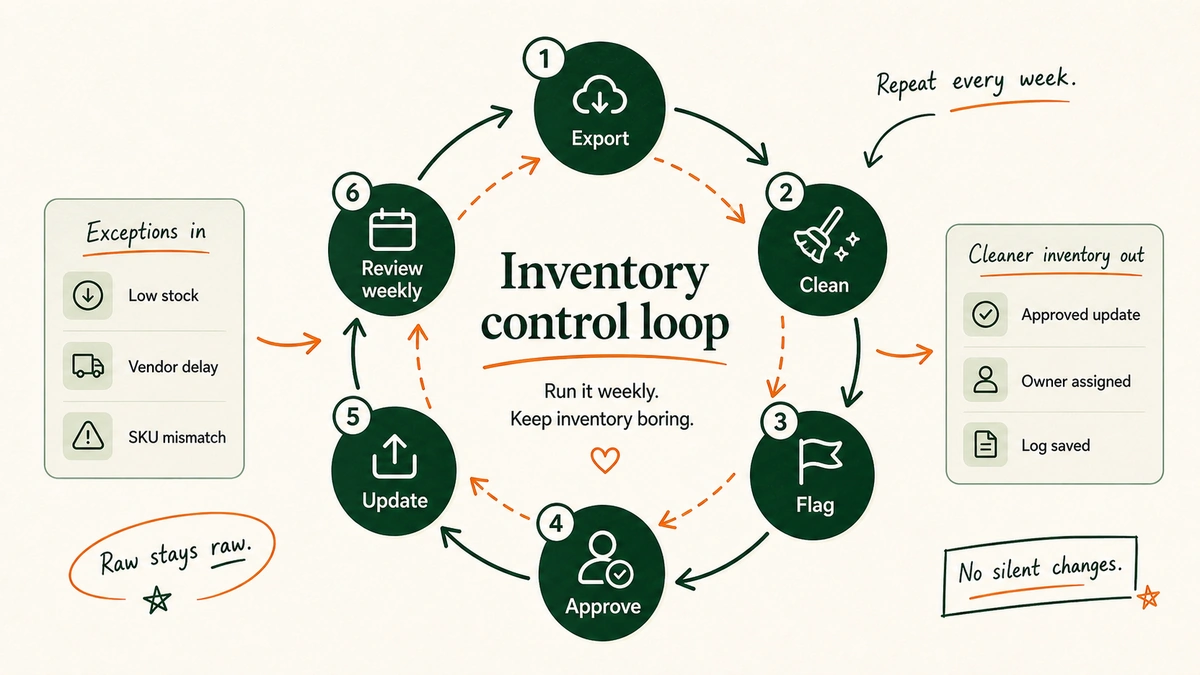
You eliminate Shopify inventory Excel chaos by replacing manual sheet maintenance with a six-step loop.
Step 1: Export the right Shopify inventory data.
Start with Shopify, not the team’s favorite sheet.
Use the inventory export as the daily or weekly raw snapshot. Shopify lets you export one location or all locations. Its current CSV options include “All states” and “Available”; “All states” is the safer baseline because it gives a fuller view of inventory states by location.
Your baseline export should include:
- SKU, handle, title, variant values, and location.
- Available, committed, incoming, unavailable, and on-hand quantities.
On hand (current)andOn hand (new)when preparing imports.
Raw stays raw. No hand edits in the snapshot.
Step 2: Create one inventory truth table.
Now join Shopify rows to the context your team keeps elsewhere.
Each row should answer:
- What SKU and Shopify variant is this?
- Which location does it map to?
- What does Shopify say today?
- What does the vendor, return file, or 3PL file change?
- What rule decides the next action?
- Who owns review?
Use plain statuses: safe, watch, needs vendor check, draft reorder, manager review, approved for Shopify update.
A custom AI mini-app can remove the row-scanning work here. In our work, the first useful build is usually a review queue, not a system that updates Shopify by itself.
That is a calm first win. The team opens one page, sees the few rows that matter, and knows who owns the next step.
Step 3: Add risk rules before automation.
Risk rules decide what deserves attention.
Start with five:
- If available inventory is below reorder point and lead time is longer than cover, flag high risk.
- If Shopify says a SKU is sellable but the vendor marks it discontinued, flag policy mismatch.
- If a location is
not stockedbut the team expects stock there, flag location mismatch. - If returns inflate available inventory, flag returns review.
- If SKU or location is missing, block automation.
“A location is any physical place where you sell products, fulfill orders, or stock inventory.”
- Shopify Help Center, Locations
Pro tip: Do not build 30 rules. Pick the five errors that cost refunds, stockouts, vendor delays, or founder attention.
Step 4: Use AI to turn rows into exceptions.
Give AI a narrow job. Not “manage inventory.” Too vague. Too risky.
Use this:
You are reviewing Shopify inventory exceptions for a DTC brand.

Inputs:
- Shopify inventory export
- Vendor lead-time sheet
- Returns summary
- Reorder rules

Return only rows that need human attention today.

For each row, include:
- SKU
- Location
- Risk: High, Medium, or Low
- Reason
- Suggested next action
- Shopify update now: Yes or No

Rules:
- Never recommend a Shopify update when SKU or location is missing.
- Never approve a reorder automatically.
- Keep reasons under 30 words.
The prompt is not the system. The system is the truth table, rules, approvals, and audit trail around it.
This is how I would judge broader AI use cases for lean DTC teams too. Workflow first. Model second.
Step 5: Keep a human approval gate.
Inventory updates change customer promises.
AI can flag a SKU, draft a reorder note, prepare import rows, and explain the reason. It should not silently change Shopify inventory, hide products, or place purchase orders.
| AI can do | Human must approve |
|---|---|
| Flag risky SKUs | Reorder quantities |
| Summarize vendor mismatches | Vendor commitments |
| Draft import rows | Shopify imports |
| Draft ops notes | Availability changes |
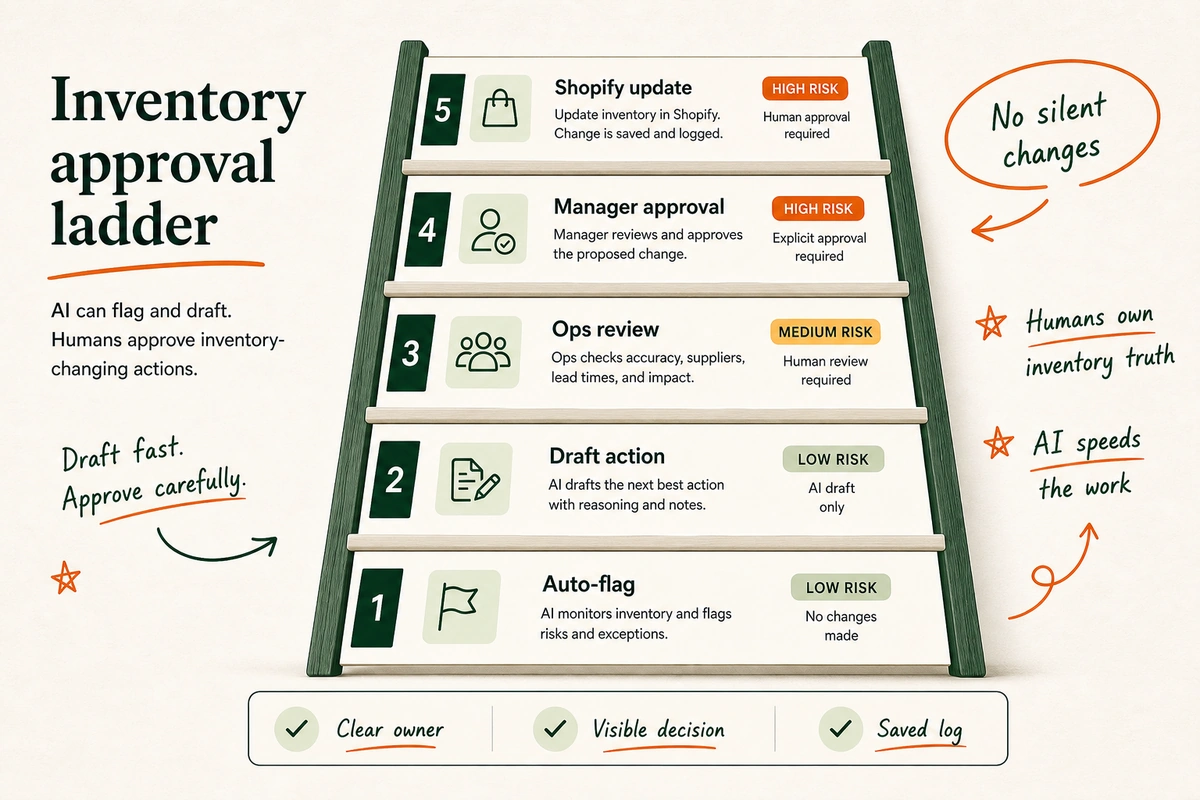
Same idea as ChatGPT for Shopify customer support or Claude for Shopify customer support: draft fast, review risky decisions, keep trust intact.
Step 6: Review the loop every week.
The weekly review is where the system gets sharper.
Ask:
- Which alerts were real?
- Which alerts were noise?
- Which vendor files caused cleanup work?
- Which SKUs kept returning?
- Which decisions waited on the wrong owner?
Then adjust the rules. Fewer surprises beats more dashboards.
The goal is not to stare at a new tool. The goal is to stop asking, “Which sheet is right?”
Run the first test with ten SKUs. Pick bestsellers, slow movers, one new item, one return-heavy item, and one vendor-risk item. Keep the test small. You want to see the loop work before you add the whole catalog.
On Friday, ask one plain question: did this help us act sooner?
If yes, add more SKUs. If no, fix the rule or the source file. Simple.
Shopify Flow vs. an AI mini-app
Shopify Flow is useful when the event is already clean inside Shopify.
Use Flow for:
- Low-stock emails.
- Tasks when inventory changes.
- Notifications when a variant is out of stock at one location.
- Product tags or visibility changes based on stock rules.
Shopify Flow runs on triggers, conditions, and actions. Shopify’s inventory trigger can start a workflow when inventory changes because of an order, manual edit, or app update. Shopify also lists templates for low-stock alerts, vendor reorder emails, and out-of-stock workflows.
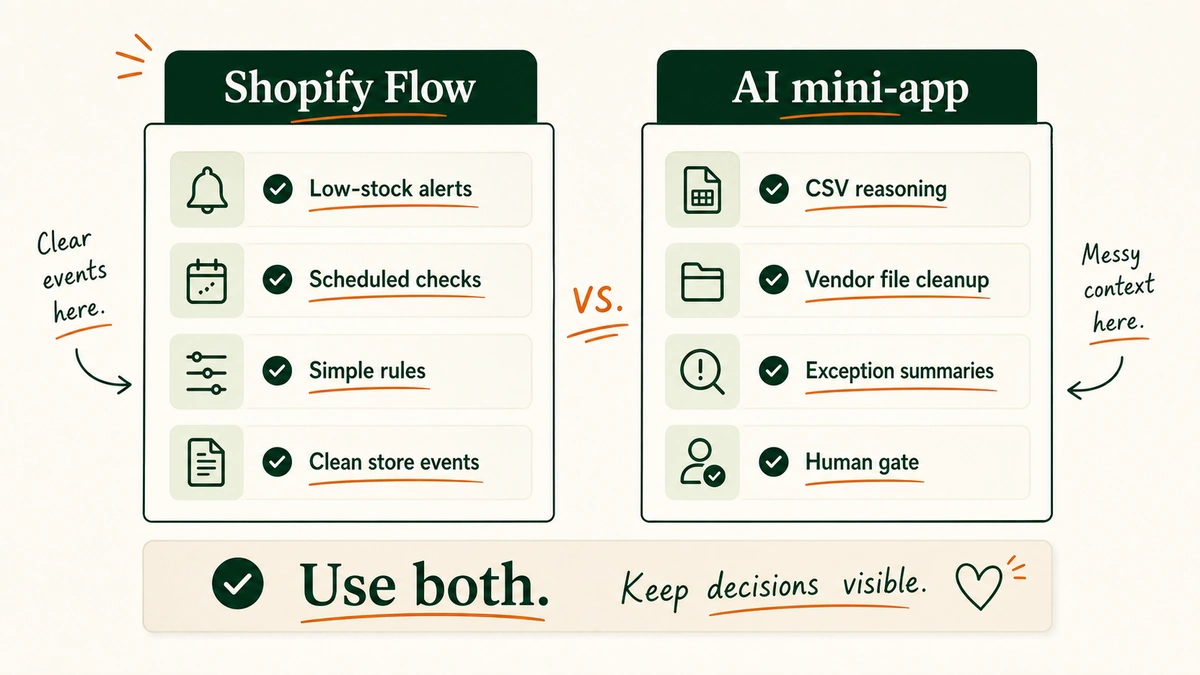
Use an AI mini-app when the messy context sits outside Shopify:
- Vendor lead-time sheets.
- 3PL CSVs.
- Returns summaries.
- Manual product policy notes.
- SKU naming cleanup.
- Weekly exception summaries.
Flow watches clean Shopify events. AI helps reason across the messy files around Shopify.
Use both if both fit. Flow can send the clean alert. AI can write the messy summary.
That split keeps the stack sane. Shopify handles the clear store event. AI handles the row that needs context. Ops owns the call.
Common Shopify inventory Excel mistakes to avoid
Mistake 1: Automating the old sheet. Duplicate SKUs, hidden formulas, stale vendor columns. Now faster.
How to avoid it: Build a new truth table with only the fields needed for inventory decisions.
Mistake 2: Treating location as a note. Multi-location inventory is not a comment cell.
How to avoid it: Use controlled location names that match Shopify.
Mistake 3: Letting AI approve changes. Confident text is not proof.
How to avoid it: Require approval for imports, reorder quantities, discontinued-SKU decisions, and availability changes.
Mistake 4: Measuring alerts instead of outcomes. A long queue is not progress.
How to avoid it: Track fewer late stockouts, fewer vendor surprises, fewer SKU mismatches, and fewer morning admin checks.
Simple scorecard. Simple review. Better week.
One good rule beats ten vague alerts. One owner beats a shared sheet no one trusts.
My final take on boring inventory
I would not start with a giant tool search. I would start with one truth table, five risk rules, one approval gate, and a small AI review layer that turns spreadsheet scanning into exception review. Boring inventory is the goal. Calm inputs, clear owners, fewer surprises.
– Vai
Related Articles
- How Shopify stores use AI to improve profitability
- 9 AI in B2B commerce use cases for lean DTC teams
- ChatGPT for Shopify customer support
- Claude for Shopify customer support
Sources
- Shopify Help Center: Exporting and importing inventory with a CSV file
- Shopify Help Center: Locations
- Shopify Help Center: Managing inventory
- Shopify Help Center: Shopify Flow
- Shopify Help Center: Product variant inventory quantity changed
- Shopify Community: How do you catch ops problems in your store before they get expensive?

No comment yet, add your voice below!