

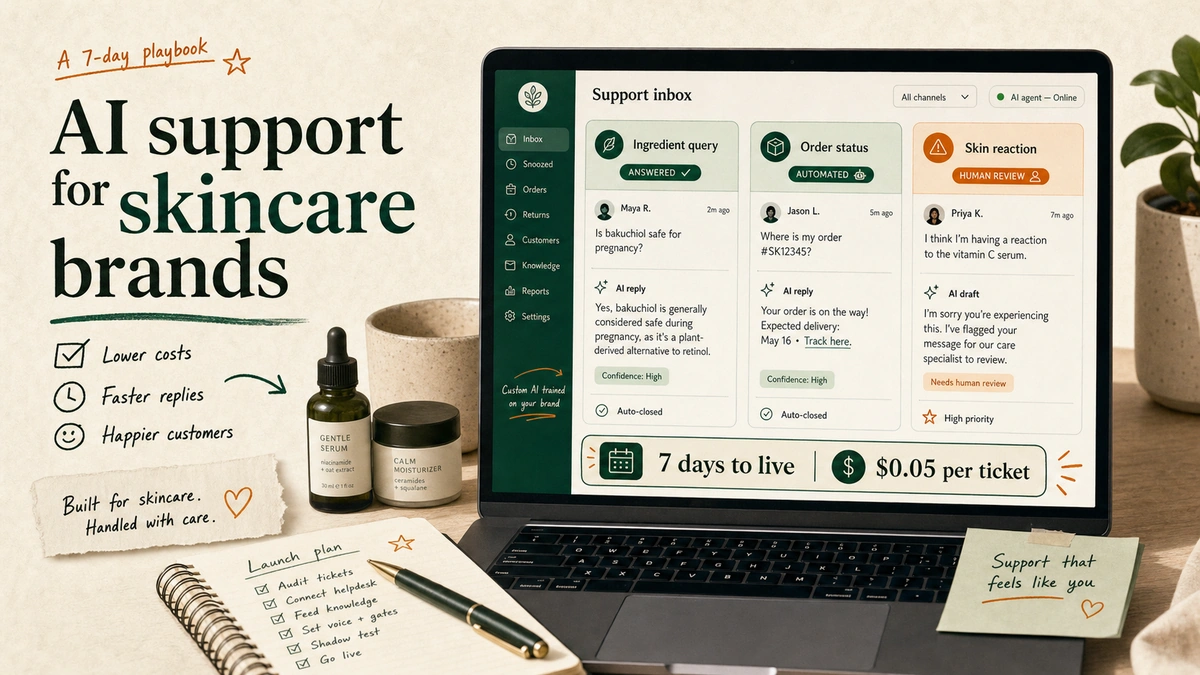
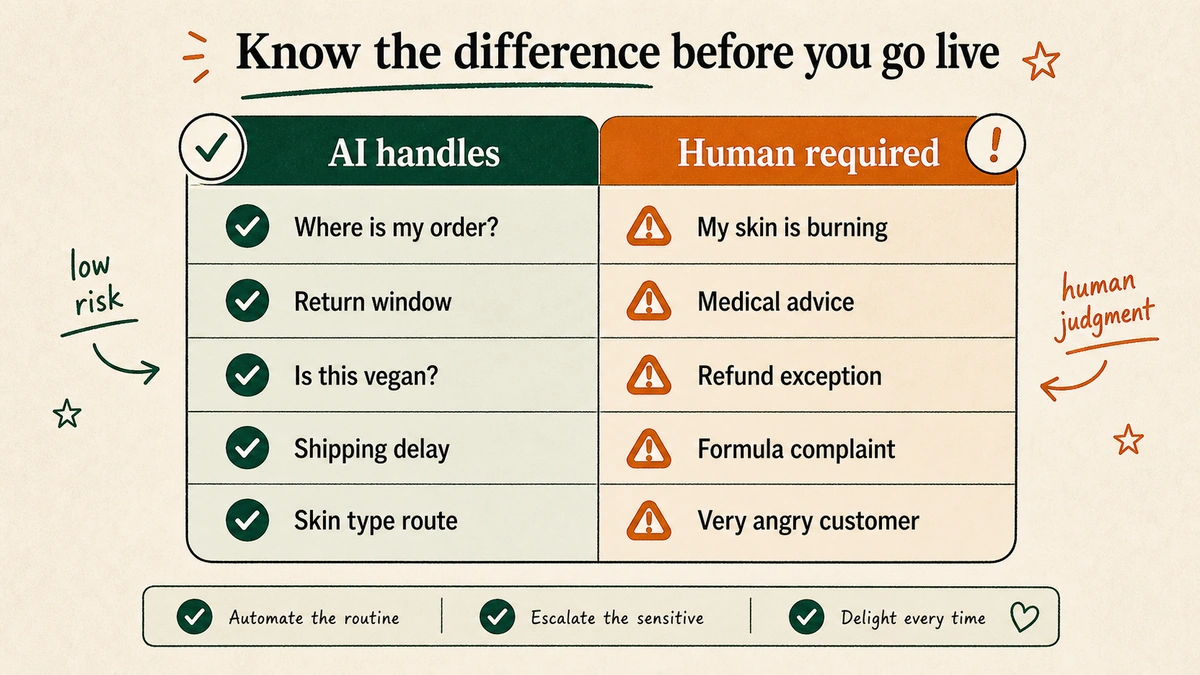
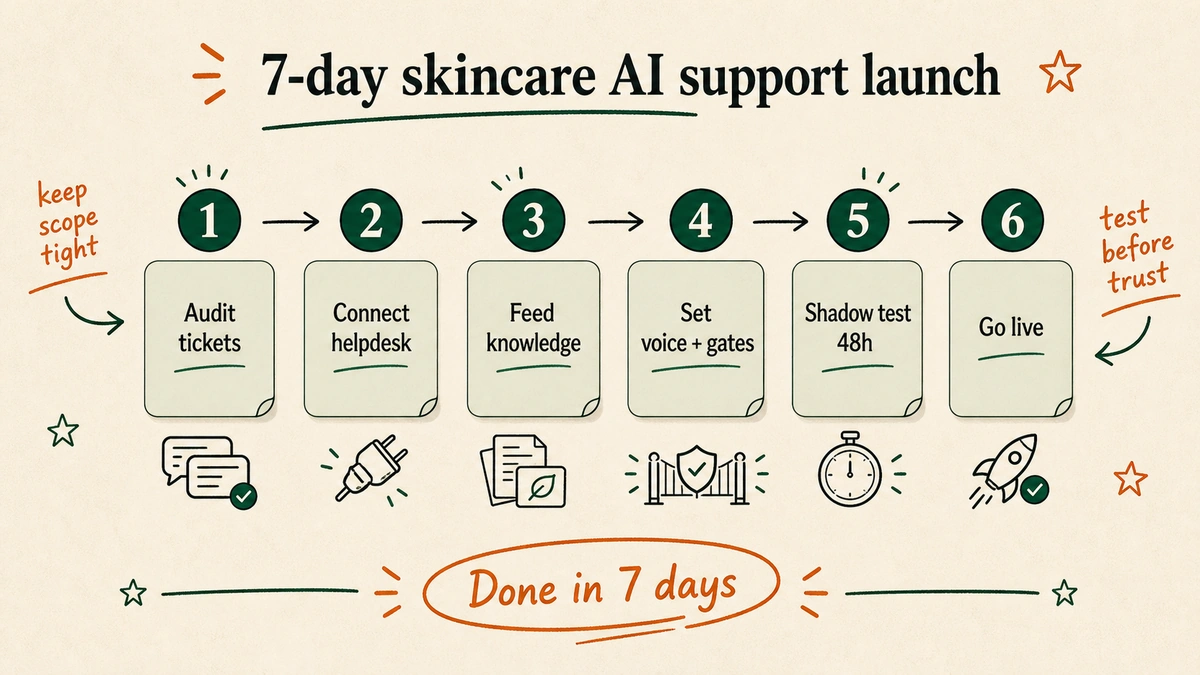
Here is exactly how to deploy AI customer service to skincare ecommerce brands on Shopify in 7 days. Six steps: audit tickets, connect your helpdesk, feed the AI your product knowledge, set brand voice rules, run a 48-hour shadow test, go live. Every step is below.
One thing before we start. This post is about custom AI customer service. Not the AI features built into platforms like Gorgias AI or Zendesk AI. Those are helpdesk add-ons. Useful for some things. Custom AI is a different animal: a standalone system built around your brand. Your ingredient lists. Your return policy. Your tone of voice. Your escalation rules. Different category. Very different results.
It’s a Tuesday afternoon. A skincare founder messages me. “My team is drowning. 400 unread tickets. Three people. All doing the same thing: rewriting the same return policy into a reply box, over and over.”
She’s running a 15-person Shopify brand. Good products. Real customers. No developer on the team.
Six days later, her AI was live.
TL;DR
- Deploy AI customer service for a skincare Shopify brand in six steps: audit tickets, connect the helpdesk, feed product knowledge, set voice rules, shadow test, then go live.
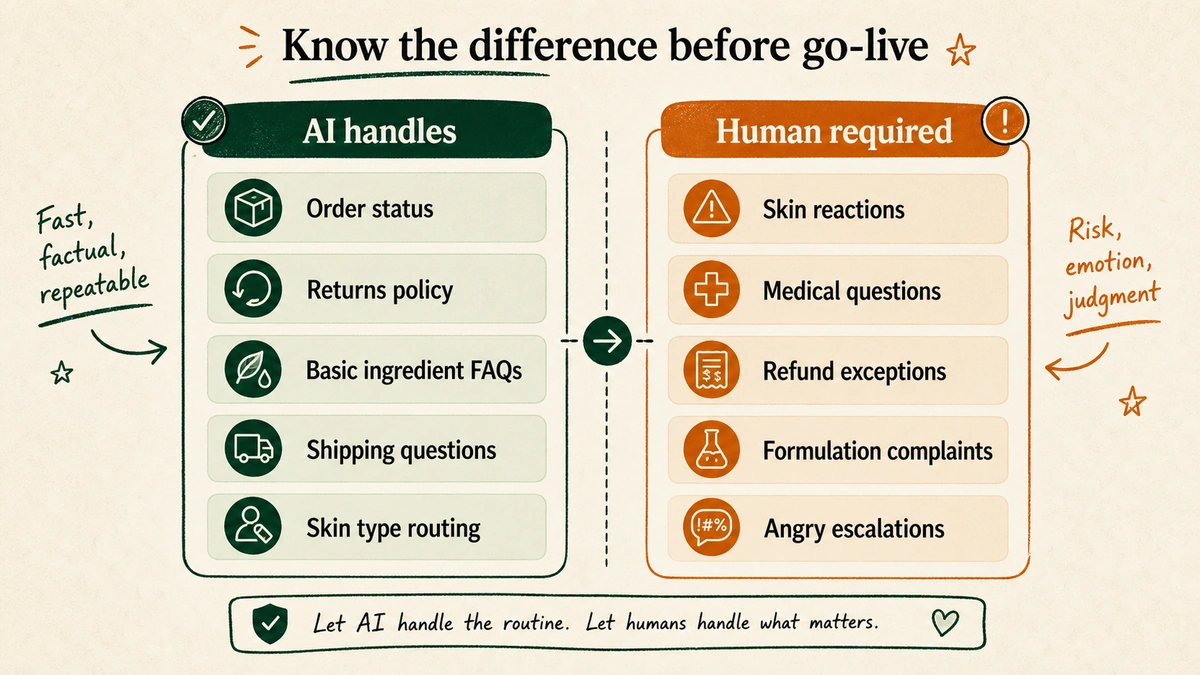
- Let AI answer low-risk tickets: order status, returns, shipping, discount codes, subscriptions, and basic ingredient FAQs.
- Route skin reactions, medical questions, refund exceptions, and angry customers to humans.
- Custom AI usually costs $0.05-$0.10 per ticket when the scope is narrow and the escalation gates are clear.
Table of Contents
– What does AI customer service actually do for a skincare brand?
– Why is skincare support harder to automate than most ecommerce categories?
– How to deploy AI customer service to skincare ecommerce brands: Step by step
– What AI should handle vs. what a human must always answer for skincare brands
– What it actually costs to run AI customer service for a skincare brand
– FAQs about deploying AI customer service for skincare brands
– Deploy it yourself, or let us handle it
What does AI customer service actually do for a skincare brand?
The custom vs. platform AI distinction matters here.
Gorgias AI and Zendesk AI are features built into their respective platforms. They use generic training and work within those platforms’ feature constraints. Useful for basic suggested replies. Not built for a brand that sells a 12-step routine with 40 SKUs and needs precise ingredient-query handling. Custom AI is a different category: a standalone system built from the ground up around your brand. Not a toggle you flip on. A system you deploy. (See how Zendesk AI compares to custom AI in detail.)
For a skincare Shopify store, a properly deployed custom AI handles:
- Order status and tracking updates
- Return and exchange requests (policy-driven, no judgment calls needed)
- Basic ingredient questions (“Is this fragrance-free?”, “Is this vegan?”, “Does this contain parabens?”)
- Shipping policy, delivery windows, and international shipping queries
- Discount code issues and subscription management
- Skin type routing FAQs (“Which moisturizer is best for dry skin?”)
The goal is not to replace your support team. It’s to remove the 60-70% of tickets that don’t require human judgment. Learn how custom AI differs from platform-based tools in our breakdown of Gorgias customer support AI vs. custom AI.
Tatcha, the luxury skincare brand, reported via Alhena AI that 11.4% of total site revenue ran through AI-assisted conversations (2025), with a 38% average order value uplift from those interactions. Sephora, The Ordinary, and Drunk Elephant have all trained customers to expect product-specific answers before purchase. These are not chatbots answering “where’s my order.” These are fully deployed systems doing real commercial work. Gartner projects that by 2028, 70% of customers will use conversational AI to begin a support journey.
Why is skincare support harder to automate than most ecommerce categories?
“Will this serum work for my rosacea?”
That’s not a shoe size question. Answered wrong, it irritates a customer’s skin and ends the relationship.
Skincare support has unique stakes. Ingredient allergy queries. Sensitive skin concerns. Shade matching. “Is this safe during pregnancy?” Questions like these require human judgment. At minimum: a careful escalation gate. Generic AI support, the kind that comes baked into your helpdesk plan, was not designed for this.
Brand voice matters more in skincare than most verticals, too. A luxury dermatology brand sounds different from a playful clean beauty brand. The AI your customers talk to needs to sound exactly like you. Not like a customer service bot.
This is what makes most skincare founders put off deployment. The setup feels risky. The questions feel too nuanced.
But the cost of waiting is real. Gorgias’s 2025 ecommerce customer service benchmarks show that brands with zero support automation average a 736-minute first-response time. Over 12 hours. Brands with 40%+ automation average 12 minutes. Same ticket. Wildly different experience.
“The average first response time for a Shopify brand with no automation is over 12 hours. With AI handling 40% of tickets, that drops to 12 minutes.”
A 15-person US skincare brand we worked with averaged over 11 hours first-response time. Three people. 900 tickets a month. Most of it automatable.
The problem wasn’t the team. It was the system.
How to deploy AI customer service to skincare ecommerce brands: Step by step
Six steps. Seven days. Here is the exact order.
Step 1: Audit your top 20 support ticket types
Open your inbox (Gorgias, Zendesk, Freshdesk, Gmail, or Re:amaze) and pull the last 30 days of tickets. Sort by volume. What are your top 20 questions?
For most skincare brands, the top five will be some version of: order status, return request, shipping delay, a basic ingredient question, and a skin type routing question. That is your Tier 1. These are the tickets AI can handle automatically from day one.
Mark everything else. Skin reactions. Medical questions. Refund disputes. Formulation complaints. These become your escalation gates in Step 4.
This audit takes two hours. It is the most important step in the whole process.
Step 2: Connect your helpdesk
Custom AI connects directly to your helpdesk. Gorgias, Zendesk, Freshdesk, Gmail: all support API or webhook-based integrations. The AI reads incoming tickets and writes draft replies, or sends them automatically depending on your confidence settings.
No coding required if you use a fully managed deployment. You grant API access to your helpdesk and Shopify store. The integration handles the rest. Brands using Klaviyo for email, Recharge for subscriptions, Yotpo for reviews, or Okendo for post-purchase feedback can also connect that data to give the AI fuller purchase history context. See how this works in detail in our guide to building a customer service AI chatbot for Shopify.
If you would rather skip the entire setup, a fully managed service handles every step from here. You grant access. They build and launch.
Step 3: Feed it your product knowledge and policies
The AI is only as accurate as what you give it. For a skincare brand, that means:
- Return and shipping policy (the full document, not a summary)
- Ingredient lists for every SKU (formatted clearly; the AI reads these to answer ingredient queries)
- Skin type guide (which products are safe for sensitive skin, rosacea, oily skin, etc.)
- FAQ document (every question your team has answered more than three times)
- Brand copy and tone examples (10 real support replies that sound right; these calibrate the voice)
This is your AI’s truth base. Everything it says will reference this material. Get it right here and the replies are accurate from day one.
In our work with skincare brands, the step that gets skipped most is the skin type guide. Teams assume the AI will figure it out from product descriptions. It won’t. A dedicated skin type guide (even one page) cuts misrouting dramatically. We’ve built this for brands on Shopify, Gorgias, and Zendesk. Every time, the same pattern: skip the guide, fix misrouted tickets for weeks. Write the guide, get it right from day one.
Step 4: Set brand voice rules and escalation gates
Write 5-8 brand voice rules. Keep them concrete:
- “Never use clinical jargon unless the customer uses it first”
- “Always suggest a next step at the end of every reply”
- “Match the customer’s energy. If they are frustrated, do not open with ‘Great news!'”
- “Sign off with [brand’s standard closing line]”
Then set hard escalation gates. These are the tickets that skip AI entirely:
- Any mention of a skin reaction or allergic response
- Any request for medical or dermatologist advice
- Customers who have written in more than twice about the same issue
- Refunds over a set dollar threshold
The escalation gates are what make custom AI safe for skincare. The AI does not guess on sensitive questions. It routes to a human and drafts an acknowledgment so the customer is not left waiting. Setting the right voice rules is covered step by step in this guide to matching AI voice to your brand voice in customer support.
Step 5: Run a shadow test for 48-72 hours
Before the AI sends a single reply, run it in shadow mode. Every incoming ticket: AI drafts a reply but does not send it. Your team reviews every draft.
What you are looking for: accuracy (did it answer the question?), tone (does it sound like you?), and escalation (did it flag the right tickets?).
Most deployments we run surface 3-8 fixes at this stage. Common ones: the AI over-explains a simple answer, or misclassifies a product complaint as a standard inquiry. We tested this consistently across multiple Shopify skincare deployments. The shadow test cuts post-launch fire-fighting by roughly 80%. Fix the issues here, before go-live. This is where you earn confidence.
Step 6: Go live and track two metrics weekly
Launch. Track two numbers:
- Deflection rate: what percentage of tickets did AI fully resolve without a human? Gorgias benchmarks put the median ecommerce brand at 45%, top-quartile brands at 65%.
- CSAT: is reply quality holding up? Aim for your pre-AI CSAT baseline or better. Industry benchmark: 80-85%.
Review both weekly for the first month. Update your knowledge base and voice rules as patterns emerge.
The 15-person skincare brand we described earlier: after 7 days live, they were resolving 58% of tickets without a human. First-response time: from over 11 hours to under 12 minutes. CSAT: 83%, two points above their pre-AI baseline. Gorgias benchmarks (2025) put the top-quartile ecommerce brand at 65% deflection. They were tracking toward that by week four.
Accurate. On-brand. Policy-safe.
“Building and deploying custom AI customer service for a skincare brand takes one week. Maintaining it takes almost nothing. The founders I work with are surprised by how quiet it gets after launch.”
— Vai S., founder, EfficiaLabs
What AI should handle vs. what a human must always answer for skincare brands
The escalation framework for skincare is different from a general ecommerce store. Here is the breakdown:
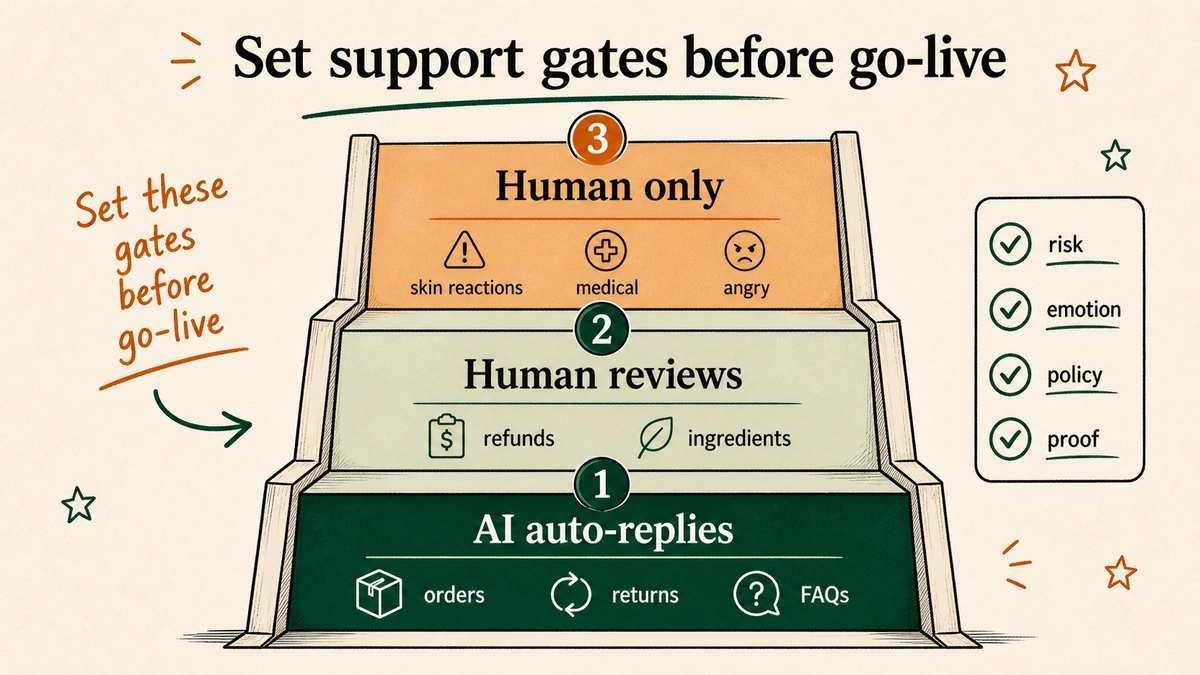
AI handles automatically:
– Order status and tracking
– Return requests that match your policy exactly
– “Is this product fragrance-free / vegan / cruelty-free?”
– Basic skin type routing (“Which moisturizer is best for dry skin?”)
– Shipping policy and delivery windows
– Discount codes and subscription management
AI drafts, human approves:
– Complex layering questions (“Can I use this with retinol?”)
– Customers who have contacted you before about the same issue
– Refunds or exceptions outside your standard policy window
Human only, no exceptions:
– “I used your product and my skin reacted”
– “Is this safe if I have eczema / psoriasis / rosacea?” (specific medical conditions)
– “My doctor said not to use X. Will your product work?”
– Angry or escalated customers, regardless of issue type
– Press, influencer, or wholesale inquiries
The middle tier matters. AI drafting a reply for human approval is not the same as AI sending it. Speed benefit, no risk.
What it actually costs to run AI customer service for a skincare brand
The honest comparison: SaaS AI tools vs. custom AI.
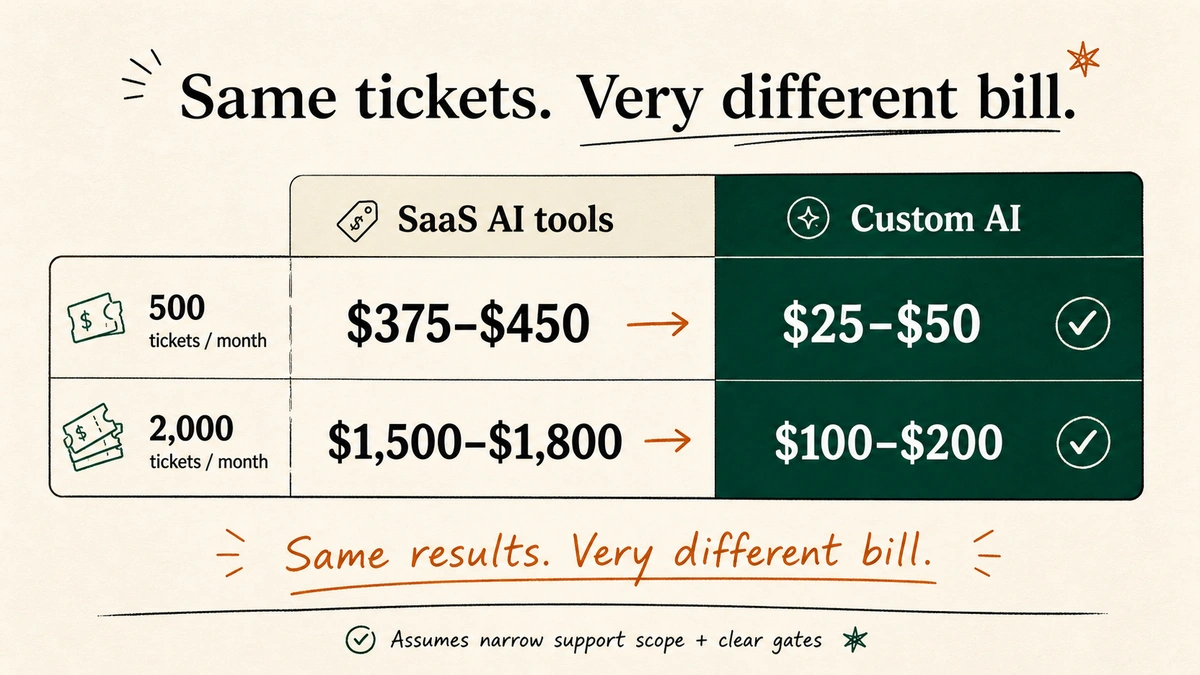
SaaS AI platforms (Rep AI, Siena AI, and similar tools) charge per conversation or per month. At 500 tickets a month, that runs $375-$450. At 2,000 tickets a month, $1,500-$1,800. Compare Rep AI and custom AI head-to-head in our full breakdown. For a broader look at the category, the 49 AI in DTC statistics for 2026 covers what DTC brands are actually spending on AI support today.
Custom AI (built specifically for your brand, your products, your voice) runs $0.05-$0.10 per ticket. No monthly seat fees. No per-feature tiers.
| SaaS AI tools | Custom AI | |
|---|---|---|
| 500 tickets/month | $375-$450/mo | $25-$50/mo |
| 2,000 tickets/month | $1,500-$1,800/mo | $100-$200/mo |
At 2,000 tickets a month, the difference is $1,300-$1,700. Every month. That is not a rounding error.
Fully managed custom AI (where a provider builds, deploys, and maintains the entire system) still runs $0.05-$0.10 per ticket. No engineering on your side. No configuration work. The cost does not change whether you build it yourself or use a managed service. What changes is who does the work. See how this compares across providers in our guide to the best companies for ecommerce AI customer care.
FAQs about deploying AI customer service for skincare brands
How long does it take to deploy AI customer service for a skincare brand?
Seven days is realistic if you have your product knowledge, policies, and FAQ documents ready. Audit and setup: 2-3 days. Shadow testing: 48-72 hours. Day 7, go live. Fully managed service: same timeline, you grant access instead of doing the setup.
Will AI customer service sound robotic to my customers?
Only if the voice setup is skipped. The brand voice rules in Step 4 prevent this. The shadow test catches anything that sounds off. Goal: your customers should not notice a difference. If they can tell it is AI, the voice calibration needs another pass.
What helpdesks does AI customer service integrate with?
Gorgias, Zendesk, Freshdesk, and Gmail all support API or webhook-based integrations. If your team uses it to manage tickets, it can connect. Most integrations are read/write: the AI reads the incoming ticket and writes a draft or sends a reply directly.
What happens if the AI gives a customer wrong skincare advice?
This is what the escalation gates in Step 4 prevent. For anything beyond basic product FAQs, the AI routes to a human, drafts an acknowledgment, and flags the ticket. It does not guess on sensitive skin or medical questions. See how to set this up in detail with the ChatGPT for Shopify customer support guide.
Do I need to maintain the AI after it goes live?
Minimal. New products, updated policies: update the knowledge base. Usually a 15-minute task. Fully managed service: your provider handles it. Most clients do not touch anything for months after launch.
Deploy it yourself, or let us handle it
If you want to do this yourself, this post is your roadmap. Six steps. Seven days. You have everything you need here.
If you would rather spend your next 7 days on the brand instead of the build, that is what we do at EfficiaLabs. We take care of everything: helpdesk connection, knowledge feeding, brand voice setup, shadow testing, launch. You do not touch a line of code. Most clients are live in a week. And after that, the system runs itself. Maintenance is minimal. Cost per ticket: $0.05-$0.10. You only pay if it works.
Most founders tell me the same thing a week after launch. “I wish I had done this six months ago.”
— Vai
Sources
- Gorgias ecommerce customer service benchmarks — first-response time by automation rate, AI deflection benchmarks, CSAT ranges
- Alhena AI — Tatcha case study — 11.4% site revenue from AI-assisted conversations, 38% AOV uplift
- EfficiaLabs deployment data — $0.05-$0.10/ticket cost, 7-day deployment timeline

No comment yet, add your voice below!