

A customer service AI chatbot for Shopify answers shopper questions, looks up store context, and routes risky tickets to humans. The useful version is not a floating FAQ box. It is a support layer connected to orders, products, policies, and a weekly review loop.
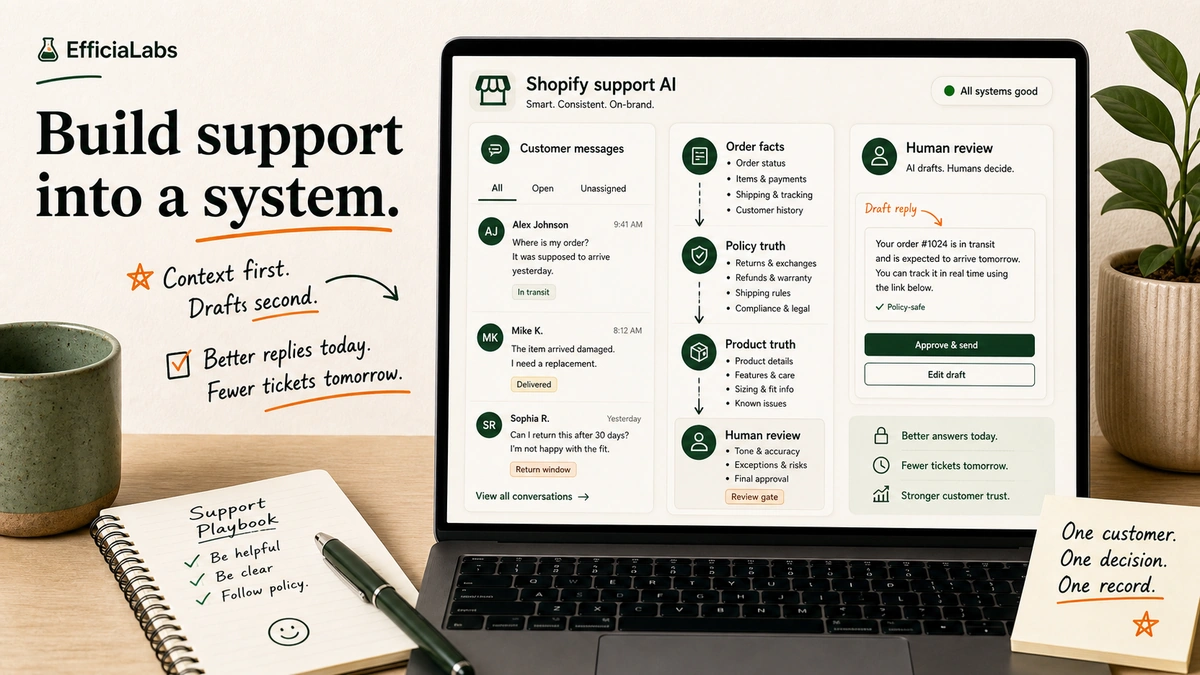
Last Tuesday, a founder showed me her inbox. Nothing dramatic. Just the usual: order status, returns, fit questions, address changes.
Small tickets. Hundreds of them. Each one cheap alone. Together, a tax on growth.
That is the point where AI customer support starts to make sense. Not because AI is impressive. Because the same questions keep stealing the same hours from the same small team.
This guide is for Shopify brands doing more than $1M in annual revenue. Low risk first. ROI second. Custom only when the business case is obvious.
In a sentence
- Start with repeat store tickets: order status, returns, shipping, product fit, and discount issues.
- Build ROI from two buckets: support cost saved and revenue recovered.
- Keep refunds, address changes, chargebacks, and angry customers behind human review.
- Use low-code first if you are testing the idea; go custom when store rules and tool workflows become the hard part.
Table of Contents
- What is a customer service AI chatbot for Shopify?
- When does AI customer support make financial sense?
- The ROI math: tickets saved, revenue recovered, costs avoided
- What should your first Shopify support chatbot handle?
- What should it not automate yet?
- How to build a customer service AI chatbot for Shopify
- Low-code chatbot vs helpdesk AI vs custom AI support
- When a custom AI chatbot becomes worth it
- Common mistakes that kill chatbot ROI
- FAQs about customer service AI chatbot development for ecommerce
- Build the support layer your next $1M in revenue needs
What is a customer service AI chatbot for Shopify?
A customer service AI chatbot for Shopify answers buyer questions using store data, help docs, rules, product data, and chat rules. Basic bots answer scripted FAQs. Better AI support bots answer from approved sources. AI support agents connect to the store, check order data, start flows, and flag risky cases for a person.
Shopify already gives merchants a basic version of this idea. Shopify Inbox includes instant answers, and its default Track my order instant answer gives buyers order status when they click it. Shopify also says its AI answer ideas are based on store rules and chat history, but merchants remain responsible for content accuracy. Cc: Shopify Inbox docs.
That last sentence matters.
The brand is responsible.
If the bot invents a return window, promises a refund, picks the wrong size, or shows order info to the wrong person, the buyer blames the store. So the job is not “add AI.” The job is to build a support system that knows:
- What it can answer.
- What it can look up.
- What it can never do without approval.
- When to stop and hand the ticket to a human.
When does AI customer support make financial sense?
AI support makes financial sense when three things are true:
- Your ticket volume is high enough that repeat questions cost real payroll.
- Your inbox contains revenue moments: sizing, product fit, ship timing, discount issues, subscriptions, and pre-purchase doubt.
- Your team has enough clean source material for the AI to answer from.
If you get ten tickets a week, do not build a custom chatbot. Fix your FAQ page.
If you get hundreds or thousands of tickets a month, different story.
Look at the public case studies, all reviewed for this 2026 draft:
- 2026 benchmark: Orthofeet automated 56% of tickets in under two months with Gorgias. Email first reply dropped from 24 hours to 35 seconds. Chat first reply dropped from 3 minutes to 13 seconds.
- 2026 benchmark: Pepper reached a 54% average automation rate, with a 19% sales rate from AI-led chats, 19.2x ROI on AI-led sales chats, and an 18% AOV lift.
- 2026 benchmark: a Shopify Plus case study from Vail Creatives reported 12% sales from AI-led chats versus a 1.4% base site sales rate, plus $5,280+ in monthly saved revenue and an 85.6% AI solve rate.
“AI Agent can automatically detect if a customer wants to start or check the status of a return.”
- Courtney Bajek, Customer Service Lead at Orthofeet
“We are not threatening those really personal interactions that make our brand Pepper.”
- Gabrielle McWhirter, CX Operations Lead at Pepper
These are vendor and agency case studies. Treat them as proof, not a guarantee.
Still, the pattern is clear. ROI does not come from a clever chat bubble. It comes from cutting low-value manual work and saving high-intent shoppers before they leave.
That is why this matters for brands over $1M. At that size, support is where margin leaks and repeat buyers pause. For a wider market snapshot, keep the companion AI in DTC statistics post nearby.
The ROI math: tickets saved, revenue recovered, costs avoided
Use this formula:
Monthly ROI = support cost saved + revenue recovered - AI build and operating cost
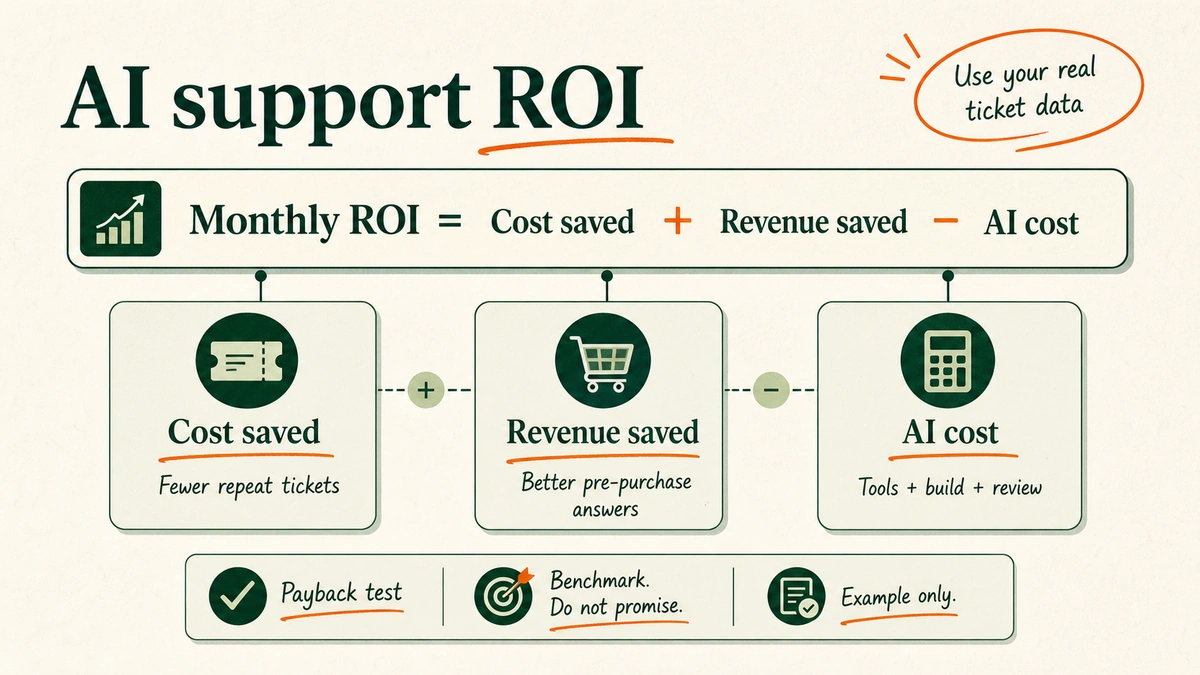
There are two sides to the ROI case.
Cost saved: tickets the AI solves without a human.
Revenue saved: shoppers who buy because the AI answered product, ship, sizing, or return questions while they were still ready to buy.
The mistake is only counting the first one. If the AI handles a “where is my order?” ticket, you save time. If it helps a shopper choose the right product before she bounces, you may save the sale.
Pepper is the useful proof point here. Their Gorgias case study reports a 19% sales rate from AI-led chats, 19.2x ROI on AI-led sales chats, and an 18% lift in average order value. Cc: Pepper customer story.
The Vail Creatives Shopify Plus case study is useful too. AI-led chats sold at 12% versus a 1.4% base site sales rate, with $5,280+ in monthly saved revenue and 750% ROI on tools. Cc: Vail Creatives.
Here is the model to fill in for your store:
| Input | What to use |
|---|---|
| Monthly tickets | Your helpdesk export |
| Repeat-ticket share | Count WISMO, returns, shipping, discount, and product FAQ tags |
| Cost per ticket | Payroll plus tools divided by resolved tickets |
| Expected solve rate | Start with a low target; benchmark only after matching scope |
| AI-led sales | Chat revenue or linked revenue from your helpdesk/chat tool |
| AOV | Shopify analytics |
| AI operating cost | Tooling, model usage, maintenance, and QA time |
| Build cost | One-time build amortized over 6-12 months |
Example math, using store inputs, not a benchmark: (2,000 tickets x 50% repeat x 40% solved x $4 per ticket) + $2,000 saved revenue - $1,500 AI cost = $2,100 monthly net benefit.
If your real inputs do not produce a positive number, do not force the build. Start with better help docs, saved replies, Shopify Inbox instant answers, or a simple helpdesk AI pilot.
What should your first Shopify support chatbot handle?
Start where risk is low and volume is high.
Good first use cases:
- Order status.
- Shipping timelines.
- Return rules.
- Product availability.
- Size and fit guidance.
- Discount code troubleshooting.
- Subscription FAQs.
- Store rules.
These jobs are boring. Good.
Boring support makes money first.
Gorgias says its AI Agent is trained on brand rules, site content, Shopify data, help center material, docs, and custom guidance. It can also track solve rate, CSAT, first reply time, linked revenue, AOV, and sales. Cc: Gorgias AI Agent docs.
That tells you the shape of a serious build: answer the questions where you have clean truth.
For a store, clean truth tends to live in five places:
- Shopify orders and customer records.
- Product data and variant data.
- Return, refund, ship, and warranty rules.
- Help center articles.
- Past support conversations.
If the bot cannot cite or retrieve one of those sources, it should not act confident.
What should it not automate yet?
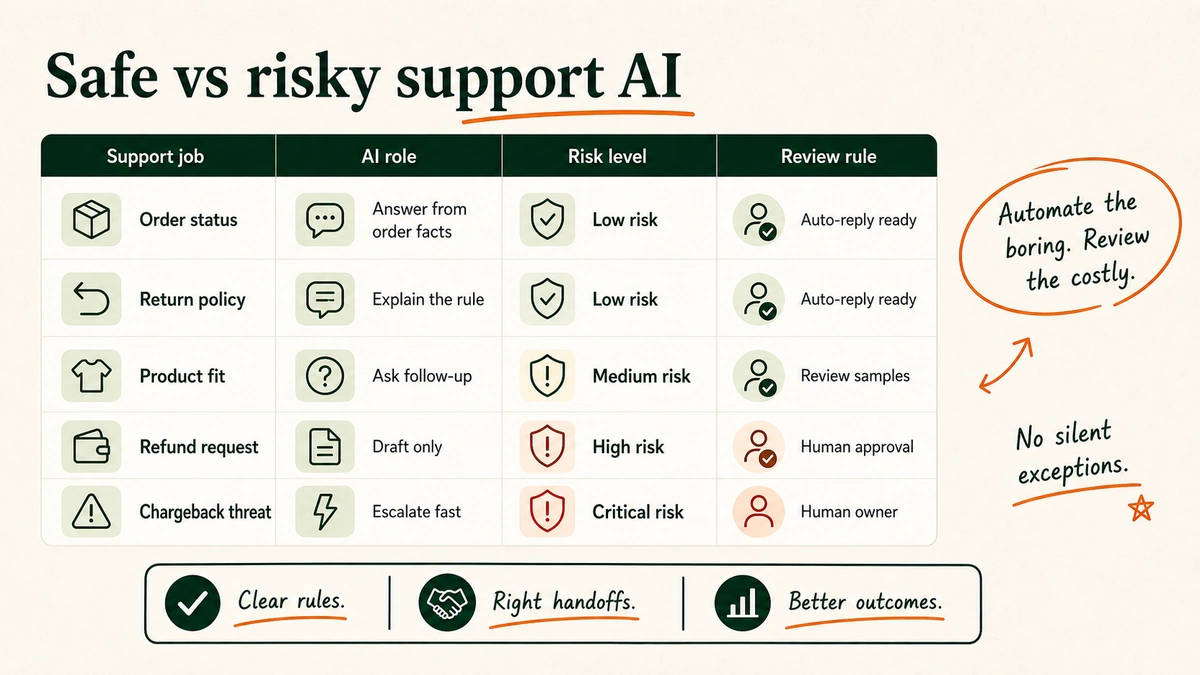
Do not start with refunds, chargebacks, address changes after ship, health or safety claims, legal claims, allergy advice, or angry buyers asking for exceptions.
These are review-gate jobs. The AI can draft, sort, collect context, and prep the answer. It should not always press send.
For example, “Where is my order?” can usually be automated. “Refund me now or I’m filing a chargeback” needs a human.
This is where a lot of ROI claims get silly. They count every human touch as waste. It is not waste when the human prevents a bad refund or a bad promise.
The aim is not 100% automation.
The aim is profitable automation.
How to build a customer service AI chatbot for Shopify
Build it in eight steps.
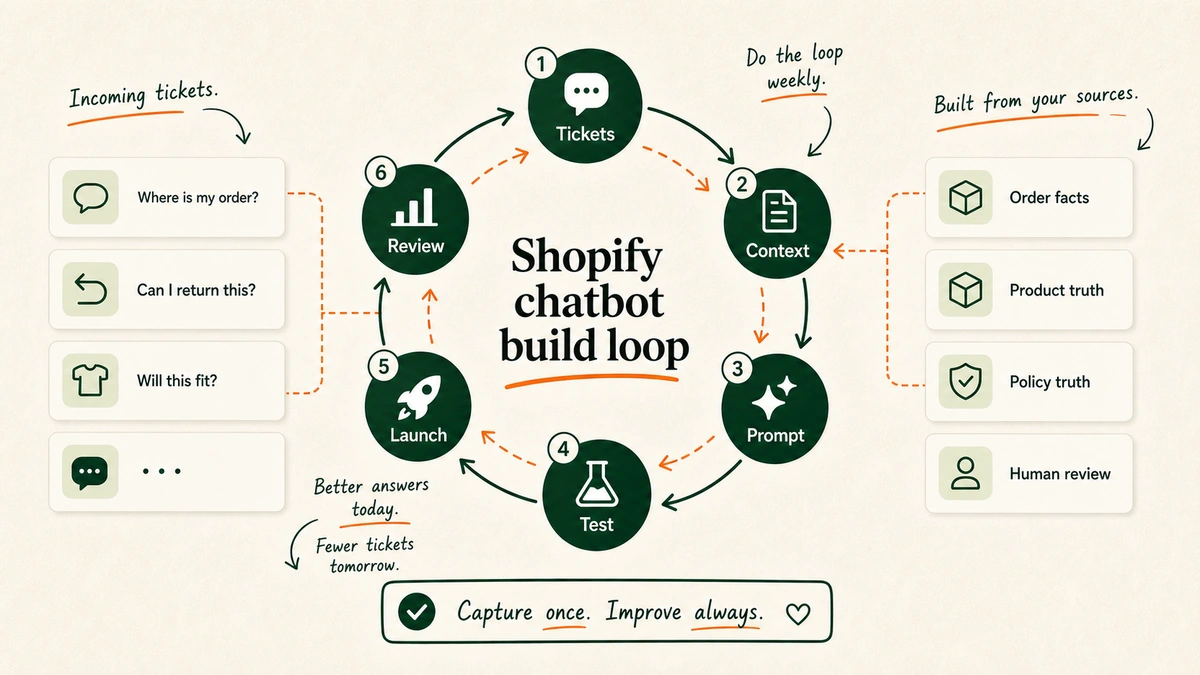
Step 1: Pull your top 100 support tickets
Do not begin in the chatbot builder. Begin in the inbox.
Export your last 100-300 tickets. Tag them by job:
- WISMO
- Return request
- Discount code
- Product fit
- Sizing
- Subscription
- Shipping delay
- Damaged item
Count the boring tickets first. If order status dominates, start with order lookup. If product fit stops shoppers from buying, start with product guidance.
Step 2: Build the store context pack
Your context pack is the truth the AI may use.
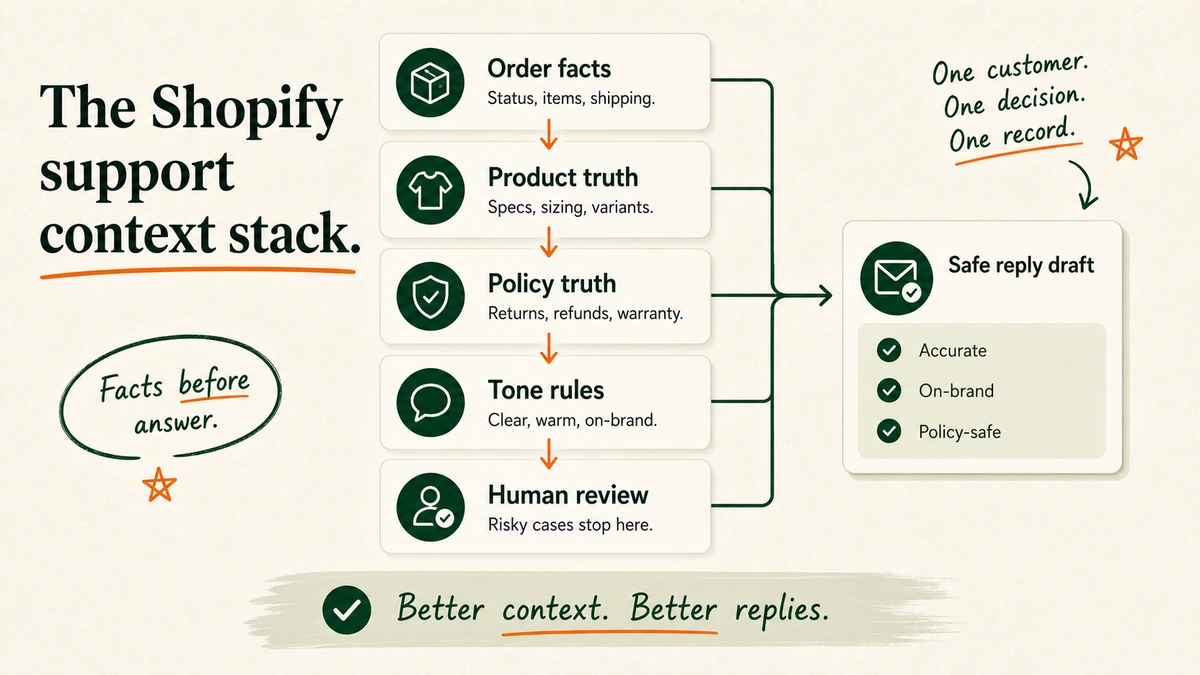
Minimum context pack:
- Return, refund, ship, and warranty rules
- Product data and size guides
- Subscription and discount rules
- Brand tone examples
- Escalation rules
- Help center URLs and top support macros
Do not crawl the whole site and hope. If your rules page is out of date, the AI will be out of date. First clean the truth. Then connect it.
Step 3: Choose your first automation path
You have three paths.
Low-code chatbot: fast to test, useful for FAQs and simple guidance.
Helpdesk AI: best when your team already lives in Gorgias or Zendesk and wants handoff plus stats.
Custom AI support: best when the work needs your store logic, your rules, your edge cases, and your tools stitched together.
Start lower than your ego wants. If you have not proved the use case, low-code is fine. If you know the ticket pattern and need real store context, helpdesk AI or custom work starts to make sense. The existing Gorgias vs Tidio vs Manychat vs Chatfuel comparison can help with that first tool screen.
Step 4: Connect order, product, rules, and helpdesk data
The bot needs different access for different jobs.
Order status needs order and ship data. Product guidance needs item, stock, variant, and size-guide data. Returns need order date, ship status, return window, item type, and rules. Escalation needs helpdesk context, buyer history, and priority rules.
This is where Shopify matters. A generic site-trained bot can read your return rules. A useful store support bot can check whether the order is eligible. Different thing.
Gorgias says its AI Agent can use Shopify buyer and order data, store content, help center articles, docs, guidance, and actions. Cc: Gorgias AI Agent docs.
Step 5: Write the support operating prompt
The prompt is not a magic paragraph. It is an ops rule: role, tone, source order, answer length, handoff rules, approval gates, and what to do when unsure.
Use this as the starting point:
You are the support AI for a Shopify store. Help with order status, shipping, returns, product questions, sizing, discount issues, and basic subscription questions.

Use only approved sources: Shopify order data, product data, help center, rule docs, and support guidance.

Do not invent delivery dates, refund eligibility, product claims, discounts, or rule exceptions.

For refunds, address changes, chargebacks, medical/safety advice, legal advice, or policy exceptions, collect context and escalate.

If unsure, say what you can verify and ask one clear follow-up question.
Not poetic. Useful. We have separate guides on ChatGPT for Shopify customer support and Claude for Shopify customer support if you want model-specific prompt patterns.
Step 6: Add human review gates
Human review gates protect the brand.
Create gates for:
- Refund approvals
- Chargeback threats
- Angry customers
- Shipping address changes
- Lost package exceptions
- High-value orders
- VIP customers
- Fraud signals
The AI should pass the human:
- Customer message
- Customer intent
- Order details
- Relevant policy
- Draft reply
- Risk level
That saves time without pretending every ticket is safe.
Step 7: Test messy tickets before launch
Do not test only clean questions.
Test the stuff customers actually send:
- Typos
- Missing order numbers
- Wrong email address
- “I need this by Friday”
- “I want a refund”
- “I already emailed twice”
Your goal is not a nice demo. Your goal is to find where the bot breaks before buyers do. Run 50-100 test chats. Log misses. Fix the source, not just the prompt.
Step 8: Review failed chats every week
The launch is not the finish line.
Review:
- Escalated chats
- Low-confidence answers
- Refund conversations
- Bad CSAT conversations
- High-value sales chats
- Tickets where the AI had no source
Each week, improve one thing: source docs, prompt rules, store data access, or handoff logic.
Low-code chatbot vs helpdesk AI vs custom AI support
Do not buy more system than you need.
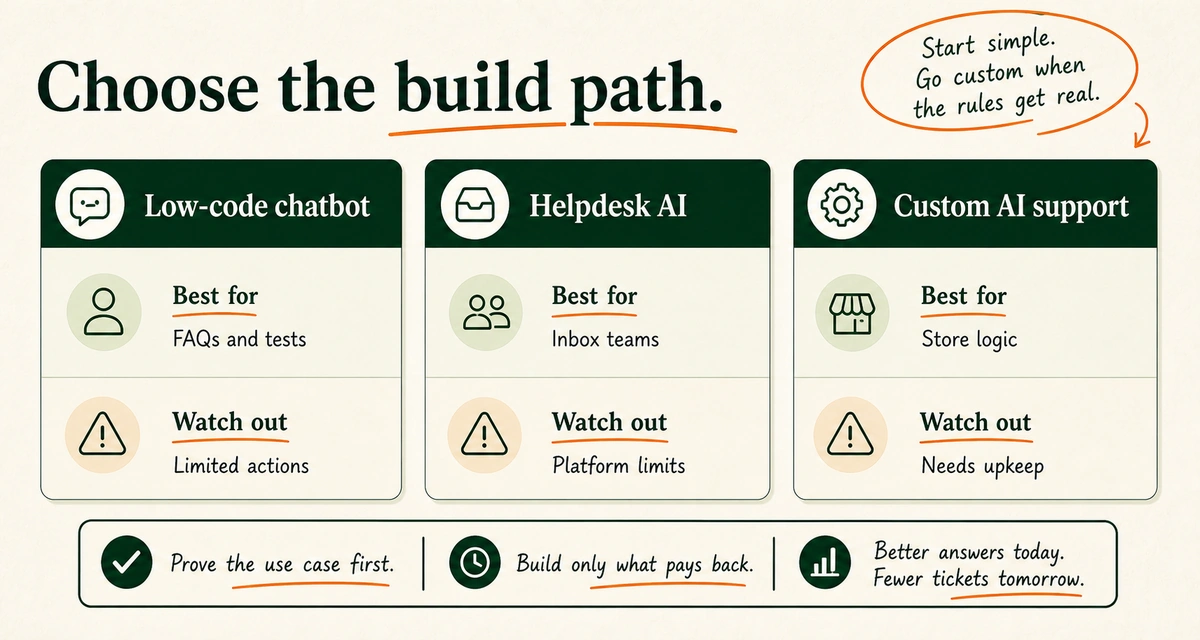
| Option | Best for | Watch out for |
|---|---|---|
| Low-code chatbot | Testing FAQs, product guidance, simple support flows | Weak edge-case handling, limited system actions |
| Helpdesk AI | Brands already using Gorgias, Zendesk, or similar tools | Can get expensive or constrained by platform logic |
| Custom AI support | Brands needing store actions, rule logic, tool workflows, and guardrails | Needs clear scope, upkeep, and weekly review |
For a brand just crossing $1M, low-code may be enough to prove demand. For a brand with high ticket volume, messy return rules, subscriptions, many tools, or deep product guidance, the ceiling arrives fast.
That ceiling usually sounds like: “The bot answers FAQs, but it cannot do the thing.”
The thing is where ROI lives.
Check the order. Read the return rule. Verify the buyer. Draft the refund note. Route the angry buyer. Recommend the right product.
When a custom AI chatbot becomes worth it
A custom AI chatbot becomes worth it when the support problem is no longer generic. Signs you are there:
- Your support team handles hundreds of repetitive Shopify tickets every month.
- Your product data has enough nuance that generic picks fail.
- You need different rules by item, country, buyer type, order value, or ship status.
- Refunds, returns, swaps, and subscriptions need rule logic.
- Your team loses time switching between Shopify, helpdesk, 3PL, subscription, review, loyalty, and email tools.
- You want weekly support insights, not the same FAQ forever.
This is the point where “install a chatbot” becomes too small.
Once you need Shopify actions, rule logic, refund gates, and weekly loops, this stops being a chatbot install. It becomes a custom support system. That is the kind of build EfficiaLabs helps Shopify brands design and ship.
The business case still comes first: cost removed, revenue saved, risks kept human, system access needed, and upkeep cost.
In our work, this is the point where we stop talking about chat widgets and start mapping the support system. We tested the smallest custom flow first. We measured whether it saved time, saved revenue, or both. We built only the next piece after the first one paid back.
Common mistakes that kill chatbot ROI
1. Automating before cleaning the source of truth
Bad docs produce bad answers.
If your return rules are vague, your AI will be vague. If your product data is messy, your AI will be messy.
Fix source truth first.
2. Chasing maximum automation rate
An 80% solve rate sounds great until the AI approves the wrong refund.
Track solve rate, yes. Also track refund errors, handoffs, CSAT, sales, and recontact rate.
3. Treating sales and support as separate systems
For Shopify brands, they overlap.
A shopper asking about shipping speed before checkout is not a support burden. She is a conversion opportunity.
DreamzTech’s ecommerce AI assistant case study reported a 28% sales-rate lift, a 35% drop in cart abandon, 50K monthly chats, and AOV rising from $128 to $180 after a Shopify, stock, and payment build. Cc: DreamzTech.
4. Skipping authentication
Order info is buyer data. The bot should not reveal order status, ship address, or account details just because someone typed an order number.
5. Never reviewing failed chats
The best support AI systems are coached. Gorgias says teams can inspect topics, give feedback, review sources used in replies, and update content when behavior misses the mark. Cc: Gorgias AI Agent docs.
Set the meeting. Improve the system. Repeat.
FAQs about customer service AI chatbot development for ecommerce
Can a Shopify chatbot check order status?
Yes. Shopify Inbox includes a default Track my order instant answer, and more advanced systems can connect to order data. For custom builds, include ID checks and privacy rules.
Should a Shopify AI chatbot issue refunds automatically?
Usually not at first. Let the AI collect context, check policy, and draft the recommendation. Keep final approval with a human.
Is low-code enough?
Sometimes. Low-code is good for testing FAQs and simple guidance. It gets weak when the bot needs Shopify actions, custom handoff rules, or deeper rule logic.
How much automation should we expect?
Use public case studies as benchmarks, not promises. Orthofeet reported 56% ticket automation. Pepper reported 54% average automation. The Edit LDN case study reported 80% of queries handled by AI. Your rate depends on ticket mix, data quality, tool links, and review habits.
Build the support layer your next $1M in revenue needs
The first version does not need to be fancy.
Start with the tickets your team is tired of answering. Connect the truth. Add review gates. Measure the money.
If the AI only answers FAQs, it is a website feature.
If it checks store context, guides shoppers, protects rules, and hands humans the right work, it becomes support infrastructure.
That is where the ROI starts.
And when your store reaches the point where low-code tools cannot handle your rules, flows, and edge cases, EfficiaLabs can help you build the custom AI support system underneath it.
Not a chatbot for the sake of having one.
A calmer inbox. Faster answers. Better conversion moments. Fewer expensive guesses.
Related reads: Shopify AI profitability, Shopify inventory automation, B2B commerce AI use cases, AI in DTC statistics, and Gorgias vs Tidio vs Manychat vs Chatfuel.

No comment yet, add your voice below!