Zendesk AI vs. custom customer support AI: which actually wins for ecommerce?

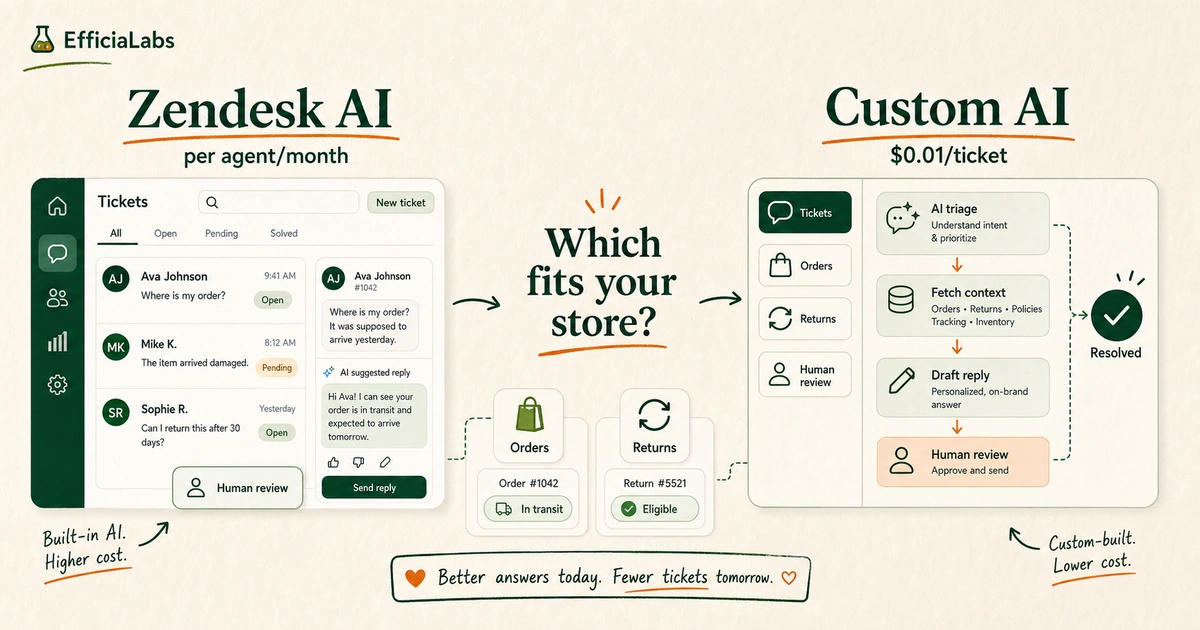
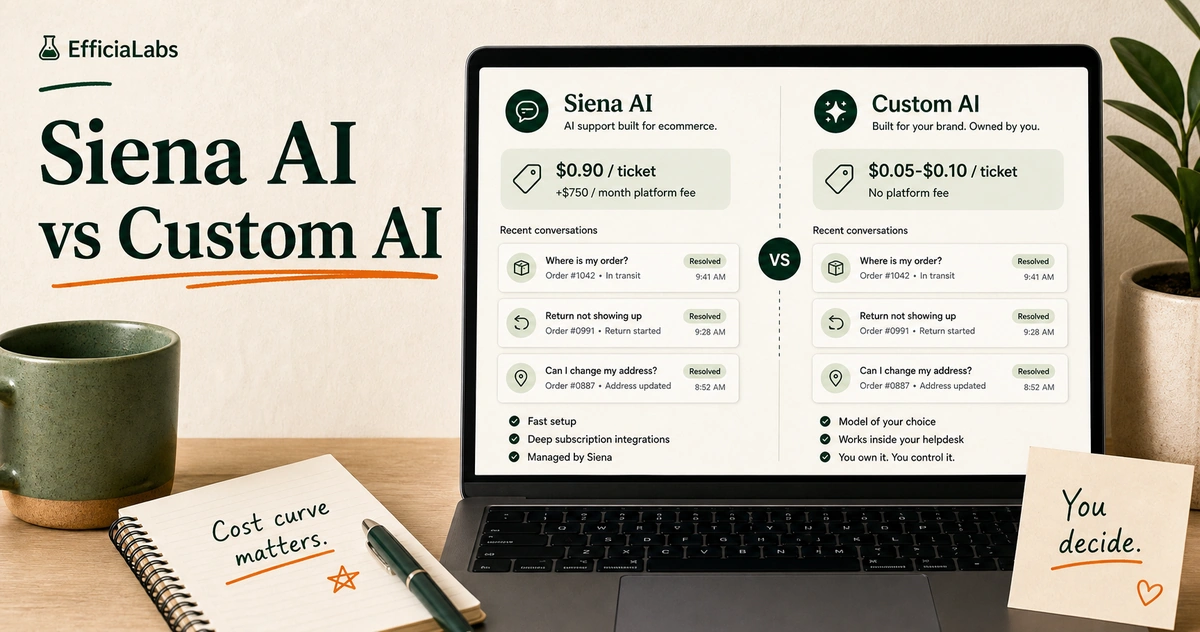
Hero image showing two support AI paths side by side — a Zendesk AI interface on the left and a custom AI workflow on the right — for an ecommerce brand choosing between them.

A client sent me a screenshot last month. One of their long-time customers had written in about a delayed order. Stressed, loyal, three years of repeat purchases. What they got back from the Zendesk AI: “Dear Customer, I have received your inquiry and will process it accordingly. Thank you for your patience.”

The brand sells premium candles. Their whole thing is warmth, craft, personal touch. Their human agents write like a friend. The AI wrote like a DMV form.

They were paying $825 a month for it.

That’s the Zendesk customer support AI vs custom AI problem in one screenshot. Zendesk AI wins in specific scenarios. Custom AI wins in others. Here’s the full math so you can decide which fits your store.

TL;DR

Zendesk AI has three billing layers. Most brands only discover this after signing. Automated Resolutions (AI-closed tickets) are billed above your plan’s included allowance and the per-AR rate is not published.
Custom AI runs at approximately $0.01 per ticket with no per-agent fee and no overage surprises. For Shopify brands that care about brand voice and multi-platform integrations, custom AI is almost always the better long-term fit.

Table of Contents
TL;DR
What Zendesk AI actually includes in 2026
What Zendesk AI actually costs
What “custom AI” actually means for a Shopify brand
The real cost comparison
What Zendesk AI does well
Where Zendesk AI falls short for DTC brands
When Zendesk AI still makes sense
The 3-question framework
Frequently asked questions
The verdict

Hero image showing two support AI paths side by side — a Zendesk AI interface on the left and a custom AI workflow on the right — for an ecommerce brand choosing between them.

What Zendesk AI actually includes in 2026

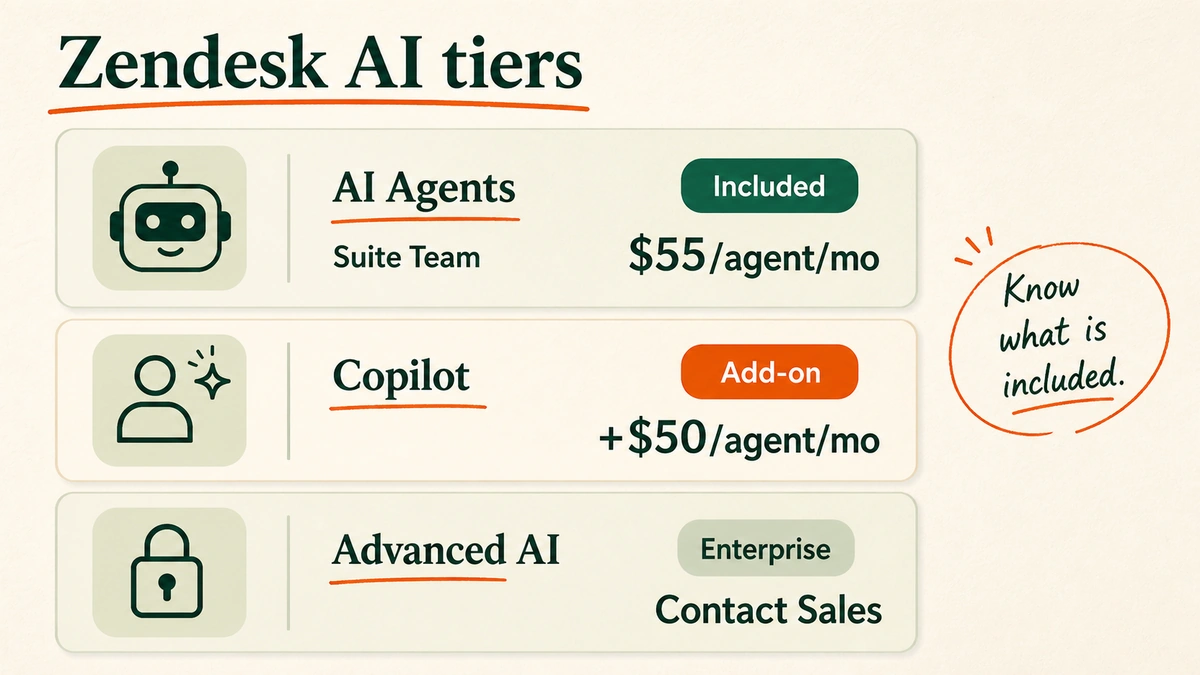
Zendesk AI is not one product. It is three. Each priced or gated separately.

AI Agents

Included in Suite Team at $55 per agent per month. These are the bots that handle front-line replies: FAQs, order status, return policy questions. They respond without a human touching the ticket. This is the layer most brands assume they are buying when they sign a Zendesk contract.

Copilot

An add-on at $50 per agent per month. Copilot does not automate. It assists. It drafts replies for your human agents to review before sending. Useful if your brand has high-stakes tickets where every reply needs a human check. Not useful if your goal is to reduce the number of humans needed.

Advanced AI

Enterprise only. Contact sales. Intelligent triage, generative AI for voice, sandbox environments. If you are running a 10–25 person Shopify brand, this tier is not for you.

The point: most brands signing Zendesk contracts think “AI is included.” It is. But the AI that actually resolves tickets autonomously (AI Agents) is just the entry layer.

Getting to the full AI stack costs significantly more, and the pricing is layered in a way that is easy to miss.

Diagram showing three tiers of Zendesk AI — AI Agents included in Suite Team at $55 per agent per month, Copilot as a $50 per agent per month add-on, and Advanced AI as enterprise-only requiring a sales conversation.

What Zendesk AI actually costs

The headline numbers: Suite Team is $55 per agent per month. Suite Professional is $115 per agent per month. Copilot adds $50 per agent per month on top of any Suite plan.

A five-agent team on Suite Professional with Copilot: $165 × 5 = $825 per month.

But that is the base. There is a second layer most brands miss.

Every Zendesk Suite plan includes a set number of Automated Resolutions (ARs): tickets fully closed by AI without human involvement. Once you exceed that included allowance, Zendesk charges per additional AR. The per-AR overage rate is not published on their pricing page. You have to contact sales to get it.

In practice: at 500 tickets per month you are almost certainly within your included AR allowance. At 2,000 or 5,000 tickets per month, you are almost certainly exceeding it. Your true monthly cost is higher than the plan rate.

Pro tip: Before signing any Zendesk AI contract, ask specifically: “How many Automated Resolutions are included in my plan tier, and what is the per-resolution overage rate?” If they cannot give you a clear number, that is information.

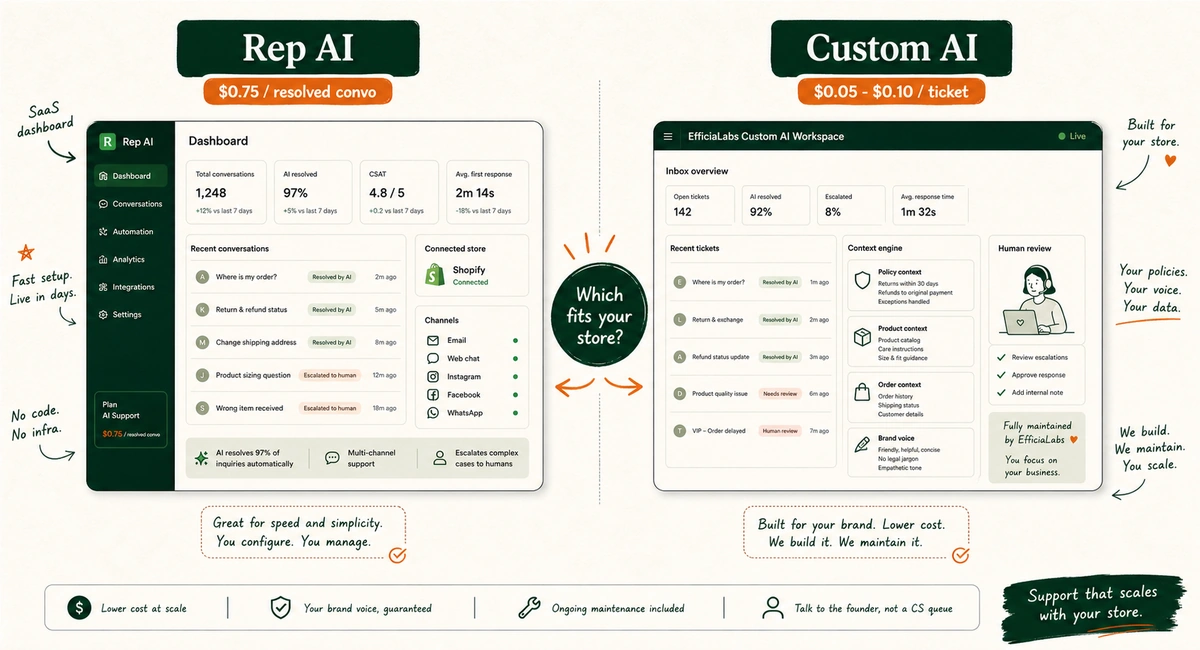
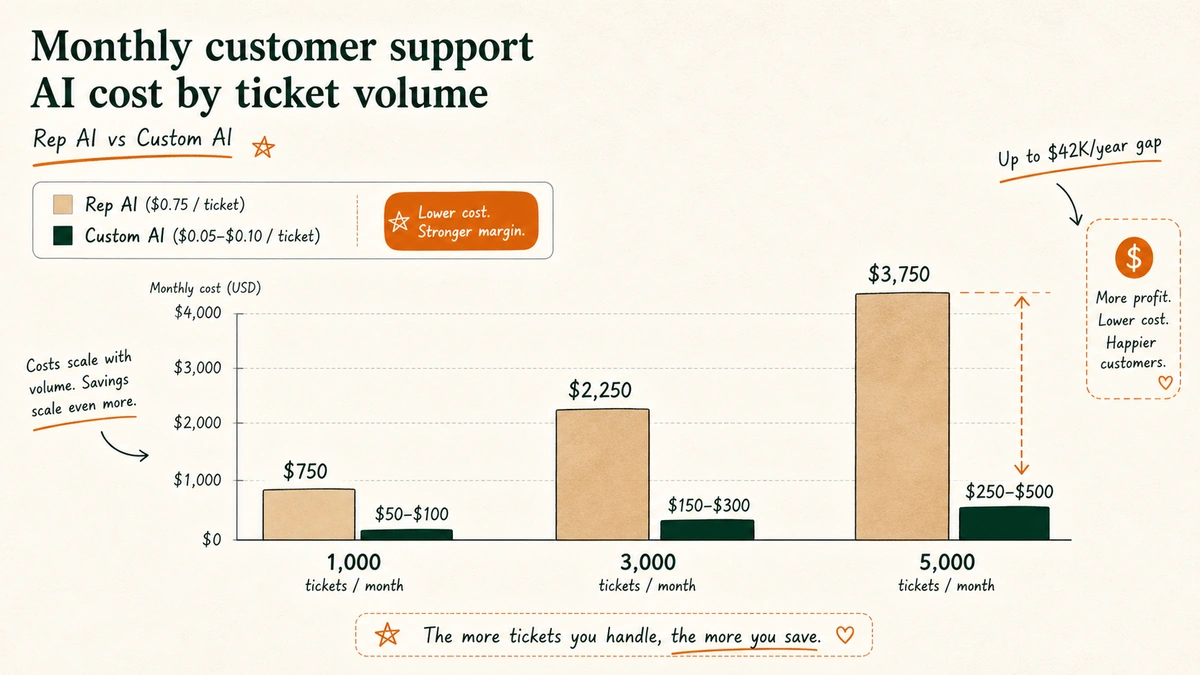
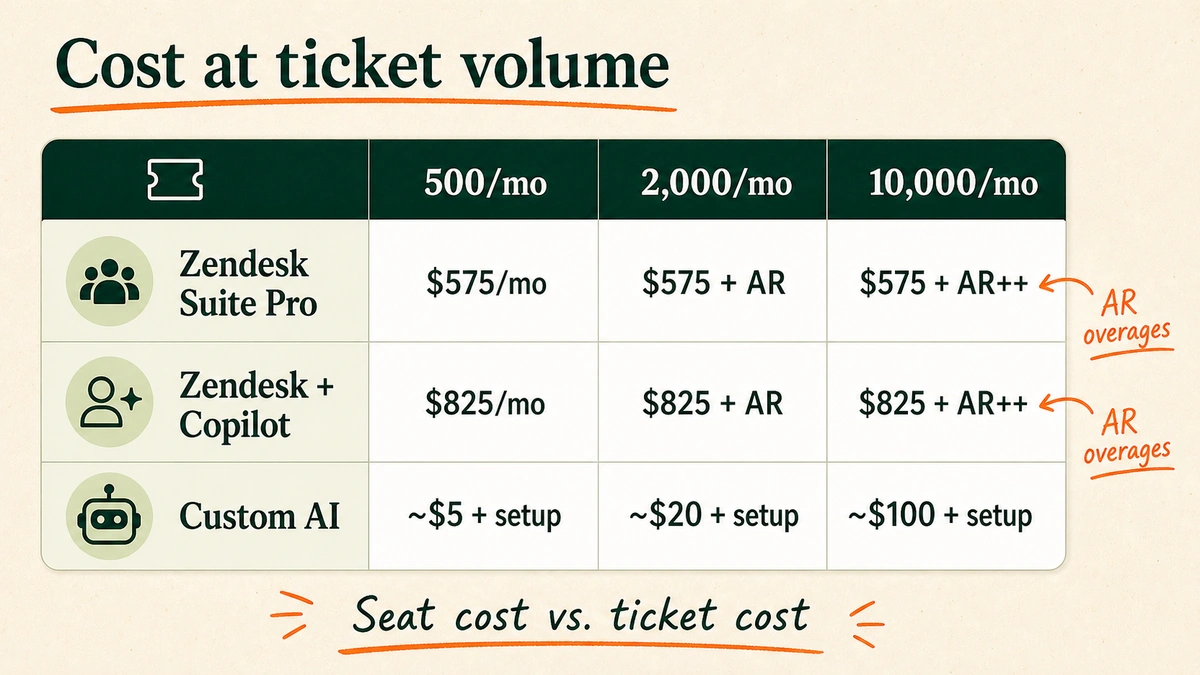
Cost comparison matrix showing monthly costs for Zendesk Suite Pro, Zendesk with Copilot, and custom AI at 500, 2,000, and 10,000 monthly tickets for a five-agent support team.

What “custom AI” actually means for a Shopify brand

Not a developer project. That is the misconception worth clearing up first.

Custom AI for customer support means an AI built specifically for your store: trained on your tone, your product catalog, your return policy, your edge cases, integrated into your actual stack without your team writing a single line of code.

We build it, deploy it, maintain it. You connect your platforms and approve the voice guidelines. That is roughly the full extent of the effort on your side.

In our work with DTC brands, I have seen this framing consistently catch founders off guard. They expect a six-month engineering project. It is not that.

The customer service AI chatbot for Shopify guide covers the technical side if you want to go deeper.

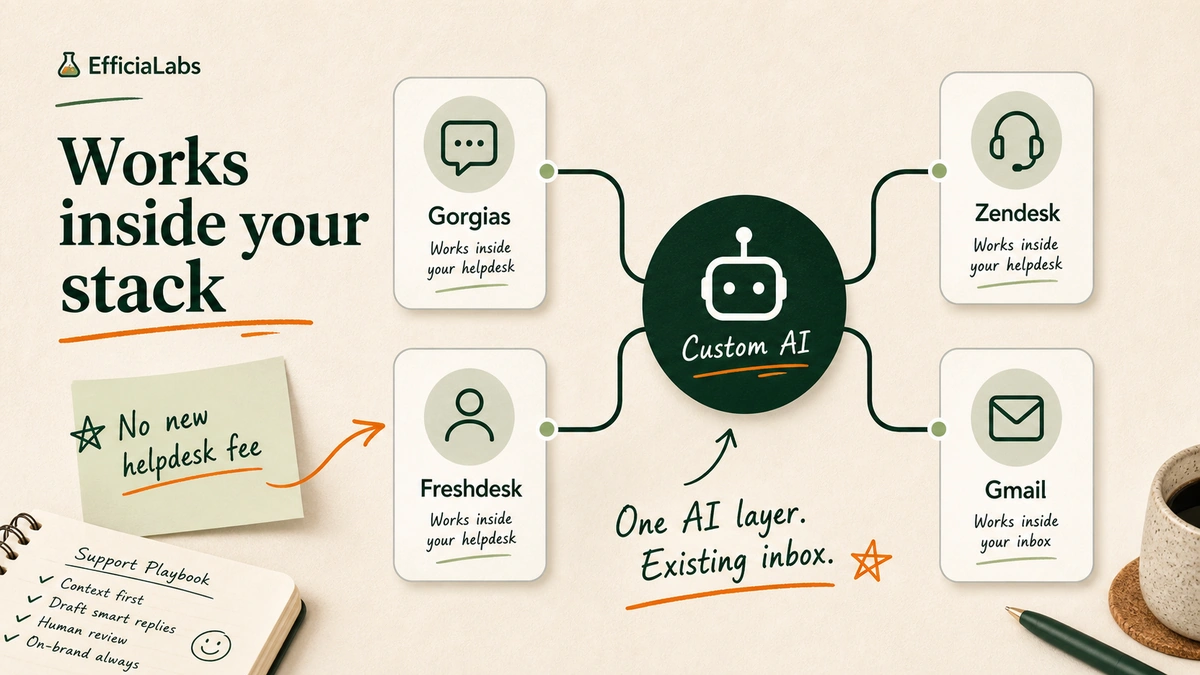
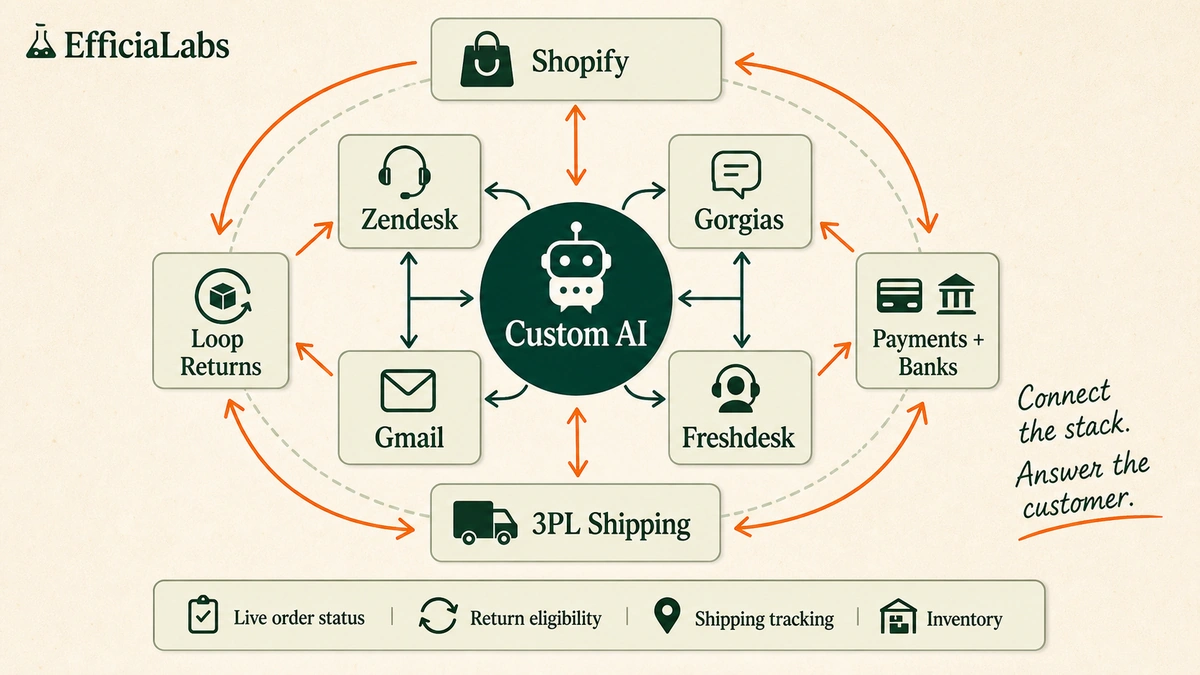
The integration layer is where custom AI pulls ahead. A custom build can connect to:

  • Support platforms: Zendesk, Gorgias, Gmail, Freshdesk: wherever your tickets live today, without switching platforms
  • Ecommerce ops: Shopify (live order data, inventory), Loop Returns (return eligibility and status), 3PL shipping providers like ShipBob and ShipStation
  • Financial and vendor systems: payment platforms, discount apps, vendor databases, bank account integrations

When a customer asks “Where is my order?” the AI checks live shipment data and answers accurately. When they ask “Can I return this?” the AI checks the order date against your policy and gives a real answer.

Not a scripted deflection. Not “we will get back to you.” An answer.

Integration map showing a custom AI hub connected to Zendesk, Gorgias, Gmail, and Freshdesk in an inner ring, and Shopify, Loop Returns, 3PL Shipping, and Payments and Banks in an outer ring, with live data flowing inward.

The real cost comparison

A hypothetical: a 15-person Shopify brand in the US. Five support agents. 3,000 tickets per month.

Ticket volume Zendesk Suite Pro (5 agents) Zendesk + Copilot (5 agents) Custom AI
500 per month $575/mo $825/mo ~$5/mo + setup
2,000 per month $575 + AR overages* $825 + AR overages* ~$20/mo + setup
10,000 per month $575 + significant AR overages* $825 + significant AR overages* ~$100/mo + setup

*Zendesk does not publish per-AR overage rates. Request a quote before committing.

Zendesk’s cost is anchored to headcount. Five agents always costs five times the plan rate, regardless of whether AI handles 10% or 90% of tickets.

Custom AI scales with actual usage. At $0.01 per ticket, 3,000 tickets per month costs $30 to run.

The setup cost is a one-time investment. At the cost difference between $825 per month and $30 per month, the math pays back quickly. For broader context on how DTC brands are using AI to improve unit economics, 49 AI in DTC statistics for 2026 is worth reading before any tooling decision.

What Zendesk AI does well

Credit where it is due.

Zendesk AI has real advantages for specific use cases:

  • Fast deployment: 24–48 hours from signup to live AI agents. No new vendors to evaluate or onboard.
  • Built-in QA automation: Monitors reply quality, flags outliers, and gives your support team a weekly performance scorecard.
  • Native analytics and reporting built directly into the workspace.
  • High automation ceiling: AI agents can automate up to 80% of customer interactions in well-configured deployments. h/t Zendesk CX Trends 2025
  • Multilingual support: 79 languages on the Advanced tier. Useful if you sell globally without human translators.

For brands where support is a cost center, where the goal is tickets closed correctly without particular attention to tone: Zendesk AI delivers.

Note: The 79-language multilingual capability is exclusive to the Advanced tier, which is enterprise-only and requires a sales conversation. Suite Team and Suite Professional have more limited language coverage out of the box. I have not seen a custom AI deployment match that full language breadth without specific build work for each target market.

Where Zendesk AI falls short for DTC brands

Brand voice

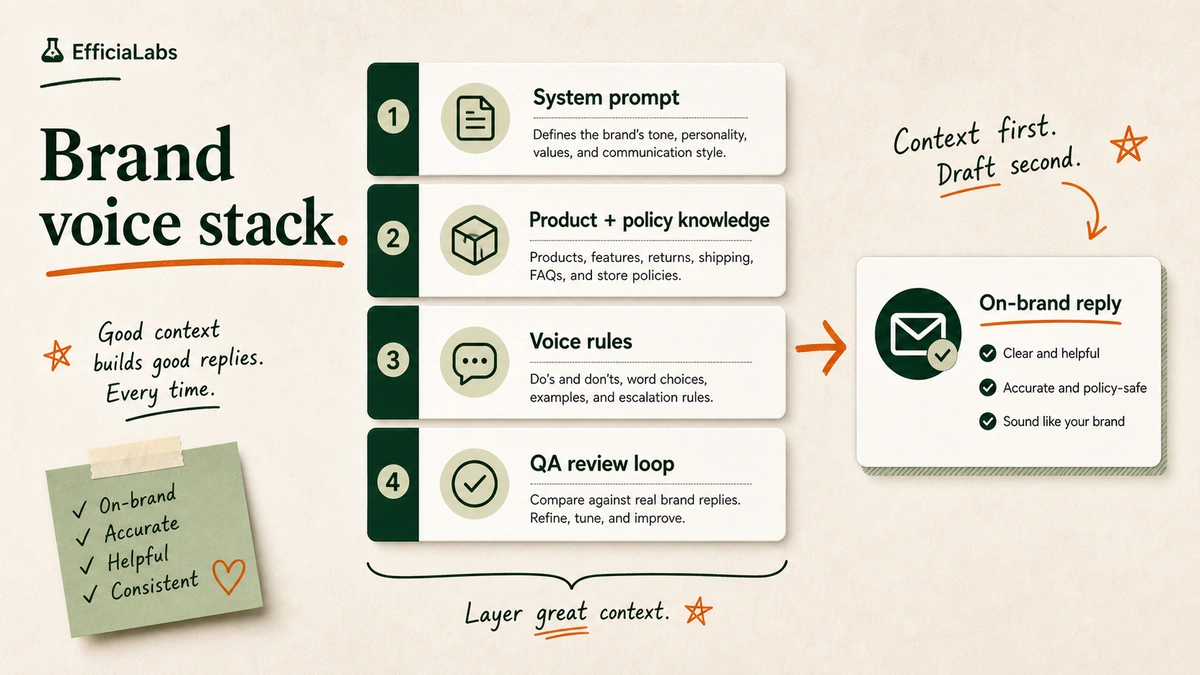
Zendesk AI replies in a generic help-desk register. Formal. Correct. Impersonal. You can add instructions to the bot configuration, but you are working against the platform’s defaults. The result is usually still a notch below what a human agent trained in your voice would write.

For a brand where the post-purchase experience is part of the product (beauty, wellness, premium apparel, anything with a community), generic AI replies are a brand problem, not just a CX problem. We’ve tested this across DTC brands in beauty, home goods, and outdoor gear: the gap in perceived brand quality between generic and custom AI replies is noticeable from the first ticket. The guide on how to match AI voice to your brand voice in customer support goes deeper here, but the short version: “Dear Customer” is a churn signal.

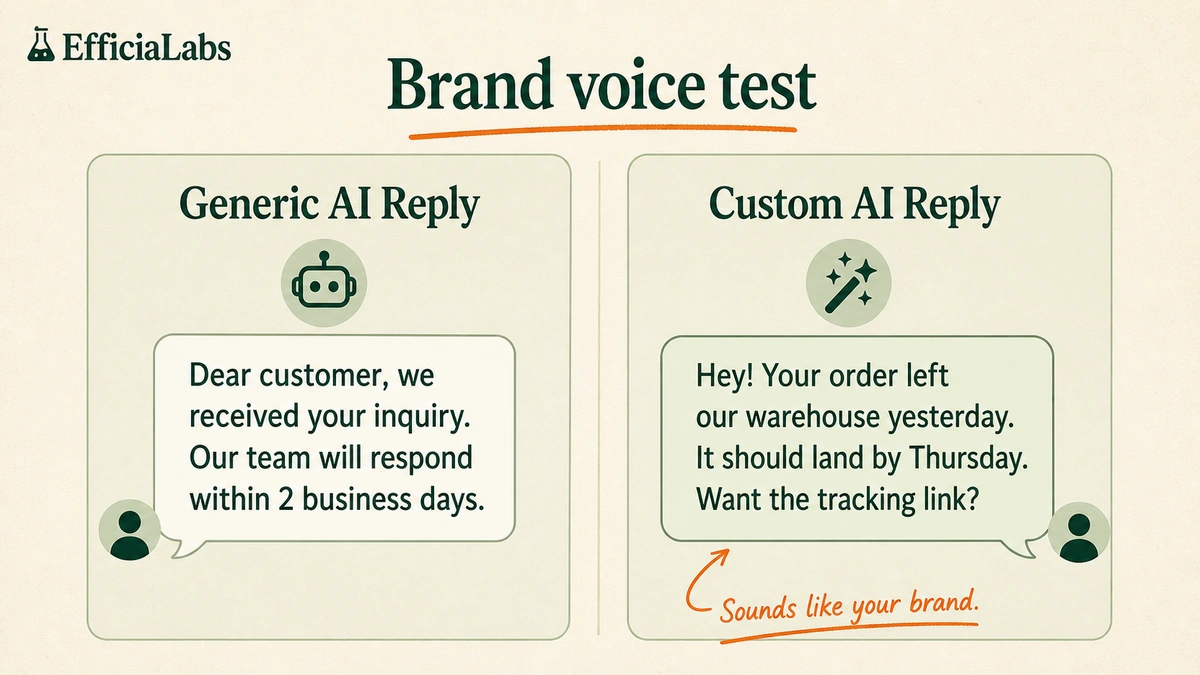
Side-by-side comparison of a generic Zendesk AI support reply reading "Dear Customer, I have received your inquiry" versus a custom AI reply in warm brand voice that pulls live order data and answers the question directly.

Ecommerce integrations

Zendesk AI operates within the Zendesk ticket record. It does not natively pull live Shopify order data, Loop Returns eligibility, or 3PL shipment tracking. You can build custom integrations through their API, but that is an engineering project, and you are back to needing a developer.

Flexibility and roadmap lock-in

You are on Zendesk’s product roadmap. New features ship when Zendesk decides. Pricing models change when Zendesk decides. The per-AR billing layer, for example, appeared as Zendesk shifted toward usage-based pricing. If your support workflows depend on specific AI behavior, changes you did not request will affect you.

Ticket volume economics

The platform fee does not get cheaper as you scale. 10,000 tickets at $0.01 is $100 per month. 10,000 tickets on Zendesk is $575 at minimum, plus whatever AR overages the volume triggers.

When Zendesk AI still makes sense

Honest answer: there are real scenarios where Zendesk is the right call.

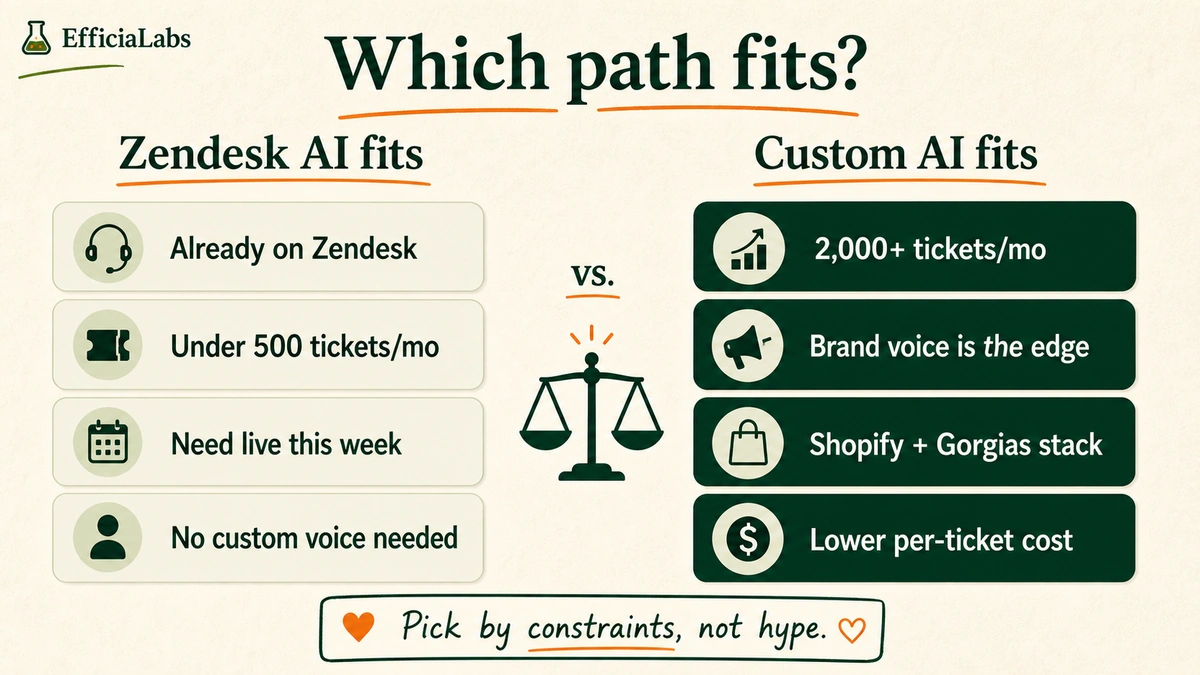
  • You are already fully committed to the Zendesk workspace and the switching cost is real.
  • You need AI live this week, not in two weeks.
  • You are processing fewer than 500 tickets per month and the cost difference does not justify the disruption.
  • Your team relies on Zendesk’s built-in reporting, macros, and workflow automations that would take time to rebuild elsewhere.

In these situations, the disruption outweighs the savings.

Where it gets harder to justify: if you are already paying for Suite Professional plus Copilot at $825 per month and your AI replies still sound generic. That is the scenario where the math and the brand impact both point toward custom.

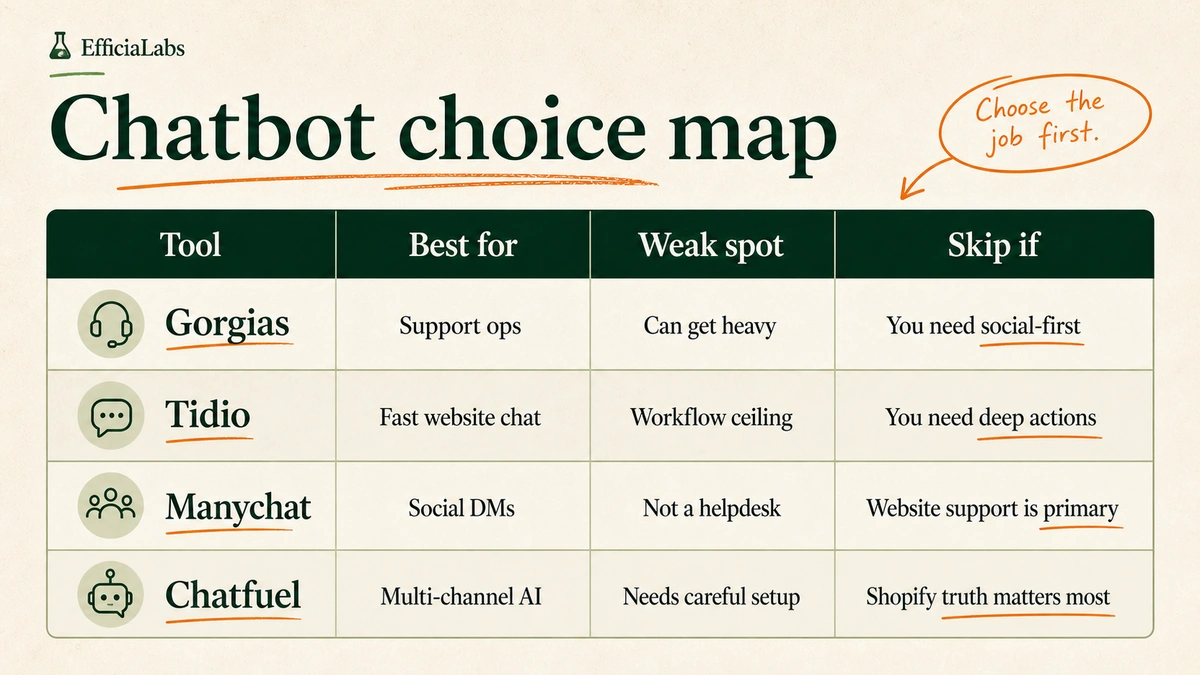
If you are evaluating ticketing platforms more broadly, Gorgias vs Tidio vs Manychat vs Chatfuel for ecommerce covers how the main options compare for DTC brands.

Decision ladder showing four scenarios where Zendesk AI is the right fit on the left — including being already on Zendesk, low ticket volume, and fast deployment needs — and four scenarios where custom AI wins on the right, including high ticket volume and brand voice requirements.

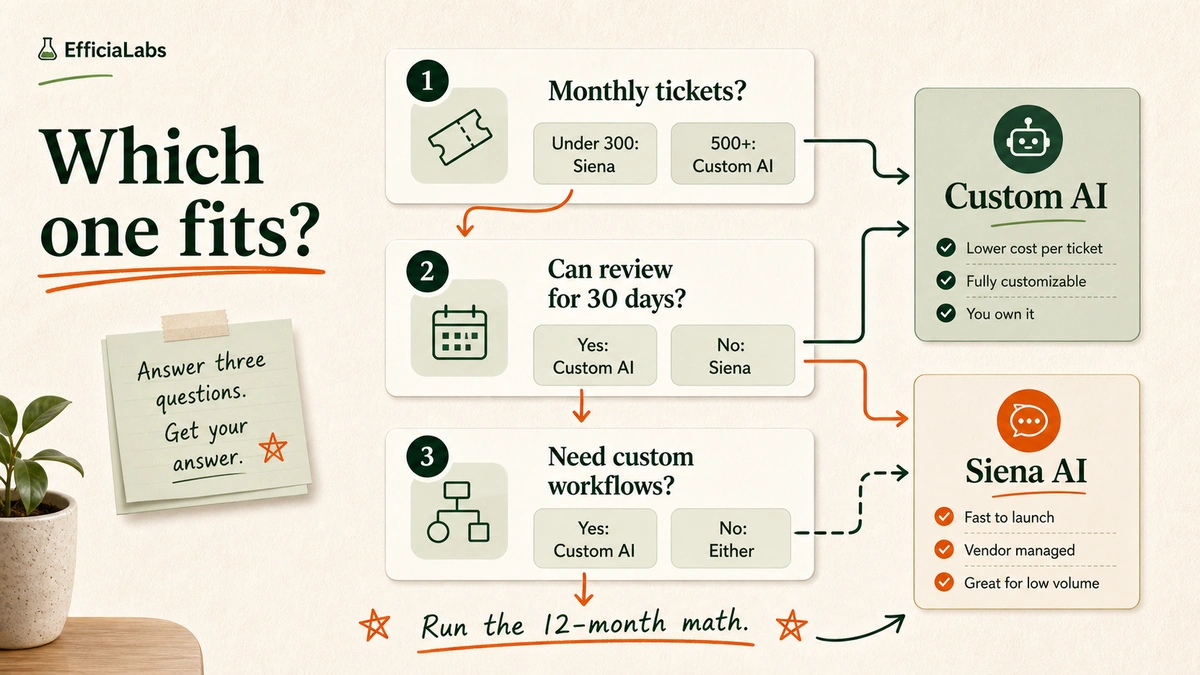
The 3-question framework

Not sure where you fall? Three questions.

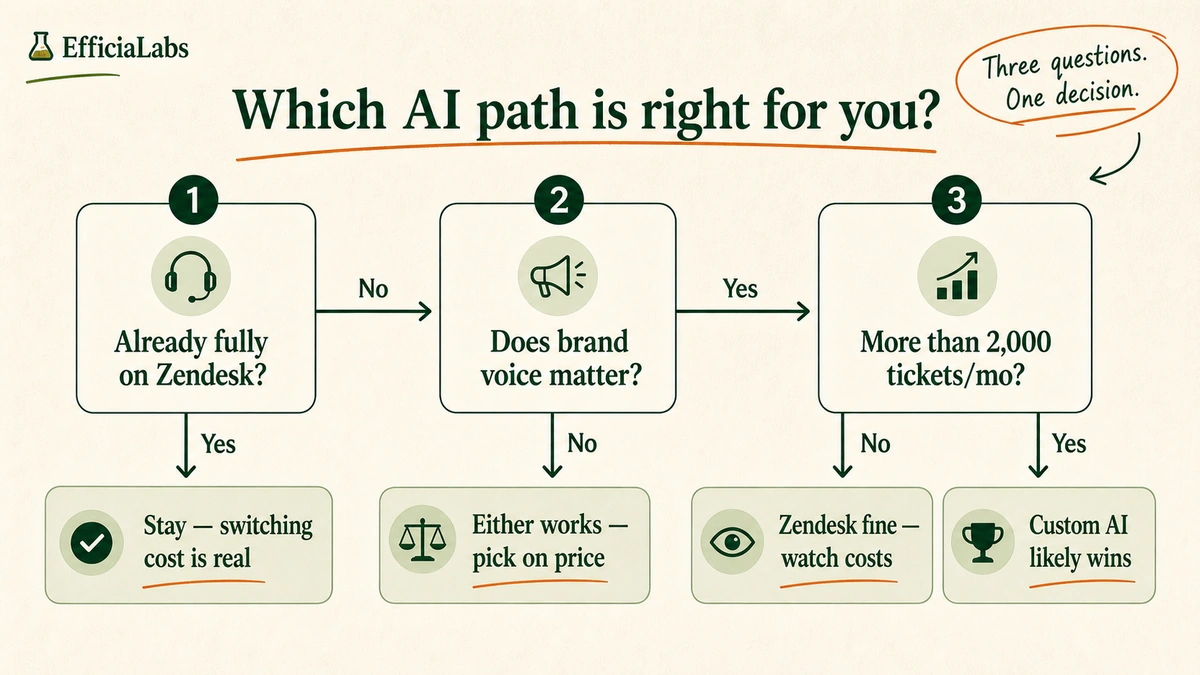
Q1: Are you already fully committed to Zendesk?

If yes, and your agents live in the Zendesk workspace daily, the switching friction is real. Custom AI can layer on top of Zendesk, so you do not have to rip anything out, but you are adding a vendor. Still worth evaluating the cost math. Go to Q2.

If no, you are choosing your stack fresh. Go to Q2.

Q2: Does your brand voice matter to your customers?

If no, cost is probably your only decision variable. Run the numbers from the table above.

If yes, and your brand is built on warmth, personality, or a specific tone your customers recognize and respond to, generic AI replies carry risk. One “Dear Customer” to the wrong customer at the wrong moment is a review. Go to Q3.

Q3: Do you process more than 2,000 tickets per month?

Pro tip: Check your support platform’s analytics dashboard before answering this. The number you need is total monthly ticket resolutions: that is the AR count Zendesk would bill against.

If no: Zendesk AI works for now. Watch what happens to your bill when you hit AR overages as volume grows.

If yes: custom AI almost certainly wins on cost alone before you factor in brand voice or integrations. The setup investment pays back within a few months at that volume.

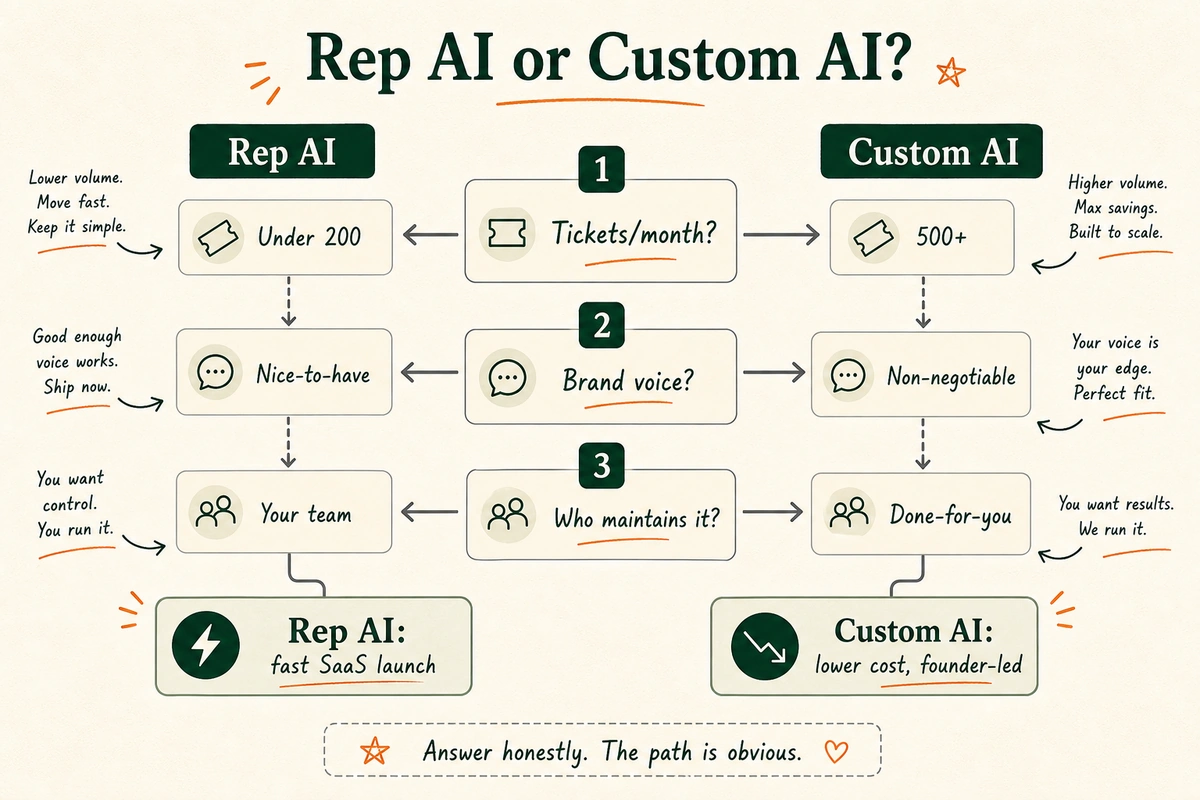
Three-question decision framework showing branching yes and no paths from questions about Zendesk commitment, brand voice importance, and monthly ticket volume, leading to four distinct recommendations.

Frequently asked questions about Zendesk AI vs. custom customer support AI

Is Zendesk AI good for small ecommerce stores?

For stores processing under 500 tickets per month that are already on Zendesk, yes. The AI Agents tier is included in Suite Team at $55 per agent per month, setup is fast, and the cost difference versus custom AI at low volume is small. The main limitation at any size is brand voice. Zendesk’s AI replies are generic by default.

How much does Zendesk AI actually cost per ticket?

It depends on your volume and whether you are exceeding your included Automated Resolutions allowance. A five-agent team on Suite Professional paying $575 per month across 2,000 tickets works out to $0.29 per ticket at the base rate, assuming you stay within your AR allowance.

Once you exceed it, the per-AR overage adds to that cost. Zendesk does not publish the overage rate.

Custom AI runs at approximately $0.01 per ticket at any volume. For a broader look at the provider landscape, the best company for ecommerce AI customer care compares how providers are structured.

Can custom AI integrate with Shopify order data?

Yes. Custom AI connects to Shopify’s API to pull live order status, shipping tracking, inventory levels, and return eligibility. It answers “Where is my order?” with a real tracking update and “Can I return this?” with a policy-based yes or no. No human in the loop. This is the most common reason DTC brands choose custom over platform AI.

How long does it take to build and deploy custom AI?

In our experience, a basic custom AI deployment takes one to two weeks from kickoff to live. That includes brand voice calibration, integration setup across your platforms, and a QA pass to confirm replies meet your standards.

Nothing goes live until the output sounds right. If you want a full breakdown of what the build involves, the customer service AI chatbot for Shopify guide covers the architecture and process.

Does EfficiaLabs replace Zendesk, or work alongside it?

Either. We build on top of Zendesk: the AI handles Tier-1 tickets automatically while your agents manage escalations in the Zendesk workspace as before. Or we replace it entirely if the brand is ready to move to Gorgias, Gmail, or another platform.

Most of the stores we work with are not on Zendesk. They use Gorgias or Gmail, and we build directly into those.

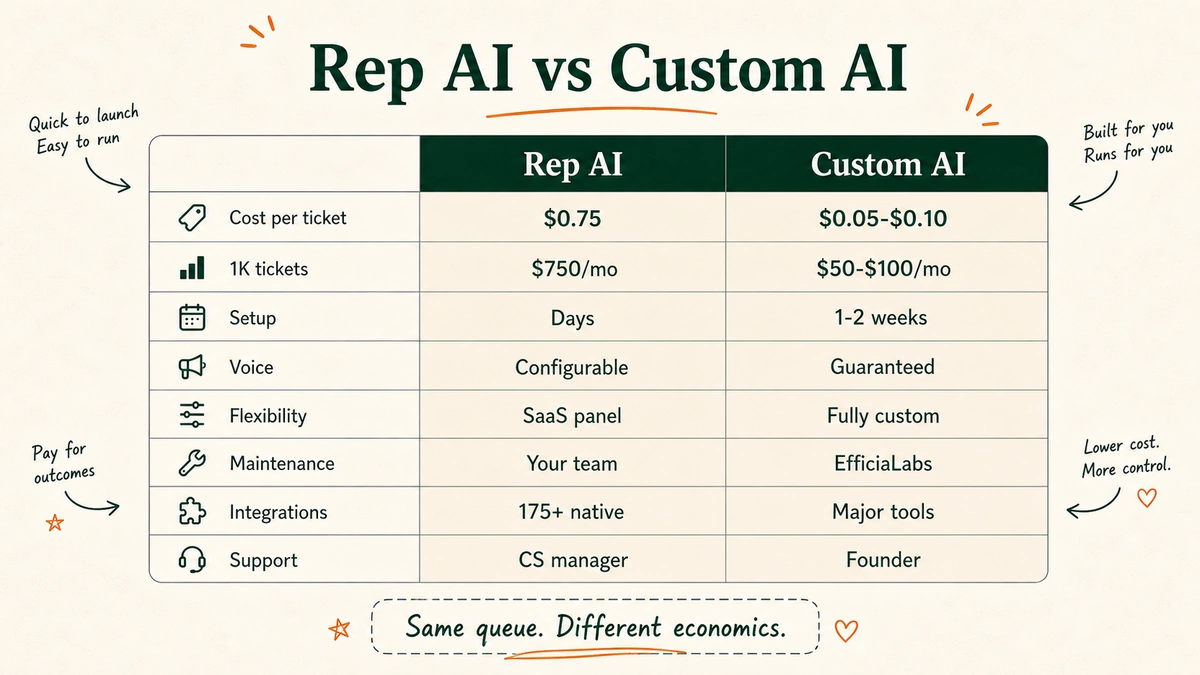
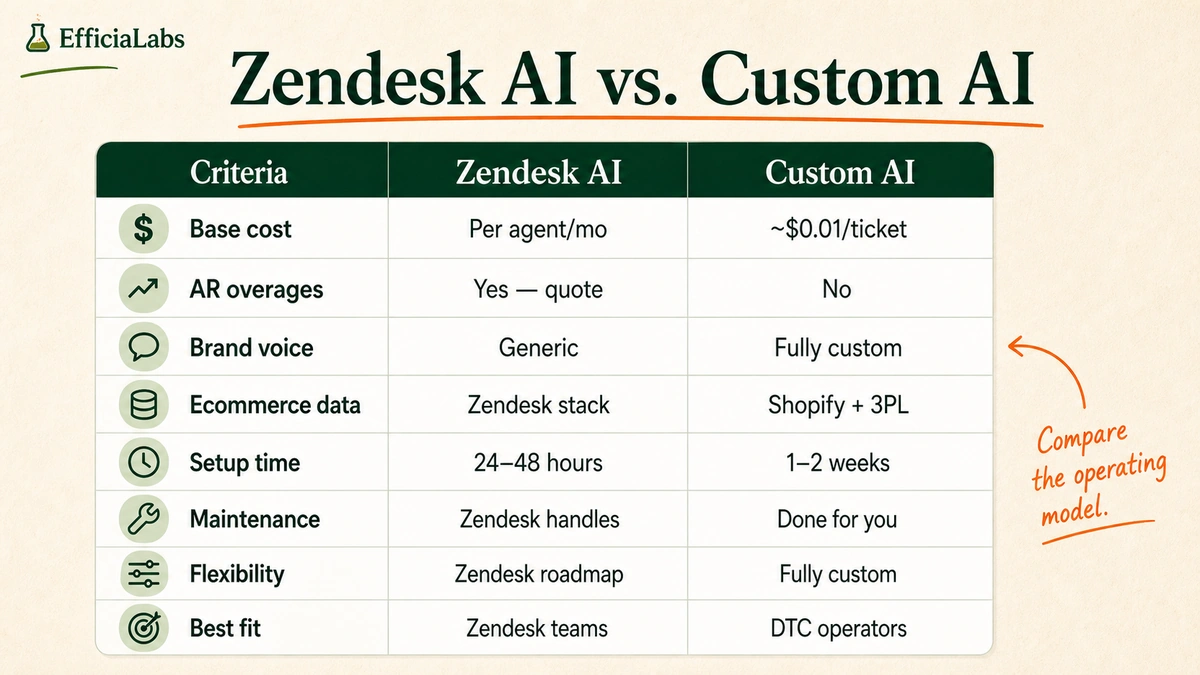
Full side-by-side comparison table of Zendesk AI versus custom AI across eight criteria including base cost model, AR overage billing, brand voice, ecommerce integrations, setup time, maintenance, and flexibility.

The verdict

If you are fully committed to Zendesk and processing fewer than 500 tickets per month, the economics do not justify switching. Use Zendesk AI. Keep a close eye on your AR usage as volume grows.

If you are above 2,000 tickets per month, care about how your replies sound, and want AI that pulls live data from your Shopify store: custom AI wins. The cost is lower, the brand fit is better, and you are not dependent on Zendesk’s roadmap decisions.

The same framework applies if you are on Gorgias instead of Zendesk. The breakdown is in Gorgias customer support AI vs custom AI: which is better?. If you want a broader comparison of AI customer care providers by fit and cost, the best company for ecommerce AI customer care in 2026 covers the full landscape.

Ecommerce founders already have enough on their plate. If the math points to custom AI and you want it built, deployed, and maintained without your team touching anything technical: that is what we do. Every client I work with gets my personal attention, and we do not call it done until the replies sound like your brand.

Reach out when you are ready.

— Vai


Sources

  1. Zendesk Suite pricing: zendesk.com/pricing (verified June 2026)
  2. Zendesk AI features overview: zendesk.com/service/ai
  3. Zendesk AI Agent tier comparison: gravity.cx/blog/zendesk-ai-agent-advanced-guide
  4. Zendesk Automated Resolutions overage pricing: not publicly disclosed on zendesk.com/pricing as of June 2026. Contact Zendesk sales directly for current per-AR rates and included AR counts per plan tier before signing.

Gorgias Customer Support AI vs Custom AI: Which Is Better?

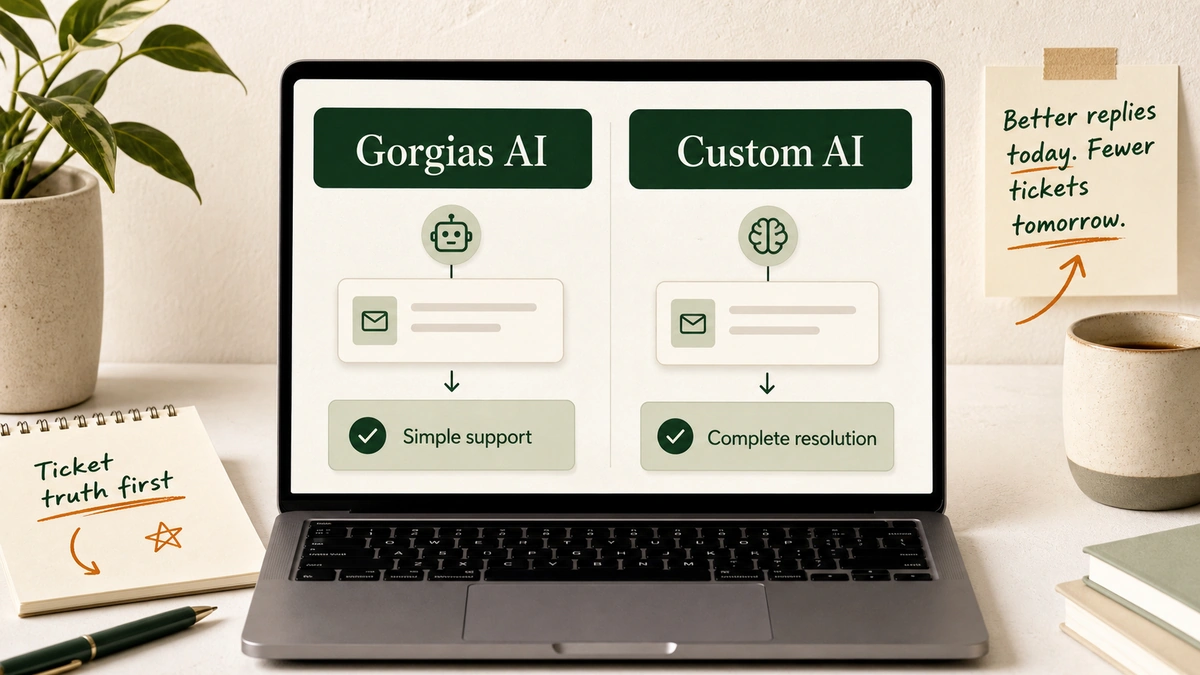
A laptop support workspace shows two paths labeled Gorgias AI and Custom AI, with support tickets, policy notes, and cost markers on an off-white desk.

Gorgias Customer Support AI vs Custom AI is not a tool comparison. It is an operating decision. Gorgias AI is usually better for low-volume Shopify support. Custom AI is better when you want complete deflection, tighter brand voice, cross-system actions, and lower cost per resolved ticket.

A laptop support workspace shows two paths labeled Gorgias AI and Custom AI, with support tickets, policy notes, and cost markers on an off-white desk.

I like Gorgias.

That is the first thing to say.

It is a serious helpdesk for ecommerce. Shopify context. Social DMs. Email. Chat. One inbox. Useful.

The mistake is treating its AI as the only possible answer.

Some stores need a clean default. Some need a machine built around their weird policies, angry edge cases, founder-approved tone, and 17 tabs of operational context.

Two different problems.

Two different answers.

Table of Contents

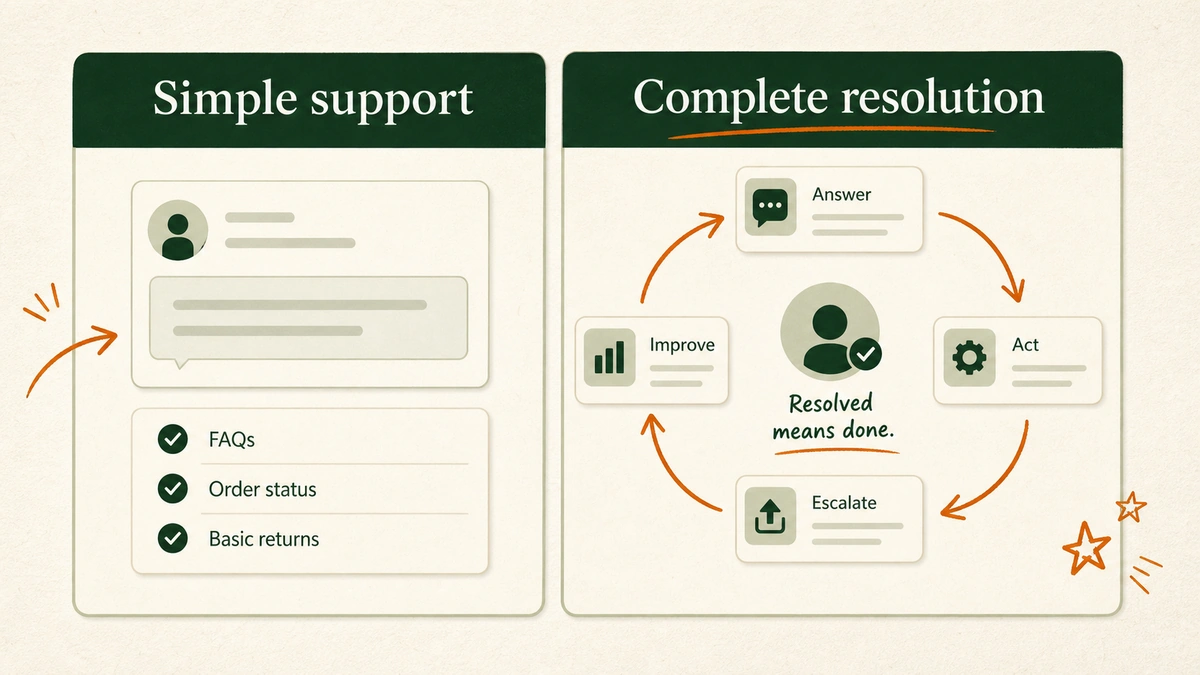
TL;DR: choose Gorgias AI for simple support, custom AI for complete resolution

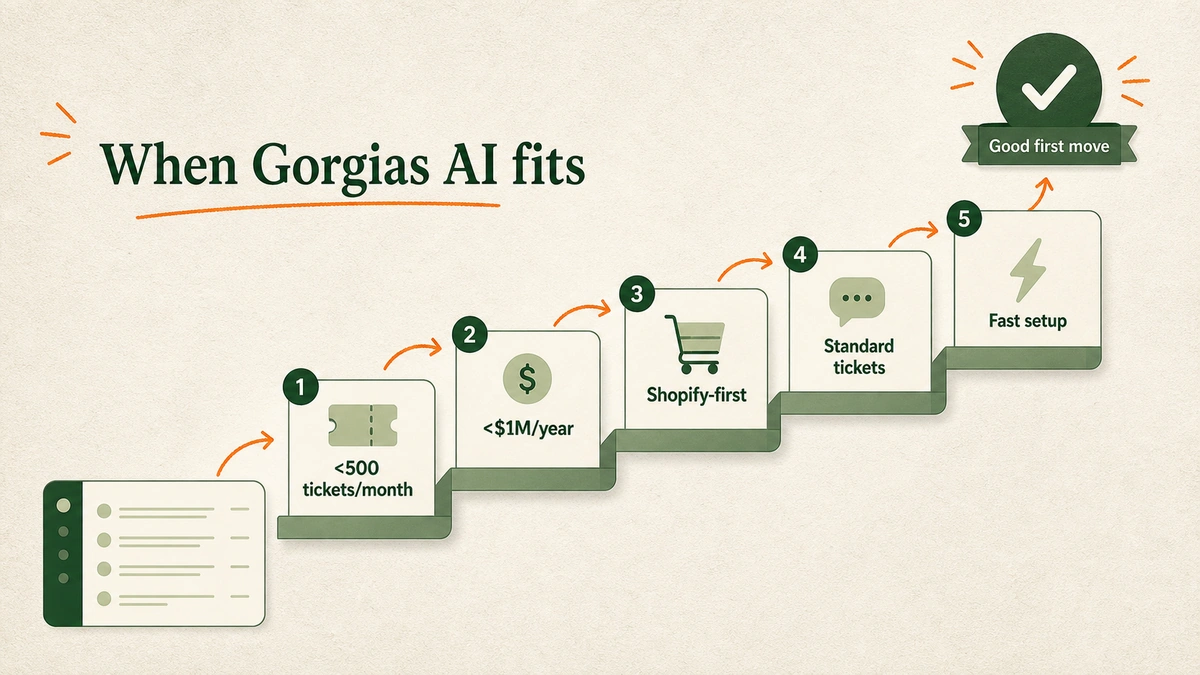
If your store gets fewer than 500 tickets a month, makes less than $1M a year, and most questions are standard Shopify support, start with Gorgias AI.

If the founder, or Head of Ops or CX wants complete deflection, a custom AI is the better long-term bet.

A side-by-side comparison panel shows simple support on the left and complete resolution on the right, with ticket examples and decision labels.

Here is the short version:

Situation Better first choice Why
Fewer than 500 monthly tickets Gorgias AI The setup cost and operational weight of custom AI may not be justified yet.
Less than $1M annual revenue Gorgias AI The business may need simple automation before a full support system.
Mostly WISMO, returns, FAQs, sizing, and discount codes Gorgias AI These are the exact repetitive patterns helpdesk-native AI can handle well.
Multiple systems decide the answer Custom AI The AI needs to reason across policies, order tools, subscriptions, returns, warehouse rules, and exceptions.
Founder wants complete deflection Custom AI The system is built only for that store instead of starting generic and trying to customize backward.
Brand voice is a non-negotiable Custom AI The reply logic, tone, examples, and review criteria can be built from the brand’s actual voice.
Cost per ticket matters at scale Custom AI A custom system can be optimized around model cost, routing, and deflection economics.

Note: This is not “Gorgias bad, custom good.”

Lazy comparison. Useless.

The better question is:

What job are you hiring the AI to do?

If the job is “answer common questions inside Gorgias,” Gorgias AI makes sense.

If the job is “resolve as many tickets as safely possible, in our voice, across our stack, without my team babysitting it,” custom AI starts to look very different.

What is Gorgias AI Agent?

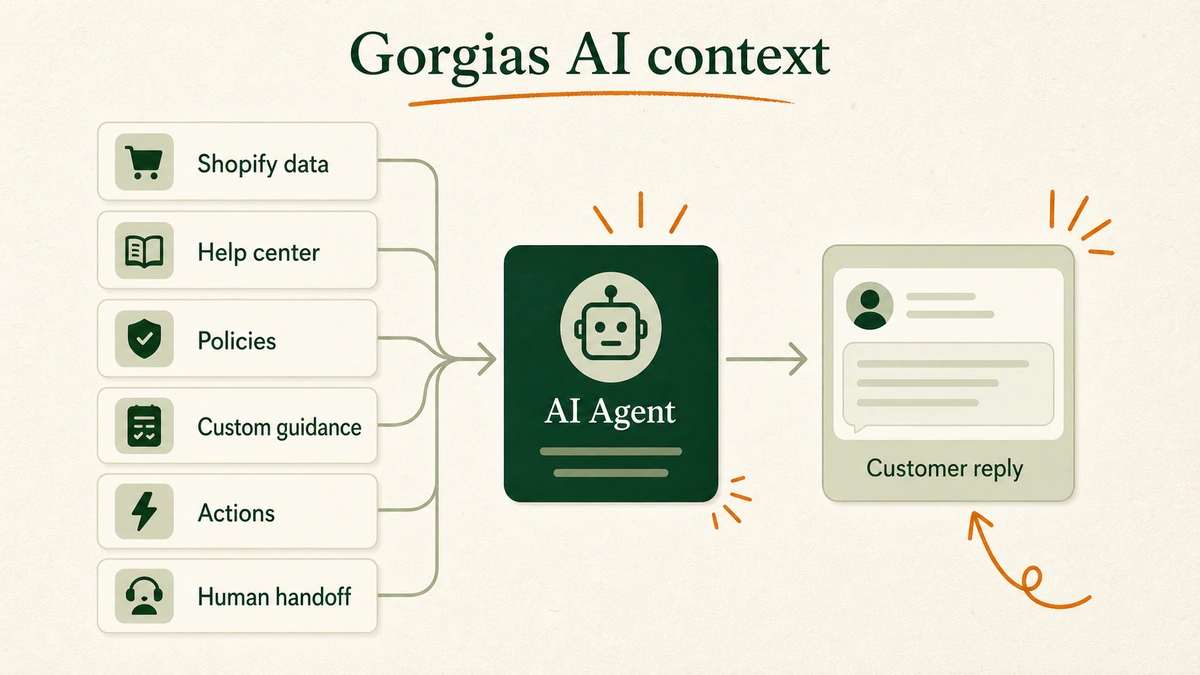
Gorgias AI Agent is the AI layer inside Gorgias for ecommerce support and sales. It is trained on brand policies, website content, help center articles, documents, custom guidance, and Shopify data. Gorgias describes it as an AI Agent that can analyze, train, test, and deploy from inside the helpdesk.

A layered context stack shows Shopify data, help center articles, policies, custom guidance, and AI Agent connected to customer tickets.

Gorgias’ current AI Agent docs say AI Agent has two skillsets:

  • Shopping Assistant: Handles pre-purchase questions, recommendations, upsells, and discounts.
  • Support Agent: Handles post-purchase issues like order tracking, edits, returns, and subscription management.

It can also use Actions. The current Gorgias Shopify Actions docs list order actions such as canceling orders, editing shipping addresses, removing order items, replacing an item, reshipping an order, and adding order notes.

That is real capability.

Not just “AI writes a reply.”

But the details matter.

Those Shopify Action docs also list limitations. For example, some Shopify order changes do not automatically pass to every 3PL or fulfillment tool. Some multi-item replacement cases hand over to the team. Some price-change cases need a human when additional payment is required.

That is normal. Support has landmines.

As of June 2026, the same Gorgias Shopify Actions page lists 6 available Shopify action types and a separate limitations section.

AI that edits orders should have boundaries.

Good fit: A Shopify-first brand that already runs support in Gorgias, has clean help docs, wants faster coverage, and mainly needs repetitive ecommerce tickets resolved.

Weak fit: A brand where the real answer depends on five systems, founder-level judgment, or store-specific rules that are not neatly documented.

For a broader setup walkthrough, see our guide on how to build a customer service AI chatbot for Shopify. If the team is still deciding which model belongs in the workflow, the guides to Claude for Shopify customer support and ChatGPT for Shopify customer support cover that earlier layer.

What is a custom customer support AI?

A custom customer support AI is not a chatbot widget.

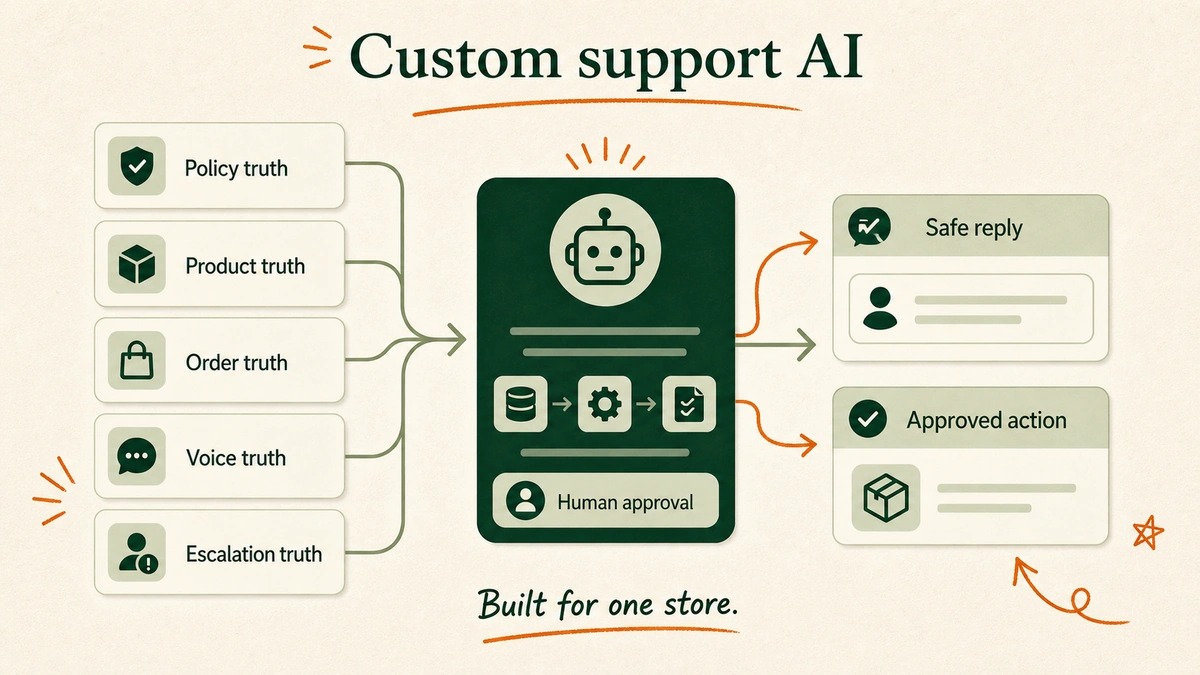
It is a support system built around one store.

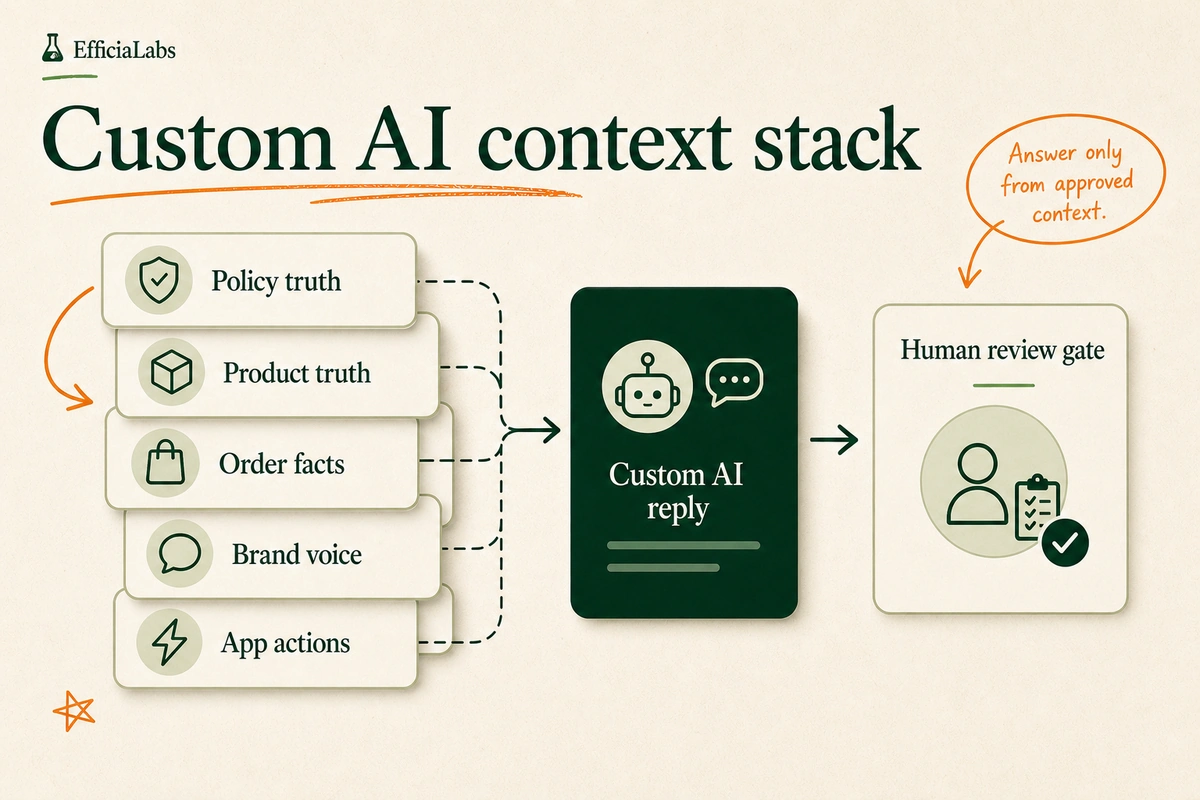
A custom support AI context stack shows store policies, product rules, order tools, returns data, voice guide, and human approval gates feeding one reply engine.

It can work inside Gorgias, Zendesk, Freshdesk, Gmail, or another support inbox. The helpdesk is the surface. The custom AI is the V8 engine underneath it.

The difference is where the system starts.

Most SaaS AI starts generic:

  • Here is the product.
  • Connect your store.
  • Add your help center.
  • Configure the tone.
  • Create rules.
  • Test.

Custom AI starts with the store:

  • What are your top ticket types?
  • Which tickets should never be automated?
  • Which policies are hard rules?
  • Which policies need judgment?
  • Which systems contain the truth?
  • What does a good reply sound like?
  • What does a bad reply sound like?
  • Can I upsell any product to this customer?
  • What should happen after the reply?

That last question is the one people miss.

Support is not just answering.

Support is checking, deciding, acting, logging, escalating, refunding, updating, preventing.

If a customer asks, “Can I change the address on the order I placed 42 minutes ago?”, the AI may need to:

  • Confirm the order exists.
  • Check fulfillment status.
  • Check the shipping window.
  • Validate the new address.
  • Decide whether a warehouse or 3PL update is required.
  • Update the order or hand off.
  • Write the reply.
  • Add a note.
  • Flag the pattern if it happens often.

That is not a prettier macro.

That is an operations workflow.

In our customer support builds, voice is usually the second problem.

Accuracy comes first.

This is why matching AI voice to your brand voice is only one layer. The reply must sound right. It also has to be right.

Gorgias AI vs. custom AI: the practical comparison

The easiest way to compare these options is to stop asking “Which AI is smarter?”

Ask who owns the system.

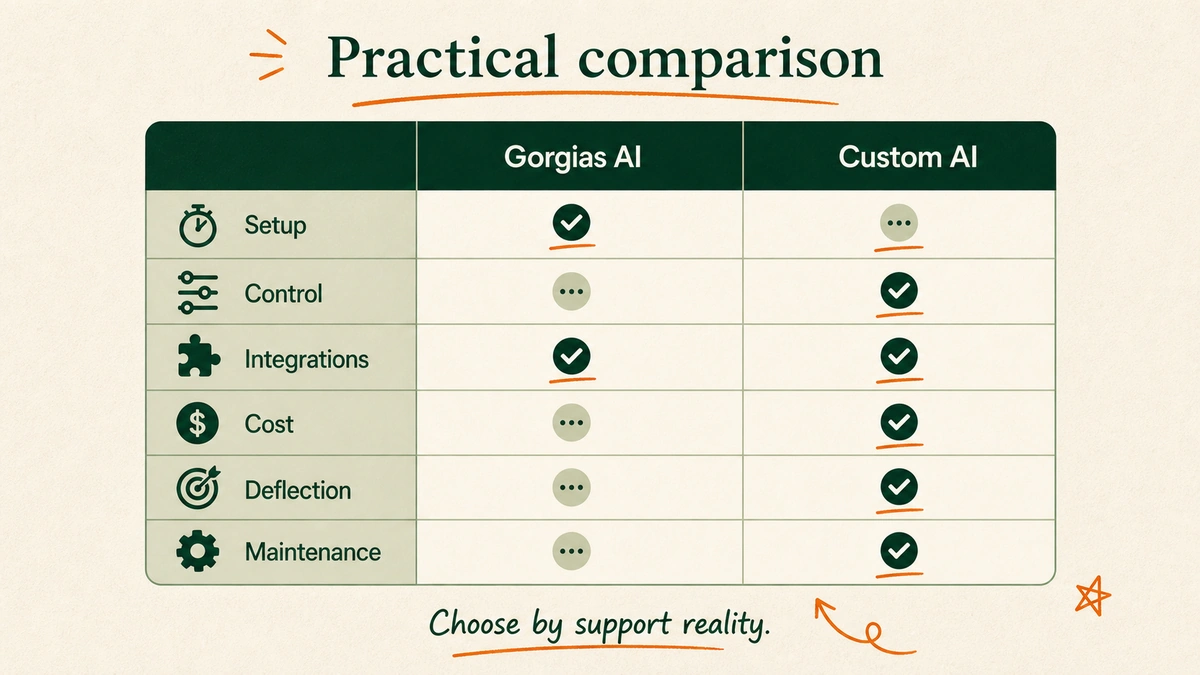
A comparison matrix lists Gorgias AI and custom AI across setup speed, control, integrations, cost model, deflection depth, and maintenance ownership.
Category Gorgias AI Custom customer support AI
Setup speed Faster if you already use Gorgias and Shopify Slower upfront because the system is built around your support reality
Best use case Common ecommerce questions and standard Shopify workflows Full-ticket resolution across custom policies, tools, and edge cases
Brand voice Configurable tone and guidance Built from examples, approvals, reviews, and store-specific voice rules
Integrations Strong inside the Gorgias ecosystem and ecommerce integrations Built around whatever systems the store actually uses
Deflection goal Automate the tickets it can confidently handle Push toward complete safe deflection across the store’s repeatable support work
Maintenance Your team monitors, trains, and tunes inside the product EfficiaLabs can build, deploy, monitor, and improve the system for the store
Cost model Gorgias says most plans price AI Agent at $0.90 per resolved interaction, with starter plans beginning at $1 EfficiaLabs systems can run as low as about $0.01 per ticket in model cost, depending on complexity and setup

That last row needs care.

Gorgias prices a product. EfficiaLabs builds a system. Those are not identical commercial models.

“AI Agent that powers the entire customer journey.”
– Romain Lapeyre, CEO of Gorgias

Cc: Gorgias Conversational AI launch post.

Gorgias’ AI Agent pricing page, updated May 28, 2026, says AI Agent is priced per resolved interaction, with most plans at $0.90 per resolved conversation and starter plans beginning at $1. It also says AI Agent is an add-on to Gorgias Helpdesk.

Gorgias’ billing docs add another important detail: when AI Agent fully resolves a ticket without human handoff, an automation fee can apply, and the helpdesk ticket fee can also apply to the same ticket.

So do not compare only “AI price.”

Compare full cost per resolved support issue.

Pro tip: If the vendor price page makes your spreadsheet messy, your real support costs will probably be messy too.

When Gorgias AI is probably the better choice

Gorgias AI is probably the better first move when your support operation is still simple.

Simple is not an insult.

Simple is good.

A decision ladder shows fewer than 500 monthly tickets, less than one million dollars annual revenue, Shopify-first stack, standard tickets, and fast setup.

Choose Gorgias AI first when:

  • You receive fewer than 500 support tickets per month.
  • The store makes less than $1M in annual revenue.
  • Your support stack is mostly Shopify plus standard ecommerce apps.
  • Your top tickets are WISMO, returns, FAQs, discount codes, sizing, and simple order edits.
  • You already use Gorgias and the team likes the inbox.
  • You want faster setup more than complete control.
  • You are still learning which tickets should be automated.

At this stage, the biggest risk is buying a system before you understand the support pattern.

I have seen founders try to automate chaos.

Doesn’t work.

The AI becomes a mirror. Messy policies in. Messy replies out.

If you have 300 tickets a month, your first win is not complete AI support architecture. It is categorizing the tickets, cleaning the policies, fixing repeated product-page confusion, and letting the helpdesk AI handle the obvious stuff.

For the same reason, stores should read the broader AI opportunity carefully before buying tools. Our AI in DTC statistics guide is a useful sanity check before the budget gets emotional.

Gorgias AI is also attractive when the founder wants one vendor and one surface.

One login. One bill. One inbox.

Lovely.

For a lean team, that matters.

When custom AI is probably the better choice

Custom AI becomes interesting when the founder or Head of ops or CX wants complete deflection.

Not “AI drafts some replies.”

Not “AI handles FAQs.”

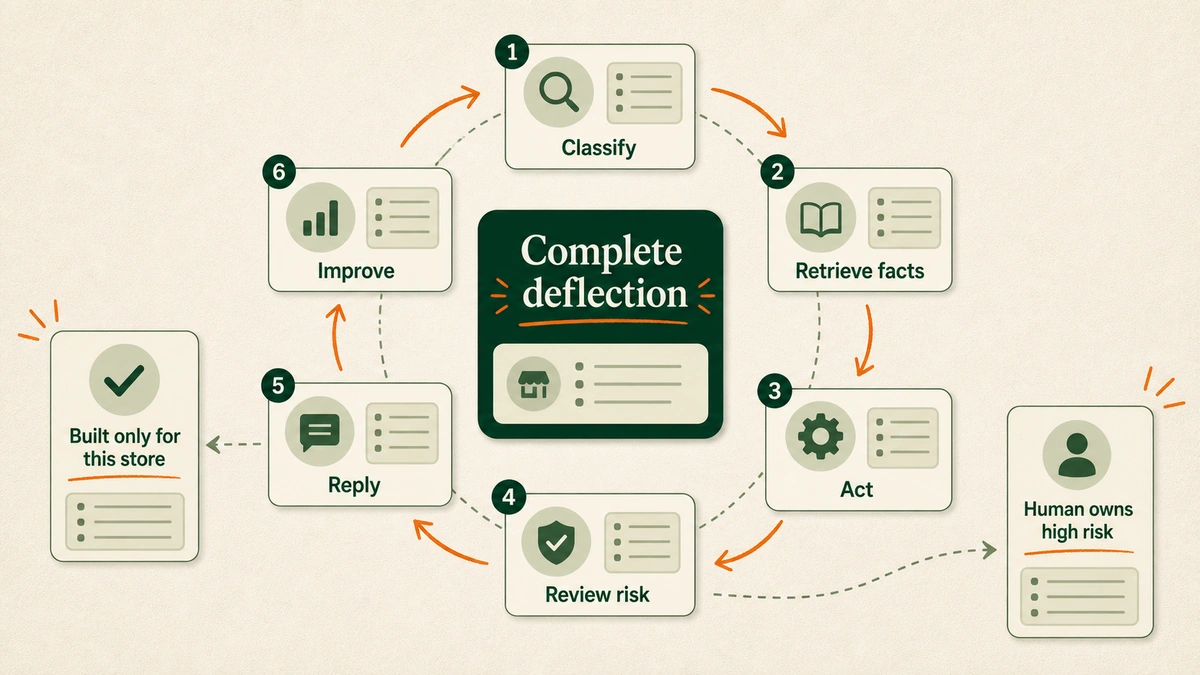
Complete deflection.

A circular workflow shows custom AI classifying a ticket, retrieving store facts, taking an approved action, reviewing risk, replying, and improving the knowledge base.

Choose custom AI when:

  • The founder or Head of ops/CX wants complete deflection/resolution, not partial automation.
  • Tickets require store-specific logic, edge-case policies, or cross-tool actions.
  • The AI needs to answer in a voice that feels built for the store.
  • The brand does not want a generic system customized afterward.
  • Cost per ticket matters.
  • The company wants the AI built, deployed, and maintained for them.
  • Want to use powerful AI models like Gemini, Claude, ChatGPT.

Here is the key difference:

Generic AI starts broad, then narrows.

Custom AI starts narrow, then deepens.

It is built for the store’s exact support reality:

  • The return rule that changes for sale items.
  • The subscription rule that changes by product line.
  • The VIP policy that only applies over a certain lifetime value.
  • The warehouse cutoff that changes by 3PL.
  • The founder’s “never say this phrase” rule.
  • The escalation logic for chargeback threats.
  • The voice examples that make replies sound human.

In our work, this is why custom AI can be better at resolving tickets.

Not because it has magic.

Because it has fewer generic assumptions.

It knows the store.

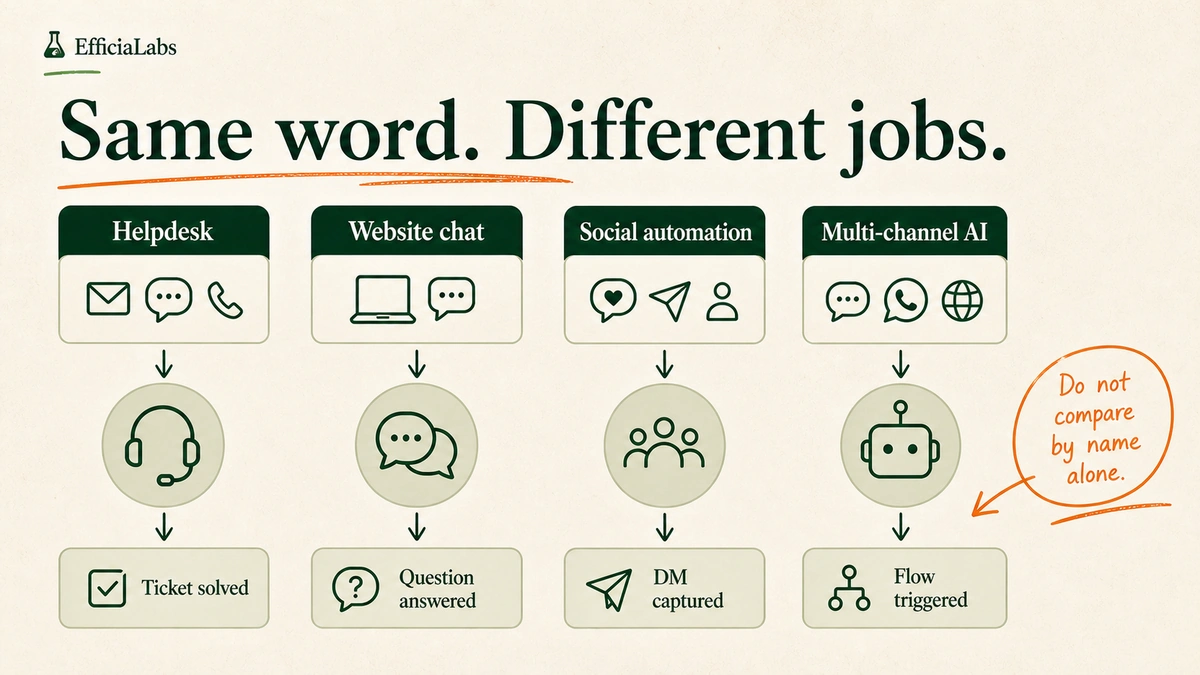
If you are choosing between SaaS tools, our Gorgias vs Tidio vs Manychat vs Chatfuel comparison is useful. But custom AI is a different category. It is not one more app in the drawer.

It is the support operating system.

That same pattern shows up outside support too. When a messy workflow is costing the team time every week, AI works best as a system layer, not a shiny widget. The inventory version is in our guide to eliminating Shopify inventory Excel chaos with AI.

The 1,000-ticket/month test before choosing either option

Before you buy a heavier AI support setup, run the 1,000-ticket/month test.

This does not mean you must manually read exactly 1,000 tickets.

It means monthly ticket volume should drive the decision.

Start simple.

Count the work.

Then choose the tool.

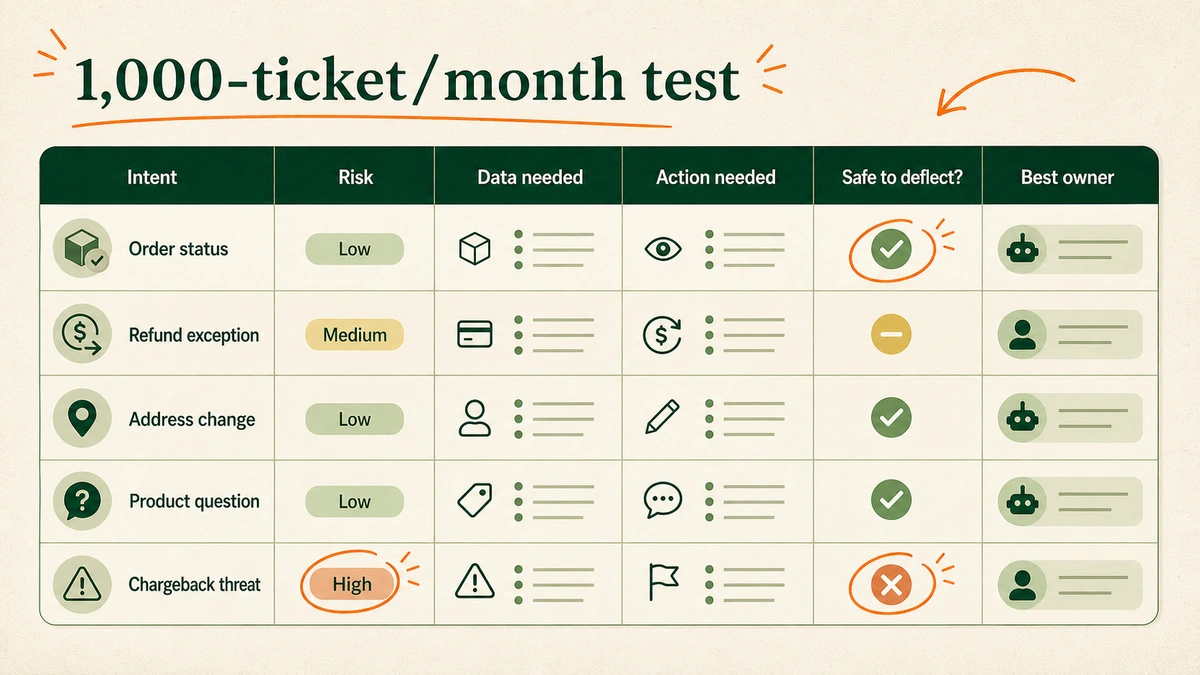
A ticket audit matrix shows columns for intent, risk, data needed, action needed, safe to deflect, and best system owner.

If you are under 1,000 tickets a month, audit the monthly ticket mix before committing to custom AI. If you are above 1,000, audit a representative sample from the last 30 to 60 days.

Tag each ticket with:

Field What to capture Example
Intent What the customer wanted “Where is my order?”
Risk How bad a wrong answer would be Low, medium, high
Data needed What facts the AI needs Order status, policy, product info
Action needed Whether the AI must do something Reply only, cancel, refund, edit address
Safe to deflect? Whether a human can be skipped Yes, no, review first
Better owner Which system should handle it Gorgias AI, custom AI, human

You are looking for buckets.

Not vibes.

In our audits, this step is where the sales demo fantasy dies.

We test the ticket mix before we trust any automation claim.

No guesswork.

No shiny demo math.

After the audit, you should know:

  • What percentage of tickets are simple enough for Gorgias AI.
  • What percentage need human judgment.
  • What percentage are repeatable but too custom for a generic setup.
  • Which policies need cleanup before any AI goes live.
  • Which integrations determine real resolution.

Important note: Do not count “AI answered” as success.

Count resolved.

A ticket is resolved when the customer gets the right answer, the right action happens, the brand is protected, and the customer does not come back asking the same thing again.

That is the standard.

Cost example: how to compare price per resolution

Do not compare monthly subscription prices.

Compare cost per resolved support issue.

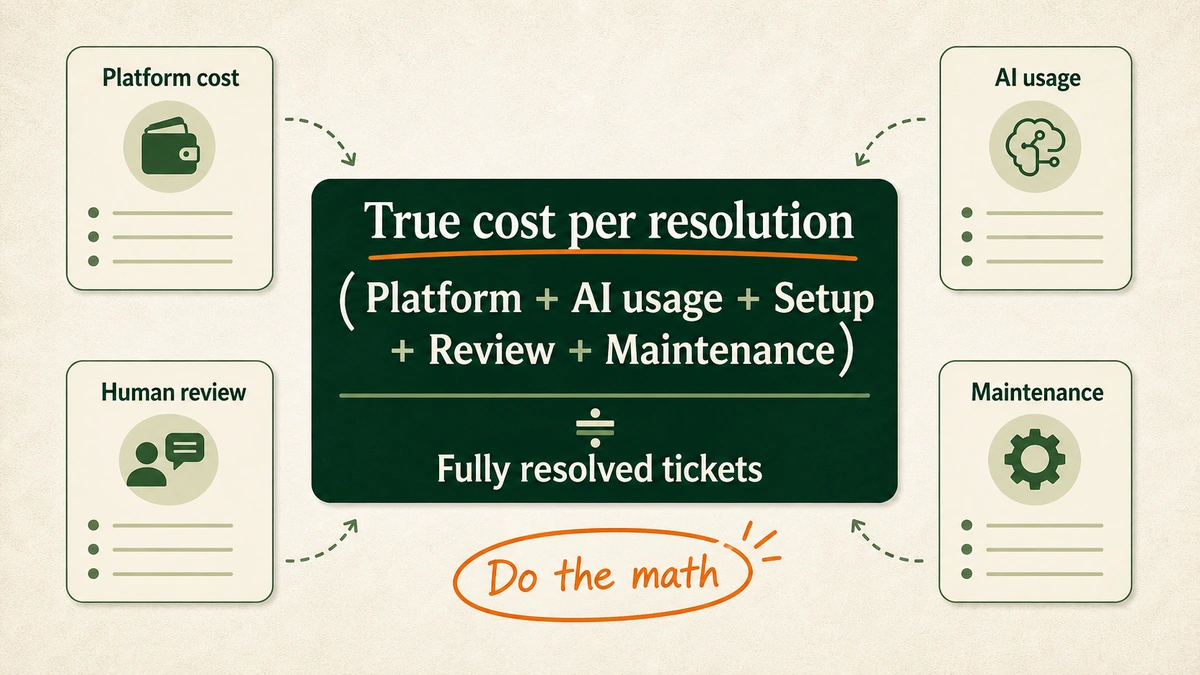
A formula box shows total AI support cost divided by fully resolved tickets, with example rows for platform cost, human review cost, and maintenance cost.

Use this formula:

True cost per resolution =
(platform cost + AI usage cost + setup cost + human review cost + maintenance cost)
/ fully resolved tickets

A few examples:

Cost item Why it matters
Platform cost The base helpdesk or AI subscription.
AI usage cost Per-resolution, per-ticket, or model usage fees.
Human review cost Time spent checking, editing, and fixing AI output.
Setup cost Documentation, workflows, integrations, and testing.
Maintenance cost Policy updates, QA, prompt changes, and edge-case fixes.

Gorgias’ public pricing page says most AI Agent plans price resolved interactions at $0.90, with starter plans beginning at $1. It also says plans include monthly automated interaction allotments from 90 to 2,500+.

EfficiaLabs custom support systems can often run at about $0.01 – $0.05 per ticket in model cost once built.

“Within six days, Fin is successfully resolving 42% of conversations.”
– Dane Burgess, Customer Support Director at Linktree

Cc: Intercom pricing archive.

But model cost is not the whole cost.

In our work, we measure the support system by resolved tickets, not generated replies.

I do not want to play spreadsheet games.

The honest comparison is:

  • What does each resolved ticket cost all-in?
  • How many tickets are fully resolved without human labor?
  • How many wrong replies create extra work?
  • How much founder or CX lead time does setup consume?
  • How often does the system need maintenance?

Simple math first.

Tool choice second.

That is why low-volume stores should be careful.

If you have 250 tickets a month, saving $0.80 per ticket is not the main game.

If you have 5,000 tickets a month and a messy support stack, it can be.

Support cost also connects to profit. If the founder is looking at AI from a margin lens, our guide on how Shopify stores use AI to improve profitability is the adjacent read.

My recommendation for a 5-50 person DTC brand

If I ran a DTC brand with 5-50 people, I would not start with the tool.

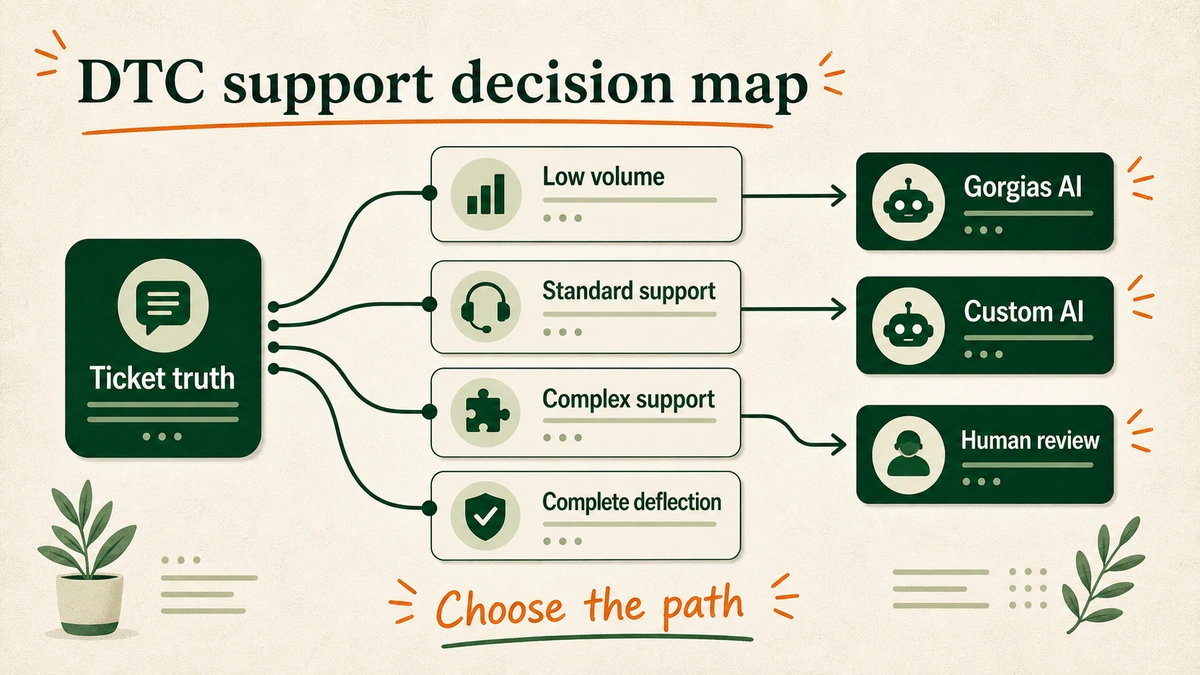
I would start with ticket truth.

A decision map shows four paths labeled low volume, standard support, complex support, and complete deflection, ending in Gorgias AI, human review, or custom AI.

Here is the path I would follow:

  1. If you have fewer than 500 tickets/month or less than $1M annual revenue, start with Gorgias AI or simple helpdesk automation.
  2. If you are near 1,000 tickets/month, audit the ticket mix before changing systems.
  3. If most tickets are standard Shopify support, use Gorgias AI and measure true resolution.
  4. If the same complex ticket appears every week, document it and make it automatable.
  5. If the founder or Head of CX wants complete deflection, build custom AI around the store.

For more examples of where this system-first thinking applies, see our breakdown of AI use cases for lean DTC teams and the comparison of the best ecommerce AI customer care companies.

Small caveat.

Complete deflection should not mean “never escalate.”

That is how brands get hurt.

Complete deflection means every ticket gets the right path:

  • Resolve automatically when it is safe.
  • Ask for more information when facts are missing.
  • Escalate when judgment is required.
  • Block automation when risk is high.
  • Improve the system when repeated confusion appears.

That is the real prize.

Better replies today. Fewer tickets tomorrow.

This is also why the service model matters. EfficiaLabs builds, deploys, and maintains the custom support AI. The store mainly grants access, reviews the important rules, and gives feedback when the system needs to learn a nuance.

Founders already have enough tabs open.

I want to close a few.

Frequently asked questions about Gorgias AI vs. custom customer support AI

Is Gorgias AI good for small ecommerce stores?

Yes, if the support volume is modest and the ticket types are standard. For stores under 500 monthly tickets or under $1M annual revenue, Gorgias AI is usually a more sensible first move than a custom system.

The caveat is ticket complexity. A small store with unusual products, regulated claims, subscription rules, or fragile brand voice may still need a more controlled setup.

Is custom AI better than Gorgias AI?

Custom AI is better when the goal is complete safe deflection, not just faster replies.

Because it is built only for the store, it can reflect the store’s policies, product nuances, escalation rules, and brand voice more deeply. That does not mean every store should build custom AI first. It means the ceiling is higher when the support operation is complex enough to justify it.

What ticket volume justifies custom customer support AI?

Start looking seriously around 1,000 tickets per month.

Below that, audit the ticket mix first. If the monthly volume is low and most issues are repetitive, simpler automation may be enough. If the volume is high or the same complex issues keep repeating, custom AI becomes more attractive.

Can custom AI work inside Gorgias?

Yes. A custom support AI can use Gorgias as the inbox while adding store-specific logic outside the default product layer.

That means the team can keep familiar workflows while the custom AI handles classification, context retrieval, action logic, and reply generation behind the scenes.

How should a DTC brand test Gorgias AI against custom AI?

Run a ticket audit first.

Label each ticket by intent, risk, required data, required action, and safe deflection. Then estimate which tickets Gorgias AI can resolve, which need humans, and which could be fully resolved by a custom system. The winner is not the one with the best demo. It is the one that resolves your actual tickets.

What should never be fully automated?

High-risk tickets should keep a human owner.

That usually includes legal threats, chargeback threats, abuse, safety issues, privacy questions, unusual refund exceptions, and anything where the brand cannot tolerate a wrong answer. AI may summarize or prepare context. A human should decide.

What is the biggest mistake stores make with AI customer support?

They automate before cleaning the support system.

Bad policies, vague docs, missing product facts, and messy escalation rules do not become better because an AI reads them. They become faster. Fix the source. Then automate.

Catch you in the next one.

Vai

Sources

Best company for ecommerce AI customer care: 9 picks for 2026

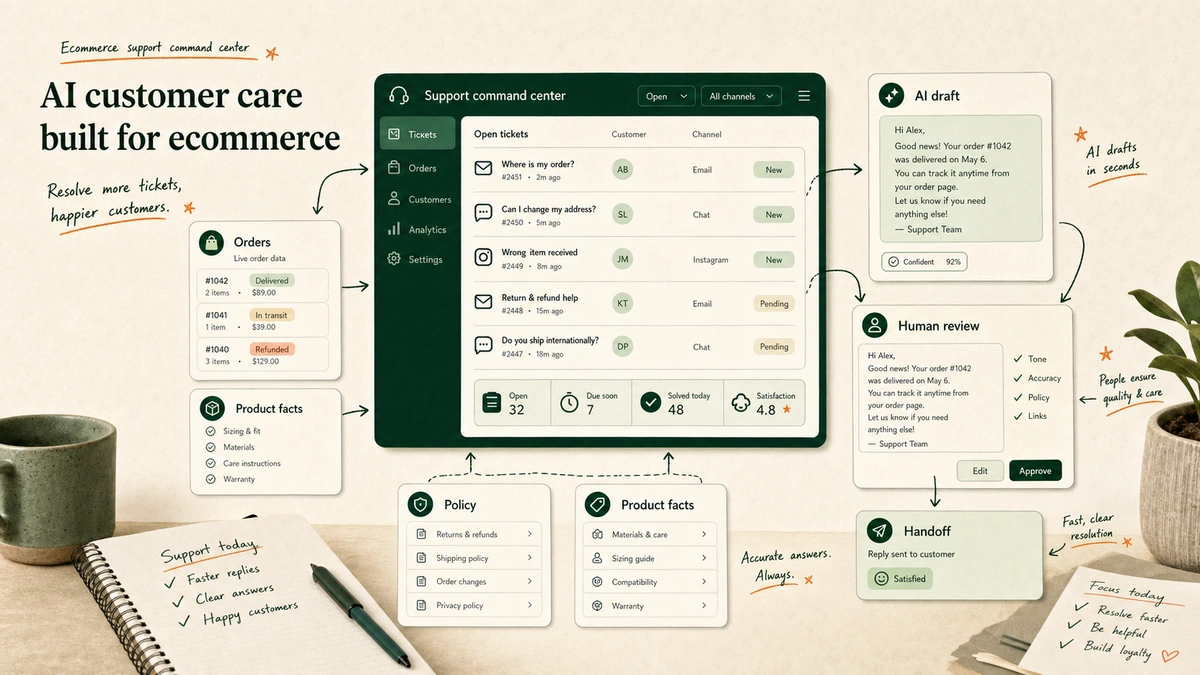
Ecommerce support command center with AI customer care, order data, policy guardrails, and human review.

The best company for ecommerce AI customer care depends on how your support operation works. Shopify brands usually start with Gorgias, Yuma, Tidio, or Intercom Fin. Larger teams may prefer Zendesk, Freshworks, or Ada. Brands with unusual workflows, private data needs, or no internal AI owner should consider a custom partner like EfficiaLabs.

Ecommerce support command center with AI customer care, order data, policy guardrails, and human review.

The demo is easy.

The hard part is the second refund edge case. The customer bought with store credit, used a bundle discount, returned one item, and is now angry because the exchange app and Shopify do not agree.

That is where most “AI support” decisions become real.

A polished bot can answer “where is my order?”

A useful AI support system can read the order. Check the rules. Know if it can act. Hand off when it should. Leave the team with less mess.

Key Takeaways

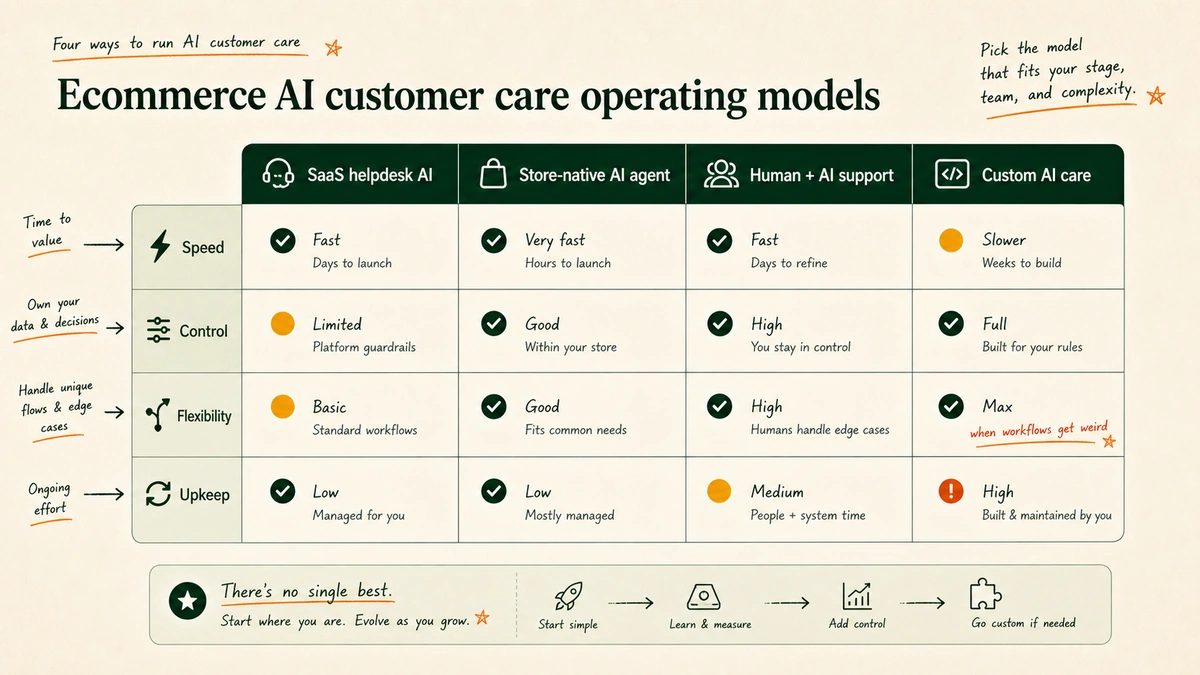
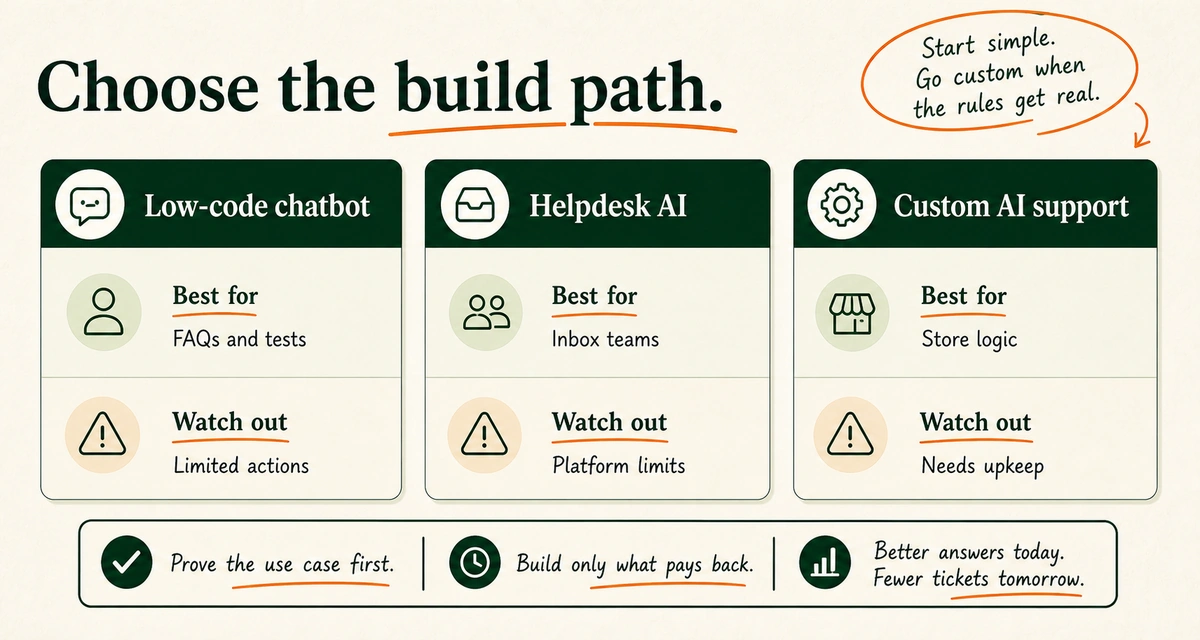
  • Start with your support operating model, not the vendor demo: helpdesk AI, ecommerce-native AI agent, outsourced human plus AI, or custom AI customer care.
  • In our work with DTC support systems, the break point is rarely FAQ accuracy. It is policy authority, handoff quality, and who maintains the system after launch.
  • As of 2026-06-04, Gorgias lists plans from $10/mo for 50 tickets/mo and AI Agent interactions from $1.00 per resolved conversation on its pricing page.
  • As of 2026-06-04, Fin lists $0.99 per outcome, a 50-outcome monthly minimum, and $29 per helpdesk seat for Fin plus Intercom on its pricing page.
  • As of 2026-06-04, Tidio lists Lyro AI Agent from $32.50/mo for 50 Lyro AI conversations and says Lyro can solve up to 67% of customer problems on its pricing page.

Two customer quotes shaped how I wrote this list:

“without losing that special human touch”

“a partner that’s just really trying”

Table of contents

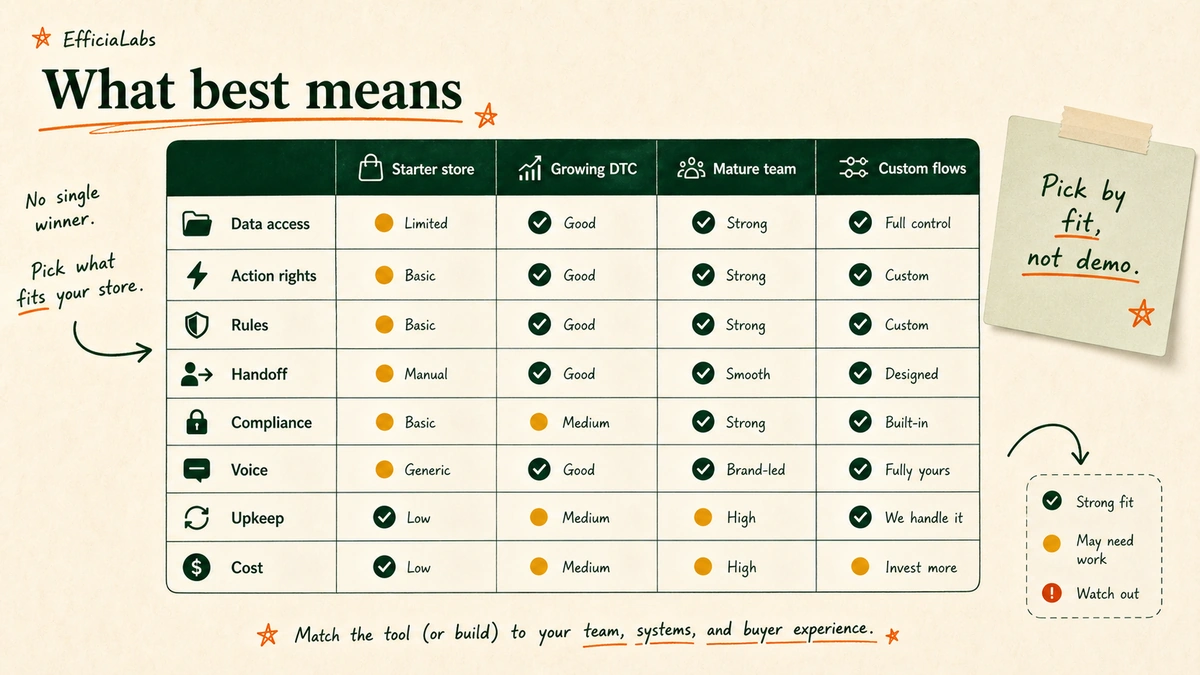
What “best company for ecommerce AI customer care” really means

A $600K Shopify store with two people answering tickets needs a different system than a $12M DTC brand with subscriptions, returns, VIP customers, chargebacks, marketplace orders, and Black Friday ticket spikes.

So before picking a vendor, define “best” by operating fit:

  • Ecommerce data access: Can the system read orders, customers, fulfillment status, subscriptions, returns, product data, and support history?
  • Order-action authority: Can it only answer questions, or can it cancel, refund, exchange, apply credit, edit an address, or trigger a workflow?
  • Policy guardrails: Can it follow your actual rules for damaged items, late orders, VIP exceptions, fraud risk, final-sale products, and partial refunds?
  • Human handoff: Does the handoff include context, attempted steps, customer emotion, and the exact reason the AI stopped?
  • Compliance posture: Does the vendor publish security, privacy, and compliance information that matches your risk tolerance and markets?
  • Brand voice control: Can it sound like your brand without inventing policy or becoming weirdly cheerful during complaints?
  • Maintenance burden: Who updates the system when products, policies, apps, shipping zones, or promotions change?
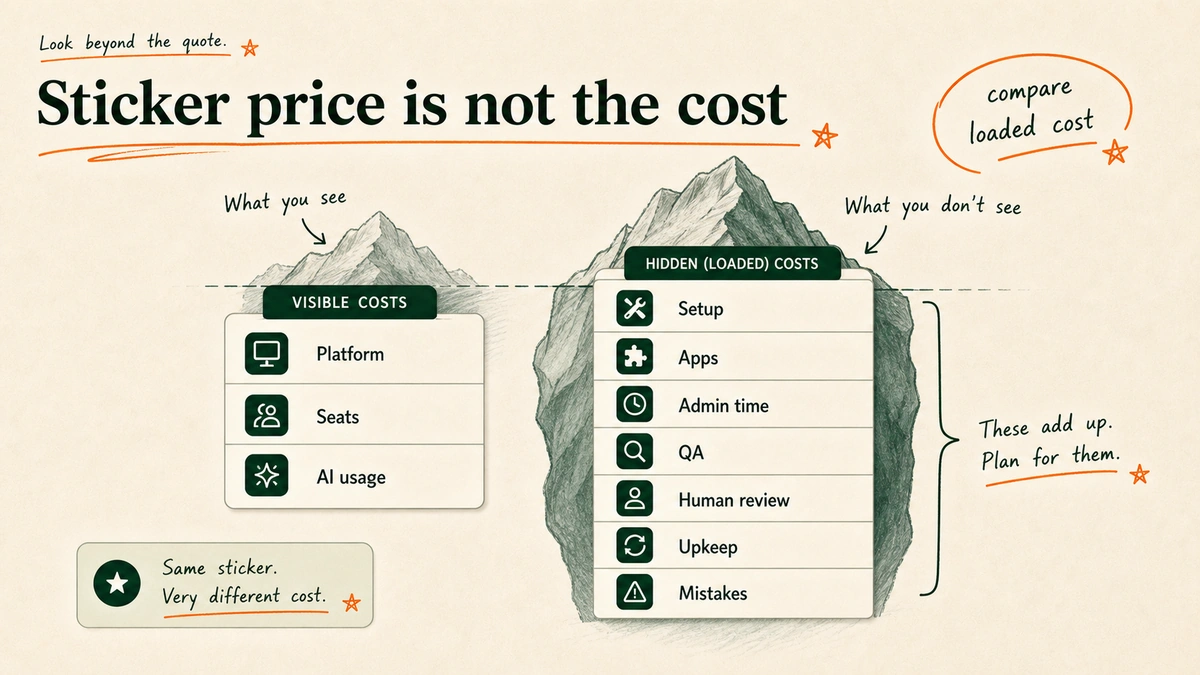
  • Loaded cost: What is the real cost after seats, usage, add-ons, implementation, QA, maintenance, and human review?

If you are still building the basics, read this guide to building a customer service AI chatbot for Shopify first. If you already have tickets, apps, macros, and policies scattered everywhere, the company choice matters more.

Evaluation matrix for choosing the best company for ecommerce AI customer care.

Quick comparison: AI support vendors

Use this as a shortlist, not a verdict.

The right fit depends on your helpdesk, Shopify setup, ticket load, team skill, and need for custom work.

Vendor Best fit Setup Watch-out
Gorgias. Shopify teams that want AI in the helpdesk. SaaS. Best if you want to run on Gorgias.
Yuma AI. Shopify Plus teams with returns and plans. SaaS AI agent. Still needs rules, QA, and stop points.
Intercom Fin. Brands already on Intercom. SaaS agent. Store actions need a real pilot.
Zendesk AI. Mature teams on Zendesk. SaaS suite. Heavy for a lean DTC team.
Freshdesk / Freddy AI. Freshworks users. SaaS suite. Broad support tool, not DTC-first.
Tidio Lyro. Smaller stores. Chat plus AI. Can hit limits as rules get hard.
Ada. Large global teams. AI platform. More than many DTC teams need.
SupportYourApp. Teams that need coverage. Managed service. You still own the process.
EfficiaLabs. $1M+ DTC brands with custom flows. Done-for-you build. Not for simple FAQ bots.
Comparison of SaaS helpdesk AI, ecommerce-native AI agents, outsourced support, and custom AI customer care.

9 best AI support companies for online stores

1. Gorgias: best for Shopify brands that want AI inside their helpdesk

Best for: Shopify brands that want helpdesk, rules, macros, and AI support in one store-focused tool.

Pricing: Gorgias publishes plan and add-on pricing on its pricing page. Check the current page because tickets, AI interactions, add-ons, and billing cycle change the total.

What I like: Gorgias is one of the clearest store-native support tools. It is built around Shopify, AI Agent, order work, and sales-aware chats.

The best use case is not “answer FAQs.” It is support work where agents already live: order status, returns, shipping, product questions, and repeat tickets.

If you are comparing chat-first tools, this older EfficiaLabs breakdown of Gorgias vs Tidio vs ManyChat vs Chatfuel is a useful adjacent read.

Watch out for: Gorgias is strongest when you want the Gorgias work model. If data lives across many apps, you still need to design the process.

You might need it if: You use Shopify and want to reduce repetitive tickets inside Gorgias.

2. Yuma AI: best for Shopify Plus brands with subscription and returns workflows

Best for: Shopify and Shopify Plus brands that want a store-native AI agent instead of a generic site bot.

Pricing: Yuma lists plan info on its pricing page. Review tiers, order volume, and feature limits before you compare.

What I like: Yuma is built around store support: order questions, plans, refunds, returns, discounts, shipping, and post-purchase pain. “Cancel my order” and “cancel my plan” need different actions.

Watch out for: Store-native does not mean hands-off. You still need clean rules, action rights, audits, and stop points.

You might need it if: You are on Shopify Plus and mostly run standard ecommerce workflows.

3. Intercom Fin: best for brands already using Intercom

Best for: Brands already using Intercom for support, buyer chat, or help center content.

Pricing: Fin has its own pricing page. Compare loaded cost, not only the headline entry point.

What I like: If your help center is strong and your team uses Intercom, Fin can answer repeat questions without a tool move.

Watch out for: Intercom is not store-native in the same way Gorgias or Yuma are. If the AI needs to act on orders, test the apps and action paths.

This is where a small test matters. Use real tickets, not a clean demo script. For Shopify-specific language model workflows, compare the constraints in ChatGPT for Shopify customer support and Claude for Shopify customer support.

You might need it if: You already use Intercom and want AI resolution inside that platform.

4. Zendesk AI: best for mature support teams already on Zendesk

Best for: Larger teams already using Zendesk for routing, agent help, QA, knowledge, work flows, and reports.

Pricing: Zendesk publishes AI and suite information on its AI customer service pages, but larger plans are often sales-led. Confirm which AI capabilities are included versus add-ons.

What I like: Zendesk is built for scale. It can tag tickets, route work, help agents, find knowledge, and improve service flows.

Watch out for: Zendesk can be too much system for a lean DTC brand whose flows change each month.

You might need it if: Your team already runs on Zendesk and needs AI to improve that machine.

5. Freshdesk / Freddy AI: best for teams already in the Freshworks ecosystem

Best for: Store teams already using Freshdesk or other Freshworks products.

Pricing: Freshworks lists Freshdesk plans and AI info on its customer support AI pages and plan pages.

What I like: Freshdesk is broad and known. Freddy AI can help agents, self-serve answers, ticket handling, and support work inside Freshworks. If your team works well there, improve it before you move.

Watch out for: This is broad support, not DTC-first store support. Test Shopify, returns, product data, plans, and discount edge cases.

You might need it if: You already use Freshworks and want AI inside that stack.

6. Tidio Lyro: best starter option for smaller ecommerce stores

Best for: Smaller stores that want live chat, AI flows, and fast answers.

Pricing: Tidio lists plans on its pricing page. Check AI chat limits, live seats, Shopify features, and channel limits.

What I like: Tidio is a good start for lean store teams: common questions, lead capture, shopper help, and simple repeat chats.

Watch out for: Starter tools hit limits when support depends on hard rules, refunds, plans, loyalty, and regional edge cases.

You might need it if: You are early, budget-sensitive, and need a practical support/chat tool.

7. Ada: best for enterprise multilingual support

Best for: Larger brands that need enterprise AI, global support, controls, data views, and formal setup.

Pricing: Ada is sales-led from its official site. Budget for the tool, setup, apps, QA, and ongoing work.

What I like: Ada is not a small Shopify bot. It fits teams that need AI service at scale, many languages, app links, controls, reports, and steady quality.

Watch out for: For a 10-person DTC team, Ada can be more platform than you need. Complexity has a cost.

You might need it if: You have high volume, multilingual needs, and a mature service organization.

8. SupportYourApp: best for outsourced human plus AI support coverage

Best for: Brands that need coverage, staff, global agents, or managed support instead of software alone.

Pricing: SupportYourApp is sales-led. Its store outsourcing and AI chatbot for customer support pages explain the model, but you need a scoped quote.

What I like: This belongs in the list because AI support is not always a software problem. The pinch can be hiring, training, hours, QA, lead work, or peak volume.

Watch out for: Outside support does not remove process ownership. You still need clear rules, brand voice, handoff rules, refund rights, and reports.

You might need it if: Your biggest support problem is coverage and staffing, especially during seasonal spikes or when the founder is still too involved in support.

9. EfficiaLabs: best for $1M+ DTC brands that want custom AI customer care built, deployed, and maintained

Best for: $1M+ DTC brands with messy flows or no team to design, ship, watch, and maintain AI support.

Pricing: Custom scope based on ticket load, channels, systems, rules, apps, AI depth, review flow, and upkeep.

What I like: I run EfficiaLabs, so do not treat this as a neutral vendor ranking. Treat it as a fit call.

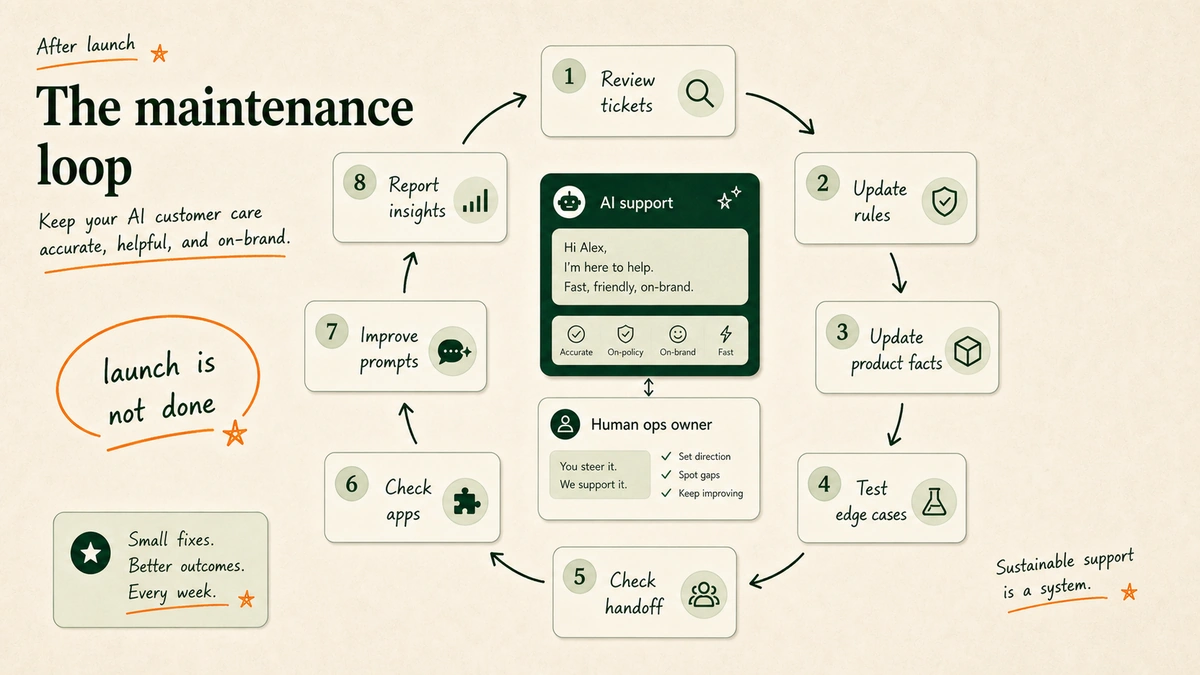
In our work with store support stacks, the hard part is not the first bot launch. It is keeping rules, product facts, apps, and sign-off logic current after launch.

A custom build can be designed around the way your brand actually operates:

  • Shopify, plans, returns, helpdesk, loyalty, warehouse flows, product catalog, and inventory cleanup.
  • Refund, replacement, warranty, VIP, fraud, and escalation rules.
  • Brand voice, complaint-handling tone, and approval thresholds.
  • The split between automation, drafts, agent assist, and human approval.
  • Data-control needs, including builds where sensitive support data can stay in systems you control.

That upkeep matters. Rules change. Products launch. Promos break assumptions. Buyers find edge cases you did not write down.

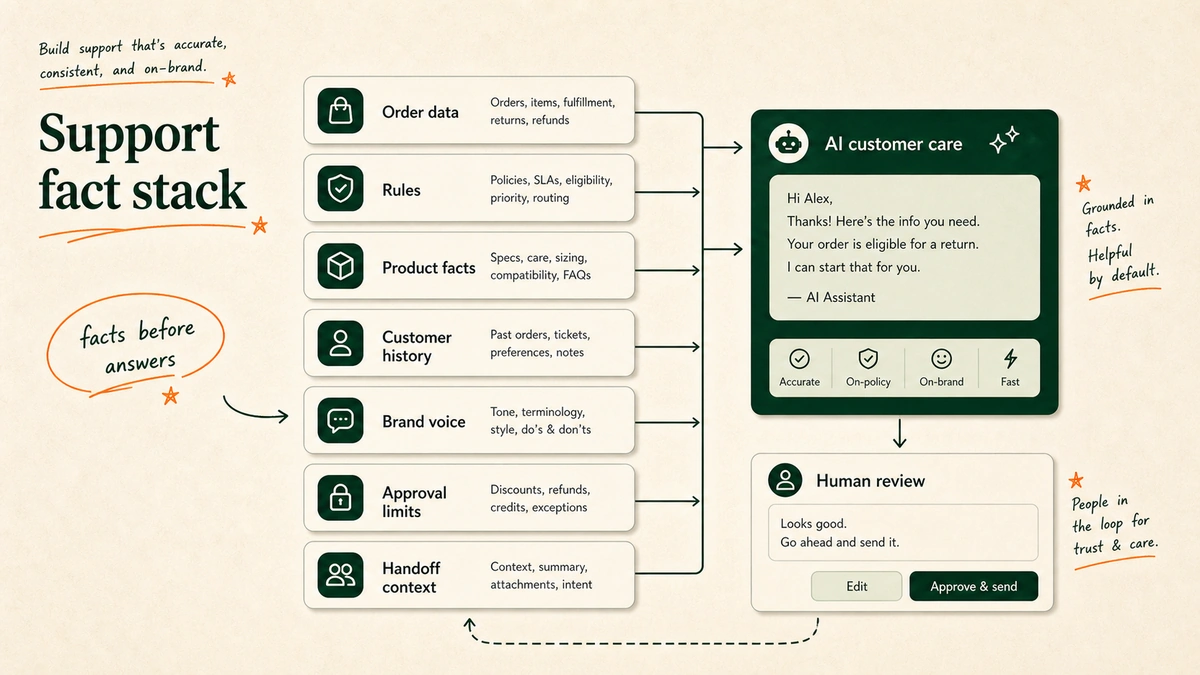
Support fact stack for ecommerce AI customer care with order data, policy, product facts, brand voice, and approval rules.

Watch out for: Custom is not the first move for every store. If you only need FAQs, WISMO, or basic chat, buy SaaS first. Custom work earns its keep when tool limits, manual edge cases, risk, or upkeep cost more than a build.

For teams thinking through tone and guardrails, the work starts with matching AI support to your brand voice, not with picking a model.

You might need it if: You are a $1M+ DTC brand and want a partner to build and maintain the AI customer care layer.

When a custom AI customer care company beats SaaS

SaaS should be the first answer.

It is faster. It is cheaper to try. It gives you a working baseline. It forces you to see which tickets are repetitive and which are not.

Custom starts to win when the support system becomes too specific for generic tooling.

That happens in five situations.

First, you need private or controlled design. Sensitive support data can stay in systems you control, with strict rules for what leaves your helpdesk, store platform, or database.

Second, your flows are odd. Generic AI can handle basic returns, then fail on partial bundle returns, loyalty credit, plan pauses, B2B support cases, warranty rules, or regional shipping.

Third, your apps are custom. Shopify is only one part of the stack. Many DTC brands also use return portals, plan tools, ERPs, warehouse tools, review tools, loyalty tools, email/SMS, fraud tools, and old sheets.

Fourth, you need local-law-aware guardrails. Do not let AI make legal, refund, warranty, health, safety, or regulated-product claims unless the rules and review flow are built for each market.

Fifth, you do not have an AI owner. Buying a tool does not create one. Someone still needs to update facts, test bad cases, inspect replies, watch drift, and fix the system when the brand changes.

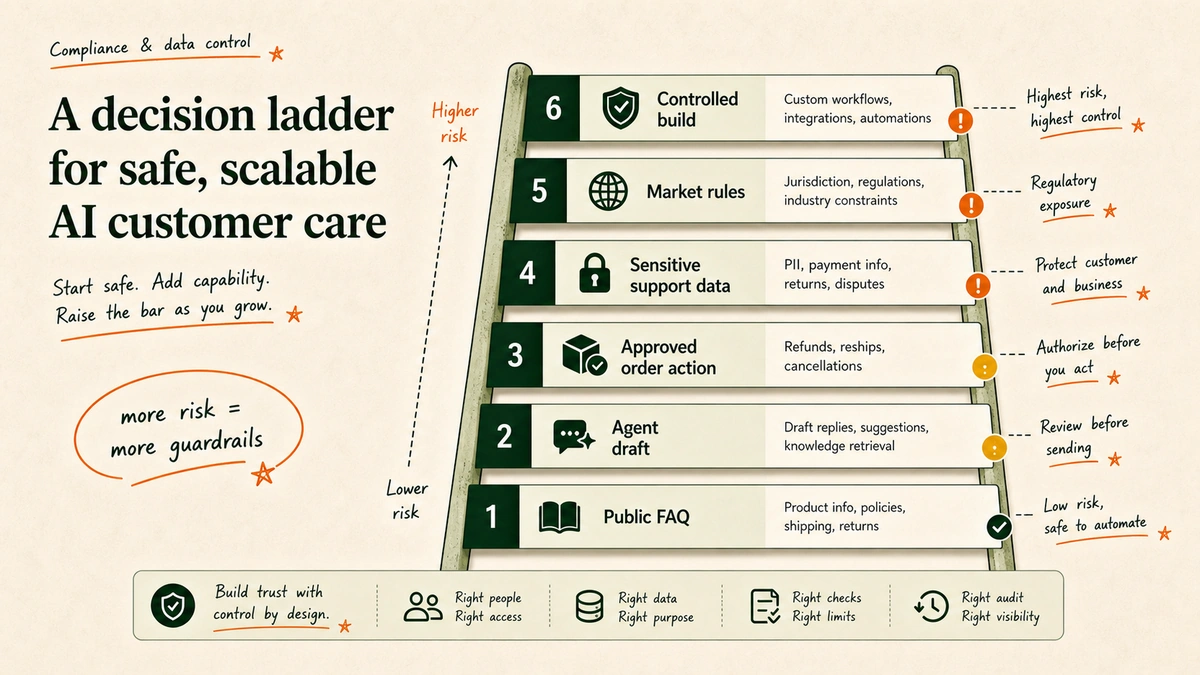
Data control and compliance decision ladder for ecommerce AI customer care automation.

The clean way to think about it:

  • Buy SaaS when your support workflows are standard and your team can own setup.
  • Use outsourced support when staffing and coverage are the constraint.
  • Build custom when workflows, data control, integrations, or maintenance ownership are the real problem.

This is also why industry statistics only get you so far. A broad trend report, like our AI in DTC statistics article, can show momentum. It cannot tell you whether your refund approval path is ready for automation.

How to choose the right ecommerce AI customer care company

Do not choose from a vendor demo. Choose from your tickets.

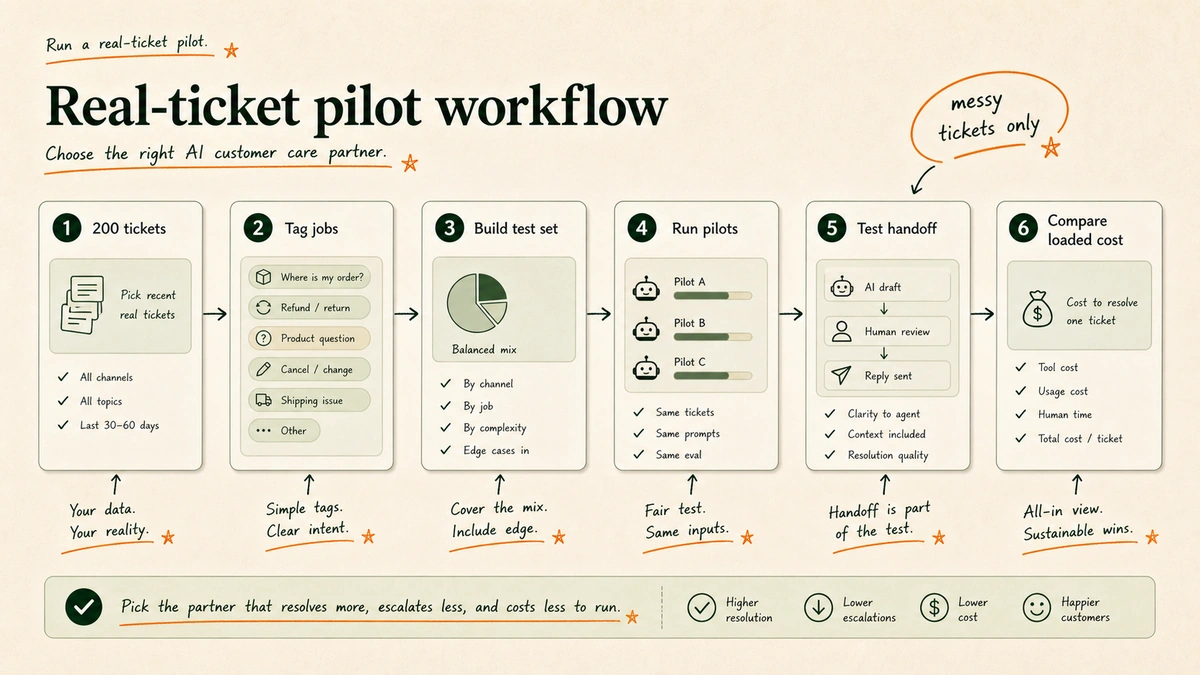
Real-ticket pilot workflow for choosing an ecommerce AI customer care company.

1. Pull 200 real tickets

Use real chats from the last 30 to 90 days: happy questions, angry notes, odd cases, refunds, damaged items, shipping delays, plan problems, and pre-purchase questions.

Do not clean them up too much. Messy tickets are the point.

2. Tag the work

Tag each ticket by job:

  • WISMO and tracking.
  • Returns and exchanges.
  • Refund requests.
  • Product questions.
  • Subscription changes.
  • Discount and promo issues.
  • Damaged, missing, or wrong items.
  • Complaints and escalations.
  • VIP or exception handling.

This shows what AI should handle first. It also keeps you from buying the best demo instead of fixing the worst support load.

3. Run a pilot on real questions

Ask each short-listed vendor to work against real tickets. We tested this pattern because polished demos hide the messy cases. You can mask private data at first. Keep real rules, product facts, and order context.

For each response, score:

  • Did it answer the customer’s actual question?
  • Did it follow policy?
  • Did it avoid inventing facts?
  • Did it know when to hand off?
  • Did it preserve brand voice?
  • Did it reduce agent work, or just create review work?

4. Test handoff and failure cases

A good AI support system is not the one that answers everything.

It knows when not to answer.

Test situations where the AI should stop:

  • Refunds above a threshold.
  • Fraud or chargeback risk.
  • Legal threats.
  • Health, safety, or regulated-product questions.
  • Angry repeat customers.
  • Unclear warranty claims.
  • Requests outside documented policy.
  • High-value customers where retention judgment matters.

If the vendor cannot show a clean handoff path, do not let the AI take action.

5. Compare loaded cost, not sticker price

Sticker price is not the cost.

Loaded cost includes:

  • Platform fee.
  • Seats.
  • AI usage or resolution fees.
  • Implementation.
  • Integrations.
  • Internal admin time.
  • QA and testing.
  • Human review.
  • Maintenance.
  • Cost of wrong answers.
Loaded cost comparison for ecommerce AI customer care companies.

This is where smaller brands get the math wrong. A cheap tool that needs constant founder attention is not cheap.

For profitability thinking beyond support, see how Shopify stores use AI to improve profitability.

FAQs about ecommerce AI customer care companies

What is the best company for ecommerce AI customer care?

The best company for ecommerce AI customer care depends on your operating model. Shopify brands that want AI inside the helpdesk should look at Gorgias. Shopify Plus brands with ecommerce-specific automation needs should evaluate Yuma. Intercom, Zendesk, Freshworks, Tidio, Ada, and SupportYourApp fit different maturity levels. EfficiaLabs fits $1M+ DTC brands that need custom AI customer care built and maintained around their workflows.

Should a DTC brand buy SaaS AI support or build custom?

Buy SaaS first if your workflows are standard, your team can maintain the system, and the main goal is to reduce repetitive tickets. Build custom when your workflows are unusual, your integrations are fragmented, your data-control requirements are stricter, or no internal person can own the AI system after launch.

What tickets should ecommerce AI handle first?

Start with high-volume, low-risk tickets: order status, tracking, shipping timelines, return-policy questions, product FAQs, size or fit guidance, and simple post-purchase updates. Move slowly into refunds, replacements, cancellations, subscriptions, and exception handling because those require stronger policy guardrails and approval rules.

What should AI customer care never automate without approval?

Be careful with large refunds, legal threats, health or safety questions, regulated-product claims, fraud risk, chargebacks, warranty exceptions, angry repeat buyers, VIP saves, and anything outside policy. AI can draft, sum up, tag, or suggest. It should not act without human sign-off.

My take: buy the tool until the tool becomes the ceiling

Most DTC brands should not start with a custom build. Start with the tool that matches your current support stack. Clean up the help center. Fix broken macros. Tag your tickets. Automate the obvious questions. Measure what improves. If you are still early, start with Shopify support automation before you price a full build.

Then watch for the ceiling.

The ceiling shows up when AI cannot follow your real flows. Data lives in too many places. Edge cases need judgment. No one on the team can keep the system current.

Maintenance loop for ecommerce AI customer care after launch.

For $1M+ DTC brands, the question is less “which chatbot?” and more “who owns the support system when policies, products, and customer expectations change?”

That owner might be your helpdesk vendor. It might be an outsourced support partner. It might be an internal ops lead. Or it might be a custom AI customer care company.

Choose the company that matches the work you actually need owned.

Sources

How to Match AI Voice to Your Brand Voice in Customer Support

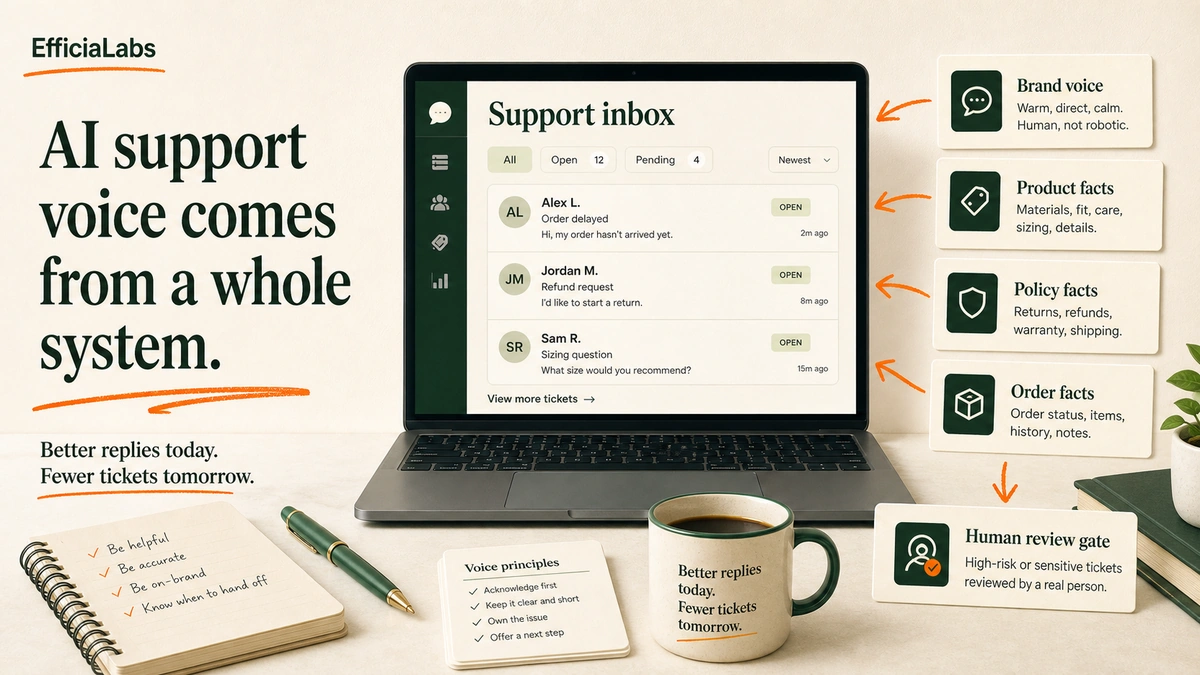
A laptop support inbox beside cards labeled brand voice, product facts, policy facts, and human review gate.

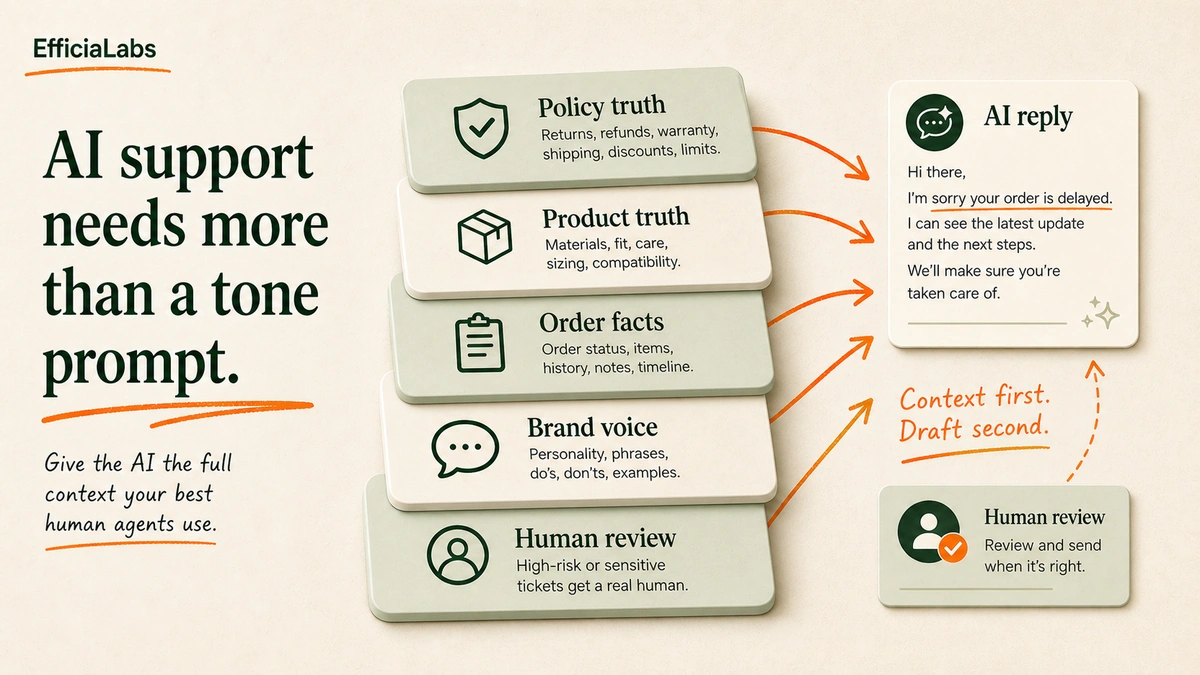
Here is how to match AI voice your brand voice in customer support: give the AI the same operating context you would give a new CX hire. Strong reply examples. Product facts. Policy rules. Banned phrases. Escalation triggers. Weekly review. A tone prompt gives you polite sameness. A support system gives you replies that sound like you and stay accurate.

A laptop support inbox beside cards labeled brand voice, product facts, policy facts, and human review gate.

A customer writes:

“This was supposed to arrive yesterday. I needed it for a trip.”

Bad:

“We sincerely apologize for the inconvenience and appreciate your patience.”

Looks fine. Feels dead.

Better:

“That timing is frustrating. Send me your order number and I’ll check what happened before we make the next move.”

Same problem. Different human.

That is the gap. Most AI support tools can answer. Fewer can answer in your brand’s voice while respecting policy, shipping rules, and customer mood.

Table of Contents

In a sentence

AI support voice is not tone alone. It is tone plus product truth, policy truth, order facts, handoff rules, and review. The job is not to make AI sound pleasant. The job is to make it sound like your best CX hire on a good day.

How to match AI voice your brand voice in customer support without generic replies

Yes. But not by asking it to “be friendly.”

That is how you get airport-lounge English. Smooth. Pleasant. Nobody’s.

The reason is simple. AI defaults to the average of what it has seen unless you give it stronger local truth. Contentstack frames this as the sameness problem: generic AI creates tone drift, terminology errors, and bland consensus when it is not grounded in brand-specific rules.

Support makes this harder than marketing.

In a welcome email, the reader is calm. In support, the customer is often annoyed, worried, rushed, or asking about money. A cute brand voice can become irritating on a damaged-item ticket. A casual voice can become risky on a refund exception. A confident voice can become dangerous if the AI invents a policy.

This is why I do not treat AI support voice as a copywriting task. In our work with Shopify brands, the better analogy is onboarding a new CX hire.

You do not tell a new hire, “Be warm and helpful,” then leave them alone in Gorgias.

You show them the best replies. You explain when to apologize. You give them the refund policy. You tell them which tickets go to a senior agent. Then you review their work until the pattern sticks.

Do the same with AI.

What does brand voice mean in a support ticket?

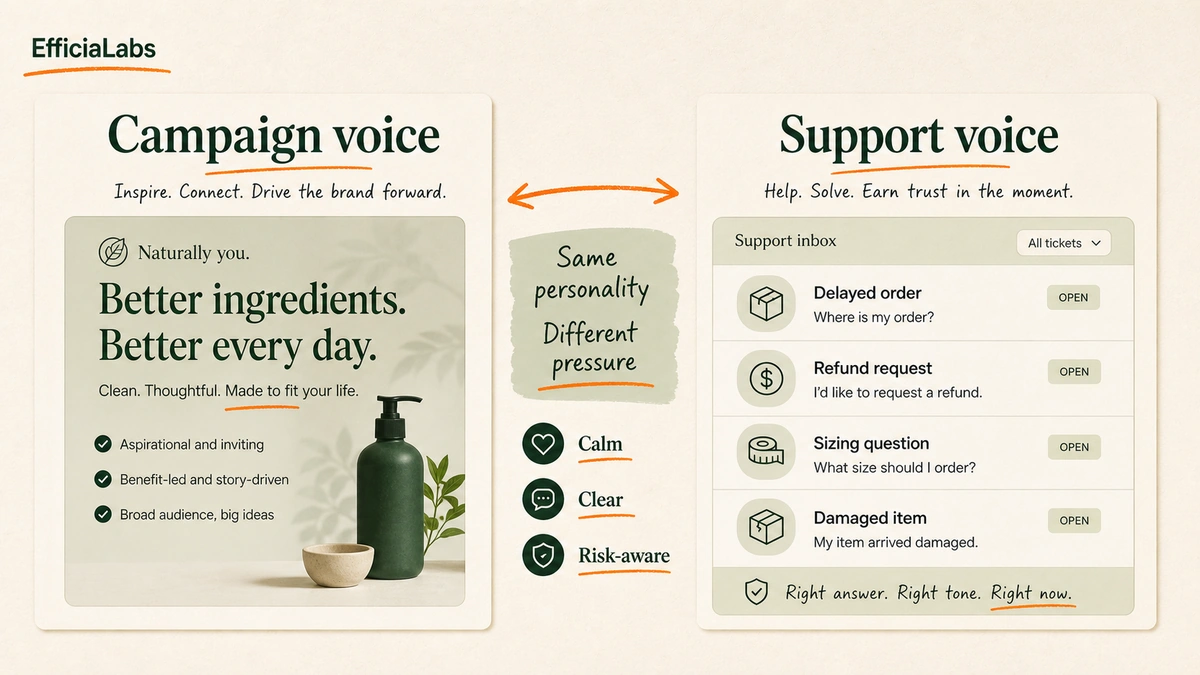
Brand voice is the stable personality behind how your brand communicates. In support, tone is how that personality adjusts to the ticket in front of it.

A split panel comparing marketing voice for campaigns with support voice for delayed orders, refunds, sizing, and complaints.

Why this article exists:

  • In 2026, Contentstack names 3 common failure modes: tone drift, terminology errors, and perspective loss.
  • In 2026, Gorgias organizes support-voice guidance around 4 operating moves: guidance, help resources, feedback, and regular training.
  • In 2026, Gleap answers 3 chatbot voice questions, but stays broad on Shopify support operations.

Marketing voice can be punchy. Support voice needs judgment.

A skincare brand can sound calm and sensory in campaigns. But if a customer reports irritation, the support reply must become precise, careful, and escalation-ready. A sportswear brand can sound energetic on Instagram. But when a VIP order misses a race weekend, the reply should be fast, accountable, and specific.

Use this working table:

Ticket type AI tone Must include Hand off when
Delayed order Calm, direct Tracking status, next step, timeline caveat Customer needs it by a fixed date
Refund request Clear, fair Return window, condition rules, link or next step Outside policy or repeat complaint
Sizing question Helpful, practical Fit notes, measurements, exchange policy Customer mentions medical, safety, or event deadline
Damaged item Accountable Photo request, replacement path, apology Expensive item or second failure
VIP or influencer Personal, careful Acknowledge relationship, avoid canned reply Any complaint, deadline, or public post threat

Notice what is missing.

“Friendly.”

Friendly is not enough. The AI needs to know what helpful looks like when the customer is confused, annoyed, or one reply away from a chargeback.

The Gorgias guide on AI tone of voice gets close to this support reality. It points to help docs, macros, feedback, and handover rules as training inputs for AI Agent. That matters because the reply style and the reply source are connected.

The voice improves when the facts improve.

Build the AI support voice pack before touching prompts

Most teams start with the prompt.

Wrong order.

Start with the pack.

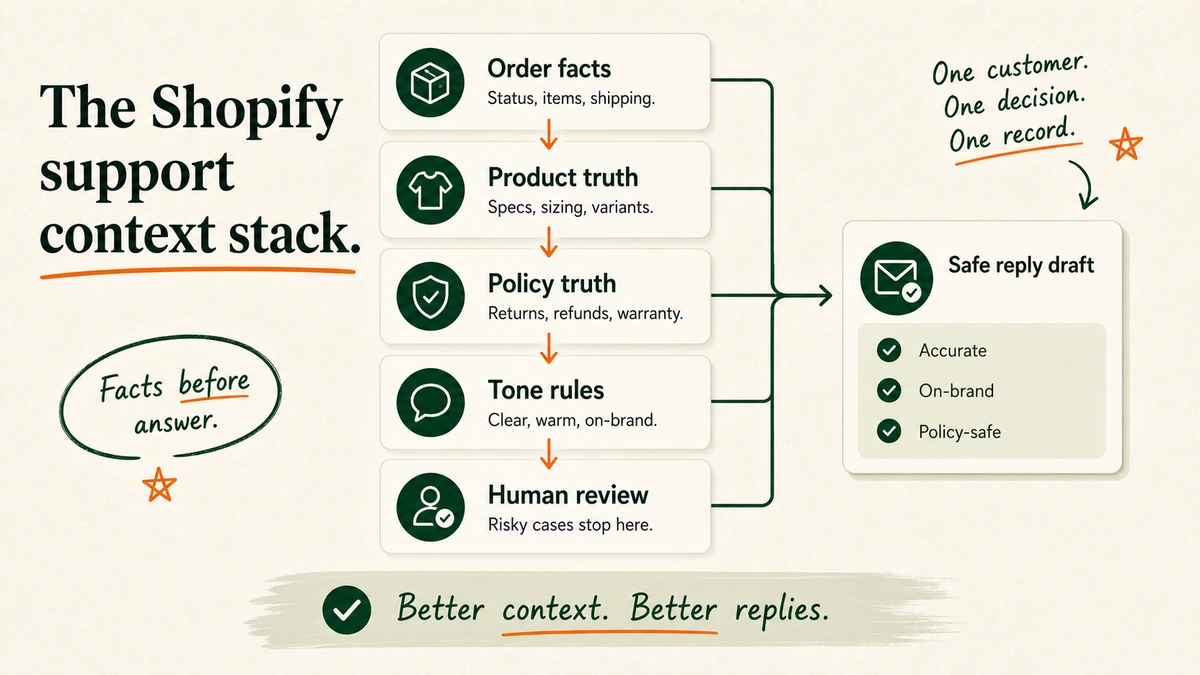
A layered support context stack showing policy truth, product truth, order facts, brand voice, and human review.

An AI support voice pack is the small, practical version of your brand book. It is not a 40-page PDF. It is the material the AI needs to write support replies the way your best agent would.

Build it from these parts:

  • 10-20 strong past support replies: Pick replies that sound like the brand and solved the ticket cleanly.
  • Best macros: Include the macros agents actually use, not the ones nobody trusts.
  • Refund, shipping, warranty, discount, and cancellation policies: Use the latest approved language.
  • Product language from PDPs: Pull how you describe fit, materials, bundles, ingredients, use cases, care instructions, and limitations.
  • Customer review language: Capture how customers describe the product in their own words.
  • Founder or brand phrases: Add the phrases that make the brand recognizable without turning the AI into a parody.
  • Banned words and risky claims: Include phrases the AI must never use.
  • Escalation rules: Tell the AI when to stop drafting and route the ticket to a person.

Pro tip: Keep the first voice pack short enough for a CX lead to edit in one sitting. A useful 2-page pack beats a beautiful brand book nobody updates.

This is also where custom AI starts to matter. A generic chatbot can store a voice prompt. A serious customer service AI chatbot for Shopify needs product data, order data, policy data, help docs, and review gates in the same workflow.

Tiny example.

If your brand sells lotion candles, “soy candle” can be the wrong phrase. The right phrase might be “lotion candle” or “cosmetic grade soy wax.” That is not a tone issue. That is product truth.

If your brand avoids medical claims, the AI must know that “helps eczema” is not allowed, even if a customer review says it.

If your brand has a 30-day return window, the AI must not offer 45 days because it wants to sound generous.

Voice is not decoration.

It is the way your rules show up in a reply.

Turn your voice into rules the AI can follow

Adjectives are where brand voice projects go to die.

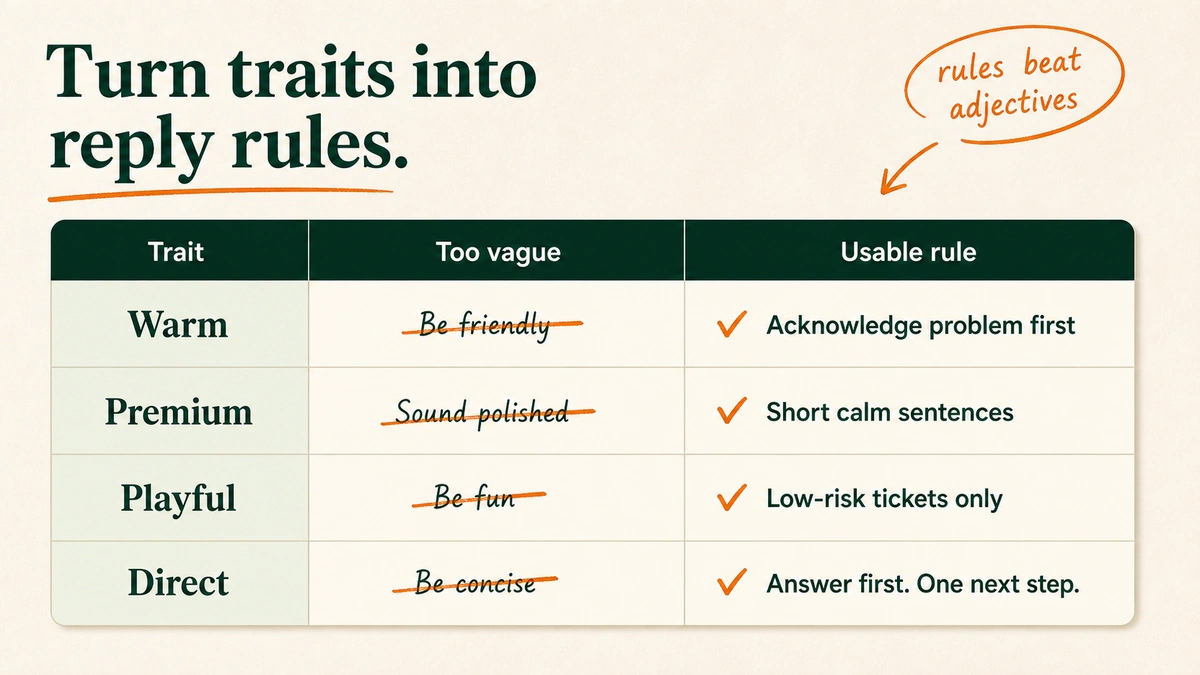
A matrix translating warm, premium, playful, and direct into specific AI support reply rules.

“Warm.” “Premium.” “Playful.” “Helpful.” Fine for a workshop. Weak for an AI system.

Translate each trait into observable behavior:

Voice trait Bad instruction Better support rule
Warm Be warm and friendly Acknowledge the customer’s problem in the first sentence before giving instructions.
Premium Sound premium Use short, calm sentences. No slang. No over-apologizing. No exclamation marks on complaint tickets.
Playful Be fun Use light phrasing only on low-risk tickets like sizing, product discovery, or order excitement.
Direct Be concise Lead with the answer. Then give one next step. Avoid three-paragraph explanations.

Here is the difference.

Off-brand:

We sincerely apologize for the inconvenience and appreciate your patience while we look into this matter.

On-brand:

That should not have arrived that way. Send us a photo and your order number and we’ll fix it.

Same function. Less fog.

The Reddit operator thread captured the real-world version of this. One ecommerce commenter said people expect AI to “just know their vibe,” but it works more like training a new employee with feedback and a style guide. h/t r/ecommerce.

AI can get close, but only if you feed it the right context. – Bart At Tidio

That is the mental model.

Do not ask the AI to have taste. Give it examples of taste.

Use this prompt to test whether AI has your voice

Do not test voice on fake happy-path tickets.

Test it where your team normally edits the most.

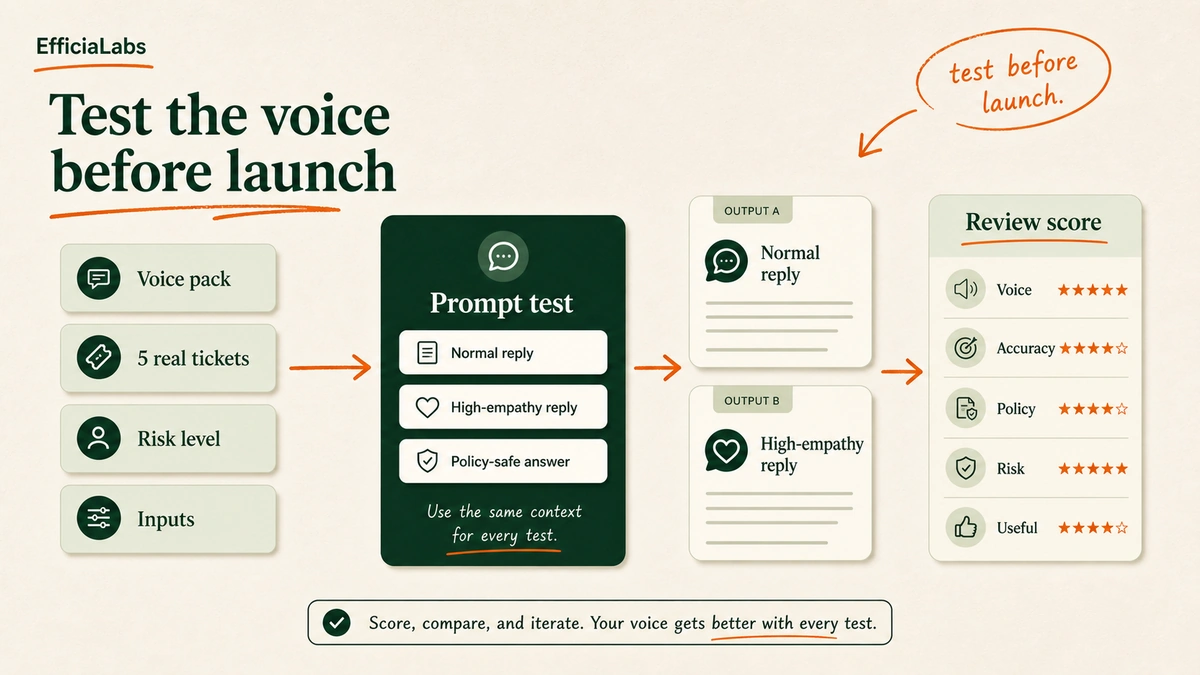
A prompt formula showing support voice pack, five real ticket scenarios, output constraints, and review scores.

Pick 5 real tickets:

  1. A delayed order with a fixed customer deadline.
  2. A refund request outside policy.
  3. A sizing question from a first-time customer.
  4. A damaged item with a photo attached.
  5. A frustrated subscription customer asking to cancel.

Then ask the AI for two drafts per ticket: normal and high-empathy. Score each one from 1-5 on voice, accuracy, policy fit, risk, and usefulness.

This is the same reason brands compare Claude for Shopify customer support against other models on nuanced tickets. Model choice matters. But the voice pack and review loop matter more.

Use this prompt:


You are drafting customer support replies for a Shopify brand.

Use the support voice pack below as your source of truth.

Support voice pack:
[PASTE BRAND VOICE RULES]
[PASTE PRODUCT FACTS]
[PASTE REFUND, SHIPPING, WARRANTY, DISCOUNT, AND CANCELLATION POLICIES]
[PASTE 10-20 EXAMPLE REPLIES]
[PASTE BANNED WORDS AND CLAIMS]
[PASTE ESCALATION RULES]

Task:
Draft replies to the 5 customer tickets below.

For each ticket, give:
1. Normal reply
2. High-empathy reply
3. Risk level: Low, Medium, or High
4. Handoff recommendation: AI can answer, human should review, or human must answer
5. One sentence explaining which brand voice rule you used

Constraints:
- Lead with the customer's actual issue.
- Do not invent policy exceptions.
- Do not promise refunds, replacements, discounts, timelines, or outcomes unless the policy text allows it.
- Do not use banned words or risky claims.
- Keep each reply under 90 words unless the ticket requires more detail.

Tickets:
[PASTE 5 REAL TICKETS]

After the test, do not rewrite everything.

Look for patterns:

  • Too long? Add a length rule.
  • Too fake-warm? Add banned phrases.
  • Too casual on complaints? Add risk-based tone rules.
  • Too many policy guesses? Tighten the source of truth.
  • Missed escalations? Add handoff triggers.

Better replies today. Fewer edits tomorrow.

Set escalation rules so on-brand does not become risky

An AI reply can sound perfect and still be the wrong reply.

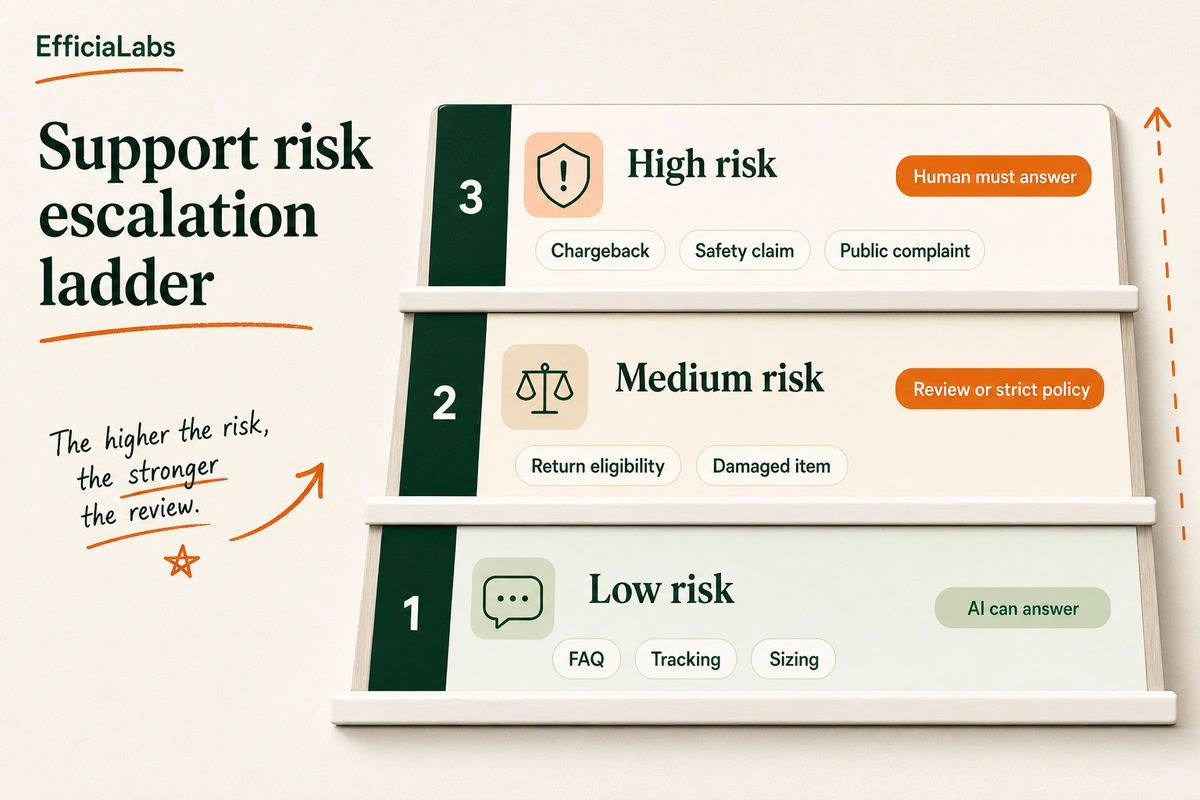
A three-level decision ladder showing low, medium, and high risk support tickets with human handoff rules.

This is where most brand voice articles stay too soft. They talk about tone. They do not talk enough about risk.

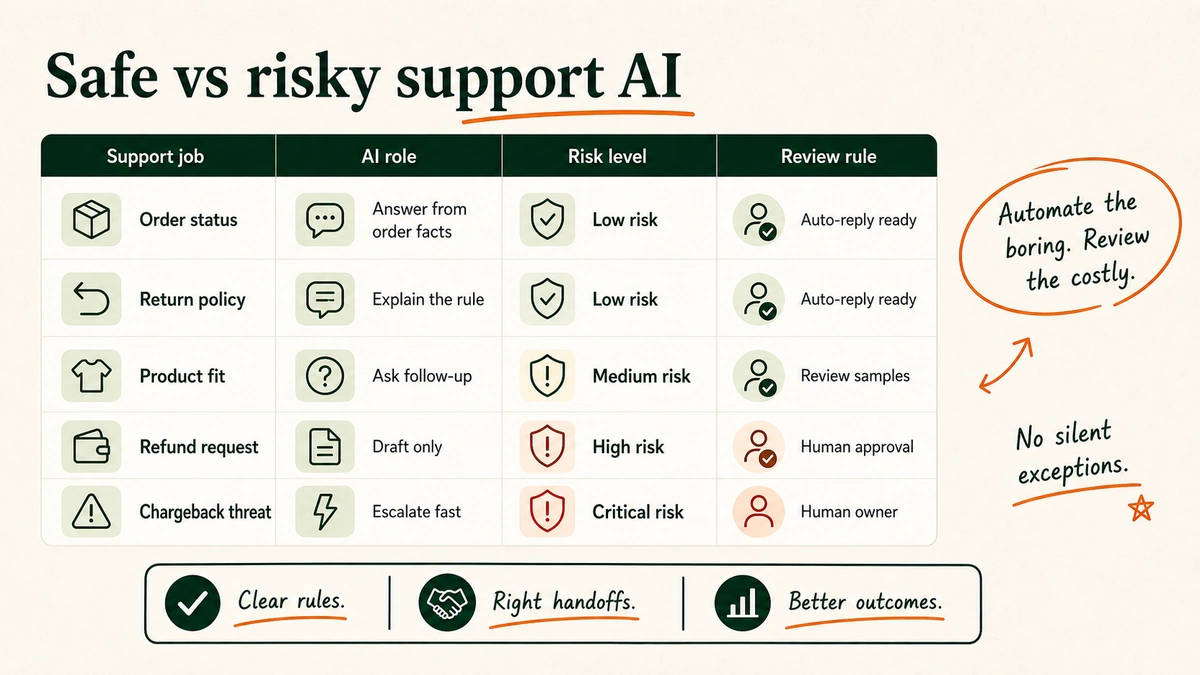
For Shopify support, the AI needs a ladder:

Risk level AI can do Examples Rule
Low Answer directly FAQ, order tracking, sizing, care instructions Use approved facts and standard tone.
Medium Draft for review or answer with strict policy Return eligibility, damaged item, discount exception Stay inside policy. Ask for missing facts.
High Hand off Chargeback, legal claim, safety issue, public complaint, VIP issue Do not resolve. Route to human.

Important note: If the ticket can change money, trust, safety, or public reputation, the AI should slow down or hand off.

Brand voice includes knowing when not to answer.

A playful answer on a sizing question is fine. A playful answer on a chargeback threat is a mess.

A premium answer can be concise. But if it skips empathy on a damaged wedding-week order, it feels cold.

A generous answer sounds lovely until the AI gives away a refund your policy does not allow.

So write hard handoff rules. Use them inside Gorgias, Zendesk, Tidio, Intercom, ChatGPT projects, Claude projects, or a custom workflow. The platform is not the point. The operating rule is.

For tooling context, the ceiling shows up fast in off-the-shelf comparisons like Gorgias vs Tidio vs Manychat vs Chatfuel for ecommerce. The more your support depends on Shopify order state, product nuance, customer history, and policy exceptions, the more the AI needs to be wired to your actual business.

Review AI replies weekly like a CX lead, not a prompt hobbyist

The first version will miss.

Good.

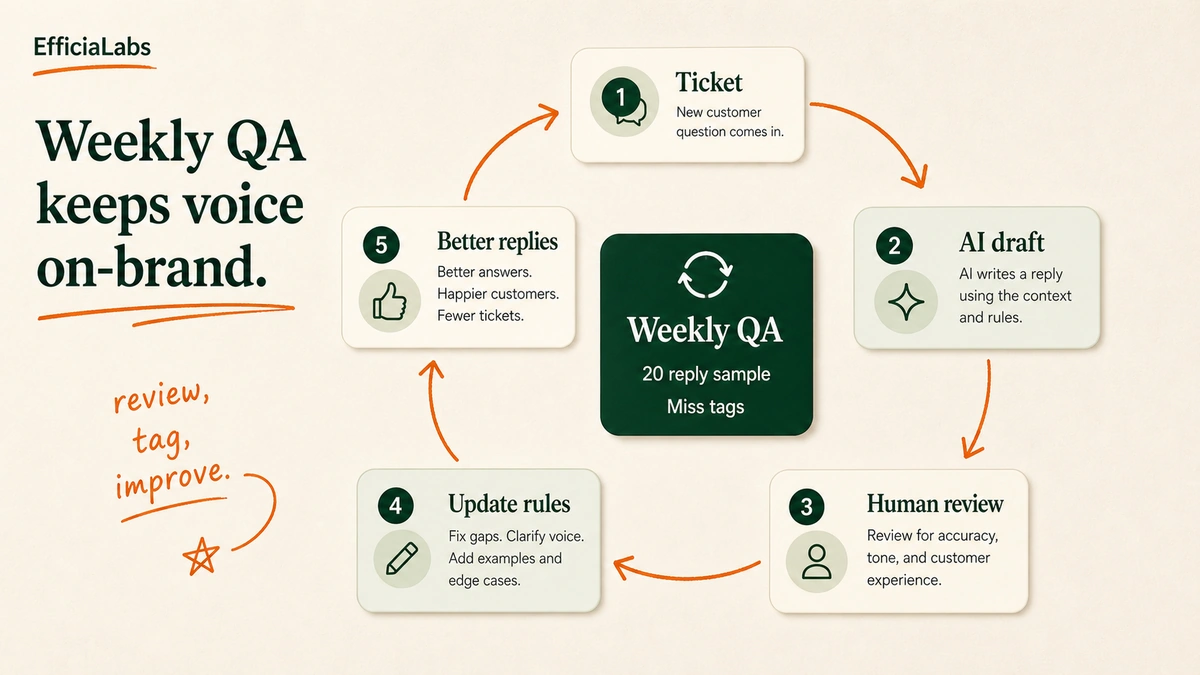
A circular QA loop showing tickets becoming AI drafts, human review notes, updated rules, and better replies.

That is how you find the real rules.

In our work with AI customer care systems, we have seen the same pattern: the first prompt reveals the obvious fixes, but the weekly review reveals the business fixes. The AI did not know the holiday shipping exception. The AI used an old bundle name. The AI apologized too much. The AI answered a complaint that should have gone to a founder.

We tested this review habit because prompt edits alone hide the real problem: stale support context.

Set a weekly review rhythm:

  1. Sample 20 AI replies.
  2. Tag each miss: wrong tone, wrong policy, too long, too robotic, missed handoff, weak answer.
  3. Pull 3 good replies into the example library.
  4. Update help docs, macros, policy snippets, and voice rules.
  5. Retest the same 5-ticket set before changing more.

Note: Do not review only the replies customers liked. Review the misses. That is where the next rule lives.

One owner should run this. CX lead. Founder. COO. Ops lead. Not “everyone.”

Everyone means nobody.

This is where EfficiaLabs fits if the system needs more than a nice prompt. We build custom AI customer care for Shopify stores making $1-25M annually, especially when the support workflow needs order data, policy logic, macros, handoff rules, and QA in one place.

Not magic.

Just context, rules, and review.

AI Agent has really picked up on our brand’s voice. – Lynsay Schrader

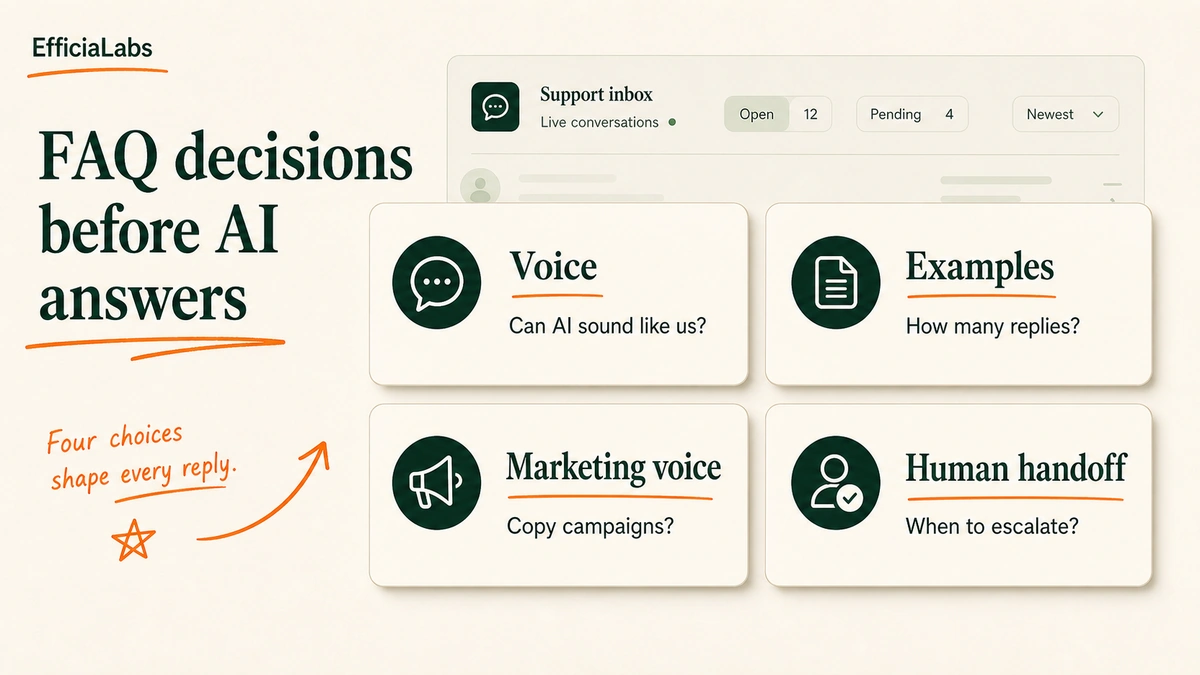
Four support FAQ cards labeled voice, examples, marketing voice, and human handoff.

FAQs about matching AI voice to your brand voice in customer support

Can AI really sound like my brand in customer support?

Yes, if it has enough brand-specific context and a review loop. The AI needs examples of strong support replies, product facts, policies, banned phrases, and escalation rules.

It will sound generic when it only gets adjectives. It gets closer when it sees what your team actually says in real support moments.

How many examples does AI need to learn our support voice?

Start with 10-20 strong replies. That is enough to show pattern, rhythm, phrasing, and judgment without burying the AI in noise.

Add more only when the examples cover new ticket types: refund exceptions, damaged items, subscriptions, VIP customers, international shipping, or product safety questions.

Should AI copy our marketing voice exactly?

No. Your support voice should come from the same brand personality, but it should not copy campaign language blindly.

Support is more sensitive. A phrase that works in a launch email can feel glib when a customer is missing an order. Keep the personality. Change the tone by risk and mood.

What should AI never handle without a human?

AI should not independently resolve chargebacks, legal threats, safety claims, medical claims, harassment, public complaint threats, VIP issues, or refund exceptions outside policy.

It can summarize, classify, and draft for review. It should not make the call.

See you in the next one – Vai

Sources

How to build a customer service AI chatbot for Shopify

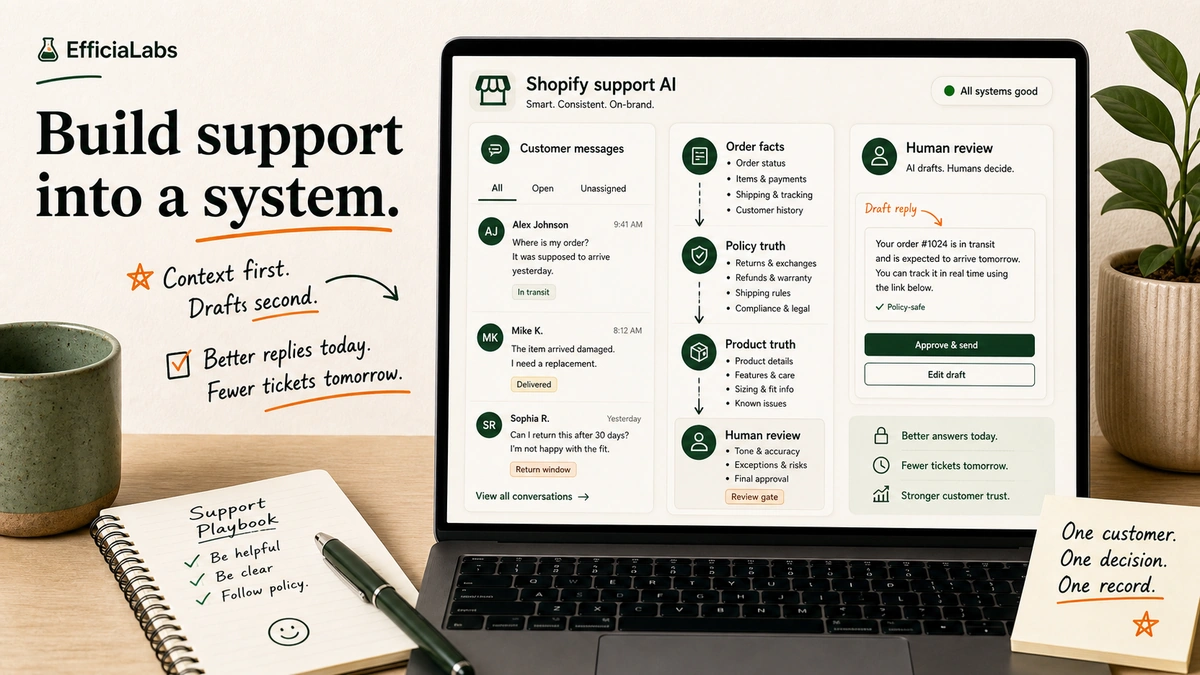
A laptop workspace showing a Shopify support AI workflow connected to orders, products, policies, and human review.

A customer service AI chatbot for Shopify answers shopper questions, looks up store context, and routes risky tickets to humans. The useful version is not a floating FAQ box. It is a support layer connected to orders, products, policies, and a weekly review loop.

A laptop workspace showing a Shopify support AI workflow connected to orders, products, policies, and human review.

Last Tuesday, a founder showed me her inbox. Nothing dramatic. Just the usual: order status, returns, fit questions, address changes.

Small tickets. Hundreds of them. Each one cheap alone. Together, a tax on growth.

That is the point where AI customer support starts to make sense. Not because AI is impressive. Because the same questions keep stealing the same hours from the same small team.

This guide is for Shopify brands doing more than $1M in annual revenue. Low risk first. ROI second. Custom only when the business case is obvious.

In a sentence

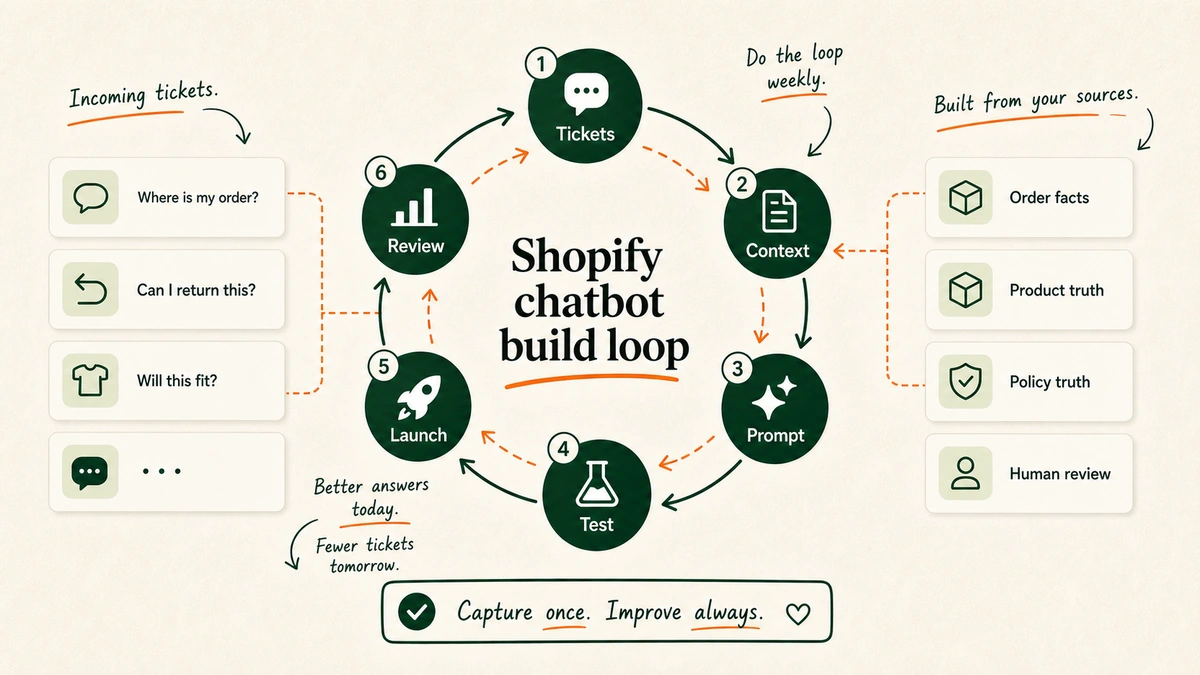
  • Start with repeat store tickets: order status, returns, shipping, product fit, and discount issues.
  • Build ROI from two buckets: support cost saved and revenue recovered.
  • Keep refunds, address changes, chargebacks, and angry customers behind human review.
  • Use low-code first if you are testing the idea; go custom when store rules and tool workflows become the hard part.

Table of Contents

What is a customer service AI chatbot for Shopify?

A customer service AI chatbot for Shopify answers buyer questions using store data, help docs, rules, product data, and chat rules. Basic bots answer scripted FAQs. Better AI support bots answer from approved sources. AI support agents connect to the store, check order data, start flows, and flag risky cases for a person.

Shopify already gives merchants a basic version of this idea. Shopify Inbox includes instant answers, and its default Track my order instant answer gives buyers order status when they click it. Shopify also says its AI answer ideas are based on store rules and chat history, but merchants remain responsible for content accuracy. Cc: Shopify Inbox docs.

That last sentence matters.

The brand is responsible.

If the bot invents a return window, promises a refund, picks the wrong size, or shows order info to the wrong person, the buyer blames the store. So the job is not “add AI.” The job is to build a support system that knows:

  • What it can answer.
  • What it can look up.
  • What it can never do without approval.
  • When to stop and hand the ticket to a human.

When does AI customer support make financial sense?

AI support makes financial sense when three things are true:

  1. Your ticket volume is high enough that repeat questions cost real payroll.
  2. Your inbox contains revenue moments: sizing, product fit, ship timing, discount issues, subscriptions, and pre-purchase doubt.
  3. Your team has enough clean source material for the AI to answer from.

If you get ten tickets a week, do not build a custom chatbot. Fix your FAQ page.

If you get hundreds or thousands of tickets a month, different story.

Look at the public case studies, all reviewed for this 2026 draft:

  • 2026 benchmark: Orthofeet automated 56% of tickets in under two months with Gorgias. Email first reply dropped from 24 hours to 35 seconds. Chat first reply dropped from 3 minutes to 13 seconds.
  • 2026 benchmark: Pepper reached a 54% average automation rate, with a 19% sales rate from AI-led chats, 19.2x ROI on AI-led sales chats, and an 18% AOV lift.
  • 2026 benchmark: a Shopify Plus case study from Vail Creatives reported 12% sales from AI-led chats versus a 1.4% base site sales rate, plus $5,280+ in monthly saved revenue and an 85.6% AI solve rate.

“AI Agent can automatically detect if a customer wants to start or check the status of a return.”

  • Courtney Bajek, Customer Service Lead at Orthofeet

“We are not threatening those really personal interactions that make our brand Pepper.”

  • Gabrielle McWhirter, CX Operations Lead at Pepper

These are vendor and agency case studies. Treat them as proof, not a guarantee.

Still, the pattern is clear. ROI does not come from a clever chat bubble. It comes from cutting low-value manual work and saving high-intent shoppers before they leave.

That is why this matters for brands over $1M. At that size, support is where margin leaks and repeat buyers pause. For a wider market snapshot, keep the companion AI in DTC statistics post nearby.

The ROI math: tickets saved, revenue recovered, costs avoided

Use this formula:

Monthly ROI = support cost saved + revenue recovered - AI build and operating cost

Formula graphic showing monthly AI support ROI as support cost saved plus revenue recovered minus AI build and operating cost.

There are two sides to the ROI case.

Cost saved: tickets the AI solves without a human.

Revenue saved: shoppers who buy because the AI answered product, ship, sizing, or return questions while they were still ready to buy.

The mistake is only counting the first one. If the AI handles a “where is my order?” ticket, you save time. If it helps a shopper choose the right product before she bounces, you may save the sale.

Pepper is the useful proof point here. Their Gorgias case study reports a 19% sales rate from AI-led chats, 19.2x ROI on AI-led sales chats, and an 18% lift in average order value. Cc: Pepper customer story.

The Vail Creatives Shopify Plus case study is useful too. AI-led chats sold at 12% versus a 1.4% base site sales rate, with $5,280+ in monthly saved revenue and 750% ROI on tools. Cc: Vail Creatives.

Here is the model to fill in for your store:

Input What to use
Monthly tickets Your helpdesk export
Repeat-ticket share Count WISMO, returns, shipping, discount, and product FAQ tags
Cost per ticket Payroll plus tools divided by resolved tickets
Expected solve rate Start with a low target; benchmark only after matching scope
AI-led sales Chat revenue or linked revenue from your helpdesk/chat tool
AOV Shopify analytics
AI operating cost Tooling, model usage, maintenance, and QA time
Build cost One-time build amortized over 6-12 months

Example math, using store inputs, not a benchmark: (2,000 tickets x 50% repeat x 40% solved x $4 per ticket) + $2,000 saved revenue - $1,500 AI cost = $2,100 monthly net benefit.

If your real inputs do not produce a positive number, do not force the build. Start with better help docs, saved replies, Shopify Inbox instant answers, or a simple helpdesk AI pilot.

What should your first Shopify support chatbot handle?

Start where risk is low and volume is high.

Good first use cases:

  • Order status.
  • Shipping timelines.
  • Return rules.
  • Product availability.
  • Size and fit guidance.
  • Discount code troubleshooting.
  • Subscription FAQs.
  • Store rules.

These jobs are boring. Good.

Boring support makes money first.

A matrix showing safe Shopify support chatbot use cases and risky automations that need human review.

Gorgias says its AI Agent is trained on brand rules, site content, Shopify data, help center material, docs, and custom guidance. It can also track solve rate, CSAT, first reply time, linked revenue, AOV, and sales. Cc: Gorgias AI Agent docs.

That tells you the shape of a serious build: answer the questions where you have clean truth.

For a store, clean truth tends to live in five places:

  • Shopify orders and customer records.
  • Product data and variant data.
  • Return, refund, ship, and warranty rules.
  • Help center articles.
  • Past support conversations.

If the bot cannot cite or retrieve one of those sources, it should not act confident.

What should it not automate yet?

Do not start with refunds, chargebacks, address changes after ship, health or safety claims, legal claims, allergy advice, or angry buyers asking for exceptions.

These are review-gate jobs. The AI can draft, sort, collect context, and prep the answer. It should not always press send.

For example, “Where is my order?” can usually be automated. “Refund me now or I’m filing a chargeback” needs a human.

This is where a lot of ROI claims get silly. They count every human touch as waste. It is not waste when the human prevents a bad refund or a bad promise.

The aim is not 100% automation.

The aim is profitable automation.

How to build a customer service AI chatbot for Shopify

Build it in eight steps.

A circular workflow showing tickets, context, prompts, testing, launch, and weekly review for a Shopify AI chatbot.

Step 1: Pull your top 100 support tickets

Do not begin in the chatbot builder. Begin in the inbox.

Export your last 100-300 tickets. Tag them by job:

  • WISMO
  • Return request
  • Discount code
  • Product fit
  • Sizing
  • Subscription
  • Shipping delay
  • Damaged item

Count the boring tickets first. If order status dominates, start with order lookup. If product fit stops shoppers from buying, start with product guidance.

Step 2: Build the store context pack

Your context pack is the truth the AI may use.

A layered stack showing the sources a Shopify AI support chatbot needs to answer accurately.

Minimum context pack:

  • Return, refund, ship, and warranty rules
  • Product data and size guides
  • Subscription and discount rules
  • Brand tone examples
  • Escalation rules
  • Help center URLs and top support macros

Do not crawl the whole site and hope. If your rules page is out of date, the AI will be out of date. First clean the truth. Then connect it.

Step 3: Choose your first automation path

You have three paths.

Low-code chatbot: fast to test, useful for FAQs and simple guidance.

Helpdesk AI: best when your team already lives in Gorgias or Zendesk and wants handoff plus stats.

Custom AI support: best when the work needs your store logic, your rules, your edge cases, and your tools stitched together.

Start lower than your ego wants. If you have not proved the use case, low-code is fine. If you know the ticket pattern and need real store context, helpdesk AI or custom work starts to make sense. The existing Gorgias vs Tidio vs Manychat vs Chatfuel comparison can help with that first tool screen.

Step 4: Connect order, product, rules, and helpdesk data

The bot needs different access for different jobs.

Order status needs order and ship data. Product guidance needs item, stock, variant, and size-guide data. Returns need order date, ship status, return window, item type, and rules. Escalation needs helpdesk context, buyer history, and priority rules.

This is where Shopify matters. A generic site-trained bot can read your return rules. A useful store support bot can check whether the order is eligible. Different thing.

Gorgias says its AI Agent can use Shopify buyer and order data, store content, help center articles, docs, guidance, and actions. Cc: Gorgias AI Agent docs.

Step 5: Write the support operating prompt

The prompt is not a magic paragraph. It is an ops rule: role, tone, source order, answer length, handoff rules, approval gates, and what to do when unsure.

Use this as the starting point:


You are the support AI for a Shopify store. Help with order status, shipping, returns, product questions, sizing, discount issues, and basic subscription questions.

Use only approved sources: Shopify order data, product data, help center, rule docs, and support guidance.

Do not invent delivery dates, refund eligibility, product claims, discounts, or rule exceptions.

For refunds, address changes, chargebacks, medical/safety advice, legal advice, or policy exceptions, collect context and escalate.

If unsure, say what you can verify and ask one clear follow-up question.

Not poetic. Useful. We have separate guides on ChatGPT for Shopify customer support and Claude for Shopify customer support if you want model-specific prompt patterns.

Step 6: Add human review gates

Human review gates protect the brand.

Create gates for:

  • Refund approvals
  • Chargeback threats
  • Angry customers
  • Shipping address changes
  • Lost package exceptions
  • High-value orders
  • VIP customers
  • Fraud signals

The AI should pass the human:

  • Customer message
  • Customer intent
  • Order details
  • Relevant policy
  • Draft reply
  • Risk level

That saves time without pretending every ticket is safe.

Step 7: Test messy tickets before launch

Do not test only clean questions.

Test the stuff customers actually send:

  • Typos
  • Missing order numbers
  • Wrong email address
  • “I need this by Friday”
  • “I want a refund”
  • “I already emailed twice”

Your goal is not a nice demo. Your goal is to find where the bot breaks before buyers do. Run 50-100 test chats. Log misses. Fix the source, not just the prompt.

Step 8: Review failed chats every week

The launch is not the finish line.

Review:

  • Escalated chats
  • Low-confidence answers
  • Refund conversations
  • Bad CSAT conversations
  • High-value sales chats
  • Tickets where the AI had no source

Each week, improve one thing: source docs, prompt rules, store data access, or handoff logic.

Low-code chatbot vs helpdesk AI vs custom AI support

Do not buy more system than you need.

A comparison panel showing low-code chatbot, helpdesk AI, and custom AI support paths for Shopify brands.
Option Best for Watch out for
Low-code chatbot Testing FAQs, product guidance, simple support flows Weak edge-case handling, limited system actions
Helpdesk AI Brands already using Gorgias, Zendesk, or similar tools Can get expensive or constrained by platform logic
Custom AI support Brands needing store actions, rule logic, tool workflows, and guardrails Needs clear scope, upkeep, and weekly review

For a brand just crossing $1M, low-code may be enough to prove demand. For a brand with high ticket volume, messy return rules, subscriptions, many tools, or deep product guidance, the ceiling arrives fast.

That ceiling usually sounds like: “The bot answers FAQs, but it cannot do the thing.”

The thing is where ROI lives.

Check the order. Read the return rule. Verify the buyer. Draft the refund note. Route the angry buyer. Recommend the right product.

When a custom AI chatbot becomes worth it

A custom AI chatbot becomes worth it when the support problem is no longer generic. Signs you are there:

  • Your support team handles hundreds of repetitive Shopify tickets every month.
  • Your product data has enough nuance that generic picks fail.
  • You need different rules by item, country, buyer type, order value, or ship status.
  • Refunds, returns, swaps, and subscriptions need rule logic.
  • Your team loses time switching between Shopify, helpdesk, 3PL, subscription, review, loyalty, and email tools.
  • You want weekly support insights, not the same FAQ forever.

This is the point where “install a chatbot” becomes too small.

Once you need Shopify actions, rule logic, refund gates, and weekly loops, this stops being a chatbot install. It becomes a custom support system. That is the kind of build EfficiaLabs helps Shopify brands design and ship.

The business case still comes first: cost removed, revenue saved, risks kept human, system access needed, and upkeep cost.

In our work, this is the point where we stop talking about chat widgets and start mapping the support system. We tested the smallest custom flow first. We measured whether it saved time, saved revenue, or both. We built only the next piece after the first one paid back.

Common mistakes that kill chatbot ROI

1. Automating before cleaning the source of truth

Bad docs produce bad answers.

If your return rules are vague, your AI will be vague. If your product data is messy, your AI will be messy.

Fix source truth first.

2. Chasing maximum automation rate

An 80% solve rate sounds great until the AI approves the wrong refund.

Track solve rate, yes. Also track refund errors, handoffs, CSAT, sales, and recontact rate.

3. Treating sales and support as separate systems

For Shopify brands, they overlap.

A shopper asking about shipping speed before checkout is not a support burden. She is a conversion opportunity.

DreamzTech’s ecommerce AI assistant case study reported a 28% sales-rate lift, a 35% drop in cart abandon, 50K monthly chats, and AOV rising from $128 to $180 after a Shopify, stock, and payment build. Cc: DreamzTech.

4. Skipping authentication

Order info is buyer data. The bot should not reveal order status, ship address, or account details just because someone typed an order number.

5. Never reviewing failed chats

The best support AI systems are coached. Gorgias says teams can inspect topics, give feedback, review sources used in replies, and update content when behavior misses the mark. Cc: Gorgias AI Agent docs.

Set the meeting. Improve the system. Repeat.

FAQs about customer service AI chatbot development for ecommerce

Can a Shopify chatbot check order status?

Yes. Shopify Inbox includes a default Track my order instant answer, and more advanced systems can connect to order data. For custom builds, include ID checks and privacy rules.

Should a Shopify AI chatbot issue refunds automatically?

Usually not at first. Let the AI collect context, check policy, and draft the recommendation. Keep final approval with a human.

Is low-code enough?

Sometimes. Low-code is good for testing FAQs and simple guidance. It gets weak when the bot needs Shopify actions, custom handoff rules, or deeper rule logic.

How much automation should we expect?

Use public case studies as benchmarks, not promises. Orthofeet reported 56% ticket automation. Pepper reported 54% average automation. The Edit LDN case study reported 80% of queries handled by AI. Your rate depends on ticket mix, data quality, tool links, and review habits.

Build the support layer your next $1M in revenue needs

The first version does not need to be fancy.

Start with the tickets your team is tired of answering. Connect the truth. Add review gates. Measure the money.

If the AI only answers FAQs, it is a website feature.

If it checks store context, guides shoppers, protects rules, and hands humans the right work, it becomes support infrastructure.

That is where the ROI starts.

And when your store reaches the point where low-code tools cannot handle your rules, flows, and edge cases, EfficiaLabs can help you build the custom AI support system underneath it.

Not a chatbot for the sake of having one.

A calmer inbox. Faster answers. Better conversion moments. Fewer expensive guesses.

Related reads: Shopify AI profitability, Shopify inventory automation, B2B commerce AI use cases, AI in DTC statistics, and Gorgias vs Tidio vs Manychat vs Chatfuel.

Sources

Gorgias vs Tidio vs Manychat vs Chatfuel for ecommerce

Desk scene with a laptop showing a four-way ecommerce chatbot decision board.

Gorgias vs Tidio vs Manychat vs Chatfuel for ecommerce comes down to the job. Gorgias fits support ops. Tidio fits on-site chat. Manychat fits social DMs. Chatfuel fits multi-channel AI. For $1M+ DTC brands, custom AI is often the stronger end state.

Desk scene with a laptop showing a four-way ecommerce chatbot decision board.

Some tools answer tickets.

All four get called chatbots. Terrible word. Useful category. Bad buying shortcut.

The question is not “Which chatbot is best?”

The question is: “What job is this bot allowed to own?”

Table of Contents

TL;DR: which chatbot should you choose?

Choose Gorgias if support tickets are the fire. Choose Tidio if you need fast website chat. Choose Manychat if the sales motion starts in Instagram, TikTok, Messenger, or WhatsApp. Choose Chatfuel if you want broad social and web AI automation.

Build custom when the chatbot becomes part of the revenue system.

Not “nice to have.” Not “we should probably have AI.”

Support. Conversion. Refund policy. Product discovery. Order truth. Brand voice. Human review.

That is a different game.

Branded comparison table for Gorgias, Tidio, Manychat, and Chatfuel.
Tool Best for Weak spot When to skip Pricing page
Gorgias Support-heavy Shopify teams Can become support infrastructure, not a sales system You mainly need social DM automation Gorgias pricing
Tidio Fast on-site chat and simple AI replies Workflow depth and custom actions You need deep Shopify/app actions Tidio pricing
Manychat Instagram, TikTok, Messenger, and WhatsApp flows Not a full ecommerce helpdesk Website support is the main fire Manychat pricing
Chatfuel Multi-channel AI across social and web Needs careful setup for store-specific truth Shopify policy/order truth matters most Chatfuel pricing

In a sentence: SaaS chatbots are good for proving the workflow. Custom AI is better when the workflow is valuable enough to own.

Why this comparison is confusing

Gorgias, Tidio, Manychat, and Chatfuel are not four versions of the same thing.

They sit in different parts of the customer journey.

Four chatbot categories shown as separate operating lanes with different outcomes.

Gorgias is a customer support platform. Its pricing page groups the product around helpdesk, AI Agent, Automate, Voice, and ecommerce integrations.

Tidio sits closer to live chat plus AI support. Its pricing page presents Lyro AI Agent, Flows, live chat, help desk, and customer-service features.

Manychat is a social messaging automation tool. Its pricing page is organized around Instagram, Facebook Messenger, TikTok, WhatsApp, SMS, and email.

Chatfuel positions itself around AI agents for WhatsApp, Instagram, TikTok, Facebook Messenger, and a website widget.

Same label. Different jobs.

In 2024, Meta said more than 400 million people used Meta AI monthly, with 185 million weekly users, which explains why every messaging platform is rushing AI into the inbox.

In Q4 2025, Meta said US click-to-message ads revenue grew more than 50% year over year, a useful signal for brands comparing Manychat and Chatfuel.

In 2025, Klarna said its AI chatbot handled about 1.3 million customer interactions per month and reduced repeat inquiries by 25%, which shows the support upside. Also: Klarna is not your skincare brand. Context matters.

“Reflexive AI usage is now a baseline expectation at Shopify.”

  • Tobi Lutke, Shopify CEO (CNBC)

“a business agent representing it and acting on its behalf, in its voice”

  • Clara Shih, Meta head of business AI (CNBC)

For DTC brands with 5-50 FTEs, workflow beats category name. A lean team needs fewer tickets, better answers, cleaner routing, and more revenue.

In our work with DTC teams, the messy part is not “which chatbot has AI?” It is “which system knows the truth and when should it stop?”

That is the lens.

Gorgias vs Tidio vs Manychat vs Chatfuel: the quick comparison

Criteria Gorgias Tidio Manychat Chatfuel
Primary job Ecommerce support ops Website chat and AI support Social DM automation Multi-channel AI automation
Best-fit team Has a CX lead Wants quick live chat Sells through social DMs Wants social plus web AI
Shopify/support depth Strongest Useful for lighter support Not the main job Setup-dependent
Social depth Support channels first Website first Strongest social-first option Strong channel coverage
Main ceiling Ticket system, not conversion brain Template and native-action limits Weak helpdesk fit Needs clean context
Pricing Pricing page Pricing page Pricing page Pricing page

If support is painful, Gorgias wins more often.

If website questions are painful, Tidio is easier to justify.

If social messages are where demand starts, Manychat deserves the first look.

If the brand wants one broad AI layer across WhatsApp, Instagram, TikTok, Facebook Messenger, and the website, Chatfuel belongs.

If the workflow touches revenue, support, product truth, policy truth, and a specific brand voice, I would stop treating SaaS as the final answer. Use it as research.

Run the SaaS tool. Learn the questions. Learn the edge cases. Then build the system you actually need.

In our work, that discovery step is where the useful build spec appears.

Same pattern in AI customer support for Shopify. The model matters. The context pack matters more.

When should you choose Gorgias?

Choose Gorgias when the main fire is support operations.

You have tickets. Order questions. Returns. Subscription edits. Customers asking the same 17 things across 6 channels.

Gorgias is strongest when a DTC brand needs:

  • A real ecommerce helpdesk.
  • Omnichannel support conversations in one place.
  • Shopify-native context.
  • AI support inside a support-team workflow.
  • Agent handoff when automation should stop.

Best for: support-heavy Shopify brands with ticket volume, macros, order workflows, and a human CX team.

Watch out for: buying Gorgias when the real problem is not support.

A shopper asks, “Will this fit a 6-foot guy?” The answer is part policy, part product logic, part conversion copy. A generic support workflow gives you a tidy ticket. Not always the sale.

That distinction matters for $1M+ brands. At that size, repeated buyer objections are not “support tickets.” They are buried conversion research.

When should you choose Tidio?

Choose Tidio when speed matters.

You want a website chat widget, live chat, basic flows, and AI answers from your knowledge base.

Tidio is strongest when a DTC brand needs:

  • On-site chat without a heavy implementation.
  • Basic customer-service automation.
  • Fast FAQ handling.
  • Simple flows for lead capture or support routing.
  • A lower-friction starting point than a full helpdesk migration.

Best for: earlier teams that want website chat and AI support without rebuilding CX.

Watch out for: workflow ceilings.

Templates are useful until the best answer requires a product quiz, size logic, Recharge subscription state, Loop return status, Klaviyo segment, and a founder-approved tone rule.

Then you are no longer asking, “Can the bot reply?”

You are asking, “Can the bot act inside the business?”

For that ceiling, read the EfficiaLabs guide to using Claude for Shopify customer support. The point is context quality.

When should you choose Manychat?

Choose Manychat when the conversation starts on social.

Instagram comments. TikTok comments. Facebook Messenger. WhatsApp replies. Creator campaigns. Comment-to-DM. DM-to-coupon.

Manychat is strongest when a DTC brand needs:

  • Comment-to-DM automation.
  • Social campaign capture.
  • Influencer or creator-funnel follow-up.
  • Instagram and TikTok lead handling.
  • WhatsApp or Messenger flows tied to marketing moments.

Best for: social-first DTC brands where discovery, intent, and first-party capture happen in the inbox.

Watch out for: pretending social automation is the same as customer support.

A shopper replying “link?” on Instagram is not the same as a customer asking why a subscription order renewed early. The first is a marketing flow. The second is account support with risk attached.

When should you choose Chatfuel?

Choose Chatfuel when the brand wants broad channel coverage with AI automation.

Chatfuel is strongest when a brand needs:

  • WhatsApp automation.
  • Instagram and TikTok conversation handling.
  • Website widget coverage.
  • AI agent-style responses across channels.
  • One system for several lightweight customer interactions.

Best for: brands that want social plus web automation without stitching together too many tools.

Watch out for: store truth.

The harder the question, the more the answer depends on approved context.

Policy truth. Product truth. Order facts. Inventory logic. Discount rules. Subscription status. Escalation rules. Tone rules. Review rules.

If those live in scattered docs, Slack threads, Shopify notes, Klaviyo flows, and someone’s head, the chatbot is not the problem.

Fresh bread. Burnt oven.

Why should $1M+ DTC brands consider custom AI?

SaaS tools rent you a workflow. Custom AI lets you own the workflow.

Layered context stack feeding a custom AI chatbot with a human review gate.

For a small store, renting is fine. You need coverage. You need speed. You need to stop answering “Where is my order?” for the hundredth time.

For a $1M+ DTC brand, the math changes.

The bot is no longer just a support shortcut. It touches conversion, retention, product education, and operational load.

Custom AI wins when the brand needs:

  • Brand voice rules, not a tone slider.
  • Shopify and app API actions.
  • Better objection handling for skeptical shoppers.
  • Clear marginal AI cost control.
  • No forced fit into someone else’s product roadmap.

Do not read this as “custom is always cheaper.”

It is not.

Custom has setup cost, QA, monitoring, and maintenance. A store that needs a 30-minute install should use SaaS.

But once volume grows, the brand should know answer cost, model choice, retrieved context, called actions, and human review gates.

That is why AI in DTC statistics are useful only after the operating question is clear. Adoption is not the goal.

This is where EfficiaLabs usually enters the conversation.

We build custom AI systems for DTC brands that have outgrown “chatbot as widget” thinking. In our work, the best chatbot brief starts as a support complaint and ends as an operations map.

More control over brand voice.

More control over Shopify and app integrations.

More control over marginal cost.

More control over what the AI is allowed to say.

Decision ladder showing when a DTC brand should use SaaS chatbots versus custom AI.

Start with one painful workflow. Support triage. Order lookup. Product discovery. Inventory questions. A skeptical buyer flow.

Then measure what breaks, what converts, and what humans still need to own.

That same pattern applies beyond support. See EfficiaLabs on AI profitability loops for Shopify stores, AI use cases in B2B commerce, and Shopify inventory automation.

Context first. Draft second.

Always.

FAQs about Gorgias vs Tidio vs Manychat vs Chatfuel for ecommerce

Which is best for Shopify stores?

Gorgias is the strongest fit when “best for Shopify” means support operations. Tidio fits Shopify stores that want fast website chat. Manychat fits Shopify brands where social DMs create demand. Chatfuel fits brands that want multi-channel AI across social and web.

Which is best for Instagram and WhatsApp automation?

Manychat and Chatfuel are the strongest fits for Instagram and WhatsApp automation in this comparison.

Manychat is cleaner for social DM automation, comment-to-DM flows, and creator campaign capture. Chatfuel fits broader AI automation across social and web.

Which is best for reducing support tickets?

Gorgias is the clearest pick for reducing support tickets when the store already has meaningful support volume.

Tidio can reduce simple website questions. Chatfuel can help when support questions arrive through social and web. Manychat can reduce repetitive social DMs.

When should a DTC brand build a custom chatbot instead?

Build custom when the chatbot needs to do more than reply.

Good triggers:

  • The brand does $1M+ and support or conversion questions show up every day.
  • The same buyer objections keep appearing before purchase.
  • The team needs Shopify and app actions, not just answers.
  • The brand voice is specific enough that generic AI replies feel wrong.
  • The cost and quality of SaaS conversations are becoming hard to control.

If the store only needs a quick widget, use SaaS.

If the store needs an AI operating layer, build custom.

Sources

49 AI in DTC statistics for 2026

Desk with laptop showing AI in DTC statistics grouped into adoption, discovery, customer experience, operations, and trust decisions.

These ai in dtc statistics show where AI is changing ecommerce in 2026: adoption is high, discovery is moving into AI assistants, CX expectations are rising, and trust is the brake.

Desk with laptop showing AI in DTC statistics grouped into adoption, discovery, customer experience, operations, and trust decisions.

7:42am. Coffee. Spreadsheet open.

Another AI stat on LinkedIn. Another “AI changes everything” report. Another founder asking if this is real or just a vendor with a PDF.

Fair question.

The numbers below are not here to make AI sound inevitable. They are here to help a lean DTC team decide what to test, what to systemize, and what to ignore.

Table of Contents

In a sentence

  • AI adoption is no longer the differentiator. The operator gap is ownership, data quality, and review.
  • AI discovery is real, but still early. Treat it like a new high-intent channel, not a replacement for owned search, email, or conversion work.
  • Customer-facing AI has a trust ceiling. People like faster shopping, but payment, privacy, and bad recommendations still make them pause.
  • The best first AI projects are boring: support triage, inventory review, product data cleanup, retention segmentation, and weekly exception reports.
  • If a vendor stat cannot survive one source check, do not build a roadmap around it.

How to read these AI in DTC statistics

Matrix showing primary source, current year, secondary source, and unverifiable AI statistics sorted by trust level.

I sorted these by recency first, then source quality. A 2026 ecommerce AI report beats a 2023 generic retail stat. A source-of-record beats a blog that links to another blog that links to a report.

In our work, that filter matters more than the headline number. I would rather use one narrow stat with a clear source than five impressive claims with no method.

We tested that filter while building this list. I measured each candidate stat against recency, source quality, and whether a lean DTC team could act on it.

Simple rule:

  • Use now: current, sourced, directly relevant to ecommerce or DTC.
  • Watch: useful, but broader retail or consumer data.
  • Verify before spend: vendor claims, secondary summaries, or stats with unclear methodology.

This is the same way I would judge AI use cases for lean DTC teams. Workflow first. Model second. Hype last.

What do AI adoption and budget statistics show?

Circular loop showing AI adoption moving through owner assignment, workflow design, measurement, and human review.

1. In 2025, 93% of surveyed DTC brands were already using AI.

The DTC and Triple Whale survey covered 875+ DTC operators and found AI had moved from experiment to everyday workflow. Source 1

Operator read: If your team is still asking “should we use AI?”, you are late. The better question is: “which workflow has a clear owner and measurable output?”

2. In 2025, more than 83% of surveyed DTC brands planned to increase AI usage over the next year.

That is not cautious exploration. That is budget and attention moving toward AI across DTC teams. Source 2

Operator read: More usage does not mean better systems. Require a review gate for any AI workflow that touches customers, inventory, pricing, refunds, or ad spend.

3. In 2026, Stord reported that 88% of organizations use AI in at least one core function.

The problem is not access. It is depth. Source 3

Operator read: One AI tool in support, one in creative, and one in analytics is not an AI operating system. It is three tools.

4. In 2026, only 7% of organizations had reached fully scaled AI deployment.

Stord called out the gap between adoption and maturity. Source 4

Operator read: This is where small teams can win. A 20-person brand with one clean loop can outperform a bigger brand with seven half-owned pilots.

5. In 2026, 92% of organizations planned to increase AI investment.

Same Stord report. High intent. Low maturity. Source 5

Operator read: Do not copy the market’s spend curve. Copy the market’s best operating discipline: clear use case, clean data, defined owner, review cadence.

6. In 2026, 99% of organizations still lacked a mature framework for full AI integration.

That is the stat I would underline. Source 6

Operator read: Your first AI hire should not be a prompt wizard. It should be someone who can map messy workflows and make the data boring.

7. In 2025, NVIDIA found 89% of retail and CPG respondents were using AI or assessing AI projects.

That was up from 82% in 2023. Source 7

Operator read: Adoption has crossed the “interesting” line. Now the advantage is implementation quality.

8. In 2025, 97% of NVIDIA retail and CPG survey respondents said AI spending would increase in the next fiscal year.

The budget signal is loud. Source 8

Operator read: If your paid media, ops, and CX tools all pitch AI upgrades this year, ask them which metric changes by Friday.

9. In 2026, Gorgias reported that 96% of ecommerce professionals use AI to perform their roles.

Gorgias showed AI role usage rising from 69.2% in 2024 to 77.2% in 2025 to 96% in 2026. Source 9

Operator read: Training matters less than workflow design. If everyone uses AI differently, the business learns nothing.

What do AI search and discovery statistics show?

Product data, reviews, policy pages, and structured content stacked into a clean AI discovery system.

“Generative AI-powered chat interfaces are changing how consumers act online.”
– Vivek Pandya, Adobe

10. In February 2025, Adobe found generative AI traffic to U.S. retail sites was up 1,200% versus July 2024.

Adobe based the retail analysis on more than 1 trillion visits to U.S. retail sites. Source 10

Operator read: AI referral traffic may still be small. Growth rate says you should start tracking it now.

11. During the 2024 holiday season, Adobe saw generative AI traffic to U.S. retail sites rise 1,300% year over year.

Cyber Monday was even sharper: 1,950% year over year. Source 11

Operator read: Create a GA4 / analytics view for AI referrals before Q4. You cannot optimize what lands in “referral” soup.

12. In Adobe’s 2025 U.S. survey, 39% of consumers had used generative AI for online shopping.

Adobe surveyed more than 5,000 U.S. respondents. Source 12

Operator read: This is not only early adopters anymore. Your product pages need to answer AI-generated buying questions cleanly.

13. In Adobe’s 2025 U.S. survey, 53% of consumers planned to use generative AI for online shopping that year.

That is planned behavior, not just curiosity. Source 13

Operator read: Add FAQ-style answers to PDPs. But make them useful. “Premium quality” is not an answer.

14. In Adobe’s 2025 U.S. survey, 55% of AI shopping users used it for research.

Research was the top listed shopping task. Source 14

Operator read: AI is mostly upstream right now. Feed it comparison facts, sizing facts, use cases, and policy facts.

15. In Adobe’s 2025 U.S. survey, 47% of AI shopping users used it for product recommendations.

That puts AI inside the recommendation path before the customer reaches your store. Source 15

Operator read: If your product data is thin, AI assistants will choose the clearer competitor.

16. In Adobe’s 2025 U.S. survey, 43% of AI shopping users used it to seek deals.

Deal seeking is a channel behavior, not just a coupon behavior. Source 16

Operator read: Discount logic, bundle value, shipping thresholds, and subscription savings need to be machine-readable and human-clear.

17. In Adobe’s 2025 retail data, generative AI visitors showed 8% higher engagement than non-AI traffic.

They lingered longer on retail sites. Source 17

Operator read: AI visitors may be better qualified researchers. Give them a page that closes the loop.

18. In Adobe’s 2025 retail data, generative AI visitors viewed 12% more pages per visit.

More pages can mean better exploration or unresolved questions. Source 18

Operator read: Watch which pages AI visitors hit next. If they bounce between PDP, FAQ, and returns, your PDP is missing an answer.

19. In Adobe’s 2025 retail data, generative AI visitors had a 23% lower bounce rate.

Lower bounce is useful. It is not revenue by itself. Source 19

Operator read: Track AI visitors by conversion stage. Treat them like high-intent assisted traffic until your own data proves otherwise.

20. Criteo’s 2026 commerce AI work found AI-referred visits converting at 1.5x the rate of other sources.

Criteo framed these visitors as often upper-funnel and net-new. Source 20

Operator read: Good. Still verify in your store. AOV, margin, and return rate decide whether the channel is actually good.

21. Criteo reported that more than 70% of AI-referred users land directly on product pages.

Criteo said that was up from around 50% six months earlier. Source 21

Operator read: Your PDP is becoming the new homepage. Fix clarity there first.

22. Criteo reported that 39% of shoppers already use AI for product discovery.

Discovery is moving from keyword to conversation. Source 22

Operator read: Build content around jobs-to-be-done, not only product names.

23. Criteo reported that 47% of shoppers use AI for comparison shopping.

Comparison is where vague positioning gets punished. Source 23

Operator read: If your category pages do not say who the product is for, who it is not for, and what it beats, AI has to guess.

What do personalization statistics show?

Mock ecommerce dashboard showing personalized product recommendations, consent status, and human review controls.

24. In 2025, NVIDIA found 60% of retail generative AI use cases centered on marketing content generation.

That was the top listed generative AI use case in the NVIDIA retail and CPG survey. Source 24

Operator read: Content generation is the easy entry point. It is also the easiest place to produce forgettable slop.

25. In 2025, NVIDIA found 44% of retail generative AI use cases involved predictive analytics.

This is closer to the operator layer: demand, cohorts, inventory, and timing. Source 25

Operator read: Predictive work needs better input data than content work. Start only where the source tables are trusted.

26. In 2025, NVIDIA found 42% of retail generative AI use cases involved personalized marketing and advertising.

Personalization is now a default promise in AI software. Source 26

Operator read: Personalization without consent, context, and frequency control becomes creepy fast.

27. In 2025, NVIDIA found 41% of retail generative AI use cases involved customer analysis and segmentation.

Segmentation is where AI can help teams move faster. Source 27

Operator read: Do not let AI create 47 segments nobody uses. Make it produce one next action per segment.

28. In 2025, NVIDIA found 40% of retail generative AI use cases involved digital shopping assistants or copilots.

The assistant layer is becoming normal. Source 28

Operator read: A shopping assistant is only useful if it knows product truth, order truth, policy truth, and escalation rules.

29. In 2026, SAP reported that 58% of consumers value localized content and product recommendations.

SAP tied this to brands understanding regional traditions and social norms. Source 29

Operator read: For US, UK, AU, and CA brands, “English” is not one market. Shipping, holidays, sizing, returns, and cultural references differ.

30. In 2026, SAP reported that 55% of consumers appreciate highly personalized content.

That number sits beside a warning: customers dislike wasted data collection and bad experiences. Source 30

Operator read: Personalization should remove friction. It should not announce how much you know.

31. In 2026, SAP reported that 50% of consumers believe their favorite brand uses data to improve interactions.

Favorite brands get more benefit of the doubt. Source 31

Operator read: AI works better after trust. Do not use AI to compensate for weak service basics.

What do retention and customer experience statistics show?

Loop showing customer question, AI triage, human review, better reply, insight captured, and retention improvement.

“The problem is not the promise of AI.”
– Manos Raptopoulos, SAP

32. In 2026, SAP reported that 37% of consumers want quicker customer service.

That is one of the basic expectations SAP surfaced in DTC statistics. Source 32

Operator read: AI support should start with triage, order-status summaries, and draft replies. Speed first. Autonomy later.

33. In 2026, SAP reported that 32% of consumers want faster delivery.

Delivery is still a customer experience feature. Source 33

Operator read: AI cannot fix a slow 3PL. But it can flag late orders, set expectations, and stop avoidable WISMO tickets.

34. In 2026, SAP reported that 32% of consumers want products always in stock.

Stock availability sits beside service and delivery in the basics. Source 34

Operator read: This is why AI-assisted inventory cleanup can matter more than another creative tool.

35. In 2026, Gorgias reported that 57% of ecommerce brands use AI for 26-50% of all customer interactions.

Gorgias also reported 37% expect AI to handle 51-75% within two years. Source 35

Operator read: Use this as a caution. When AI touches more interactions, QA and escalation design become more important, not less.

36. In 2026, Gorgias reported that 96% of ecommerce AI use cases include customer support automation.

Support automation was the highest use case listed. Source 36

Operator read: If you are implementing ChatGPT for Shopify customer support or Claude for Shopify support, separate standard replies from risky decisions.

37. In 2026, Gorgias reported that 88% of ecommerce AI use cases include product recommendations.

Recommendations now sit next to support as a core AI workflow. Source 37

Operator read: Recommendation quality depends on catalog quality. Bad attributes in, bad recommendations out.

38. In 2026, Gorgias reported that 69% of ecommerce AI use cases include automated tracking and status updates.

That is a practical use case for lean teams. Source 38

Operator read: Order-status automation is a good first build because the answer can be checked against order truth.

What do AI profit and ops statistics show?

Mock dashboard showing AI impact on support automation, inventory control, logistics cost, and operating cost.

39. In 2025, NVIDIA found 87% of retail and CPG respondents said AI increased annual revenue.

That is a broad retail/CPG stat, not DTC-only. Still useful. Source 39

Operator read: Do not accept “revenue increased” without attribution. Ask: incremental revenue, assisted revenue, or just correlation?

40. In 2025, NVIDIA found 94% of retail and CPG respondents said AI reduced annual operational costs.

Cost reduction is one of AI’s cleaner cases. Source 40

Operator read: For small DTC teams, cost savings often show up as fewer manual checks, fewer escalations, and fewer spreadsheet hours.

41. In 2026, Stord reported that 95% of retailers said AI helped decrease annual operating costs.

Stord’s report echoes the cost side of the AI story. Source 41

Operator read: Cost reduction is not glamorous. It is often the most reliable first AI ROI.

42. In 2026, Stord reported 20% to 30% lower inventory levels through predictive demand modeling and dynamic segmentation.

This is an operations stat, not a marketing stat. Source 42

Operator read: Inventory AI belongs close to human review. A wrong product description is annoying. A wrong stock decision costs money.

43. In 2026, Stord reported that 74% of ecommerce leaders view AI as their primary 2026 driver.

The operator agenda is shifting toward AI. Source 43

Operator read: “Primary driver” is too broad for a roadmap. Turn it into one quarterly system: support, inventory, retention, or creative QA.

44. In 2026, Stord reported that self-correcting networks delivered 65% better service levels and 15% lower logistics costs.

Stord framed this around intelligent routing and self-correcting networks. Source 44

Operator read: Most 5-50 FTE brands should not start here. Start by making delivery promises, exceptions, and carrier issues visible.

45. In 2026, Gorgias reported that 51% of ecommerce AI use cases include inventory control.

That puts inventory in the middle of the AI stack, not the fringe. Source 45

Operator read: Connect this to AI profitability loops for Shopify stores. Margin leaks are often operational, not creative.

46. In 2026, Gorgias reported that 36% of ecommerce AI use cases include dynamic pricing or discounting.

Pricing automation is already on the table. Source 46

Operator read: Put a human in the loop. Discounts change margin, brand positioning, and customer expectations.

What do AI data and trust statistics show?

Matrix showing safe and risky AI uses across customer data, payment information, recommendations, and human review.

47. In 2026, Stord reported that 30% of consumers would never allow AI to handle shopping or access payment information.

That is the trust ceiling. Source 47

Operator read: Do not rush agentic checkout. Start with AI-assisted research, support, and product matching where the customer still controls the final click.

48. In 2026, Stord reported that 16% of consumers are very comfortable with AI using payment information to complete purchases.

That is a much smaller group than the AI-curious group. Source 48

Operator read: Comfort with AI shopping is not the same as comfort with AI payment.

49. In 2026, Stord reported that 21% of consumers are open to AI-assisted shopping if they can review transactions first.

Review before purchase matters. Source 49

Operator read: This is the pattern for DTC AI generally: draft, recommend, summarize, flag. Then let the human approve.

What would I do with these numbers?

Decision ladder ranking AI actions from ignore and watch to test, systemize, and automate with human review.

I would not build a “use AI everywhere” roadmap.

We test AI systems by asking one dull question first: did this help the team make a better decision this week?

I would build five small loops:

  1. Support: AI summarizes tickets, drafts standard replies, and escalates risky cases.
  2. Inventory: AI flags low-stock, vendor, 3PL, and return mismatches before customers feel them.
  3. Product pages: AI turns customer questions into PDP facts, comparison blocks, and FAQs.
  4. Retention: AI finds segments with clear next actions, not clever labels.
  5. Reporting: AI writes the weekly exception report every operator actually reads.

That is enough.

The stat that matters is not 93% adoption or 1,200% traffic growth. It is whether your team makes one decision faster, with fewer mistakes, every week.

Small loop. Real owner. Human review.

Then expand.

Sources for every statistic

# Source
1 DTC x Triple Whale, 2025: The State of AI in DTC Marketing
2 DTC x Triple Whale, 2025: The State of AI in DTC Marketing
3 Stord, 2026: State of AI in E-Commerce 2026
4 Stord, 2026: State of AI in E-Commerce 2026
5 Stord, 2026: State of AI in E-Commerce 2026
6 Stord, 2026: State of AI in E-Commerce 2026
7 NVIDIA, 2025: State of AI in Retail and CPG survey
8 NVIDIA, 2025: State of AI in Retail and CPG survey
9 Gorgias, 2026: The State of Conversational Commerce in 2026
10 Adobe Analytics, 2025: Generative AI traffic to U.S. retail websites
11 Adobe Analytics, 2025: Generative AI traffic to U.S. retail websites
12 Adobe Analytics, 2025: Generative AI traffic to U.S. retail websites
13 Adobe Analytics, 2025: Generative AI traffic to U.S. retail websites
14 Adobe Analytics, 2025: Generative AI traffic to U.S. retail websites
15 Adobe Analytics, 2025: Generative AI traffic to U.S. retail websites
16 Adobe Analytics, 2025: Generative AI traffic to U.S. retail websites
17 Adobe Analytics, 2025: Generative AI traffic to U.S. retail websites
18 Adobe Analytics, 2025: Generative AI traffic to U.S. retail websites
19 Adobe Analytics, 2025: Generative AI traffic to U.S. retail websites
20 Criteo, 2026: AI is changing DTC discovery
21 Criteo, 2026: AI is changing DTC discovery
22 Criteo, 2026: AI is changing DTC discovery
23 Criteo, 2026: AI is changing DTC discovery
24 NVIDIA, 2025: State of AI in Retail and CPG survey
25 NVIDIA, 2025: State of AI in Retail and CPG survey
26 NVIDIA, 2025: State of AI in Retail and CPG survey
27 NVIDIA, 2025: State of AI in Retail and CPG survey
28 NVIDIA, 2025: State of AI in Retail and CPG survey
29 SAP News, 2026: 15 reasons it is time to fix customer experience
30 SAP News, 2026: 15 reasons it is time to fix customer experience
31 SAP News, 2026: 15 reasons it is time to fix customer experience
32 SAP Engagement Cloud, 2025/2026: DTC statistics every marketer should know
33 SAP Engagement Cloud, 2025/2026: DTC statistics every marketer should know
34 SAP Engagement Cloud, 2025/2026: DTC statistics every marketer should know
35 Gorgias, 2026: The State of Conversational Commerce in 2026
36 Gorgias, 2026: The State of Conversational Commerce in 2026
37 Gorgias, 2026: The State of Conversational Commerce in 2026
38 Gorgias, 2026: The State of Conversational Commerce in 2026
39 NVIDIA, 2025: State of AI in Retail and CPG survey
40 NVIDIA, 2025: State of AI in Retail and CPG survey
41 Stord, 2026: State of AI in E-Commerce 2026
42 Stord, 2026: State of AI in E-Commerce 2026
43 Stord, 2026: State of AI in E-Commerce 2026
44 Stord, 2026: State of AI in E-Commerce 2026
45 Gorgias, 2026: The State of Conversational Commerce in 2026
46 Gorgias, 2026: The State of Conversational Commerce in 2026
47 Stord, 2026: State of AI in E-Commerce 2026
48 Stord, 2026: State of AI in E-Commerce 2026
49 Stord, 2026: State of AI in E-Commerce 2026

How to eliminate Shopify inventory Excel chaos with AI

Desk with laptop showing a Shopify inventory workspace, exception queue, and human review notes.

If you are asking how to eliminate Shopify inventory Excel chaos, the fix is one loop: export Shopify data, merge vendor context, flag exceptions with AI, approve changes, then update Shopify from a clean source.

Desk with laptop showing a Shopify inventory workspace, exception queue, and human review notes.

7:08am. Shopify Admin open. Vendor sheet open. Warehouse CSV open. Someone has named a tab final_final_reorder_v3.

This is how inventory chaos usually starts. Not with a broken system. With one helpful spreadsheet that becomes the shadow system.

This guide shows the operating loop I would install first: one truth table, a small set of risk rules, AI for exception review, and humans approving any Shopify-changing action.

In our work, the best fix is rarely a big bang. It is a clean small loop that the team can trust by Friday.

Table of Contents

In a sentence

To eliminate Shopify inventory Excel chaos, stop using spreadsheets as the decision layer. Use them as a staging layer. Shopify stays the inventory system, one truth table holds context, AI drafts exceptions, and a human approves every update.

Source checks used in this guide:

Note: This is not an ERP replacement plan. It is the lean version you can run before the team is ready for a larger inventory platform.

Small team. Clear owner. No mystery rows.

Why Shopify inventory Excel chaos starts quietly

The first sheet is innocent.

One tab for reorder points. One tab for vendor lead times. One tab for returns. Then a VA checks Shopify every morning because the sheet is never quite current.

Shopify’s inventory CSV guide explains the tension. Inventory exports can include product identifiers, locations, inventory states, and On hand (current) / On hand (new) columns. Shopify can also reject stale rows when current quantities no longer match the export.

“Effective inventory management helps you avoid selling products that have run out of stock.”

Good. Useful. Protective.

But it means the spreadsheet has to respect Shopify’s logic. If the sheet uses loose SKU names, fuzzy location labels, or stale vendor notes, it becomes a weaker admin panel.

Layered inventory data sources flowing into one truth table.

The pain is visible in Shopify’s own community. In 2026, a merchant doing 20+ orders a day described the pattern: a zero-inventory SKU kept taking orders, a vendor moved from 3-day to 8-day fulfillment, and the issue was found days later in a sheet.

Crickets. Then refunds.

What should replace the spreadsheet?

Replace the spreadsheet with an inventory control loop.

The loop can still use a sheet. The difference is that the sheet now has a job: collect context before a reviewed Shopify update.

Layer What it answers Owner
Product truth Which SKU, variant, and location is this? Ops
Stock truth What does Shopify say today? Ops
Context truth What did vendors, returns, or 3PLs change? Ops + supply
Risk rules Which rows need attention? Ops lead
Review gate Who can approve the update? Manager
Audit trail What changed, and when? Owner
Circular workflow for cleaning, flagging, approving, updating, and reviewing inventory.

This is where AI helps. Not as an inventory boss. As a fast reader.

It can scan the truth table, compare vendor lead times with Shopify quantities, and return only the rows that need review today. Same pattern as AI profitability loops: find the leak, show the exception, make the next action obvious.

Important note: If the source data is messy, AI makes the mess faster. Clean the row model first.

In our work with lean teams, this is the line that matters most. AI should make the review faster. It should not make the final call.

How do you eliminate Shopify inventory Excel chaos?

You eliminate Shopify inventory Excel chaos by replacing manual sheet maintenance with a six-step loop.

Step 1: Export the right Shopify inventory data.

Start with Shopify, not the team’s favorite sheet.

Use the inventory export as the daily or weekly raw snapshot. Shopify lets you export one location or all locations. Its current CSV options include “All states” and “Available”; “All states” is the safer baseline because it gives a fuller view of inventory states by location.

Your baseline export should include:

  • SKU, handle, title, variant values, and location.
  • Available, committed, incoming, unavailable, and on-hand quantities.
  • On hand (current) and On hand (new) when preparing imports.

Raw stays raw. No hand edits in the snapshot.

Step 2: Create one inventory truth table.

Now join Shopify rows to the context your team keeps elsewhere.

Each row should answer:

  • What SKU and Shopify variant is this?
  • Which location does it map to?
  • What does Shopify say today?
  • What does the vendor, return file, or 3PL file change?
  • What rule decides the next action?
  • Who owns review?

Use plain statuses: safe, watch, needs vendor check, draft reorder, manager review, approved for Shopify update.

A custom AI mini-app can remove the row-scanning work here. In our work, the first useful build is usually a review queue, not a system that updates Shopify by itself.

That is a calm first win. The team opens one page, sees the few rows that matter, and knows who owns the next step.

Step 3: Add risk rules before automation.

Risk rules decide what deserves attention.

Start with five:

  • If available inventory is below reorder point and lead time is longer than cover, flag high risk.
  • If Shopify says a SKU is sellable but the vendor marks it discontinued, flag policy mismatch.
  • If a location is not stocked but the team expects stock there, flag location mismatch.
  • If returns inflate available inventory, flag returns review.
  • If SKU or location is missing, block automation.
Mock AI inventory dashboard with high-risk SKU exceptions and approval buttons.

“A location is any physical place where you sell products, fulfill orders, or stock inventory.”

Pro tip: Do not build 30 rules. Pick the five errors that cost refunds, stockouts, vendor delays, or founder attention.

Step 4: Use AI to turn rows into exceptions.

Give AI a narrow job. Not “manage inventory.” Too vague. Too risky.

Use this:


You are reviewing Shopify inventory exceptions for a DTC brand.

Inputs:
- Shopify inventory export
- Vendor lead-time sheet
- Returns summary
- Reorder rules

Return only rows that need human attention today.

For each row, include:
- SKU
- Location
- Risk: High, Medium, or Low
- Reason
- Suggested next action
- Shopify update now: Yes or No

Rules:
- Never recommend a Shopify update when SKU or location is missing.
- Never approve a reorder automatically.
- Keep reasons under 30 words.

The prompt is not the system. The system is the truth table, rules, approvals, and audit trail around it.

This is how I would judge broader AI use cases for lean DTC teams too. Workflow first. Model second.

Step 5: Keep a human approval gate.

Inventory updates change customer promises.

AI can flag a SKU, draft a reorder note, prepare import rows, and explain the reason. It should not silently change Shopify inventory, hide products, or place purchase orders.

AI can do Human must approve
Flag risky SKUs Reorder quantities
Summarize vendor mismatches Vendor commitments
Draft import rows Shopify imports
Draft ops notes Availability changes
Decision ladder showing inventory actions that require increasing human review.

Same idea as ChatGPT for Shopify customer support or Claude for Shopify customer support: draft fast, review risky decisions, keep trust intact.

Step 6: Review the loop every week.

The weekly review is where the system gets sharper.

Ask:

  • Which alerts were real?
  • Which alerts were noise?
  • Which vendor files caused cleanup work?
  • Which SKUs kept returning?
  • Which decisions waited on the wrong owner?

Then adjust the rules. Fewer surprises beats more dashboards.

The goal is not to stare at a new tool. The goal is to stop asking, “Which sheet is right?”

Run the first test with ten SKUs. Pick bestsellers, slow movers, one new item, one return-heavy item, and one vendor-risk item. Keep the test small. You want to see the loop work before you add the whole catalog.

On Friday, ask one plain question: did this help us act sooner?

If yes, add more SKUs. If no, fix the rule or the source file. Simple.

Shopify Flow vs. an AI mini-app

Shopify Flow is useful when the event is already clean inside Shopify.

Use Flow for:

  • Low-stock emails.
  • Tasks when inventory changes.
  • Notifications when a variant is out of stock at one location.
  • Product tags or visibility changes based on stock rules.

Shopify Flow runs on triggers, conditions, and actions. Shopify’s inventory trigger can start a workflow when inventory changes because of an order, manual edit, or app update. Shopify also lists templates for low-stock alerts, vendor reorder emails, and out-of-stock workflows.

Side-by-side comparison of Shopify Flow alerts and an AI mini-app review layer.

Use an AI mini-app when the messy context sits outside Shopify:

  • Vendor lead-time sheets.
  • 3PL CSVs.
  • Returns summaries.
  • Manual product policy notes.
  • SKU naming cleanup.
  • Weekly exception summaries.

Flow watches clean Shopify events. AI helps reason across the messy files around Shopify.

Use both if both fit. Flow can send the clean alert. AI can write the messy summary.

That split keeps the stack sane. Shopify handles the clear store event. AI handles the row that needs context. Ops owns the call.

Common Shopify inventory Excel mistakes to avoid

Mistake 1: Automating the old sheet. Duplicate SKUs, hidden formulas, stale vendor columns. Now faster.

How to avoid it: Build a new truth table with only the fields needed for inventory decisions.

Mistake 2: Treating location as a note. Multi-location inventory is not a comment cell.

How to avoid it: Use controlled location names that match Shopify.

Mistake 3: Letting AI approve changes. Confident text is not proof.

How to avoid it: Require approval for imports, reorder quantities, discontinued-SKU decisions, and availability changes.

Mistake 4: Measuring alerts instead of outcomes. A long queue is not progress.

How to avoid it: Track fewer late stockouts, fewer vendor surprises, fewer SKU mismatches, and fewer morning admin checks.

Simple scorecard. Simple review. Better week.

One good rule beats ten vague alerts. One owner beats a shared sheet no one trusts.

My final take on boring inventory

I would not start with a giant tool search. I would start with one truth table, five risk rules, one approval gate, and a small AI review layer that turns spreadsheet scanning into exception review. Boring inventory is the goal. Calm inputs, clear owners, fewer surprises.

– Vai

Related Articles

Sources

9 AI in B2B Commerce Use Cases for Lean DTC Teams

A laptop workspace shows B2B commerce AI workflows connected to product, account, order, and review-gate cards.

A founder sends a Slack message at 7:14 p.m.

“Can AI handle our wholesale reorders?”

Simple question. Messy answer.

Because “wholesale reorders” usually means product rules in one place, account pricing in another, purchase orders in email, payment terms in Shopify, and a sales rep who knows that one boutique always orders late but pays fast.

So the real question is not “can AI do B2B commerce?”

The real question is: where can AI help without making a quiet mess?

In our work with small commerce teams, we saw the same pattern: AI fails when the workflow is vague, not when the model is weak.

Key Takeaways

  • AI works best in B2B commerce when it is attached to a narrow workflow, a named owner, and trusted source data.
  • The safest early use cases are draft-first: product recommendations, reorder prompts, quote drafts, support summaries, and content drafts.
  • Do not let AI silently change pricing, discounts, payment terms, refunds, or account permissions.
  • Start where the workflow already hurts. One data source. One review gate. One weekly measure.

Table of Contents

What is AI in B2B commerce?

AI in B2B commerce is the use of machine learning, language models, and automation to help business buyers find products, place orders, reorder, request quotes, get support, and manage account-specific rules.

Not magic. Not “set and forget.”

A DTC brand selling wholesale has more rules than a normal online store:

  • Different prices by account.
  • Different catalogs by buyer type.
  • Different payment terms by company location.
  • Different minimums, pack sizes, deposits, and shipping rules.
  • Different people placing orders for the same company.

Shopify’s current B2B documentation is a useful reality check. Shopify B2B lets merchants create companies and company locations, assign catalogs, configure payment terms, use draft orders, accept purchase order numbers, and support reorders from customer accounts. Cc: Shopify B2B features and Shopify B2B terminology.

A layered stack shows product, account, order, policy, and human judgment feeding an AI commerce workflow.

That is why generic AI advice breaks.

“Use AI for personalization” sounds neat until the model recommends a product the buyer cannot purchase, at a price they should not see, with a lead time your warehouse cannot meet.

Fun little problem.

How should lean DTC teams prioritize AI in B2B commerce?

Use four filters:

Filter Good sign Bad sign
Value The workflow wastes hours every week or blocks revenue The workflow is merely annoying
Risk AI can draft, rank, summarize, or recommend AI would silently approve money, legal, or trust decisions
Data readiness Product, account, order, and policy facts live somewhere reliable The “truth” is tribal knowledge in Slack
Ownership One person can review and improve the workflow weekly Everyone owns it, so nobody does
A decision matrix plots AI commerce workflows by risk, value, data readiness, and owner clarity.

The boring filter wins.

McKinsey’s 2025 State of AI survey found 88% of respondents said their organizations regularly used AI in at least one business function, up from 78% a year earlier. But only about one-third said their companies had begun to scale AI programs. Cc: McKinsey State of AI 2025.

Translation: adoption is easy. Scaling is where the bodies are buried.

McKinsey also found AI high performers were nearly 3x as likely as others to fundamentally redesign individual workflows, and more likely to define when model outputs need human validation. That is the pattern to copy.

Workflow first. Tool second.

We’ve seen this work best when one person owns the workflow and one person can veto the output.

9 AI in B2B commerce use cases worth considering

These are not ranked by trendiness.

They are ranked by how often they show up as real work inside lean commerce teams.

1. Build the product and account truth layer first

A loop diagram shows clean catalog data powering search, product recommendations, reorder prompts, and measurement.

What it does: AI helps reconcile product facts, account rules, pricing logic, order history, and policy notes into a usable operating layer.

This is not glamorous. It is also the highest-leverage starting point.

Before AI recommends anything, it needs to know:

  • Which products each account can buy.
  • Which prices, terms, and discounts apply.
  • Which SKUs have pack sizes, minimums, or quantity rules.
  • Which products are low-stock, discontinued, seasonal, or region-limited.
  • Which account notes matter.

Data required: Product catalog, cost and margin data, customer/company records, company locations, order history, catalogs, price lists, payment terms, support policies, inventory status.

Owner: Ops lead or ecommerce lead.

Safe first build: A weekly “B2B truth check” that flags missing product attributes, stale account notes, catalog conflicts, and accounts with outdated payment terms.

Human review gate: A person approves changes to catalogs, pricing, payment terms, permissions, and account notes.

Watch out for: AI confidently cleaning the wrong field. A product description typo is annoying. A wrong case-pack rule creates bad orders.

You might need it if: Your team cannot answer “what is this account allowed to buy?” without asking three people.

What I like: This is the work nobody wants to call AI. Good. It is exactly where AI earns trust.

For a deeper profit-first version of the same idea, read our guide on how Shopify stores use AI to improve profitability.

2. Improve B2B product search and recommendations

What it does: AI turns messy buyer intent into better product discovery.

A buyer does not always search like your catalog is written.

They search by job:

  • “refill for hotel bathrooms”
  • “summer display packs”
  • “case of the 12 oz best seller”
  • “same as last time but lavender”

AI can map that intent to product attributes, account-specific catalog access, purchase history, and margin rules.

Data required: Product titles, descriptions, variants, tags, attributes, prior orders, account catalogs, inventory, margin bands, substitutions, and excluded SKUs.

Owner: Merchandising lead.

Safe first build: A recommendation assistant that suggests 3-5 products for a buyer request, with evidence and exclusions.

Human review gate: Merchandising approves recommendation rules before they appear in a buyer-facing surface.

Watch out for: “Personalization” that ignores business rules. Gartner’s 2025 survey of 632 B2B buyers found 61% preferred an overall rep-free buying experience, but 69% reported inconsistencies between website information and seller-provided information. Cc: Gartner Sales Survey, June 2025.

That is the trap. Buyers want self-serve. They still punish inconsistent answers.

“Bad prospecting actively damages relationships with potential customers.”

  • Robert Blaisdell, VP Analyst, Gartner Sales Practice

You might need it if: Your B2B buyers ask reps to find products that already exist on the site.

What I like: Good AI search does not feel like AI. It feels like the store finally understands how buyers talk.

3. Suggest account-specific reorders and replenishment

What it does: AI predicts what a business account may need next based on order history, seasonality, consumption patterns, and current availability.

This is the most DTC-friendly B2B use case.

If you sell consumables, apparel basics, beauty replenishment, food and beverage, home goods, or retail display packs, your buyers often reorder the same families of products.

AI can draft the nudge:


Review this account's last 12 months of B2B orders.

Suggest the next reorder based on:
- products ordered repeatedly
- time since last order
- seasonal patterns
- current inventory
- account-specific catalog access
- margin and shipping constraints

Return:
- recommended SKUs
- reason for each recommendation
- confidence level
- risks or missing data
- message draft for the sales rep

Data required: Account order history, SKU velocity, replenishment interval, inventory, current catalog, discontinued items, substitutions, and buyer notes.

Owner: Wholesale lead or sales rep.

Safe first build: A Monday reorder digest for reps. AI drafts recommendations. Reps decide what to send.

Human review gate: The rep approves every buyer-facing message.

Watch out for: Recommending unavailable products. Nothing says “we do not know your account” like pushing an out-of-stock SKU.

You might need it if: Reorders depend on a rep remembering who usually buys what.

What I like: It turns memory into a system. Still human. Less fragile.

4. Turn emails, PDFs, and spreadsheets into draft orders

A mock B2B order workspace shows an email and PDF becoming a draft order and quote awaiting review.

What it does: AI reads unstructured order requests and turns them into structured draft orders for review.

This is where B2B commerce gets beautifully ugly.

One buyer sends a spreadsheet. Another sends a PDF. Another replies to a three-month-old email thread with “same as March but add two cartons of the green one.”

AI can extract:

  • Account name.
  • Buyer contact.
  • Shipping location.
  • Product names or SKUs.
  • Quantities.
  • Requested delivery date.
  • Missing fields.
  • Conflicts with catalog, price, or inventory.

Data required: Email inbox, PDF/spreadsheet attachments, product catalog, customer/company records, account pricing, shipping addresses, inventory, and draft-order rules.

Owner: CX ops or wholesale operations.

Safe first build: AI creates a draft order summary, not an order. The human clicks into the ecommerce admin and creates or approves the order.

Human review gate: Every draft order is reviewed before confirmation, invoice, payment capture, or inventory reservation.

Watch out for: Ambiguous product names. “The green one” is not a SKU.

You might need it if: Your team manually retypes B2B orders from email into Shopify, an ERP, or a spreadsheet.

What I like: This is grunt-work compression. Not strategy theater. Just fewer copy-paste errors.

Shopify already supports B2B draft orders, PO numbers, price locks, inventory reservations, invoices from drafts, and payment terms. Cc: Shopify B2B features. AI’s job is to prepare the work. Your system of record still decides.

5. Draft quotes and sales-rep follow-ups

What it does: AI helps reps respond faster with quote drafts, account summaries, reorder notes, and follow-up emails.

The rep should not spend 20 minutes finding the last order, checking what was quoted, scanning the buyer’s catalog, and writing “just following up.”

AI can create the briefing:

  • Account summary.
  • Last 3 orders.
  • Open quote or draft order.
  • Products discussed.
  • Stock constraints.
  • Suggested next message.
  • Questions the rep should ask.

Data required: CRM notes, order history, quote history, email thread, product availability, pricing rules, account catalog, and payment terms.

Owner: Sales lead.

Safe first build: A rep copilot that drafts internal account briefs and follow-up messages.

Human review gate: Reps approve all external emails, quote terms, discounts, and delivery promises.

Watch out for: Generic sales language. B2B buyers do not need more “checking in.” They need an answer, a price, a next step, or a reason to wait.

You might need it if: Reps are spending more time preparing follow-ups than having useful buyer conversations.

What I like: The best version gives reps more context, not more spam.

Gartner’s same 2025 survey found 73% of B2B buyers actively avoid suppliers that send irrelevant outreach. That should be printed above every AI email workflow.

“Sellers should offer unique guidance.”

  • Alice Walmesley, Director Analyst, Gartner Sales Practice

6. Route B2B support and account-service requests

A decision ladder shows low-risk B2B support drafts at the bottom and high-risk account decisions requiring human approval.

What it does: AI classifies account-service requests, drafts replies, and escalates risky cases.

B2B support is different from normal DTC support.

A “where is my order?” ticket might affect a retail launch date. A return request might involve a buyer, a store manager, a sales rep, and a payment term. A pricing complaint might expose an account rule problem.

Use a ladder:

  1. Auto-draft: FAQs, order status, invoice copy, reorder instructions.
  2. Review recommended: account changes, address changes, returns, damaged goods.
  3. Human owner decides: refund exceptions, pricing disputes, chargebacks, legal/privacy issues, VIP accounts.

Data required: Support inbox, order data, company/location data, policy docs, tone guide, escalation contacts, SLAs, and account notes.

Owner: CX lead or support lead.

Safe first build: AI drafts internal ticket summaries and proposed replies. A human sends.

Human review gate: Any refund, exception, pricing, safety, legal, privacy, or angry-customer case goes to a human.

Watch out for: Silent exceptions. The model should not “be helpful” by inventing policy.

You might need it if: Your support team keeps asking sales, ops, or finance for the same account context.

What I like: It separates standard replies from judgment calls.

For Shopify support-specific workflows, see our guides on using ChatGPT for Shopify customer support and using Claude for nuanced Shopify support tickets.

We built the ladder this way because support AI should shrink the queue, not hide the scary cases.

7. Guard pricing, discounts, and margin decisions

A comparison panel shows unsafe autonomous discounts on one side and reviewed margin recommendations on the other.

What it does: AI flags pricing conflicts, discount leakage, and margin risk before a person approves the action.

This is where I get boring on purpose.

Do not let AI silently change B2B prices.

Let it recommend. Let it show the math. Let a person approve.

Data required: Cost of goods, margin targets, account price lists, volume breaks, discount rules, shipping costs, payment fees, returns, and current inventory.

Owner: Finance, ecommerce, or revenue operations.

Safe first build: A pricing review assistant that flags orders or quotes where margin falls below a threshold.

Human review gate: Humans approve price changes, discount rules, payment terms, and exception pricing.

Watch out for: Revenue pretending to be profit. A huge wholesale order can still be a bad order if discounts, freight, payment terms, and returns kill margin.

You might need it if: Reps negotiate from instinct and finance finds out later.

What I like: AI is useful here as a brake, not a gas pedal.

8. Forecast inventory and demand risk

A clean table maps inventory and demand signals to AI jobs, owners, and human checks.

What it does: AI flags stockout risk, overstock risk, preorder risk, and fulfillment constraints earlier.

B2B demand is lumpy.

One account can distort a week. A retailer promo can drain stock. A distributor reorder can arrive late, then need everything tomorrow.

McKinsey’s 2024 logistics analysis found blind handoffs may drive 13% to 19% of logistics costs, up to $95 billion in annual US losses. It also estimated that combining visibility, AI workflow automation, and generative AI contextual communication could reduce direct costs by 35% to 40% for carriers. Cc: McKinsey logistics handoffs analysis.

For a lean DTC brand, the takeaway is smaller:

Do not forecast in a vacuum.

Connect B2B demand signals to inventory, operations, and customer communication.

Data required: Sales history, wholesale pipeline, confirmed POs, open quotes, inventory, inbound stock, lead times, shipping constraints, marketing calendar, and account notes.

Owner: Ops lead or inventory planner.

Safe first build: A weekly risk report with three labels: stockout risk, overstock risk, and promise risk.

Human review gate: A person approves purchase orders, customer promises, allocation rules, and inventory holds.

Watch out for: Forecast certainty. AI should say “risk,” “confidence,” and “missing data.” Not “truth.”

You might need it if: Wholesale orders regularly surprise your inventory plan.

What I like: The goal is not perfect prediction. The goal is fewer preventable surprises.

9. Generate product content, spec sheets, and localized copy

A formula-style visual shows product facts, constraints, audience, and output format feeding a safe AI content prompt.

What it does: AI drafts product descriptions, spec sheets, merchandising copy, sales blurbs, and localized account content from verified facts.

This is the use case everyone starts with.

It is fine. Just do it properly.

The prompt should not say:

“Write a product description for this SKU.”

It should say:


Use only the product facts below.

Audience: B2B buyer for a retail store.
Goal: Help the buyer understand fit, use case, pack size, and reorder logic.
Tone: clear, specific, no hype.

Do not invent:
- claims
- certifications
- materials
- dimensions
- compliance language
- performance results

Output:
- 60-word product description
- 5 bullet spec sheet
- 1 sales-rep note
- missing facts to confirm

Data required: Product attributes, dimensions, materials, pack size, case count, certifications, usage notes, care instructions, region limitations, and brand voice.

Owner: Merchandising or content lead.

Safe first build: Draft spec sheets for 20 high-volume wholesale SKUs, with missing-fact flags.

Human review gate: Merchandising approves factual accuracy; legal/compliance reviews regulated claims.

Watch out for: Invented claims. Especially around materials, safety, performance, sustainability, and compliance.

You might need it if: Your B2B buyers keep asking for the same product details your PDPs do not answer.

What I like: Done well, this turns product knowledge into reusable assets. Done badly, it creates liability with nicer grammar.

Common mistakes when using AI in B2B commerce

A rollout ladder shows a lean team starting with one workflow, one owner, one data source, and one review gate.

Mistake 1: Starting with the model.
Start with the workflow. Then pick the tool.

Mistake 2: Letting AI act before it can explain.
For B2B, “show the evidence” is not optional. It is the review surface.

Mistake 3: Treating B2B like a bigger DTC cart.
B2B has account rules, buyer permissions, payment terms, POs, catalogs, locations, reps, and negotiated exceptions.

Mistake 4: Skipping ownership.
Every AI workflow needs one owner. Not a committee. One person who checks the output weekly.

Mistake 5: Hiding AI in the messy parts.
The mess is where review matters most: pricing, refunds, terms, catalog access, delivery promises, and account exceptions.

Start with the workflow that already hurts

The best first AI build is not the fanciest one.

It is the workflow your team already complains about.

For one brand, that is quote prep. For another, it is wholesale reorders. For another, support routing. For another, product spec sheets.

Pick one.

Give it:

  • One data source.
  • One owner.
  • One review gate.
  • One weekly metric.
  • One rule for when AI must stop and ask.

Then run it for four weeks.

Small first. Useful first.

See you in the next one – Vai

Sources

How Shopify Stores Use AI to Improve Profitability

A laptop workspace shows a Shopify profit loop with margin, support, AOV, creative testing, and retention notes on a cream background.

Most Shopify AI advice starts in the wrong place.

“Use AI for product descriptions.”
“Use AI for chat.”
“Use AI for ads.”

Cool. Whatever.

The better question is: where is profit leaking?

For a lean DTC team, AI is useful when it helps the store make better margin decisions faster. Not when it creates more dashboards, more copy, and more things for someone to check at 11 p.m.

This guide gives you five practical loops. Each one includes the setup, the AI job, the human review gate, and a real ecommerce example with reported results.

Key Takeaways

  • AI improves Shopify profitability when it is tied to contribution margin, not vague automation.
  • The useful loop is trusted data, narrow question, ranked recommendation, human approval, and measured action.
  • The safest first build is one profit leak: reporting, bundles, support, creative, or retention.

Table of Contents

How Shopify stores use AI to improve profitability: the profit loop

A profitable AI workflow has five parts:

  1. Trusted data.
  2. A narrow question.
  3. Ranked recommendations.
  4. Human approval for risky moves.
  5. Measurement after the action ships.

That is the loop.

Not “AI writes 100 emails.” Not “AI summarizes the dashboard.” A loop. Inputs, decision, action, feedback.

Profit lever AI should do Human should approve Main metric
Margin truth Reconcile product, order, refund, ad, and shipping data Cost rules and exclusions Contribution margin
Margin leaks Rank weak SKUs, campaigns, bundles, and discounts Budget changes and pricing moves Profit per order
AOV Recommend bundles and add-ons Product exclusions and offer logic Gross margin per cart
Support Draft or resolve repetitive requests Refunds, angry customers, VIPs Cost per resolution
Creative and retention Generate test variants and summarize objections Brand claims and offer promises Repeat purchase profit

Important note: AI cannot fix bad cost data. It will only make wrong decisions faster.

Shopify’s own help docs are blunt here: profit reports only work for products and variants that had cost recorded when they were sold, and discounts or refunds affect margin reporting. Cc: Shopify profit reports.

A layered context stack shows order facts, product cost, ad spend, refunds, shipping, and human review feeding an AI profit assistant.

Step 1: Build the profit truth layer before you automate

Start here. Boring place. Correct place.

AI needs a clean profit layer before it can make useful recommendations. For a Shopify store, that means the model can see the difference between revenue, gross margin, and actual contribution margin.

Your minimum dataset:

  • Product cost by SKU and variant.
  • Shipping cost by order or shipping profile.
  • Payment and transaction fees.
  • Discounts, refunds, returns, and replacements.
  • Ad spend by channel, campaign, and date.
  • Email/SMS revenue where attribution is reliable.
  • Inventory status and stockout risk.

Then define the metric AI is allowed to optimize.

Not revenue. Not ROAS alone. Contribution margin after variable costs.

In our work, this is where most AI profit projects either start clean or start crooked. If the SKU cost is wrong, the recommendation is theater.

Practical guide: Build a weekly “profit truth” view before plugging in AI recommendations. Pull Shopify orders, product costs, refunds, discounts, shipping labels, payment fees, ad spend, and email/SMS performance into one place. Then ask AI to explain movement in contribution margin, not just top-line revenue.

The prompt should be narrow:


Review last week's Shopify performance by SKU, channel, and order.

Rank the top 10 profit changes by estimated contribution margin impact.

For each item, include:
- what changed
- evidence from the data
- estimated profit impact
- confidence level
- recommended owner
- next action

Do not recommend price, discount, or budget changes without showing the calculation.

Example: SFERRA Fine Linens used Triple Whale as a shared source of truth across channels and agencies. In Triple Whale’s 2026 case study, SFERRA reported 5+ hours saved per week on reporting with Moby AI, 3x ROAS growth in six months, and $300K+ lifetime incremental flow revenue from Sonar Send. Source: Triple Whale SFERRA case study.

“Everyone’s looking at the same numbers, so we get straight to decisions.”

— Stacy Feldman, Vice President of Ecommerce, SFERRA and Pratesi. Source: Triple Whale.

That is the real point. The AI was useful because the team had one version of the numbers.

For a 5-50 person brand, this is usually the highest-ROI first move. One source of truth. Fewer arguments. Faster decisions.

Step 2: Ask AI to find margin leaks, not “insights”

“Give me insights” is a bad AI prompt.

It invites vague dashboard poetry. Up. Down. Interesting. Significant.

Ask for leaks instead.

Margin leaks are places where the store is working hard but keeping too little. A SKU with heavy returns. A campaign that looks good on ROAS but sells the wrong products. A bundle that raises AOV and quietly murders margin. A discount code that trains repeat buyers to wait.

Practical guide: Give AI a weekly profit file and ask it to rank leaks by dollars, confidence, and reversibility. Reversibility matters. Pausing one ad set for 48 hours is safer than changing pricing across the store.

We tested this framing because it forces the model to show its work. No evidence. No action.

Use this structure:

  1. Show the current margin baseline.
  2. Identify the leak.
  3. Estimate the dollar impact.
  4. Show the evidence.
  5. Recommend the lowest-risk test.
  6. Assign an owner.
A circular workflow shows trusted data, AI leak detection, human approval, Shopify action, and profit measurement as a repeated loop.

Example: Bones Coffee Company worked with ATTN Agency and Triple Whale to scale YouTube campaigns using clearer attribution and performance data. In the case study, ATTN reported that Bones Coffee’s YouTube daily ad spend scaled +960% within 45 days, with +701% YoY net profit growth, +592% YoY Shopify sales growth, and +627% YoY ROAS growth. Source: Triple Whale and ATTN Bones Coffee case study PDF.

I would not treat those numbers as a universal benchmark. It is a vendor case study. It is also still useful.

The lesson is not “buy YouTube ads.” The lesson is: when the data layer gets trusted, the team can place bigger bets on the campaigns that are actually profitable.

Pro tip: Ask AI to include “why this might be wrong” in every leak recommendation. That one line catches more sloppy analysis than another chart.

Step 3: Use AI to raise profitable AOV, not just revenue

AOV is seductive.

Add bundles. Add upsells. Add a free shipping bar. Watch the cart size rise.

Then the month closes and margin looks worse.

The problem is that many AOV plays are revenue plays pretending to be profit plays. AI can help, but only when it knows the margin rules.

Practical guide: Build an offer rule sheet before turning on AI recommendations. Tag products by margin, return risk, replenishment behavior, stock level, and shipping weight. Then let AI recommend:

  • High-margin accessories.
  • Replenishment products.
  • Bundles that fit the buying moment.
  • Size, shade, or variant helpers.
  • Add-ons that do not create shipping pain.

Also give it exclusions:

  • Low-margin SKUs.
  • High-return products.
  • Products below inventory threshold.
  • Items with fragile shipping economics.
  • Anything compliance-sensitive.
A clean matrix compares Shopify AI profit levers across data needed, owner, safe action, human approval, and profit metric.

Example: The Vitamin Shoppe used Bloomreach Loomi AI to personalize search and category-page discovery. Bloomreach’s 2026 case study reports a 6.51% lift in search average order value, 5.69% lift in search revenue per visitor, and 7.73% lift in search add-to-cart rate, measured across two-week periods before and after launch. Source: Bloomreach Vitamin Shoppe case study.

“The implementation gave us results even better than I anticipated.”

— Tamara Pircz, Vice President, Digital Commerce, The Vitamin Shoppe. Source: Bloomreach.

The detail to steal: recommendations were not random “you may also like” blocks. They helped shoppers find the right product faster.

For a smaller Shopify brand, you can start with one use case:

“For each PDP, recommend one high-margin add-on that fits the product, inventory status, and customer intent.”

Simple. Measurable. Not glamorous.

Step 4: Cut support cost without removing judgment

Customer support is a profit lever because tickets have a cost.

Every “where is my order?” email. Every subscription pause. Every refund request. Every duplicate message after a slow reply.

But the fix is not to let AI handle everything. That is how brands create screenshots customers share for the wrong reason.

The fix is a support ladder.

Practical guide: Split tickets into three lanes:

  1. Auto-resolve: WISMO, subscription edits, cancellation instructions, delivery FAQs, simple product questions.
  2. Draft for review: refunds, damaged items, address changes, return exceptions, unclear policy cases.
  3. Human only: angry customers, VIP customers, legal threats, chargebacks, medical or safety claims.

If you want the deeper support setup, these two EfficiaLabs guides are relevant: using ChatGPT for Shopify customer support and using Claude for nuanced Shopify support tickets.

Example: eJam partnered with SigmaMind AI to automate support workflows across multiple ecommerce brands, Shopify stores, subscription tools, email, live chat, Facebook, and Instagram. SigmaMind’s 2026 case study reports 80% email automation by day 60, 71% lower first response time, 30% lower resolution time, 50% lower support cost, and 95% CSAT. Source: SigmaMind eJam case study.

This is the right kind of support example for a custom AI build. The hard work was not “install chatbot.” It was intent detection, sentiment handling, subscription actions, social comments, store routing, and escalation rules.

We built support ladders this way because one bad refund answer can wipe out the time saved by 100 clean WISMO replies.

Optional comparison: The Edit LDN used Kortical/K-Chat for a Shopify support chatbot. Kortical’s case study reports 80% of queries answered by AI, 88% support-cost reduction, and 13x message-handling capacity. Source: Kortical The Edit LDN case study.

A decision ladder shows auto-resolve, draft for review, and human-only customer support risk levels with refund and VIP examples.

The agency-built lesson: support AI needs permissions, not just prompts.

Read order status. Change subscriptions only when rules are clear. Draft refunds before sending. Escalate when the customer sounds angry.

Good support automation feels boring. That is the point.

Step 5: Speed up creative and retention testing

Profit improves when the team learns faster.

Which offer brings a second purchase? Which subject line gets opened by new customers but ignored by VIPs? Which product objection appears in reviews, tickets, and abandoned checkout replies?

AI is useful here because it compresses grunt work:

  • Summarize customer objections from tickets, reviews, post-purchase surveys, and ad comments.
  • Turn objections into email, SMS, PDP, and ad-test angles.
  • Create variants by segment.
  • Compare winners by gross margin and repeat purchase behavior.
  • Feed the winners back into the next test.

Practical guide: Build a weekly retention testing loop. Every Monday, ask AI to summarize the top objections and buying triggers from the previous week. Every Tuesday, ship two email/SMS variants. Every Friday, compare conversion, AOV, gross margin, unsubscribe rate, and repeat purchase movement.

Do not let AI choose the final claim. Let it produce options. A human checks offer truth, brand voice, compliance, and margin.

Example: Half Magic consolidated email, SMS, Customer Hub, and analytics in Klaviyo. Klaviyo’s 2026 case study reports 5x YoY growth in repeat purchasers in the last 12 months, 110% YoY growth in revenue from Klaviyo automations, and 2x higher AOV from orders attributed to Customer Hub in 90 days. Source: Klaviyo Half Magic case study.

The practical takeaway is not “use Klaviyo.” The takeaway is that creative, retention, self-service, and customer data should feed one another.

Tickets tell you objections. Reviews tell you desired outcomes. Repeat purchase data tells you what actually stuck.

AI makes that loop faster.

A prompt formula graphic shows input data, constraints, output format, human review gate, and profit measurement for Shopify AI analysis.

Common mistakes when Shopify owners use AI for profit

The mistakes are predictable.

Mistake 1: Optimizing revenue instead of margin.
Revenue is easier to see. Profit is easier to lose. Give AI contribution margin, not just sales.

Mistake 2: Feeding AI channel-reported truth only.
Ad platforms grade their own homework. Use Shopify orders, cost data, refunds, and a consistent attribution view before asking for budget recommendations.

Mistake 3: Automating support before writing escalation rules.
AI should not improvise on refunds, angry customers, damaged products, safety issues, or VIP accounts.

Mistake 4: Letting AI recommend bundles without cost rules.
A bundle can lift AOV and lower profit at the same time. Add margin and inventory exclusions.

Mistake 5: Measuring speed but not business impact.
Saving five hours is good. Saving five hours while margin improves is better.

Mistake 6: Asking for one-off outputs.
The money is in loops. Weekly data in. AI recommendation. Human approval. Shopify action. Profit review.

Start with one leak

Do not rebuild the whole store around AI.

Pick one leak.

Margin reporting. Bad bundles. Support tickets. Creative testing. Repeat purchase.

Then build the loop around it. Clean input. Narrow question. Human gate. Measured output.

That is how Shopify store owners use AI to improve profitability without turning the business into an automation science project.

We have seen the quiet version win more often: one workflow, one owner, one number that improves.

See you in the next one – Vai

Sources